LibreLinkUp
- 954.00
- 4.6
- Installs
- 1.00M
- Price
- Free

Screenshots
Analysis by Reviewed
For the person wearing a glucose sensor, checking readings is part of the day; for the people who care about them, staying informed from a distance can be harder. I see LibreLinkUp as a companion for that second group: it gives caregivers a way to follow glucose readings remotely, rather than asking the wearer to relay every update. Its value is less about adding another health dashboard and more about making shared awareness part of an ordinary routine.
That distinction matters when deciding whether it deserves a place on your phone. LibreLinkUp is a free medical app from Newyu, Inc, and its purpose is focused: it is for caregivers who have been invited to receive someone else’s readings. It is not a replacement for the wearer’s glucose-monitoring setup, and it is not a general wellness tracker. If you are the person wearing the sensor, or want to start monitoring your own glucose, this is not the right app to treat as your primary tool.
The first week: useful once sharing is set up
The initial appeal is easy to understand. A caregiver can check in without needing to call or message the person every time they want to know how things are going. That can help a parent supporting a child, a partner who wants to stay aware while at work, or a relative who lives separately but takes an active role in care. The benefit is not that the app removes the need to communicate; it gives both people another way to stay oriented between conversations.
There is a practical boundary to keep in mind: readings reach a caregiver through the wearer’s Libre setup and the sharing relationship. This is not an independent sensor or a way to collect readings from someone who has not connected and shared them. I would treat the first setup as a two-person task. The wearer should know who is being invited and what kind of involvement they want, while the caregiver should make sure they understand how to view the information before relying on it.
Where its value shows up over time
After the novelty of receiving a first update fades, the app’s lasting usefulness depends on whether remote visibility solves a recurring problem. If a caregiver regularly checks in from another location, it can reduce the need for repeated “How are you doing?” messages and give those conversations a more useful starting point. A brief look at a reading can help someone decide whether to call, wait, or ask the wearer what support they want, rather than assuming that every notification calls for the same response.
That is also where restraint matters. A glucose reading is information, not a complete account of how someone feels or what they need. I would not use a shared number as a reason to second-guess the wearer, issue instructions, or start a conversation in a way that makes them feel watched. The strongest long-term arrangement is one where both people agree on when the caregiver will check, what they should do if concerned, and when a direct call is more appropriate than interpreting an app screen.
Alerts need a shared plan
Notifications can make remote monitoring feel more immediate, but they also create a responsibility to respond thoughtfully. Before relying on alerts, I would check the app’s notification settings on the caregiver’s phone and make sure alerts are allowed there. Then I would agree with the wearer about what a notification should prompt: perhaps a message, a call, or simply a quiet check of the latest information. That conversation helps prevent every alert from becoming a source of alarm or unwanted pressure.
More From Our News Desk

Clash of Clans Is Won Between the Battles

Android Auto Makes the Case for Quieter Car Software

MobiOffice: Transforming Mobile Productivity with Seamless Integration

EA SPORTS FC™ Mobile Soccer: Redefining Mobile Sports Gaming

How Microsoft OneDrive Became a Mobile Productivity Giant

How Google Translate Breaks Language Barriers Effortlessly
A phone notification is not a guarantee that a caregiver will see it at once. Phones may be silenced, left elsewhere, or affected by connectivity, so this app should not become the only safety plan or a substitute for medical advice. If a situation feels urgent, use the agreed direct contact or appropriate medical support rather than assuming a remote screen tells the whole story. This is a companion for awareness, not a promise of continuous supervision.
Maintenance is mostly about people and phones
Keeping the app useful is less about constant tinkering and more about maintaining a reliable sharing routine. Caregivers should occasionally confirm that they can still open the app and receive the information they expect; the wearer should know whom they have invited and feel free to revisit that choice. If either person changes phones, notification habits, or their role in care, it is sensible to check that the arrangement still works instead of assuming it carries on exactly as before.
There is also a human maintenance burden. A caregiver who checks too often may turn a helpful connection into a feeling of surveillance, while someone who never looks may not get much value from having access. I would agree on a rhythm that fits the relationship and the actual care need. For some families that means checking only when an alert arrives; for others it may mean a planned glance at a particular point in the day. The wearer’s comfort should shape that routine.
LibreLinkUp is built for a specific relationship, and that focus is both its strength and its limit. Compared with relying only on texts or calls, it can make readings available without asking the wearer to manually report each one. Compared with a broad health app, it is narrower: it is useful for shared glucose awareness, not for bringing every health metric into one place. If you need the wearer’s own monitoring interface, or a tool for a different kind of health tracking, the relevant monitoring app or another purpose-built service is a better fit.
Its audience is reflected in its reach: it has more than a million installs and an average rating of 4.6 from around 33,000 ratings. It is rated for Everyone, launched on July 15, 2019, and version 4.17.0 requires Android 8.0 or later. Those details make it easy to judge whether an Android phone can run it, but they do not change the central question: will sharing readings improve this particular care arrangement? I would install it when the answer is yes, not simply because another health app is available.
Seamless Connectivity at Your Fingertips
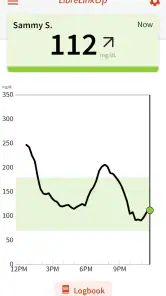
One of the standout features of LibreLinkUp is its effortless connectivity. The app syncs directly with your Libre sensor, allowing you to get real-time glucose readings right on your smartphone. No more cumbersome cables or manual data entry—just instant access to your health data. This is especially handy if you're someone who likes to keep a close eye on your levels throughout the day.
Sharing is Caring
Another cool feature is the ability to share your readings with family, friends, or healthcare providers. All you need to do is send them an invite through the app, and they can keep track of your glucose levels in real-time. It's a fantastic way to keep your loved ones in the loop, especially if they’re helping you manage your health. Plus, it’s super easy to set up, even for those who aren't tech-savvy.
User-Friendly Interface
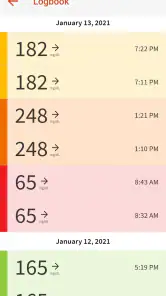
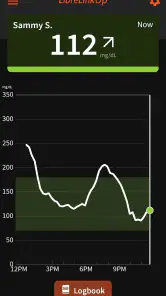
Now, let's talk about the user interface. LibreLinkUp is designed with simplicity in mind. The layout is clean and intuitive, making it easy to navigate through the different features. Whether you're checking your readings, sending an invite, or adjusting your settings, everything is just a tap away. And for those who love a bit of customization, there are options to tweak the app’s appearance to suit your preferences.
What really stands out to me is how the app manages to pack so many features without feeling cluttered. It’s clear that a lot of thought has gone into the design, ensuring that users get the most out of their experience without feeling overwhelmed.
Stay Informed with Alerts
To top it all off, LibreLinkUp offers real-time alerts to notify you of any significant changes in your glucose levels. Whether it’s a spike or a drop, you’ll get an instant notification so you can take action right away. This feature is a lifesaver, literally, as it helps prevent any potential health emergencies by keeping you informed at all times.
In conclusion, if you're using a Libre sensor and haven't tried LibreLinkUp yet, you're missing out. It’s a convenient, user-friendly app that makes monitoring your glucose levels a breeze. So do yourself a favor, and give it a download. After all, taking control of your health has never been easier or more accessible.
When the routine gets tiring
The main source of fatigue is not complicated navigation; it is the attention that shared health information can invite. A caregiver may feel compelled to check repeatedly, and the wearer may start to feel that every fluctuation will be noticed and discussed. I would set expectations early: access is there to support care, not to demand a running explanation of every reading. A calm agreement about when to check and when to reach out is more sustainable than treating the screen as a live conversation.
It can also be tiring when the caregiver expects the app to answer questions it cannot answer by itself. A number may prompt a useful check-in, but it does not explain the cause or replace the wearer’s own judgement and care plan. If a family member tends to react strongly to every change, they may be better off using the app more selectively, or relying on agreed calls instead. Remote visibility is helpful only when it improves support rather than adding pressure.
Everyday use without overreacting
Imagine a caregiver at work while a family member is going about a normal day. Rather than interrupting with repeated messages, the caregiver can check the shared information at an agreed time. If a notification arrives, they can follow the plan they discussed: check the current context, send a brief message if appropriate, and let the wearer guide the next step. That is a more useful workflow than treating every alert as an emergency or assuming that silence means something is wrong.
One non-obvious tip is to make the first few days a calibration period for the relationship, not just for the phone. Notice whether the alerts are useful, whether the caregiver understands what they are seeing, and whether the wearer feels supported. If notifications are distracting, review the available settings together and adjust the routine where possible. A second useful habit is to keep a direct way to contact one another; an app check should not replace a conversation when context matters.
Another practical trade-off is deciding who should receive access. One trusted caregiver may be easier to coordinate with than a large circle of well-meaning relatives, especially if several people might respond differently to the same information. Sharing should follow the wearer’s wishes, and each caregiver should know whether they are expected to act or simply stay informed. That clarity prevents duplicated calls and conflicting advice.
Who will keep it installed?
I think LibreLinkUp makes the most sense for caregivers who have a real, ongoing role and for wearers who want readings shared with them. It is less compelling for someone who only wants occasional general health information, a person who is not connected to a compatible Libre monitoring arrangement, or a family that does not want remote checking to become part of its routine. If the wearer prefers to share updates verbally, that preference deserves respect; installing an app is not automatically an improvement.
For an Android user, the minimum operating-system requirement is Android 8.0, and the app is free. Those practical details lower the barrier to trying it, but the lasting value still comes from a clear purpose. It is worth keeping when the caregiver genuinely uses the readings to offer timely, considerate support. If it becomes another source of worry, notifications, or unresolved expectations, taking a break from shared access may be healthier than keeping it out of habit.
A measured long-term recommendation
After the first week, I would judge the app by a simple question: has it made support easier without making either person feel monitored? If the answer stays yes, it can earn a lasting place because its job is concrete and recurring. If the answer changes, the routine can be revised, notifications reconsidered, or another way of communicating chosen. Health sharing should serve the relationship, not dictate it.
Overall, I recommend LibreLinkUp to people who already have a suitable Libre setup and want a caregiver to receive glucose readings remotely. I would not present it as a complete diabetes-management solution, a guaranteed emergency alert system, or a tool every family needs. Its best quality is focused usefulness; its main limitation is that the value depends on the connected monitoring setup, a working phone routine, and respectful communication. Used with those boundaries in place, it can remain useful well after the novelty of seeing the first reading wears off.
LibreLinkUp Frequently Asked Questions
Can I use LibreLinkUp without a loved one sharing their readings?
No. LibreLinkUp is designed to receive glucose readings that another person chooses to share with you through a compatible FreeStyle Libre setup. It does not independently measure glucose or provide readings simply because the app is installed. Before downloading, make sure the person you want to follow is willing and able to share their readings with you.
What should I check before downloading LibreLinkUp?
Check that your phone runs a compatible operating system and that you have a reliable internet connection, since the app depends on connectivity to receive shared readings and updates. It is also helpful to confirm that the person whose glucose readings you want to follow uses a compatible FreeStyle Libre setup and plans to share those readings with you.
Who is LibreLinkUp intended for, and is it a glucose-monitoring app for the person wearing a sensor?
LibreLinkUp is intended for caregivers, relatives, and other people who want to follow glucose readings shared by a loved one. Its role is to let those people receive readings remotely; it is not described as the app that measures glucose itself. The person sharing readings uses a compatible FreeStyle Libre setup, while LibreLinkUp provides a way for others to stay informed.
What is LibreLinkUp and how does it work?
LibreLinkUp is a companion app designed for users of the FreeStyle Libre glucose monitoring system. It allows users to remotely track glucose levels of friends or family members who use the FreeStyle Libre sensors. By connecting with the LibreLinkUp app, you can receive glucose updates, which can be particularly beneficial for caregivers or family members who need to monitor the health of loved ones.
Is LibreLinkUp compatible with both Android and iOS devices?
Yes, LibreLinkUp is available for both Android and iOS devices. Users can download the app from the Google Play Store for Android devices and the Apple App Store for iOS devices. The app is designed to work across these platforms, allowing users to stay connected and follow shared glucose readings on the device they use.
Pros
- Real-time glucose monitoring
- User-friendly interface
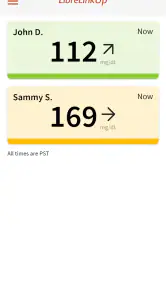
- Supports multiple connections
- Customizable notifications
- Secure data handling
Cons
- Requires Abbott sensor
- Limited third-party integration
- Subscription needed for full features
- Dependent on stable internet
- No offline mode
- Category
- Medical
- Version
- 4.17.0











