LEGO® Play
- 566.00
- 4.1
- Installs
- 5.00M
- Price
- Free

Screenshots

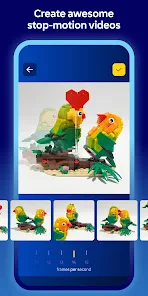
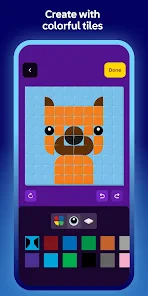


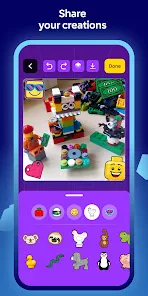

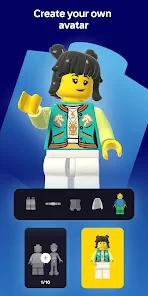
Analysis by Reviewed
I’d decide whether LEGO® Play is right for you by asking what you want from a LEGO-themed app. If the appeal is a playful digital space to explore together, it may be a good fit. If you’re looking for a detailed building simulator or a practical guide to physical sets, I’d look at alternatives aimed specifically at those jobs. The name suggests a broad play experience, so I’d approach it as something to explore rather than assume it replaces building with real bricks.
A better fit for shared, low-pressure play
As an entertainment app from LEGO System A/S, LEGO® Play is free and rated for Everyone. It has an average rating of 4.1 from around 11,000 ratings, and it has passed five million installs. Those figures suggest a substantial audience, but they don’t tell me whether a particular child will enjoy it; that depends more on their interest in LEGO and how they like to play on a screen. The app is on version 2025.15.0, with Android 7.0 as its minimum OS requirement.
A realistic use case is a short stretch of downtime when a child wants something more hands-on than watching another video. I’d sit nearby at first, let them explore, and ask them to describe what they’re trying to do. That gives the activity a shared, conversational feel instead of leaving the screen to occupy them on its own. For a LEGO fan who likes imagining builds and talking through ideas, that can be more appealing than a passive entertainment app.
Choose it for play, not as a building manual
One useful way to judge the experience is to notice what kind of play keeps the child interested: exploring, making choices, or inventing stories around LEGO. If they enjoy those open-ended moments, LEGO Play may be worth trying. If they mainly want to reproduce a particular physical model, a set’s printed or digital instructions are a more direct tool. And if they want a deep, precise virtual construction workspace, a dedicated building simulator is likely a better category to explore.
I’d also treat screen use as a trade-off rather than assume that a creative theme automatically makes screen time active. A child can still tap through quickly without thinking much. To get more from a session, try giving it a small purpose—such as choosing one idea to talk about afterward, or drawing a design they would like to build with actual bricks. That simple bridge between screen play and an offline activity helps make the time feel more intentional.
For families deciding whether to keep it, I’d start with a brief tryout and watch how the child uses it, rather than judging from the LEGO branding alone. Do they stay curious, explain their choices, or want to carry an idea into physical play? Those are better signs of a match than simply asking whether they enjoyed the first few minutes. If they prefer clear goals, precise building guidance, or play without a device, choosing a different activity is perfectly reasonable.
What a good first session can reveal
I’d treat the first few minutes as a chance to find out how the child responds, not as a test they have to pass. Let them take the lead, then notice whether they return to something that caught their attention or move on as soon as they have tapped through it. Their reaction can help you decide whether to offer another session, join in, or set the app aside without turning the choice into a judgment about their creativity.
More From Our News Desk

Weather by Xiaomi Review: Clear at a Glance, Less Clear Up Close

X Under Pressure: Can It Recover When Posting Goes Wrong?

Clash of Clans Is Won Between the Battles

Android Auto Makes the Case for Quieter Car Software

MobiOffice: Transforming Mobile Productivity with Seamless Integration

EA SPORTS FC™ Mobile Soccer: Redefining Mobile Sports Gaming
If you’re introducing it to more than one child, try asking each to explain a different choice rather than comparing who made the “best” one. That keeps the focus on imagination and conversation. It also makes the experience easier to share with children who have different ages or levels of interest in LEGO: one may want to talk through an idea while another is content to explore quietly.
Make the screen session lead somewhere
A small transition can make the app more useful in everyday family life. Before putting the device away, ask the child to describe one thing they liked or sketch an idea they might build later. This doesn’t require a full building session or a matching set; the value is in helping them connect what they did on screen with a thought they can carry into another activity. If they aren’t interested in that step, don’t force it—the app can still be a brief entertainment choice.
I’d also choose a stopping point before opening the app, especially when it’s being used during a short wait or before another activity. A simple plan such as “we’ll explore until it’s time to leave” is more practical than expecting a child to stop immediately whenever an adult asks. This is ordinary screen-time planning, not a special feature of the app, but it can prevent a pleasant little distraction from becoming a negotiation.
Where alternatives may serve you better
The main comparison I’d make is not between brands but between purposes. A physical LEGO set and its instructions suit someone who wants a tactile project with a defined result. A dedicated digital building tool is a stronger fit for someone who wants detailed control over a virtual model. LEGO Play belongs in a more casual entertainment slot: I’d choose it when the aim is to explore a LEGO-themed experience, not when I need a reliable manual or a serious design workspace.
That distinction matters for adults as well as children. An adult builder who wants to plan a complicated model may find a broad play app too loose for the task. A younger fan who enjoys imagining scenes may find a technical design tool overly demanding. If you’re deciding between them, start with the question, “What does the person want to do next?” The answer—follow instructions, design precisely, or simply play—points to a better choice than the LEGO name alone.
There’s also a reasonable case for choosing no app at all. If a child already has bricks nearby and is happily building, I wouldn’t interrupt that to offer a screen-based version of the same interest. Likewise, if the device is needed for homework or family routines are already crowded with screen activities, this entertainment app may not add enough to justify another option. Its best role is as a choice for a particular moment, not a replacement for every other kind of play.
Questions I’d settle before relying on it
Is it suitable for a younger child? Its Everyone content rating makes it broadly accessible, but that doesn’t guarantee that every child will understand or enjoy the experience in the same way. I’d sit with a younger user at first and see whether the navigation and activity make sense to them. A rating is a useful starting point, while a short, supervised tryout tells you more about the fit for your household.
Does it replace physical building? I wouldn’t treat it as a substitute for handling bricks or following instructions for a real set. If that is the goal, use the relevant building materials and instructions. The app makes more sense as a separate entertainment option, or as a prompt for conversation and ideas that might later lead to offline play.
Is it worth keeping if the child only uses it briefly? That depends on what the brief use looks like. A short visit that sparks a story or gives a child something enjoyable to do during a wait can be enough. If they open it, seem unsure what to do, and leave immediately every time, there’s little reason to keep offering it just because they like LEGO in other contexts.
Will every LEGO fan enjoy it? I wouldn’t assume so. Some fans want to build with real pieces, collect sets, or study construction details; others like casual digital exploration. Interest in LEGO is a helpful clue, but the child’s preferred way of playing is the better predictor. That is why I’d try it alongside, not instead of, the activities they already enjoy.
Where the experience needs realistic expectations
The broad idea is also its limitation: an app intended for casual entertainment may not satisfy someone who arrives with a precise task in mind. If a child expects a particular set guide, or an adult expects a detailed model editor, disappointment can come from the mismatch rather than from the app being wrong for everyone. I’d explain what you’re opening it for—exploration and play—before handing over the device.
Another trade-off is that a screen can hold attention without encouraging much thought. That’s not unique to LEGO Play, and I wouldn’t assume that a familiar creative theme automatically makes every moment educational. When I want a more active exchange, I join in with a question or suggest drawing an idea afterward. When I simply need a short entertainment break, I can accept that the app is serving a lighter purpose.
How much help a child needs can vary, too. Some will be happy to explore on their own; others may need an adult nearby to get started or make sense of what they are seeing. I’d plan the first session accordingly instead of assuming the word “play” means no guidance is ever needed. If independent use is essential in your situation, watch how the child manages the app before relying on it for that role.
My practical recommendation is to keep expectations modest and judge the app by the moments it actually supports. It can be a pleasant extra for a child who already likes LEGO and enjoys screen-based exploration. It is less convincing as a reason to buy into a digital activity when what the child really wants is a real set, a clear instruction sequence, or an open-ended physical build.
LEGO® Play is a delightful app that brings the joy of building and creativity to your fingertips. Designed for both kids and adults, this app offers a unique digital experience that mirrors the excitement of physical LEGO® sets. Having spent some quality time exploring its features, I can confidently say this app is a must-have for every LEGO® enthusiast.
Getting Started with LEGO® Play
When you first launch LEGO® Play, you're greeted with a vibrant and intuitive interface that immediately captures your attention. The app is designed to be user-friendly, ensuring that even the youngest builders can navigate with ease. With just a few taps, you're transported into a world of endless possibilities, where your imagination sets the limits.
Building Blocks of Fun
The core of LEGO® Play lies in its extensive library of virtual LEGO® sets. Whether you're interested in classic themes like City and Space or the latest movie tie-ins, there's something for everyone. The app offers step-by-step building instructions, making it easy for users to follow along and create their masterpieces. What's more, the 3D building experience is incredibly immersive, allowing you to rotate and zoom in on your creations for a closer look.
One of the standout features is the ability to create custom designs. The app provides a sandbox mode where you can let your creativity run wild, building anything from towering skyscrapers to intricate vehicles. Sharing your creations with friends and family is a breeze, thanks to the app's integrated social features.
Educational and Entertaining
LEGO® Play isn't just about having fun; it's also an educational tool. The app encourages problem-solving and critical thinking as users figure out how to fit pieces together. It's a fantastic way for kids to develop spatial awareness and fine motor skills. Additionally, the app often hosts challenges and competitions, fostering a sense of community and friendly competition among users worldwide.
For parents concerned about screen time, LEGO® Play offers a healthy balance. The app's engaging nature ensures that children are not just passively consuming content but actively participating in creative play. This aspect makes it a valuable addition to any child's digital repertoire.
Final Thoughts
In conclusion, LEGO® Play is an exceptional app that successfully bridges the gap between digital and physical play. Its user-friendly interface, extensive library, and educational benefits make it a standout choice for LEGO® fans of all ages. Whether you're a seasoned builder or a newcomer to the LEGO® universe, this app provides endless opportunities for creativity and fun. So, why wait? Dive into the world of LEGO® Play and let your imagination soar!
LEGO® Play Frequently Asked Questions
Is LEGO® Play free to download, and what devices can run it?
LEGO® Play is free to download and is an entertainment app from LEGO System A/S. It requires Android 7.0 or later, so check your device’s operating system before installing. The app is rated for Everyone and has attracted over five million installs, making it a familiar option for families looking for LEGO-themed digital play.
What is LEGO® Play and how does it work?
LEGO® Play is an interactive application designed to engage users in creative building and play experiences using virtual LEGO bricks. It offers a variety of challenges, games, and building instructions that cater to both beginners and experienced builders. Users can explore different themes and environments, enhancing their creativity and problem-solving skills. The app is intuitive, allowing for easy navigation and interaction with the digital LEGO universe.
Is LEGO® Play suitable for all age groups?
LEGO® Play is designed to be accessible to a wide range of age groups, providing content suitable for both children and adults. The app features age-appropriate challenges and activities, ensuring that younger users can enjoy simpler tasks while older users can engage with more complex builds and games. Parental controls are also available to ensure a safe and enjoyable experience for children. Its Everyone age rating makes it a broadly family-friendly choice, though parents should still decide what is appropriate for their child.
Do I need an internet connection to use LEGO® Play?
While LEGO® Play offers a variety of offline activities and building challenges, an internet connection is required for accessing certain features, such as downloading new content, updates, and participating in online community events. Users can enjoy the core functionalities without internet, but connecting periodically ensures they have the latest features and content updates.
Are there any in-app purchases in LEGO® Play?
LEGO® Play is free to download, but the published app description does not establish whether it includes optional in-app purchases, so check the purchase details before handing the device to a child. The earlier version of this FAQ described purchases for additional building sets, themes, and features, while also saying they were optional. Treat that claim cautiously and use device-level purchase controls if you want to avoid unintended spending.
Pros
- Engages creativity and imagination.
- User-friendly interface for all ages.
- Regular updates with new content.
- Safe environment for children.
- Enhances problem-solving skills.
Cons
- Requires stable internet connection.
- In-app purchases can be costly.
- Limited free content available.
- May not run smoothly on older devices.
- Requires significant storage space.
- Category
- Entertainment
- Version
- 2025.15.0












