LEGO® Builder
- 4.61K
- 4.7
- Installs
- 10.00M
- Price
- Free

Screenshots
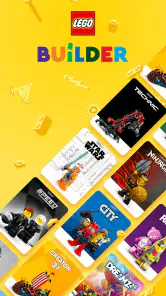


Analysis by Reviewed
I like the idea of having the instructions for a physical LEGO set ready on a screen, but the first few minutes can make or break that convenience. With LEGO® Builder, I’d begin with a set already on the table, find its guide, and make the device easy to glance at before opening bags and spreading out pieces. That simple start shows what the app is best at: helping you follow a build without turning the screen into the main event.
A good fit for physical builds, not every LEGO interest
I’d think of this as a practical guide for building physical LEGO sets, rather than a replacement for the bricks or a general-purpose creativity app. LEGO System A/S makes it free, and its entertainment focus is clear: the useful part is having digital instructions close at hand when you’re ready to build. It has a 4.7 average from around 210,000 ratings and more than 10 million installs, so it’s a familiar option for many builders. It’s rated for Everyone.
That distinction matters when you’re deciding whether to install it. If you mainly want help following a set’s build, this is a more focused choice than searching through unrelated videos or trying to keep paper instructions open beside a crowded table. If you’re looking for a broad social network, a place to design elaborate custom models, or a way to play a LEGO game, you may find that a dedicated alternative suits you better.
Articles Related to LEGO® Builder
For a first-time user, the reassuring point is that you don’t need to learn every option before building. Make the first goal small: locate the right instructions and get through an early step while keeping the pieces organized. If you already know how you like to build, the digital guide can simply be another way to view the directions rather than a new routine you have to follow.
The Building Block Basics
First off, let me tell you that LEGO® Builder is like having a master builder in your pocket. Whether you’re a seasoned pro or a newbie just getting into the LEGO universe, this app offers something for everyone. The app is available for both Android and iOS, making it super accessible no matter what device you have.
Getting started without making the build harder
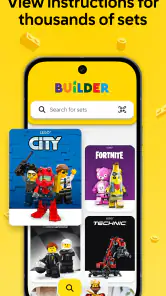
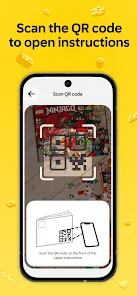
When you first open it, give yourself a moment to find the instructions for the set you want to build. If you have the box nearby, scanning is a handy starting point; otherwise, searching for the set is a sensible route. Then place your device where you can see it without reaching across your sorted pieces. That small setup choice can save more frustration than rushing straight into the first step.
A realistic first session might be a quiet evening at the kitchen table: you scan the set, bring up its instructions, sort the pieces into a few groups, and follow along at your own pace. The meaningful first success isn’t mastering every control; it’s finding the right guide and completing a step without losing your place. For a child building with an adult, the screen can stay with the person following the guide while the other person finds the pieces.
You May Like

How Microsoft OneDrive Became a Mobile Productivity Giant

How Google Translate Breaks Language Barriers Effortlessly

Why Google Sheets Is the Ultimate Mobile Productivity Tool

Unveiling the Dynamic World of My Talking Tom Friends

Free Fire MAX: Dominating the Battle Royale Arena

Free Fire: Winterlands – The Ultimate Winter Gaming Adventure
Before starting, I’d also decide where the device will sit and which hand will turn pages or adjust the view. A stand or a stable spot against something on the table can keep the screen visible while leaving both hands free for bricks. This is especially helpful when a build is spread across a small surface: placing the device at the edge makes it less likely to bump sorted pieces while you reach for it.
If you’re helping a younger builder, agree on a simple rhythm: one person checks the current step, then the other searches for the parts. That avoids both people reaching for the same pile and keeps the screen interaction from interrupting the fun. The app is useful here as a shared reference, but it won’t replace the patience of letting the builder inspect the pieces and decide where they go.
User-Friendly Interface
Once you dive into the app, you’ll notice how intuitive and easy it is to navigate. The developers have done a stellar job making sure the interface is user-friendly. You’re greeted with a clean layout that doesn’t overwhelm you with too many options right off the bat. It’s like walking into a well-organized Lego store where everything is at your fingertips.
One small but useful habit is to check that you’ve opened instructions for the exact set you’re holding before spreading pieces across the table. Set names and boxes can look similar, and catching a mismatch early is much easier than wondering why a step doesn’t match your parts. I also find it worth keeping the physical booklet nearby for a quick comparison if a screen view feels unclear.
If the scan doesn’t get you to the guide you expected, I’d avoid assuming the build itself is confusing. Go back and search for the set instead, then compare the result with the box in front of you. Using both routes as a quick cross-check is a practical way to confirm you have the correct instructions before investing time in sorting or assembly.
Features that Click
The app doesn’t just stop at providing instructions; it’s packed with features that enhance your building experience. You can search for different builds, save your favorites, and even scan your physical sets to get digital instructions. Now, how cool is that? It’s like having a digital blueprint for your creations.
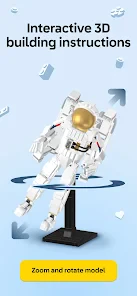
One standout feature that I absolutely love is the 3D model view. You can rotate and zoom in on your projects, which makes it super easy to follow along. And let’s not forget the part tracker that ensures you’re using the correct pieces—no more scrambling around searching for that elusive brick!
The 3D view is most useful when a step hides a connection behind the model: rotate it before attaching a piece and you can check which side faces outward. Zooming in can also help with small details, but I wouldn’t treat the part tracker as a substitute for organizing the pieces yourself. Sorting by color or shape before starting remains a simple way to avoid stopping at every step to search.
A useful trade-off is that viewing a model from different angles gives you more control than a fixed page, but it also asks you to interpret the model rather than simply copy a flat picture. I’d rotate only when a connection or orientation is genuinely unclear; constantly changing the view can make it harder to remember which side you were checking. Once the part is placed, return to a familiar angle before moving on.
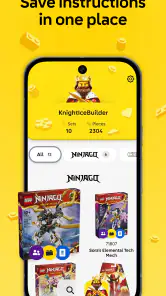
For a long build, saved instructions can also help create a clean stopping point. I’d save the set when I know I’m likely to continue later, then leave the loose pieces grouped instead of mixing everything together. That way, returning to the project is less about reconstructing your workspace and more about finding your place in the build.
When the digital guide helps—and when it doesn’t
Compared with paper instructions, a digital guide is easier to enlarge and reposition, especially when you’re checking an angle. Paper, however, never needs you to prop up a device, and it can be more comfortable if you prefer a page you can glance at without touching a screen. Compared with video walkthroughs, step-by-step instructions let you move at your own pace instead of pausing and rewinding. The trade-off is that a still model can take a moment to interpret when the relevant connection is hidden.
If a step seems wrong, pause before pulling apart several sections. Rotate the model, inspect the pieces you have left, and compare the connection with the previous step. That method is more reliable than guessing based on color alone, particularly when several similar pieces are involved. The app can make instructions easier to inspect, but it can’t sort your table or decide which piece you may have missed.
I’d choose the paper booklet instead when I want to build away from a convenient place for a device, or when screen interaction would keep breaking my concentration. I’d choose a video when I need to see a particular movement demonstrated, while recognizing that video can be awkward to pause at exactly the point I need. For most steady, step-by-step assembly, the digital guide sits between those options: adjustable like a screen, but paced by the builder rather than a recording.
Another practical limitation is that a screen is one more object competing for room beside the pieces. If your table is already crowded, it may be easier to finish one small area, clear some space, and then continue rather than trying to keep every bag and part in view at once. The app improves access to instructions; it doesn’t make a cramped work surface more manageable.
Community and Creativity
Another thing that sets this app apart is its vibrant community. You can share your creations, get inspired by others, and even participate in building challenges. It’s a great way to connect with fellow LEGO enthusiasts from around the globe.
The app also encourages creativity by allowing you to customize your builds. You can tweak designs to your liking or even come up with something totally original. The possibilities are endless, and it’s a fantastic way to unleash your inner architect.
For a first-time user, I’d start with a set you already own rather than treating the app as a place to invent a whole new model. That gives you a clear goal and lets you learn how the guide behaves before relying on it for a longer build. Once you’re comfortable, saving builds you want to return to can make it easier to pick up a project after a break.
It’s also worth separating inspiration from instruction: ideas from other builders can spark a project, but they don’t necessarily tell you which pieces you need or how to assemble a custom design. If your main goal is open-ended digital modeling, a dedicated design tool is likely a better fit. I’d skip this app if you don’t own or plan to build LEGO sets and mainly want a social feed or a game.
For families, the app can be most useful when an adult wants to support rather than take over a child’s build. Let the child choose pieces and try a placement, then use the guide’s view to resolve a specific uncertainty together. That keeps the screen as a tool for checking, not a source of answers that removes the satisfaction of working something out.
Likewise, experienced builders may not need the digital instructions for every set. If the printed booklet is already easy to follow, the app’s strongest reason to stay installed is convenience: a searchable guide, a saved place to return to, or a view that can be enlarged when a detail is fiddly. I wouldn’t switch habits just for the sake of using an app; I’d use it where it solves a real annoyance.
A useful next step for your first build
After you finish a set, keep it in your saved builds if you expect to revisit its instructions, or use the search and scan approach when you begin another box. The app is on version 4.2.11, with a minimum OS requirement of 8.1, so check your device compatibility before setting aside time for a build. Its free price makes trying it straightforward, but the best reason to keep it is practical: it can make instructions easier to inspect without taking over the hands-on part of the hobby.
LEGO® Builder has been available since December 6, 2019, and its current version is 4.2.11. Before a planned building session, I’d make sure the device can run it and that I can place it where the screen is easy to see. That small check is more useful than discovering a compatibility problem after the pieces are laid out.
My recommendation is straightforward: if you build physical sets and sometimes struggle with small illustrations, misplaced booklets, or finding the right guide, give it a try with a set you know. If you want a custom-model design studio, a game, or a replacement for every kind of LEGO resource, look elsewhere. LEGO® Builder is at its best as a calm, practical companion that helps you get back to the satisfying part: putting the pieces together.
LEGO® Builder Frequently Asked Questions
Does LEGO® Builder work offline?
LEGO® Builder is designed around digital building instructions, so having an internet connection can be useful when finding or loading a set’s guide. Once you have the instructions available on your device, you can focus on following the steps while building. If you expect to use the app somewhere without a connection, it’s sensible to open the guide beforehand and check that it is ready.
Can I keep track of the LEGO sets I’m building?
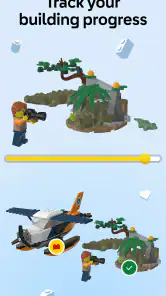
Yes. LEGO® Builder includes a way to track your builds, which can help you keep your current projects organized alongside the app’s digital instructions. This is particularly handy when you move between several physical sets or return to a model after a break. The tracking feature complements the hands-on building experience rather than replacing the pieces or the set itself.
Is LEGO® Builder only for children, or can adults use it too?
LEGO® Builder is for anyone who enjoys assembling LEGO models, whether they are building alone, with children, or as a family. Its digital guides make it easier to inspect a model and follow the assembly steps, which can be useful for builders of different ages and experience levels. The app is rated for Everyone, so it is not limited to a particular age group.
Can I use LEGO® Builder without owning a LEGO set?
Yes, you can explore the app without a physical set, but its main purpose is to support building real LEGO models with digital instructions. To follow the steps for a particular model, you’ll need the matching set and its instructions in the app. LEGO® Builder is a digital companion to hands-on building rather than a game for creating virtual models.
What is LEGO® Builder and what can I do with it?
LEGO® Builder is a digital app designed to enhance your LEGO building experience by providing interactive 3D instructions for LEGO sets. With this app, you can view models from all angles, zoom in for closer details, and follow step-by-step instructions to build your sets. The app serves as a digital companion to traditional paper instructions, making it easier to build complex models with confidence and precision.
Pros
- Engaging and educational for all ages.
- Boosts creativity and problem-solving.
- Regular updates with new content.
- User-friendly interface and controls.
- Includes virtual building instructions.
Cons
- Requires a stable internet connection.
- Limited free features available.
- In-app purchases can be pricey.
- Not suitable for low-end devices.
- Occasional crashes on older phones.

- Category
- Entertainment
- Version
- 4.2.11