MyLabcorp
- 1.67K
- 4.6
- Installs
- 1.00M
- Price
- Free

Screenshots

Analysis by Reviewed
I find a lab app most useful at the moments when I would otherwise have to stop what I’m doing and make a call: checking whether a result is available, arranging a visit, or taking care of a bill. Labcorp’s patient app brings those tasks into one place, but it still depends on having a working connection for the parts that involve current account information. That makes it a practical companion for planning healthcare, rather than something I’d rely on as a replacement for a clinician or for urgent medical advice.
When a connection matters
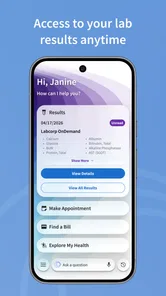
Results are the main reason I’d open Labcorp | Patient. The app is built to let patients view lab results, and it can make checking them more convenient than waiting for a paper copy or trying to reach someone by phone. The important distinction is that an app can show information without interpreting what it means for your individual health. I’d use it to review and keep track of results, then follow up with my healthcare provider about questions or next steps.
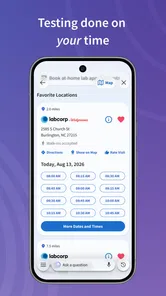
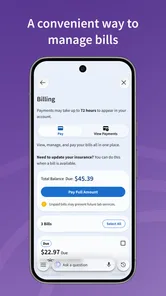
Scheduling and paying bills are also tasks where connectivity matters: you need current information to choose an appointment or complete an account action. If I were arranging a visit while away from home, I’d check the details before setting off rather than assume that a screen I viewed earlier reflects the latest status. A brief loading delay can be annoying when you’re in a hurry, so I’d handle non-urgent tasks when I have a reliable connection and a few minutes to spare.
Useful in everyday mobile situations
The app makes the most sense for someone who already uses Labcorp services and wants a convenient way to manage related tasks on a phone. For example, after a routine appointment, I could check back later for results, review my appointment history, and keep billing tasks from getting lost among email and paperwork. That is a more useful role than repeatedly opening the app without a specific reason: notifications can prompt a check, while the account gives me a place to follow through.
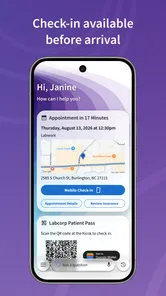
Before an appointment, I’d use a quiet moment at home to schedule or review what I need, rather than trying to do it while walking into a clinic or dealing with a weak signal. If I’m helping a family member, I’d also be careful to keep account access and health details private; convenience should not mean leaving sensitive information visible on a shared or unattended phone. The app is rated for Everyone, but that age label is not a substitute for an adult’s judgment about who should manage someone’s health account.
Where it fits among healthcare options
Compared with calling a lab or keeping paper records, a patient app can save time on routine account tasks and make it easier to revisit appointment and result history. Compared with a broader healthcare portal, this one is most relevant when your task is specifically tied to Labcorp. If you mainly need a clinician to explain a result, coordinate care across several providers, or handle an urgent concern, contacting the appropriate healthcare professional is the better route. I wouldn’t choose a lab-specific app expecting it to replace those conversations.
A useful habit is to treat the app as an organizer, not as the only place your health information exists. If a result is important to a discussion with your provider, make a note to bring it up rather than assuming that viewing it settles the question. And if a page is slow or an action does not appear to complete, I’d avoid repeatedly submitting the same payment or appointment request; first check the account again when the connection is steady, then use Labcorp’s usual support channels if the status remains unclear.
More From Our News Desk

 Block Blast!
 Makes Every Clear Feel Like One More Turn
A clean little block puzzle becomes a study in space, risk, and self-control. Its best moments come from one satisfying clear; its toughest test is knowing when to stop.

 Super Stylist Fashion Makeover
Super Stylist Turns Dress-Up into a Runway Career
Its makeover-to-client loop turns quick outfit decisions into shareable style theater. The question is whether the closet keeps giving players a reason to return.

 Block Craft 3D:Building Game
Block Craft 3D Under Pressure: How Well Does It Recover When Building Goes Wrong?
A failure-focused look at Block Craft 3D’s forgiving building loop, its uncertain recovery edges, and the moments that demand more than a cheerful village.

 Woodturning
 Trades Creative Freedom for a Satisfying Carving Loop
If your usual creative game is about building, decorating, or styling, Woodturning trades open-ended projects for a tactile, tightly guided carving loop. Here is what that switch really costs.

 PUBG MOBILE
 Shows What Battle Royale Must Get Right
PUBG MOBILE shows how battle royale has matured: bigger systems matter less than meaningful choices, readable fights, and a reason to return after every loss.

 Braindom: Brain Games Test
Braindom’s Social Life Happens Between Puzzles
Braindom turns quick logic traps into a personal ritual, but its community value is more about comparing answers than building together.
Latest News



Getting Started with Ease
First off, downloading and setting up the app was a cinch. I just had to hop onto the Google Play Store or the App Store, search for Labcorp | Patient, and within minutes, I was ready to roll. The app’s interface is pretty intuitive, meaning you don’t need to be a tech wizard to navigate it. Once you log in, you’re greeted with a dashboard that lays out all your options clearly.
Features That Stand Out
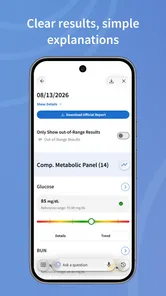
One of the coolest features is the ability to view your lab results directly in the app. Forget sorting through piles of paper or waiting for a phone call; now, everything is at your fingertips. The app sends notifications when new results are available, which is super handy if you’re like me and tend to forget to check.
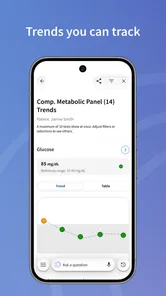
Another standout feature is appointment scheduling. The app allows you to book, reschedule, or even cancel appointments without the need to call in. It’s all about convenience, and I’m here for it! Plus, you can access a detailed history of your past appointments and results, which is great for keeping track of your health journey.
Security and Privacy
In today’s world, security is a big deal, especially when it comes to health information. Thankfully, Labcorp | Patient has got you covered with top-notch security features. The app uses encryption to protect your data, ensuring your personal information stays safe and sound. You can also set up a secure login with fingerprint or face recognition, adding an extra layer of protection.
My Two Cents
After spending some time with the app, I can honestly say it’s a game-changer for anyone trying to manage their health information more efficiently. The convenience of having everything in one place is unmatched. I did notice that sometimes the app can be a bit slow to load, especially during peak hours, but it’s a minor hiccup in an otherwise smooth experience.
All in all, Labcorp | Patient is a solid choice for those looking to streamline their healthcare management. Whether you’re tech-savvy or a bit of a technophobe, this app is designed to cater to everyone. So, if you haven’t checked it out yet, I’d say it’s worth a shot!
A practical routine for results and appointments
A helpful way to use a lab account is to connect each app visit to a real task. After a test, I’d make a mental note to check for an update later instead of repeatedly refreshing the results area. Once something appears, I’d read it somewhere I can concentrate, save any questions for my clinician, and then return to the app only if I need to check appointment or billing details. That small routine makes the phone a useful organizer rather than a source of needless worry.
For a realistic weekday example, imagine I have a busy morning and need to arrange a visit before work. I’d use the app at home, where the connection is dependable, to look at scheduling options and complete the task without rushing. Later, when a result notification arrives, I can choose a calm moment to review it instead of opening it while driving, standing in a queue, or trying to interpret a medical detail between meetings. The benefit is not that every healthcare step happens instantly; it’s that routine account actions can fit around the rest of the day.
What to check before relying on a screen
Health information can feel time-sensitive, but a notification is best treated as a prompt to check the account, not as a complete explanation or a substitute for direct care. I’d also avoid making a decision about treatment from a result shown on a phone. The app is useful for access and follow-through; clinical context belongs in a conversation with the professional responsible for my care. If a result raises an urgent concern, I would contact an appropriate healthcare professional rather than wait for an app interaction to resolve it.
There is a practical distinction between seeing an appointment or result in an account and having all the details needed for the next step. Before leaving home, I’d confirm the appointment information in the app and keep any instructions from my healthcare provider handy. If I’m unsure what a test requires or where I should go, I’d verify that through the relevant Labcorp or provider channels rather than infer it from a calendar entry. This is especially useful when plans have changed or when more than one person in a household has appointments to manage.
Choosing the right tool for the job
The main alternative is not always another app. For a one-off question, calling the lab or the healthcare provider may be more direct; for personal records, some people prefer keeping paper documents or notes; and for care that spans several clinicians, a broader health portal may be a better central view. I see Labcorp’s app as strongest when the task is specifically connected to Labcorp testing, visits, results, or bills. Its focused role is a benefit if that is what you need, but a limitation if you expect one place to coordinate every part of your care.
That distinction also helps answer who should skip it. If you rarely use Labcorp, do not want to manage healthcare on a phone, or need an app to interpret results and coordinate treatment, this may not add enough value to justify another account. Someone who prefers speaking with a person can still use the usual contact routes. For regular Labcorp patients who want to check results and handle ordinary account tasks without making a call, the app is a more natural fit.
Handling a slow session with care
If a page takes longer than expected, I’d first check whether the phone has a stable connection and try again once, rather than tapping every control repeatedly. For an appointment or payment, the important question is whether the action actually went through. I’d revisit the account to check its current status before starting over; if that still leaves doubt, contacting Labcorp is safer than risking a duplicate request or charge. This cautious approach is particularly worthwhile when the app is being used in a hurry or on an unreliable public connection.
I’d also separate preparation from completion. If I know I’ll need to schedule or review an account item while away from home, I can do the planning in advance and avoid depending on a weak signal at the last minute. A phone is convenient, but it is also easy to lose focus when notifications, calls, or interruptions arrive. Taking a moment to confirm that I’m in the right account and looking at the intended task is a small safeguard when handling personal health and billing information.
Privacy in shared and everyday use
Because the app brings personal health tasks onto a phone, I’d think about the device as well as the account. I would avoid leaving it open on a result screen when someone else can see the display, and I’d be deliberate about who has access if I share a device. A family member helping with appointments should have a clear understanding of whose account they are using and should not assume that convenience makes it appropriate to view another person’s health details.
Notifications are useful for remembering to check an update, but a phone’s lock screen can be visible in public or to people nearby. I’d review how notifications appear on my own device and choose settings that feel comfortable for private health information. That is a simple, practical trade-off: more visible reminders can make follow-up easier, while less preview detail can offer greater discretion. The right balance depends on how and where I use my phone.
Cost, access, and expectations
The app is free, and Labcorp is the developer behind this medical app. It has a 3.7 average from around 5,900 ratings, with roughly 1,200 written reviews, and has been installed over a million times. Those figures suggest that plenty of people use it, while the rating also makes me cautious about assuming every session will feel effortless. It is rated for Everyone, first released in 2018, and its current version is 7.5.0; it requires Android 7.0 or later. I’d check the store page on my own device for compatibility before installing, particularly if I use an older phone.
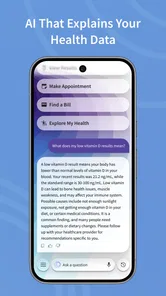
One question people often have is whether they need the app just to use Labcorp. I would view it as a convenience, not a requirement: if the app does not suit your habits, you can still use the available alternatives for contacting the lab or managing care. Another is whether checking a result means it has been explained; it does not. The app can make access easier, but interpretation and decisions should still involve your healthcare provider. Those expectations keep the app in its proper lane and make its useful parts clearer.
Who gets the most from it
I’d recommend it most to someone who uses Labcorp often enough to benefit from having results, appointment tasks, and bills gathered in one mobile account. It can be especially handy for people who prefer to handle routine tasks at a convenient time instead of calling during the day, or who want a simple place to revisit their Labcorp-related history. It is less compelling for someone whose care is spread across many providers and who needs a single comprehensive record, or for anyone who is uncomfortable handling sensitive information on a phone.
My overall view is that the app is best when its connectivity is treated as part of the workflow: use a steady connection for account changes, give loading screens time, and verify important actions before repeating them. That is a modest amount of planning for a tool designed around practical lab-related tasks. For the right patient, it can cut down on small administrative hassles; for urgent advice or a fuller picture of health, I’d reach for a clinician or a broader care channel instead.
MyLabcorp Frequently Asked Questions
Who develops Labcorp | Patient, and is it available for my phone?
Labcorp | Patient is a medical app developed by Labcorp for people who want to manage lab-related tasks on a mobile device. It is available for Android and iOS users, so you can check whether it is compatible with your phone before downloading. The app is free, and its age rating is Everyone.
What is Labcorp | Patient app used for?
Labcorp | Patient is a mobile application designed to give users convenient access to their medical laboratory test results and health information. The app allows users to view their results, schedule lab appointments, and manage their personal health records. It's an essential tool for patients who frequently undergo lab tests and wish to track their health data efficiently.
Is Labcorp | Patient app free to use?
Yes, the Labcorp | Patient app is free to download and use. It provides free access to your lab results and health records. However, standard data charges from your mobile service provider may apply while using the app. There are no hidden fees for accessing your medical information through this application.
How secure is my personal health information on Labcorp | Patient app?
Labcorp | Patient app prioritizes user privacy and data security by employing advanced encryption and security measures. Your health information is protected under HIPAA regulations, ensuring that your personal data is safe from unauthorized access. The app requires secure login credentials and offers additional security features such as two-factor authentication.
Can I schedule lab appointments through the Labcorp | Patient app?
Yes, you can conveniently schedule lab appointments through the Labcorp | Patient app. The app provides an easy-to-use interface where you can find nearby Labcorp locations, check their availability, and book an appointment at your convenience. It also allows you to receive appointment reminders and manage your scheduled visits effectively.
Pros
- User-friendly interface for easy navigation.
- Secure login ensures patient data safety.
- Quick access to lab results and appointments.
- Comprehensive health tracking features.
- Integrates with health monitoring devices.
Cons
- Limited features available without internet.
- Occasional login issues reported by users.
- No offline access to medical records.
- Limited customization of notifications.
- Some features require premium subscription.