Spring - Video Editor & Maker
- 133.00
- 4.5
- Installs
- 1.00M
- Price
- Free

Screenshots
Analysis by Reviewed
I think Spring - Video Editor & Maker makes the most sense when you treat editing as a small, repeatable routine rather than a hunt for flashy effects. For a short social clip, I’d first decide what the viewer needs to see, then arrange the useful moments before polishing anything. That simple order helps keep a quick edit focused and makes it easier to judge whether a transition or sticker actually improves the story.
A practical workflow for short clips
My preferred starting point is to trim away pauses and repeated takes, place the strongest moment early, and then check the sequence from beginning to end. Only after the cuts feel right would I adjust speed, add text, or try a transition. This keeps decorative choices from disguising a pacing problem, and it’s particularly useful when turning several phone clips into one short post.
For example, if I filmed a quick recipe after work, I could keep the ingredient setup, a few clear preparation moments, and the finished plate, then use text to make the steps understandable without narration. Music can add energy, but I’d listen to the whole edit before exporting: a track that feels right over the opening may compete with an important sound later. A final pass with the preview is a practical way to catch abrupt cuts and text that appears too briefly.
Small checks that prevent avoidable rework
Before editing, I’d decide where the finished clip is going and what the viewer should notice first. That helps me choose a sensible opening and keep the text brief instead of trying to explain everything on screen. If I’m making a how-to, I’d also check that each cut leaves enough time to understand the action; a brisk sequence is not useful if the important step flashes by.
I’d keep a copy of the original footage until I’m happy with the saved result. That gives me room to revisit a cut or try a different order without relying on a finished export as my only version. For a clip with several sound elements, I’d listen once with attention on the voice and once for the overall balance. These are simple checks, but they catch different problems.
Habits that save time without over-editing
Repeatable choices matter more than collecting effects. I’d settle on a small visual style for a series of posts—similar text treatment, restrained transitions, and a consistent pace—then reuse that approach instead of rebuilding every clip from scratch. Spring’s trimming, speed controls, text, stickers, and audio options give a casual creator enough room to shape that routine, though I wouldn’t assume every project needs all of them.
Layered audio is most useful when each sound has a clear job, such as music underneath a spoken explanation. I’d keep the voice easy to hear and avoid adding extra tracks simply because the option exists. Likewise, speed changes can make a slow section more lively, but applying them indiscriminately can make a clip feel rushed. A good practical habit is to preview each altered section in context, not just on its own.
More From Our News Desk

Weather by Xiaomi Review: Clear at a Glance, Less Clear Up Close

X Under Pressure: Can It Recover When Posting Goes Wrong?

Clash of Clans Is Won Between the Battles

Android Auto Makes the Case for Quieter Car Software

MobiOffice: Transforming Mobile Productivity with Seamless Integration

EA SPORTS FC™ Mobile Soccer: Redefining Mobile Sports Gaming
A repeatable approach for everyday posts
When I’m making several related clips, I’d use the first finished edit as a reference for the next one: keep a note of the text style, pacing, and transition restraint that worked, then make fresh choices only where the footage calls for them. This is not about forcing every video into the same mold. It simply reduces decisions that do not change the story, leaving more attention for selecting the right moments.
For a quick event recap, I’d sort the footage by what happened rather than by the order I filmed it. A short opening can establish the place or occasion, a few selected moments can carry the middle, and one clear closing shot can give the edit a natural endpoint. I would not try to include every clip just because it exists; choosing less is often what makes a short recap feel coherent.
Who will get the most from it
This editor is a sensible fit for someone making Reels, Shorts, TikTok clips, family highlights, or simple how-to videos who wants more control than a one-tap template provides. Beginners can start with basic cuts and gradually explore layers and effects; experienced users may appreciate having those everyday tools together for quick social edits. If your priority is a highly specialized, precision-heavy production workflow, though, a desktop editor or a mobile tool built around detailed control may suit you better.
Compared with a basic phone gallery editor, Spring offers a broader set of ways to combine clips, sound, and visual touches. Compared with a template-led social editor, it can feel more hands-on: that flexibility is useful when you have a specific sequence in mind, but it also means you make more choices yourself. I’d choose based on whether I want to shape a clip manually or reach a finished template quickly.
What the hands-on approach means in practice
That extra control is most valuable when a clip has a clear purpose but does not fit a ready-made layout: a small business owner showing a product detail, a student assembling a project recap, or a parent trimming a family moment into something easy to share. In each case, the editor can help arrange footage and add context without requiring a template to dictate the rhythm. The trade-off is that the result depends on your own choices about timing, text, and sound.
If I were recommending it to a friend who rarely edits, I’d suggest starting with one short project and learning the cut-and-preview cycle before exploring decorative tools. Someone who mainly wants automatic formatting, a preset look, or the fewest possible decisions may be happier with a template-first app. Neither approach is universally better; the right choice depends on whether you enjoy shaping the sequence yourself.
Spring - Video Editor & Maker is a versatile and user-friendly app that allows users to create and edit videos with ease. It offers a range of features that make video editing accessible to everyone, whether you're a beginner or a seasoned pro. The app is available for both Android and iOS, providing a seamless experience across devices.
First Impressions
When I first launched Spring - Video Editor & Maker, I was greeted with a clean and intuitive interface. The layout is modern and uncluttered, making it easy to navigate through the various tools and options available. The app's design is sleek, and it quickly becomes evident that a lot of thought has been put into making the user experience as smooth as possible.
Features That Stand Out
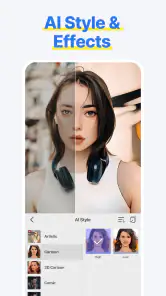
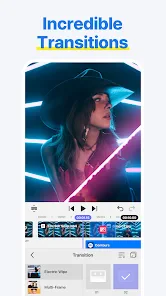
One of the most impressive features of Spring - Video Editor & Maker is its extensive library of effects and transitions. There are hundreds of options to choose from, allowing you to add a professional touch to your videos. From classic fades to dynamic zoom effects, there's something for every style and occasion.
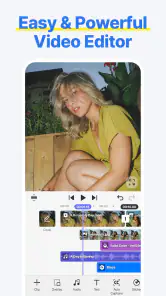
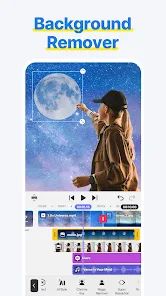
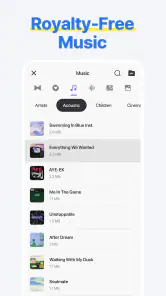
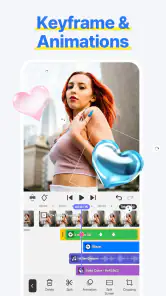
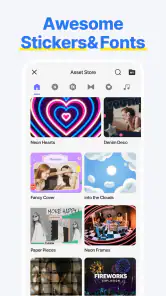
The app also offers a robust set of editing tools, including trimming, cutting, and merging clips. You can easily adjust the speed of your videos, add text and stickers, and even incorporate music from the app's built-in library. The ability to layer multiple audio tracks is a game-changer, especially for those looking to create more complex video projects.
User Experience
One of the things I appreciate most about this app is how accessible it is. Even if you're new to video editing, the app provides helpful tutorials and tips to get you started. The drag-and-drop functionality makes it simple to arrange clips and effects, and the real-time preview allows you to see your edits as you make them.
Another notable aspect is how responsive the app is. I didn't experience any lag or crashes, which is a huge plus when working on larger projects. Whether you're editing a short clip for social media or a longer video for a special event, you can count on the app to deliver consistent performance.
Making the interface work for you
A tidy editing screen is helpful, but I still find it worth slowing down before tapping through controls. I’d make one change at a time, then watch the preview, so I can tell whether that adjustment improved the clip. If I stack several edits before checking, it becomes harder to identify which choice made a moment feel awkward. This measured approach is especially useful when experimenting with speed or transitions.
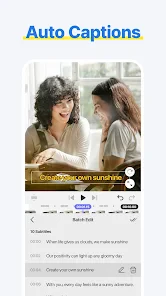
For text, I’d check placement against the actual footage rather than judging it only on a still frame. A caption can be readable over one shot and disappear against a brighter or busier shot a moment later. Keeping wording short and checking it across the sequence is a practical way to make text useful without letting it dominate the image.
What to expect from editing on a phone
Spring is a mobile editor, so I see it as a convenient way to finish social-sized projects where the footage is already on hand. That convenience does not make every project a good fit for a small screen. A long edit with many fine adjustments can be easier to manage on a larger display, while a short clip assembled from a few phone recordings is a natural match for this kind of workflow.
I would also separate creative editing from final checking. The preview helps me judge pace and presentation, but I’d still watch the saved version from beginning to end before sharing it. That final viewing is where I can notice a cut that feels different in context or a caption that goes by too quickly. It is a small step that matters more than adding one more effect.
Final Thoughts
Overall, Spring - Video Editor & Maker is a fantastic tool for anyone looking to dive into the world of video editing. Its combination of powerful features, ease of use, and reliability make it a standout choice in the crowded field of video editing apps. Whether you're a content creator, a social media enthusiast, or just someone who enjoys making videos for fun, this app is definitely worth checking out. With its wide range of features and user-friendly interface, it's a breeze to create polished, professional-looking videos.
What to check before you commit
Spring is a free video editing app from KineMaster, Video Editor Experts Group, and its store page shows a 4.5 average from around 17 thousand ratings, with over a million installs. It is rated Teen, and the listed Android requirement is version 8.0 or later. The current release is 2.0.6.35848, dated June 27, 2024. Those details make it easy to judge whether it fits your device and comfort level before starting a project.
Free does not mean every possible option is necessarily included at no cost: in-app purchases are listed from $5.99 to $49.99 per item. I’d explore the basic workflow first and only consider a purchase if a specific paid item solves a real need. The app is most appealing when you want an accessible editor and are happy to make creative decisions yourself, rather than relying on a preset to do the whole job.
Where its flexibility has limits
Having effects, transitions, text, speed adjustments, and layered sound in one place is useful, but those choices can also slow down a beginner who opens every menu before making a cut. I’d keep the first pass deliberately plain, then add only the elements that clarify the clip. For repeat work, a short checklist—trim, arrange, check audio, add text, preview—helps prevent small finishing decisions from turning a quick edit into an unnecessarily long session.
I would also be cautious about assuming that a smooth experience on one short project guarantees the same feel on every device or with every longer edit. If a project matters, preview it carefully and keep the original clips available until the finished result is saved where you need it. That is sensible editing practice, especially when music, text, and several cuts all need to land together.
When another tool may be the better fit
I would look elsewhere if a project depends on frame-by-frame precision, a tightly managed multi-stage production, or an automatic design that chooses the pacing for me. A desktop editor can be more comfortable for detailed work, while a template-focused mobile editor can get a simple post ready with fewer decisions. Spring sits between those approaches: it offers hands-on editing tools, but expects me to guide the result rather than handing over the creative choices.
There is also a practical difference between having many options and needing them. A person who only wants to trim a beginning and ending may find a phone’s built-in editor quicker. Spring makes more sense when I also want to combine clips, shape their order, add text or stickers, and work with sound in the same project. I’d choose the lightest tool that can do the job well rather than adding complexity for its own sake.
My take after weighing the trade-offs
Spring is a strong choice for casual creators who want hands-on control without immediately moving to a desktop workflow. It is less compelling for someone who wants automatic, template-first results, or for a specialist who needs a tightly controlled production environment. I’d recommend it to a friend who enjoys shaping short videos and is willing to learn a few repeatable habits; I’d steer a friend seeking the fastest possible one-tap post toward a template-focused alternative instead.
The best results here come from restraint: make the sequence clear, keep the audio intentional, and use effects to support rather than overwhelm the footage. With that approach, Spring can turn everyday phone clips into watchable, personal edits without making the process feel like a technical project.
Spring - Video Editor & Maker Frequently Asked Questions
Can I use Spring to make videos for social media?
Yes. Spring is presented as a tool for making Reels, Shorts, and TikTok videos, so it may suit users who want to prepare short-form content for social platforms. Its focus on video editing makes it worth considering for casual creative projects as well as social posts. You can explore the available tools and decide whether they fit the style of videos you want to create.
Is Spring available for both Android and iOS?
Spring is an Android app in the Video Players & Editors category. Before downloading, check that you are viewing the app for your device and that your operating system meets its installation requirements. The app is free to download, although in-app purchases are available. Confirm the platform and purchase details in the relevant app store before installing or buying anything.
How many people use Spring, and what do they think of it?
Spring has more than a million installs and an average rating of 4.5 from around 17,000 ratings. These figures give a general sense of its reach and reception, but they cannot predict whether its editing experience will suit your own projects. Consider the kinds of videos you plan to make and whether the app’s editing approach matches what you need.
Is Spring - Video Editor & Maker free to download and use?
Spring is free to download, and its store summary highlights video editing without a watermark, with tools for making Reels, Shorts, and TikTok videos. The app also offers in-app purchases priced from $5.99 to $49.99 per item, so some paid options may be available alongside its free use. Check the purchase details in the app before choosing one.
Who develops Spring, and what is its age rating?
Spring is a video editing app developed by KineMaster, Video Editor Experts Group. It has a Teen content rating, which is worth checking if you are choosing an app for a younger user. Its audience includes people who want to create and edit social videos, while the rating helps families decide whether it is suitable for their household.
Pros
- User-friendly interface for quick editing
- Wide range of filters and effects
- High-quality video export options
- Supports multiple video formats
- Integrates with social media platforms
Cons
- Limited free version features
- Occasional app crashes
- Large file size after installation
- In-app purchases can be pricey
- Requires stable internet for cloud features
- Category
- Video Players & Editors
- Version
- 2.0.6.35848












