Kids police - for parents
- 597.00
- 4.5
- Installs
- 1.00M
- Price
- Free

Screenshots


Analysis by Reviewed
When a child is dug in over a small daily task, it can be hard to find a reminder that feels different from another request from the same parent. Kids Police - for Parents takes a playful approach: it is a free parenting app from Kids police, built around pretend calls intended to encourage better behavior. I see it as a light prop for a narrow moment, not a substitute for explaining rules or building routines together.
Where this kind of prompt can fit
The most useful way to try a pretend call is to make it a brief cue for one familiar task, rather than a surprise threat. For example, after dinner, a parent could choose a cleanup scenario, let the child hear the reminder, and then stay nearby while toys go back in their places. The practical work still belongs to the family; the app simply changes the voice delivering the prompt.
That distinction matters. A playful outside voice may catch a young child’s attention, but relying on it for every request can make the parent’s own instructions feel less important. I would use it occasionally, then return to a calm, direct reminder. If a child seems worried by the police framing, I would stop and choose a different approach rather than trying to persuade them to enjoy it.
A small tool, not a parenting plan
Compared with the usual alternatives—setting a predictable bedtime routine, using a visual checklist, or agreeing on a simple reward—the app is more theatrical and less suited to teaching a sequence of steps. A checklist can stay visible and help a child remember what comes next; a pretend call offers a moment of novelty. Those approaches can work alongside each other, but I would not expect a call to resolve ongoing conflict or explain why a boundary matters.
It is best suited to parents who want a playful prompt for an occasional transition and whose child enjoys make-believe voices. It is a poor fit if the child is anxious about police, if the situation calls for a sensitive conversation, or if the household wants a routine that works without a phone. In those cases, a parent’s own reassurance or a visible routine is the more dependable choice.
What is Kids Police?
So, let’s dive into what this app is all about. The app is a playful application that allows parents to simulate a call from a police officer. It’s designed to help parents encourage good behavior in their children without using any form of intimidation or fear. The app features various scenarios where a friendly officer calls and has a chat with the kids, reminding them of good manners and behavior.
How Does It Work?
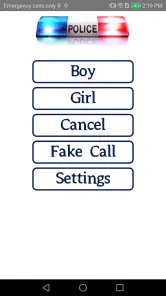
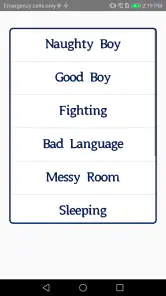
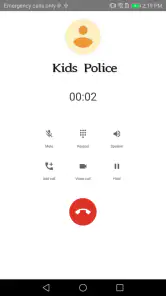
Using the app is as simple as pie. You just select the scenario that fits your situation, and boom, the call is ready. You can choose from different categories like bedtime, cleanup time, or even when they need a little reminder to eat their veggies. With a simple tap, your phone starts ringing, and you can hand it over to your kid for a little chat with Officer Friendly.
More From Our News Desk

Weather by Xiaomi Review: Clear at a Glance, Less Clear Up Close

X Under Pressure: Can It Recover When Posting Goes Wrong?

Clash of Clans Is Won Between the Battles

Android Auto Makes the Case for Quieter Car Software

MobiOffice: Transforming Mobile Productivity with Seamless Integration

EA SPORTS FC™ Mobile Soccer: Redefining Mobile Sports Gaming
For a smoother try, I would pick the scenario before the stressful moment arrives and explain that it is pretend. That keeps the call from feeling like a threat invented in the middle of an argument. It also gives a parent a chance to decide whether the chosen reminder fits the child and the situation. If the child asks whether an actual officer is involved, answer plainly rather than sustaining the impression.
Why Parents Love It
Now, you might be wondering why this app is a hit with parents. Well, it’s all about the gentle nudge it gives to kids. Instead of raising your voice or repeating yourself a million times, you have this app to back you up. Kids often respond well to external voices of authority, especially when it comes with a friendly tone. Plus, it adds a bit of fun to the routine, making those dull moments a bit more exciting.
Another thing I love about this app is its versatility. Whether you’re dealing with a toddler refusing to brush their teeth or a preschooler who won’t share their toys, there’s a call scenario for you. And the best part? It’s all done in a light-hearted manner that makes kids giggle rather than worry.
Using the call without making it a crutch
A useful way to judge whether the app is helping is to notice what happens after the call. Does your child move on to the task with less friction, or do they become focused on the phone and the pretend officer instead? That difference matters. I would count success as a smoother transition into the actual routine, not simply a quiet child during the call.
For a child who struggles with several steps at once, I would pair the prompt with one clear action: put the blocks in the box, then come to the bathroom. The call can supply a nudge, but it is not a visual sequence to consult or a record of progress. If the task has multiple parts, a simple checklist or parent-guided routine is likely to do more teaching.
Timing is another practical trade-off. A prompt may be easier to accept before a child is already upset than during a full argument. I would also avoid using it in public or around other children unless the child is comfortable with the joke; what feels playful at home could feel embarrassing elsewhere. Keeping the interaction private and low-key protects the child’s dignity.
Fun Features and Easy Interface
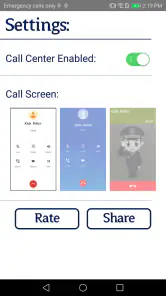
The interface is super user-friendly, so you won’t be fumbling around trying to figure out how to make a call. It’s straightforward and intuitive, designed to make your life easier. Plus, it’s packed with fun features like different voices and scenarios, keeping the experience fresh each time.
One useful trade-off to keep in mind is that a pretend call is most effective when it stays a novelty. If it becomes the automatic answer to every refusal, a child may lose interest—or start waiting for the phone instead of responding to a parent. I would keep the prompt short, follow it with a clear next step, and praise the effort rather than treating the app itself as the achievement.
The app is rated for Everyone, has an average rating of 4.5 from around 4.1 thousand ratings, and has been installed over a million times. It first appeared on November 3, 2014; version 1.2.4 is the current version, and it requires Android 5.0 or newer. Those details make it an option for many compatible Android devices, though they do not change the basic question for a parent: does this style of pretend authority feel reassuring and fun to your child?
What established users should keep in mind
The current version is 1.2.4, and the app has been around since November 3, 2014. That gives existing users a stable version reference when deciding whether to keep it installed, but it does not by itself tell me that the app’s approach has changed over time. I would separate what is clear now—the present version and Android compatibility—from any expectation that future changes will add scenarios or alter how the calls work.
If you already use it, the best reason to keep it is that your child still responds comfortably and it helps with a specific transition. If it has become predictable or prompts bargaining for the phone, there is little value in insisting on it; switch to a routine that the child can follow without a performance. New parents can also try it in a calm moment first, rather than introducing it only when everyone is frustrated.
Before relying on it during a busy part of the day, I would open it once and familiarize myself with the scenario choices. That small preparation helps avoid fumbling while a child is waiting and gives me time to choose wording that fits our household. It also makes it easier to decide in advance how I will explain the pretend call and what we will do immediately afterward.
It is also worth deciding in advance how you will respond if the trick does not work. I would not keep escalating the call or imply that real police will come. Simply end the game, restate the expectation in your own words, and offer a manageable choice where appropriate. That keeps the tool within the playful role it is meant to serve and avoids turning discipline into fear.
Oh, and did I mention it’s free? Yep, you can download it without spending a dime, which is always a win in my book. There are some in-app purchases, but only if you want to unlock additional scenarios, which is completely optional.
Who is likely to get the most from it?
I can see this being most useful for a parent of a young child who enjoys pretend play, understands the call as a game, and has one recurring task that tends to stall. A parent who wants a quick, occasional change of voice may find it more engaging than repeating the same instruction. The app is in the parenting category, is free, and comes from Kids police, so it is easy to consider as a small experiment rather than a major commitment.
It is less suitable for older children who see the premise as childish, for children who are uneasy around police, and for families trying to build independent habits without screen prompts. It is also not the tool I would reach for when a child needs comfort, an explanation, or help naming a feeling. In those moments, conversation is more important than a clever interruption.
Parents may reasonably wonder whether it replaces a usual discipline strategy. I would treat it as an optional cue, not a replacement for clear boundaries, consistency, or a discussion about why a task matters. A familiar routine is more dependable when the phone is unavailable, and a visual chart is better when the child needs to see the order of several actions. The call’s distinctive value is its brief, theatrical interruption—not long-term tracking or instruction.
Final Thoughts
In a nutshell, the app is a delightful tool that adds a sprinkle of fun to parenting. It’s not about scaring kids but rather engaging them in a playful manner that helps reinforce good behavior. So, if you’re looking for a creative way to handle those everyday parenting challenges, give this app a whirl. You might just find it becomes your new best friend in the parenting toolkit!
My recommendation is to treat it as an occasional nudge, try it first in a low-pressure moment, and watch your child’s reaction. If the pretend call makes a routine easier without causing worry, it may earn a small place in your parenting toolkit. If it feels awkward or loses its charm, ordinary conversation and consistent routines remain perfectly sensible alternatives.
Kids police - for parents Frequently Asked Questions
What devices can run Kids Police, and is it free to download?
Kids Police is a free parenting app that can run on Android devices with version 5.0 or later. Before downloading, check that your device meets this requirement and has enough available storage. The app’s simple premise is aimed at parents who want a playful way to address children’s behavior, rather than a general-purpose police or emergency service.
What is the main purpose of the Kids Police app?
The Kids Police app is designed as a fun and educational tool for parents to help manage their children's behavior. The app simulates a pretend call from the police, which can be used as a creative way to encourage children to follow rules or complete tasks. It's important to explain to children that this is just a playful tool and not a real interaction with the police.
How can the Kids Police app assist in parenting?
The Kids Police app assists in parenting by providing a unique way to reinforce good behavior in children. Parents can use the app to simulate calls from a police officer, which can be customized to praise good behavior or gently warn against misbehavior. It serves as an innovative method for parents to engage with their kids on the importance of rules and responsibilities.
Is the Kids Police app safe and appropriate for children of all ages?
Yes, the Kids Police app is designed to be safe and appropriate for children. However, it is mainly targeted at younger children who are more likely to engage with the imaginative aspect of the app. Parents should ensure that children understand the app's purpose as a playful tool and not as a real threat, to prevent any unnecessary fear or anxiety.
Are there any in-app purchases or advertisements within the Kids Police app?
The Kids Police app may contain in-app purchases and ads, depending on the version you download. While the basic functionalities are usually free, some features might require payment to access. It's advisable for parents to review these details in the app store description and adjust in-app purchase settings on their devices to avoid any unintended purchases by children.
Pros
- Effective tool for behavior control
- Simple interface for easy use
- Variety of fake call scenarios
- No internet required after setup
- Free to download and use
Cons
- May cause anxiety in sensitive kids
- Limited customization options
- Ads can be intrusive
- Some scenarios not culturally relevant
- Not a long-term solution for behavior
- Category
- Parenting
- Version
- 1.2.4












