Kardia
- 5.12K
- 4.7
- Installs
- 1.00M
- Price
- Free

Screenshots
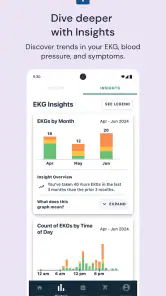
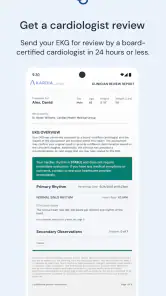
Analysis by Reviewed
What I find most useful about Kardia is its focus on recording heart rhythm when a concern or question comes up, rather than trying to turn a phone into an all-purpose wellness dashboard. It is a medical app from AliveCor Inc., and that focused role makes it easier to judge what it can—and cannot—do in everyday life. I’d consider it alongside guidance from a clinician, not as a substitute for one.
Checking heart rhythm in practice
The app has a 4.7 average from around 49,000 ratings, and it is free to download. Those figures suggest that many people find a use for it, but the practical question is whether you have a reason to record an ECG and a compatible way to take one. The app is for Everyone, though the usefulness of heart readings depends on a person’s situation and any medical advice they have received.
What the recording is for
In a typical use, Kardia guides you through taking an ECG with sensors, then presents a recording you can review and share with a doctor. That can be more useful than trying to describe a brief episode from memory: a clinician may be able to consider the tracing alongside your symptoms and history. The key distinction is that a recording is information to discuss, not a diagnosis or a promise that a problem will be caught.
For a better record, I’d sit still, follow the app’s positioning instructions, and note what I was feeling and when it happened. That small habit can give a clinician useful context beyond the waveform alone. If an episode is severe or urgent, I would seek medical care rather than spend time repeating measurements or waiting for an app result.
A realistic everyday use
Imagine you notice an unusual flutter while sitting at home. If a clinician has already recommended monitoring and you have the required sensor, you can make a recording at the time, keep the result, and share it during a conversation about what happened. That is a more sensible workflow than taking repeated readings just to reassure yourself. One clear recording tied to a time and symptom can be easier to discuss than a pile of unexplained results.
The app can also fit into a longer-term routine when a health professional has asked you to keep track. I would choose a consistent, calm moment for routine checks and reserve extra recordings for symptoms or specific instructions. That approach keeps the record more interpretable and helps avoid turning ordinary daily fluctuations into a source of needless worry.
Where it differs from a general health app
Many fitness apps emphasize steps, workouts, sleep, or broad activity trends. Kardia’s more specialized appeal is ECG recording and sharing, so it makes more sense for someone managing a heart-related question than for someone who simply wants an activity dashboard. A wearable may be more convenient for continuous lifestyle tracking; a clinician’s appointment is better for examination and treatment decisions. Kardia sits between those options as a way to capture a specific kind of information for follow-up.
More From Our News Desk

Weather by Xiaomi Review: Clear at a Glance, Less Clear Up Close

X Under Pressure: Can It Recover When Posting Goes Wrong?

Clash of Clans Is Won Between the Battles

Android Auto Makes the Case for Quieter Car Software

MobiOffice: Transforming Mobile Productivity with Seamless Integration

EA SPORTS FC™ Mobile Soccer: Redefining Mobile Sports Gaming
That distinction matters when deciding whether to install it. A phone app alone does not make an ECG: the recording depends on the compatible sensor setup and on following the instructions. Before relying on it, I’d check that the equipment available to me works with the app and ask my clinician what readings would be useful to share. The app is not a replacement for emergency services, a medical assessment, or a prescribed care plan.
What to keep in mind
The recording process is simple once the setup is ready, but it is not as effortless as glancing at a watch. You need to stop, position your fingers correctly, and stay still long enough to get a useful trace. That makes it a poor fit for someone expecting automatic, continuous monitoring or a quick answer to every sensation. It can also be frustrating if the sensor is not close at hand at the moment a symptom occurs.
Sharing a reading is helpful, but it does not guarantee an immediate response from a doctor; the timing and interpretation depend on your care arrangements. I’d treat the app as a way to bring clearer information to an appointment or agreed check-in, not as an on-call clinician. If reviewing readings makes you more anxious or encourages constant checking, it may be better to use it only on a clinician’s schedule.
Who is likely to benefit
Kardia is most compelling for people whose clinician has recommended ECG monitoring and who are willing to use a dedicated sensor as part of that plan. It may also suit someone who wants a portable way to capture a symptom-related recording for later discussion. It is less suitable for a casual fitness goal, for someone seeking automatic tracking, or for anyone who expects an app to explain symptoms on its own.
AliveCor Inc. has kept the app focused on heart care, and its current version is 5.53.1-4247edaf33, with a minimum operating system requirement of 8.0. It has been available since October 3, 2013, and has passed one million installs. Those details help set expectations about its established purpose, but they do not change the basic rule: the right use is the one agreed with a health professional.
My take
Hey there, fellow app explorer! So, I recently got my hands on this intriguing app called Kardia, and let me tell you, it’s been quite the ride. If you’re like me and always on the lookout for apps that can make life a tad easier, especially in the health department, then you might want to stick around for this one.
First off, let’s dive into what Kardia is all about. Imagine having a personal cardiologist tucked right into your pocket. Sounds cool, right? Well, that’s pretty much what this app aims to do. It’s designed to help you monitor your heart health anywhere, anytime. Perfect for those of us who are a bit health-conscious or have a knack for tech-driven wellness solutions.
Features That Stand Out
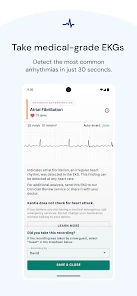
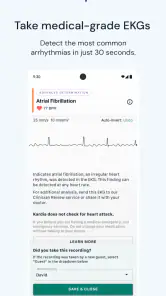
Now, onto the fun part – the features. Kardia offers real-time ECG recordings, which is a big deal if you’re someone who needs to keep an eye on their heart rhythm. It’s super simple to use; just place your fingers on the sensors and voila! The app gives you a quick snapshot of your heart’s performance.
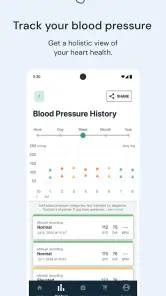
Another feature worth mentioning is the ability to share your ECG readings with your doctor directly from the app. This could potentially save you a trip to the clinic. Plus, it tracks your blood pressure and physical activity, giving you a holistic view of your heart health. It’s like having a mini health report card at your fingertips!
Using Kardia: My Experience
So, setting up Kardia was a breeze. The interface is user-friendly, and even if you’re not tech-savvy, you’ll find it pretty straightforward. I was able to sync it with my smartphone without breaking a sweat. Once everything was set up, I took it for a spin. I tried out the ECG feature first, and I have to say, it was oddly satisfying watching the app do its thing.
The accuracy seemed spot on, but I’d still recommend consulting with a healthcare professional for a comprehensive analysis. Remember, it’s a tool to help you keep track, not replace your doctor.
Why You Might Want to Give Kardia a Try
If you’re someone who’s serious about keeping tabs on your heart health, Kardia could be a game-changer. It’s especially useful for those who have been advised by a doctor to monitor their heart regularly. Plus, it’s portable and easy to use, which means you can literally check up on your heart while sipping coffee at your favorite café.
However, if you’re just looking for a casual fitness tracker, this might be a bit too specialized for your needs. But for anyone with a keen interest in heart health, it’s definitely worth checking out!
To wrap it up, Kardia is a nifty little app that brings medical-grade heart monitoring straight to your phone. It’s like having a health ally right in your pocket. So, if heart health is on your radar, why not give it a whirl?
Making a reading more useful later
A practical detail I would build into the routine is keeping the symptom note separate from the interpretation. Record what you noticed, when it began, and whether it had eased by the time you used the sensor; avoid trying to label the sensation yourself. That creates a clearer account to take to a clinician and reduces the temptation to treat an app’s presentation as a verdict.
I would also agree in advance with a health professional on what to do with a result and how to share it. If a clinician wants particular recordings, follow that plan rather than improvising a schedule. A useful tracing is not simply the one that looks reassuring; it is one collected in a way that can be understood alongside the person’s symptoms and care history.
Sensor setup is part of the decision
One question worth answering before relying on the app is whether you have the compatible sensor and can keep it accessible when you may need it. The phone does not perform the ECG by itself, so a download alone will not provide the central function. I’d check the sensor arrangement and the app’s instructions before building a monitoring habit around it, rather than discovering during a worrying moment that the equipment is unavailable or unfamiliar.
There is a trade-off here compared with a watch-based feature: the dedicated recording can be more deliberate, but it asks you to stop and actively take it. That can be an advantage when you want a specific record to discuss, and a drawback when the priority is effortless tracking throughout the day. Neither approach answers every medical question, so the better choice depends on the purpose a clinician has identified.
When another option makes more sense
If your main aim is general fitness, a standard activity tracker is likely a better match because its everyday focus is movement and routine trends. If you need evaluation, treatment, or urgent help, contact a healthcare professional or emergency services rather than relying on a phone-based recording. Kardia is most useful in the narrower middle ground: collecting an ECG when there is a reason to capture one and bringing that information into an existing care conversation.
I would also skip it if taking readings is likely to make you check repeatedly or feel more distressed. A tool that encourages a cycle of symptom, measurement, temporary reassurance, and another measurement may not be a good personal fit. In that situation, it is sensible to ask a clinician whether using the app is appropriate and, if so, to establish clear boundaries for when to record and when to seek care.
A considered choice for heart monitoring
With around 5,100 reviews and over one million installs, Kardia has found an audience, but popularity does not determine whether it belongs in your own routine. I’d choose it when there is a clinician-guided reason to capture ECG readings, the sensor setup suits my needs, and I know how the records will be used. For those conditions, it can make a brief episode easier to document than memory alone.
My recommendation is therefore specific rather than universal: treat Kardia as a focused recording tool, not a pocket cardiologist or a substitute for assessment. If that distinction feels clear and the app fits a care plan, it is worth considering. If you want passive tracking, broad wellness features, or instant explanations, a different option—or direct advice from a medical professional—will serve you better.
Kardia Frequently Asked Questions
Is Kardia intended for people who already have a heart condition, or can anyone use it?
Kardia is a medical app focused on heart care, so it may interest people who want to monitor heart health or keep track of readings to discuss with a clinician. It is not limited to people with a diagnosed condition, but the app should not be treated as a way to determine whether you have one. Consider your needs and seek professional advice about health concerns.
Can I download Kardia for free, and does that mean every feature is free?
Kardia is free to download, which makes it possible to try the app without paying for the initial download. However, downloading it for free does not necessarily mean every feature or service is included at no cost. Its basic use and any additional options may differ, so review the choices shown in the app and consider which functions you actually need before making a purchase decision.
Who makes Kardia, and what kind of app is it?
Kardia is a medical app developed by AliveCor Inc. Its focus is heart care, with a store summary describing remote, medical-grade heart care at your fingertips. If you are considering downloading it, think of it as a tool for supporting heart-health monitoring rather than a replacement for a clinician’s care.
What is Kardia and what does it offer to users?
Kardia is a comprehensive health monitoring app designed to help users track their heart health. It offers features such as ECG recording, heart rate monitoring, and analysis of heart data to detect irregularities. Users can also share their results with healthcare professionals directly through the app, making it a convenient tool for managing cardiovascular health.
Is Kardia compatible with all smartphones and wearable devices?
Kardia is compatible with most Android and iOS smartphones. However, to fully utilize its features, it’s recommended to use it with compatible Kardia devices, such as the KardiaMobile or KardiaBand. These devices pair with the app to provide accurate ECG readings and other heart health metrics, ensuring comprehensive monitoring.
Pros
- User-friendly interface for all ages.
- Tracks ECG in real-time accurately.
- Customizable health alerts.
- Integrates with other health apps.
- Battery-efficient and lightweight.
Cons
- Limited features in free version.
- Requires internet for full functionality.
- In-app ads can be intrusive.
- Some users report occasional bugs.
- Limited customer support options.
- Category
- Medical
- Version
- 5.53.1-4247edaf33











