Kangaroo: Simple Home Security
- 1.32K
- 3.6
- Installs
- 500.00K
- Price
- Free

Screenshots
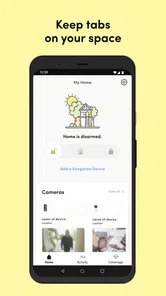
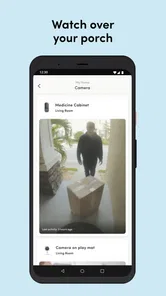
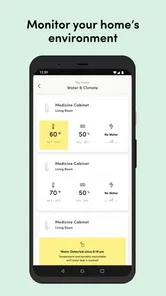
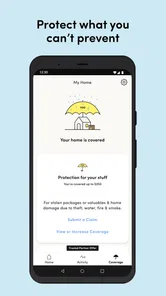
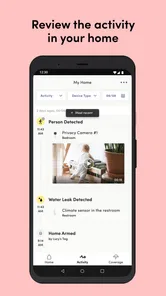
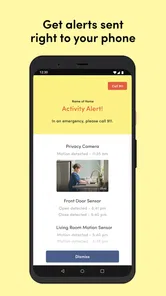
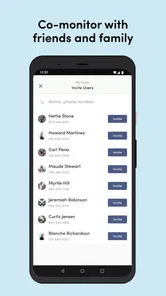
Analysis by Reviewed
For a shared home, the key question is not just whether an alert reaches a phone; it is whether the right person can interpret it and take the next step. I think Kangaroo: Simple Home Security makes most sense as one part of a household routine, rather than a magic replacement for every layer of security. It is a free House & Home app from Kangaroo Security, designed to help people keep an eye on home activity from a phone. That can be useful when residents are away, but shared use works best when everyone understands who is monitoring and what an alert should prompt them to do.
A shared home needs a clear routine
Picture a weekday when one housemate leaves early, another is still asleep, and a delivery arrives while nobody is near the door. An alert can make that moment easier to notice, but the household still needs a simple agreement about who checks in and who responds. I would decide that before relying on notifications: otherwise, several people may assume someone else has handled the situation, or one person may get every alert and become the default monitor.
This is where a phone-based security app can be more convenient than checking a device manually. It puts activity within reach when you are away, while a conventional alarm panel is most useful to people physically at home. Neither approach automatically solves coordination, though. For a shared flat or family home, agree on a practical response plan and keep it understandable to everyone who is expected to act.
What a phone alert can and cannot do
I would treat an alert as a prompt to assess a situation, not as proof that something is wrong or that the home is safe. A notification can help a resident decide whether to check in, contact another household member, or follow the plan they agreed on. It does not remove the need for ordinary precautions, such as locking doors and making sure everyone knows how to respond if an alert arrives at an inconvenient time.
That distinction matters especially when the person receiving the notice is far away or cannot act immediately. Before choosing any phone-led setup, ask who will be available during work, school, sleep, or travel, and what the backup is if the first person misses a notification. If nobody can reliably respond, a professionally managed service or a different security arrangement may suit the household better.
Easy Peasy Setup
Right off the bat, the setup process is as simple as it gets. You don’t need to be a tech guru to get Kangaroo: Simple Home Security up and running. The app guides you through the setup in a way that even your grandma could follow. With just a few taps on your smartphone, you can connect your Kangaroo sensors to your Wi-Fi and start monitoring your home. No need for any fancy equipment or professional installation services.
Features That Pack a Punch
Now, let’s talk about features. Despite its simplicity, Kangaroo doesn’t skimp on the essentials. The app provides instant alerts directly to your phone if any suspicious activity is detected. Whether it’s a door opening unexpectedly or motion detected in a room, you’ll be the first to know. Plus, with its user-friendly interface, navigating through the app feels like a breeze.
More From Our News Desk

 Block Blast!
 Makes Every Clear Feel Like One More Turn
A clean little block puzzle becomes a study in space, risk, and self-control. Its best moments come from one satisfying clear; its toughest test is knowing when to stop.

 Super Stylist Fashion Makeover
Super Stylist Turns Dress-Up into a Runway Career
Its makeover-to-client loop turns quick outfit decisions into shareable style theater. The question is whether the closet keeps giving players a reason to return.

 Block Craft 3D:Building Game
Block Craft 3D Under Pressure: How Well Does It Recover When Building Goes Wrong?
A failure-focused look at Block Craft 3D’s forgiving building loop, its uncertain recovery edges, and the moments that demand more than a cheerful village.

 Woodturning
 Trades Creative Freedom for a Satisfying Carving Loop
If your usual creative game is about building, decorating, or styling, Woodturning trades open-ended projects for a tactile, tightly guided carving loop. Here is what that switch really costs.

 PUBG MOBILE
 Shows What Battle Royale Must Get Right
PUBG MOBILE shows how battle royale has matured: bigger systems matter less than meaningful choices, readable fights, and a reason to return after every loss.

 Braindom: Brain Games Test
Braindom’s Social Life Happens Between Puzzles
Braindom turns quick logic traps into a personal ritual, but its community value is more about comparing answers than building together.
Latest News



One feature that’s particularly cool is the option to customize your alerts. You can choose to be notified via push notifications, email, or both, ensuring you never miss a beat. And for those who love a little extra, the app offers premium features like monitoring service and insurance options at an affordable price.
Set boundaries before sharing access
For a household, the useful question is not simply whether the app is easy to install, but who should receive alerts and be responsible for them. I’d keep access limited to people who genuinely need to monitor the home, then agree on what counts as a reason to contact someone else. This avoids turning routine household activity into a stream of messages and helps protect everyone’s sense of privacy.
It is also worth thinking through changing circumstances. If a roommate moves out or a family member no longer needs access, review who can still see activity and update the household routine accordingly. I would not treat a shared login as a substitute for clear personal boundaries; each resident should understand how monitoring is being used and when alerts may reach them.
Make alert settings work for real life
A practical way to start is to decide which person should receive a particular kind of notice, then choose push notifications, email, or both with that person’s habits in mind. Someone who keeps a phone nearby may prefer a push alert, while another resident who checks email between tasks may value that as a backup. These choices are useful only if the household agrees to check the channels it selects.
I would also avoid treating every notification as equally urgent. If a household reacts to every routine event as an emergency, people can become tired of the alerts; if they dismiss everything, a genuinely useful notice may be overlooked. Try the arrangement during an ordinary week, discuss what was easy to miss or too distracting, and adjust the routine rather than asking everyone to remain constantly on alert.
Alerts are useful, but attention is limited
Customizing notifications is more than a convenience. In a busy home, choosing a sensible mix of push alerts and email can help prevent important notices from disappearing among everyday phone interruptions. I’d begin with the alerts the household can actually respond to, then adjust after living with the routine. Too many notifications can lead people to ignore them; too few can leave the person at home unsure whether anyone else has noticed.
That trade-off matters if several people share responsibility. A group should decide who checks an alert first, and what the backup plan is when that person is unavailable. The app can bring information to a phone, but it cannot make a household agreement for you. For someone who lives alone, this coordination is simpler; for a busy family or a rotating set of housemates, the human routine is part of making any alert system useful.
Coordination for changing schedules
Shared responsibility is easiest when it reflects how a home actually runs. If one person is usually away during the day and another is home, agree who should take the first look at a notice at those times. When schedules change for a trip, shift, or school break, tell the other residents who is available instead of assuming the usual person will see it. This small habit can prevent duplicate calls as well as the uncomfortable silence of everyone waiting for someone else.
For a household with visitors or short-term guests, I would explain the basic routine without giving more access than they need. Guests should know whom to contact if they notice something concerning, while residents retain responsibility for deciding who monitors the home. This is a useful boundary in any shared setup: coordination does not require every person who walks through the door to become part of the monitoring arrangement.
Why It’s Worth It
What truly sets Kangaroo apart is its affordability. You get a solid home security solution without breaking the bank. The app itself is free to download, and the cost of the equipment is quite reasonable compared to other high-end security systems. It’s perfect for renters, college students, or anyone who doesn’t want to commit to a long-term contract.
Moreover, the app’s minimalist design and functionality mean fewer headaches for users. You don’t have to deal with overly complicated settings or unnecessary features. It’s all about keeping your home safe in the simplest way possible.
Where it sits among home security choices
Compared with relying only on a traditional alarm panel, a phone app is more convenient when residents are away and need to be informed. Compared with a professionally managed security service, a household-run setup places more responsibility on the people receiving the alerts. Neither alternative is automatically better: the right choice depends on whether you want to handle the response yourselves or prefer a dedicated service to be part of the plan.
The app’s simplicity is an advantage if you want a straightforward way to connect compatible Kangaroo sensors and receive notices without taking on a complex installation. It is less compelling if your main requirement is a detailed permission system for many residents, a central panel that everyone can use, or a response process that does not depend on someone checking a phone. I would compare those needs before buying equipment, since a free app alone does not settle the cost or suitability of a complete setup.
Age, trust, and choosing the right fit
The app is rated for Everyone, which makes its intended audience broad, but an age label is not a household privacy plan. I’d explain to younger residents what the alerts mean and who may receive them, rather than assuming they will understand the implications of monitoring. In a home with children, visitors, or adult relatives who need extra help, keep the conversation plain and respectful: this is about awareness of the home, not a reason to watch people constantly.
Its approach will suit people who want phone alerts and a relatively uncomplicated way to manage home monitoring. If you need a more elaborate system with a dedicated control panel, professionally managed response, or a carefully specified multi-user permission structure, compare those options before deciding. The app’s own monitoring service and insurance options may appeal to some households, but I would weigh those separately from the basic app experience and make sure the terms fit your needs.
Privacy and trust in a shared household
In my view, the best use of home monitoring begins with a conversation, not a download. Residents should know what the household is monitoring, who receives notices, and how to raise a concern if the arrangement feels intrusive. That is particularly important where adults share a home, because convenience for one person should not quietly become surveillance of everyone else.
For parents or relatives helping someone who is less comfortable with technology, explain the purpose in everyday terms and agree how they can ask questions. A household can keep the routine simple without making it secret. If a resident is not comfortable with the arrangement, that is a reason to revisit the plan rather than assume an Everyone age rating settles the question.
What to expect before relying on it
Kangaroo has an average rating of 3.5 from around three thousand ratings, with roughly 1,300 written reviews, and more than 500,000 installs. I take that as a reason to judge it against my own needs rather than assume every household will have the same experience. It launched on July 5, 2018, and version 11.17.0 requires Android 7.0 or later. Those details make it easier to check whether an older Android phone is suitable before building a household routine around it.
The app is free, but that does not mean every part of a security setup is cost-free: the equipment and optional premium services are separate considerations. Before relying on it, decide what you expect to monitor, who will receive alerts, and whether the people at home are comfortable with that arrangement. If your priority is a phone-connected, straightforward system, it may be a sensible fit; if you want a complete substitute for a monitored alarm service, compare dedicated security providers instead.
A useful trial for a household
Before treating any setup as dependable, I would walk through a few ordinary situations with the people who will use it: someone leaves for work, a resident returns at an unusual time, or the person who normally checks alerts is unavailable. The point is not to manufacture alarm, but to see whether everyone understands the routine and whether the chosen notification method fits their day. If the plan is confusing during a calm conversation, it is unlikely to feel clearer when a notice appears unexpectedly.
It is also sensible to check the Android requirement against the phone intended to receive alerts and to remember that the app’s free download is only one part of the household decision. Consider the compatible equipment and any optional service separately, then decide whether the total arrangement matches your budget and expectations. This avoids confusing “free to install” with “everything needed for home monitoring is included.”
Final Thoughts
In conclusion, if you’re on the lookout for an uncomplicated, efficient, and budget-friendly home security solution, Kangaroo: Simple Home Security is definitely worth considering. Its easy setup, robust features, and affordability make it a standout choice in the crowded market of home security apps. Give it a try, and you might just find yourself with a little extra peace of mind.
I’d recommend it most to renters, students, and households that want a practical way to receive home alerts and are willing to agree on who responds. I would skip it if you expect the app by itself to provide a complete professionally managed security system, or if household members cannot agree on monitoring boundaries. Used with compatible equipment and a clear routine, it can be a convenient part of a home-safety plan; the people sharing the home still determine whether that plan feels trustworthy and workable.
Kangaroo: Simple Home Security Frequently Asked Questions
What kind of app is Kangaroo: Simple Home Security, and who is it for?
Kangaroo: Simple Home Security is a House & Home app from Kangaroo Security, designed around the idea of home protection from anywhere. It may interest people who want to manage home security from a mobile device and receive alerts about activity. The app is free to download and is rated for Everyone, so its store age category is not limited to adults.
Is Kangaroo: Simple Home Security free to download?
Yes, Kangaroo: Simple Home Security is free to download. That makes it possible to try the app without paying an upfront download price, though the published FAQ describes optional premium plans for features such as professional monitoring and insurance deductible reimbursements. Before relying on a paid feature, review the available plan details in the app so you understand what is included and whether it suits your needs.
What features does Kangaroo: Simple Home Security offer for free?
Kangaroo: Simple Home Security offers a range of features for free, including motion detection alerts, the ability to arm and disarm your home security from your mobile device, and notifications for any suspicious activity. While the free plan provides essential security functionalities, users can opt for premium plans to access advanced features like professional monitoring and insurance deductible reimbursements.
How easy is it to install Kangaroo: Simple Home Security devices?
Installing Kangaroo: Simple Home Security devices is straightforward and designed for user-friendliness. Most devices are wireless and can be easily mounted using adhesive strips. The app provides step-by-step instructions to help guide users through the installation process, ensuring that even those with minimal technical skills can set up the system without hassle.
Is Kangaroo: Simple Home Security compatible with other smart home devices?
Yes, Kangaroo: Simple Home Security is compatible with various smart home devices. It integrates smoothly with Google Assistant and Amazon Alexa, allowing users to control their home security system through voice commands. This compatibility enhances the overall smart home experience, making it convenient to manage multiple devices from a single platform.
Pros
- Easy setup for quick installation.
- Affordable pricing for budget users.
- Real-time alerts enhance security.
- User-friendly interface simplifies use.
- Customizable settings for preferences.
Cons
- Limited advanced features.
- Requires strong Wi-Fi connection.
- Occasional app glitches.
- No professional monitoring option.
- Limited support for smart devices.