JoyPlan - Home design 3D
- 5.00
- 4.4
- Installs
- 500.00K
- Price
- Free

Screenshots



Analysis by Reviewed
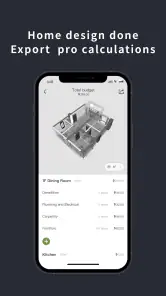
When I start a home project, I prefer to settle the practical questions before getting attached to a look: where the main furniture might go, what needs to stay accessible, and whether a proposed change feels plausible in the room. JoyPlan - Home design 3D is aimed at that kind of visual planning, giving me a way to explore home ideas on a screen before I commit to moving things around. I would treat it as a creative planning companion, not as a substitute for measurements or professional construction drawings.
A useful first pass for everyday room planning
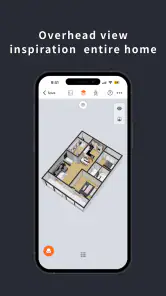
My most sensible workflow is to begin with the room’s basic layout, then place only the large pieces that shape how it works. A sofa, bed, dining table, or storage unit can reveal whether circulation feels awkward long before smaller decorations matter. Once that arrangement looks promising, I can use the 3D view to judge the overall impression rather than relying only on a flat plan. That order helps keep a project focused: solve the room first, then style it.
This makes the app especially appealing if you are rearranging a room, weighing up a furniture purchase, or collecting ideas before a renovation conversation. For example, if I were considering moving a desk into a spare room, I could sketch a layout, see how it sits beside existing furniture, and compare a couple of arrangements before doing the physical lifting. The result is a useful visual prompt, although I would still check real dimensions and door clearances separately before buying anything.
Getting Started with JoyPlan
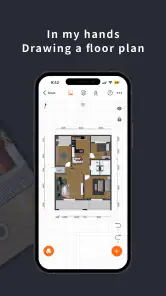
When you first open JoyPlan - Home design 3D, you're greeted with a clean, intuitive interface that makes diving into your projects a breeze. You don't need to be a tech wizard to navigate through the app, which is a huge plus for those of us who just want to start designing without a steep learning curve. The app allows you to create detailed floor plans and experiment with different layouts, which is perfect if you're trying to visualize a renovation or just have fun with potential designs.
Features That Stand Out
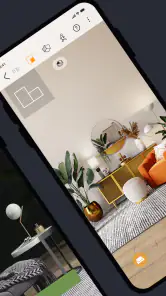
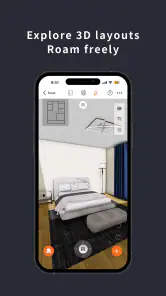
One of the features I absolutely love about this app is the 3D view option. It’s like having a mini-virtual reality tour of your project! You can walk through your designs and get a real sense of space and depth. This is particularly useful if you're considering moving furniture around or adding new pieces. Another highlight is the extensive catalog of furniture and decorations. Whether you're into minimalist designs or something more eclectic, you’ll find plenty of items to play around with. And let's not forget the customization options; you can change colors, textures, and more to suit your style.
Settings and habits that make planning clearer
I get more value from this sort of design app when I make a few decisions before decorating: which pieces are fixed, what I might replace, and what the room needs to do on an ordinary day. That simple checklist prevents me from polishing a pretty arrangement that would be annoying to live with. I also prefer to compare one meaningful change at a time—such as a different sofa position—rather than altering the layout, colors, and accessories all at once. It makes the reason a version works, or fails, much easier to spot.
For a shared household, I would use the project as a conversation aid. A partner or family member can react to a visible arrangement more easily than to “what if we put it over there?” In that situation, the app’s community feature may also offer inspiration, but I would treat other people’s designs as prompts rather than ready-made solutions: their room shape, possessions, and habits may be very different from mine. The practical test is whether an idea fits the people who will actually use the space.
More From Our News Desk

Clash of Clans Is Won Between the Battles

Android Auto Makes the Case for Quieter Car Software

MobiOffice: Transforming Mobile Productivity with Seamless Integration

EA SPORTS FC™ Mobile Soccer: Redefining Mobile Sports Gaming

How Microsoft OneDrive Became a Mobile Productivity Giant

How Google Translate Breaks Language Barriers Effortlessly
Moreover, the app provides a community feature where you can share your designs and get feedback. It's a great way to get inspiration and also see how others are using the app to transform their spaces. It feels like being part of a global design community, which is pretty cool, if you ask me!
Where it fits among home-design options
Compared with sketching on paper, a 3D room planner can make it easier to grasp depth and see how furniture relates as a group. Compared with browsing décor photos, it lets me test an arrangement for my own plan instead of imagining how someone else’s room might translate. But that visual convenience has limits: an appealing model is not proof that a real item will fit, and a polished concept cannot replace a builder’s measurements or advice for structural work. If precision for construction is the main goal, I would choose a tool designed for technical plans or consult a professional instead.
There is also a difference between exploring and specifying. JoyPlan is more attractive to me during the “could this layout work?” stage than when I need a definitive shopping list or a build-ready document. I would keep notes of actual measurements and product dimensions alongside the design, then use the visual plan to communicate the idea. That pairing is a practical safeguard against trusting a pleasing screen view too much.
My Personal Take
As someone who's always found the idea of home design fascinating, JoyPlan - Home design 3D has been a fantastic tool to play around with different ideas without any commitment. It’s like having a sandbox for adults who love all things interior design. What’s more, it’s quite satisfying to see your ideas come to life in such a realistic manner.
Who will enjoy it, and who may not
I think it suits curious homeowners, renters who want to plan a reversible rearrangement, and anyone who needs a visual starting point before discussing a room with someone else. It is less suited to people who already know exactly what they want and need precise technical output, or to anyone expecting an app to make design decisions for them. The useful part is trying options; the judgment about comfort, budget, and feasibility still belongs to you.
If you are wondering whether it costs anything to begin, the app is free to download, with in-app purchases ranging from $1.49 to $299.99 per item. I would explore the basic experience before paying for anything and check what a purchase covers at the point of decision. Its Everyone age rating also makes it broadly approachable for household idea-sharing, though I would still guide children through any purchases.
JoyPlan is published by JOYPLAN PTE. LTD. and sits in the House & Home category. It has a 4.4 average from 613 ratings and more than 500,000 installs, which gives a prospective user some context for its reach without guaranteeing that every workflow will suit them. It was released on January 23, 2024, and version 25.9.10 is the current version. Those details are useful when checking that you have the intended app, but my decision would still come down to whether its visual approach matches the job I need done.
Limits worth keeping in view
Any room-planning process can become slower when I focus on decorative choices before resolving the basic layout. A large catalog is enjoyable to browse, but the sheer number of possible combinations can distract from the question that matters: does this arrangement make the room easier to use? I would set a small goal for each session—such as testing two furniture positions—and stop once I have a clear comparison. That is a repeatable habit, not a hidden shortcut, and it helps keep casual planning from turning into endless tweaking.
I would also avoid treating the 3D view as a guarantee of exact scale or real-world appearance. Screens, visual presentation, and the details of a room can all affect how convincing a design feels. Before spending money or starting work, verify measurements independently and use the design to explain your intention, not certify that it will fit. That distinction matters most for tight walkways, doors, and bulky furniture, where a small mismatch can change the whole plan.
In terms of performance, the app runs smoothly without any noticeable lag, even when switching between different modes or loading complex designs. This is crucial because nothing is more frustrating than an app freezing in the middle of your creative process! Plus, the app is regularly updated with new features and improvements, which shows that the developers are committed to providing a great user experience.
A practical verdict for curious planners
So, is it worth trying if you have one room to rethink? I think so, especially if you want to compare layouts visually and enjoy experimenting with furniture and finishes. Is it the right choice for a renovation that needs exact technical documents? No; I would use a more specialized planning tool or get professional help for that. And if you are only looking for decorating inspiration, image collections may be quicker, while JoyPlan makes more sense when you want to place ideas into a room plan of your own.
In conclusion, if you're someone who loves tinkering with home design or just wants to visualize changes before making them, I highly recommend giving JoyPlan - Home design 3D a try. It’s fun, engaging, and incredibly useful for both design newbies and seasoned pros alike. So why not give it a go and see what amazing spaces you can create?
JoyPlan - Home design 3D Frequently Asked Questions
Is JoyPlan - Home Design 3D free to download, and are there optional purchases?
JoyPlan - Home Design 3D is free to download, so you can try the app without paying upfront. It also offers in-app purchases, with prices ranging from $1.49 to $299.99 per item. Consider checking the purchase details in the app before buying, especially if you are exploring paid options for a particular project.
Who develops JoyPlan - Home Design 3D, and is it intended for general audiences?
JoyPlan - Home Design 3D is developed by JOYPLAN PTE. LTD. and is rated for Everyone, making it suitable for a broad audience. Its focus is home design, so it may appeal to homeowners, people planning a renovation, or anyone who enjoys experimenting with room layouts and interior ideas. The app is described as redefining personalized home design.
What is JoyPlan - Home Design 3D and what can I do with it?
JoyPlan - Home Design 3D is an innovative application that allows users to create, design, and visualize their dream homes in three dimensions. With an extensive library of furniture, textures, and colors, users can customize every aspect of their home, from floor plans to interior decor. This app is perfect for both professional designers and homeowners looking to experiment with home layouts and design concepts.
Is JoyPlan - Home Design 3D suitable for beginners?
Yes, JoyPlan - Home Design 3D is designed to be user-friendly and accessible for users of all skill levels, including beginners. The app offers intuitive drag-and-drop functionality, helpful tutorials, and a simple interface that guides users through the design process step by step. Whether you're a seasoned designer or new to home design, JoyPlan makes it easy to bring your ideas to life.
Can I share my designs created in JoyPlan - Home Design 3D with others?
Absolutely! JoyPlan - Home Design 3D allows users to easily share their designs with friends, family, or clients. You can export your projects in various formats, such as images or 3D walkthroughs, and share them via email or social media platforms. This feature is particularly useful for getting feedback or showcasing your work to a wider audience.
Pros
- Intuitive user interface.
- Extensive design customization options.
- Realistic 3D visualization.
- Includes furniture catalog.
- Supports multiple floor plans.
Cons
- Requires high-performance device.
- Limited free features.
- Occasional app crashes.
- No offline mode available.
- In-app purchases can be costly.
- Category
- House & Home
- Version
- 25.9.10









