IFTTT - Automate work and home
- 16.24K
- 3.2
- Installs
- 5.00M
- Price
- Free

Screenshots
Analysis by Reviewed
I like the idea of letting routine tasks happen in the background, but I’m cautious about automations that promise more than they can reliably deliver. IFTTT is a productivity app from IFTTT, Inc that connects services and devices through simple cause-and-effect workflows. It is free to install, rated for Everyone, and has an average rating of 3.2 from around 187,000 ratings, so I’d approach it as a useful tool to test with a small, low-stakes task before trusting it with anything important.
Start with one everyday annoyance
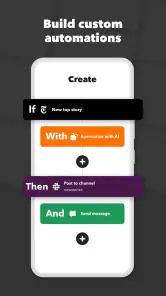
The best first project is something you already do repeatedly and can easily check: saving a chosen kind of online update, receiving a notification when a service changes, or linking a home device to a routine. Think of an applet as a rule: one event starts it, and a connected service carries out an action. Rather than trying to automate your whole day, I’d pick one clear trigger and one useful result, then see whether the handoff works consistently in your setup.
That approach also helps answer a practical question: does it need to run on its own? The point is to reduce manual steps, but each connected service still has its own account and behavior. I’d read an applet’s setup details carefully, connect only the services I actually plan to use, and test the outcome before relying on it. A notification or saved copy is easy to verify; a missed alert about something urgent is not.
Connecting the Dots
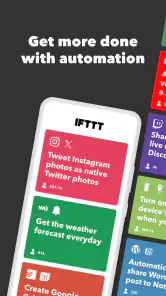
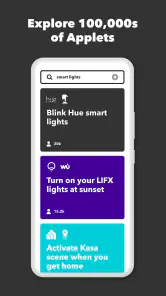
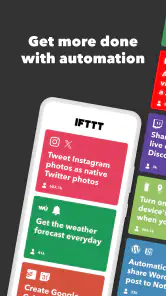
So, what exactly does this app do? In a nutshell, IFTTT helps you automate your digital chores by linking various apps and devices. Imagine getting a notification on your phone every time your favorite YouTuber uploads a new video. Or having your smart lights turn on automatically when you’re about to arrive home. Cool, right? This magic happens through what the app calls "applets," which are essentially recipes for connecting different services. You can either create your own applets or browse through the community-crafted ones.
Getting Started with Ease
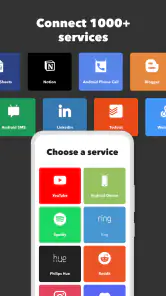
Getting up and running with IFTTT is a breeze! All you need is to download the app, sign up, and start exploring. The user interface is pretty straightforward, even for someone who isn’t tech-savvy. Once you’re in, you can search for services you use daily—like Google Assistant, Twitter, or Philips Hue—and start creating connections between them. The app supports over 700 services, so the possibilities are nearly endless.
That breadth is handy, but it doesn’t mean every possible combination will suit your needs. I’d search for the exact service and action you want before planning a workflow around it, then check what information the applet requires and whether its result is easy to confirm. Community-made recipes can be a helpful shortcut, but I treat them as starting points: a small adjustment to the trigger or destination can make an automation much more relevant to my own routine.
Real-Life Applications
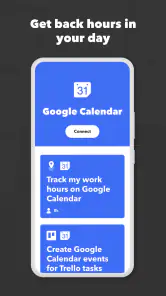
One of the things I genuinely appreciate about IFTTT is how it can fit into both your work and personal life. For those productivity enthusiasts, you can set up applets that automatically back up your important emails to Google Drive or Slack. Or, if you’re all about that smart home life, imagine having your thermostat adjust itself based on your local weather forecast.
More From Our News Desk

Weather by Xiaomi Review: Clear at a Glance, Less Clear Up Close

X Under Pressure: Can It Recover When Posting Goes Wrong?

Clash of Clans Is Won Between the Battles

Android Auto Makes the Case for Quieter Car Software

MobiOffice: Transforming Mobile Productivity with Seamless Integration

EA SPORTS FC™ Mobile Soccer: Redefining Mobile Sports Gaming
A realistic workday example is a creator who wants a record of a particular kind of update without checking several apps. A trigger can pass that event to a chosen destination, where it is easier to review later. The useful part is not merely that two services connect; it is that the handoff creates a repeatable record. I’d keep the rule narrow, so unrelated messages do not clutter the destination, and periodically check that the saved result is still useful.
At home, the same principle can link a condition to a device action, but I’d distinguish convenience from safety. A light turning on is easy to notice and correct if an automation fails. A camera notification may be useful as an extra prompt, yet I would not make it my only way to monitor a security concern. For important routines, a manual backup or a direct control in the device’s own app is sensible.
Compared with doing everything inside each service’s own app, IFTTT can save effort when a workflow crosses between services that do not otherwise fit together neatly. A built-in automation in a smart-home platform may be a better choice when all the devices already live there, especially if you want more detailed control in one place. For a multi-step business process, dedicated workflow software may offer clearer oversight. I see IFTTT as most appealing for approachable, focused connections rather than as a replacement for every specialized tool.
The app is free to install, with in-app purchases ranging from $2.99 to $169.99 per item. I’d decide whether a specific workflow is worth keeping before paying for anything, and check the current plan details in the app because the right fit depends on what you want to automate. It has been available since April 24, 2014, and its Android minimum requirement is version 8.0. Those details make it accessible to many users, but compatibility with a particular service or device is still worth checking directly.
Turning a small routine into a reliable handoff
One workflow I’d consider is keeping track of a recurring source of information without letting it take over my inbox. I’d start by choosing a specific update that I genuinely need to see, then send it to a place where I already review related notes or messages. The important design choice is the destination: a notification is best when I need to react soon, while a saved record is more useful when I want to look back later. Matching the output to the way I work is what makes the automation feel helpful rather than noisy.
Before switching it on, I’d also test the whole path from trigger to result. An applet can look sensible at a glance yet pass along more information than I need, or deliver it somewhere I rarely check. A quick test helps reveal whether the wording is understandable, the destination is convenient, and the event is specific enough. If the result is hard to recognize among other alerts, I’d narrow the trigger or choose a different endpoint instead of accepting a cluttered workflow.
There is a useful distinction between automating a task and automating a decision. IFTTT is easier to trust when the rule is predictable—when a defined event should lead to a simple action. If I need to judge context, approve a change, or decide whether an unusual situation deserves attention, I’d rather have the app bring the information to me than make the decision for me. That boundary keeps an automation useful without giving it responsibility it cannot sensibly carry.
Where the workflow can break
Automation depends on each link in the chain: the trigger must happen, the connected service must accept it, and the final action must be useful. If an account changes, a device goes offline, or a service alters how an action works, the workflow may need attention. That is why I avoid treating an applet as a guaranteed delivery system. For a task where timing or completeness matters, I’d keep a direct route available and review the automation now and then.
There is also a trade-off between convenience and control. A ready-made applet can get you moving quickly, while building or adapting a rule takes more thought but makes it easier to understand why it runs. Before enabling anything, I’d consider what information is passed between the services and whether I’m comfortable connecting those accounts. If the applet’s behavior is difficult to explain in one sentence, I would not make it part of an important routine.
Small choices that prevent noisy automations
A common mistake is choosing a trigger that fires too broadly. If an applet reacts to every update from a service, the destination can fill with events I never meant to collect. I’d look for a narrower condition when one is available, or choose a source whose updates already match my purpose. This is especially valuable for work notes: a focused record stays useful, while a catch-all feed quickly becomes another inbox to maintain.
I’d also keep a simple naming habit when I create or save several applets. A label that says what starts the workflow and where the result goes makes it easier to remember why it exists later. When something stops being useful, I can identify the right rule rather than leaving old connections running out of sight. This small bit of housekeeping matters because automation can quietly persist after the routine that inspired it has changed.
Who will get the most from it?
IFTTT makes most sense for someone who already uses several compatible apps or connected devices and can name a repetitive handoff they want to simplify. It is also a reasonable place to experiment if you enjoy tweaking routines but do not want to build a complex system from scratch. The community recipes can provide ideas, though I’d still tailor each one rather than assuming another person’s setup matches mine.
I’d skip it if you only need a task manager, a dependable alarm, or a detailed business automation system. Those jobs are usually better handled by tools designed specifically for them. I’d also think twice if I needed a workflow to run perfectly without checking it: the convenience comes from linking services, and those links bring their own limitations. For casual reminders, simple built-in phone features may be quicker and easier to maintain.
It is also not the best fit if the services you rely on do not expose the particular trigger or action you need. A service appearing in the app does not automatically mean every feature inside that service can be used in a rule. I’d verify the exact connection before building a routine around it. If I only need to control a few devices from one manufacturer, that company’s own app may be more direct; if the workflow involves approvals, branching decisions, or careful tracking, a specialist tool is likely a better match.
My take after weighing the trade-offs
What makes IFTTT stand out is its ability to seamlessly integrate into your daily routine without any hassle. It’s like having a personal assistant that takes care of the little things. Plus, the community aspect means you’re not alone in figuring out how to leverage the app; you can benefit from what others have already created.
And let’s not forget the customization aspect. The level of control IFTTT offers is just perfect for those who like things done a specific way. Whether you want to keep your social media accounts in sync or need a reminder to drink water through your smart speaker, it’s got you covered.
Its average rating of 3.2 reflects a mixed reception, so I wouldn’t assume every connection will feel effortless. With over 5 million installs and around 16,000 written reviews, it is clearly used by a broad audience, but those figures do not guarantee a particular applet will work the way you expect. My advice is to start with a reversible, low-risk rule, verify the result, and only then make it part of a routine you rely on.
In conclusion, IFTTT is more than just an app; it’s a game-changer for anyone looking to bring a little bit of automation magic into their lives. Give it a whirl and see how it can transform the way you interact with technology!
IFTTT - Automate work and home Frequently Asked Questions
Can I use IFTTT without connecting my smart-home devices?
Yes. IFTTT can be useful for connecting apps and online services as well as devices around the home, so smart-home equipment is not essential. The app’s productivity focus also makes it relevant for work and everyday digital tasks. Before you set up an automation, consider which services you want to connect and review the permissions each one requests.
What kinds of tasks can I automate with IFTTT?
IFTTT is intended to help automate recurring tasks across apps, home devices, and business services. Depending on the services you connect, an applet can respond to a trigger and carry out an action, such as turning on a light when you arrive home. It can also be used for personal or work-related routines, helping reduce the need to repeat the same steps manually.
Do I need an account to use IFTTT?
IFTTT is built around connecting services and devices, so you’ll need to set up an account and connect the services you want to use before creating automations. The app’s productivity focus is useful for people who want recurring tasks handled automatically, but take a moment to review the permissions requested by each connected service and only enable the access needed for your applets.
Is IFTTT suitable for beginners?
The basic idea is straightforward: choose a trigger, such as arriving home, and connect it to an action, such as turning on a light. IFTTT calls these automations applets, and ready-made options can make it easier to get started before building your own. If you are new to automation, begin with one simple applet and check that it behaves as expected.
What is IFTTT and how does it work?
IFTTT stands for 'If This Then That,' an app that allows users to automate tasks between different applications and devices. It works by creating 'applets' that connect two or more services, triggering actions based on specified conditions. For example, you can set your lights to turn on automatically when you arrive home. This automation helps streamline daily tasks and enhances productivity.
Pros
- Easy integration with various apps.
- User-friendly interface.
- Extensive automation options.
- Supports smart home devices.
- Customizable applets.
Cons
- Requires account setup.
- Limited free version features.
- Occasional applet failures.
- Dependent on internet connection.
- Complex for beginners.
- Category
- Productivity
- Version
- Varies with device











