HotPads Rent Apartments
- 13.38K
- 4.6
- Installs
- 1.00M
- Price
- Free

Screenshots
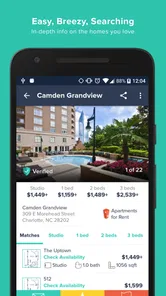
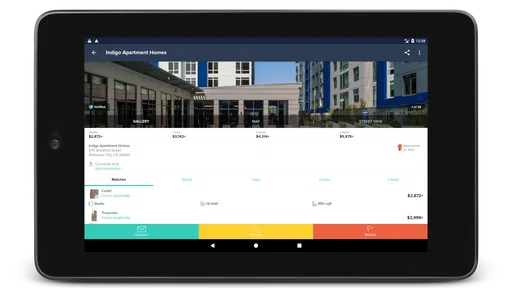
Analysis by Reviewed
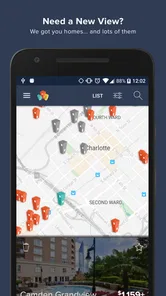
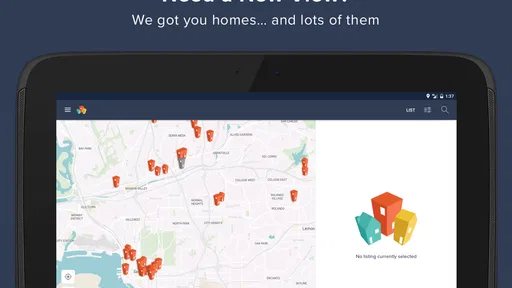
When I first open HotPads Rent Apartments, I use it to get a feel for what’s available in an area rather than starting with a long list of rental ads and trying to imagine where each one sits. The map-first approach makes the search more grounded: I can compare locations as well as homes, which is often what matters most when a move involves a new commute or an unfamiliar neighborhood.
What to expect from the search
HotPads is a free House & Home app from HotPads, built around finding apartments and houses for rent. It has a 4.6 average from around 44,000 ratings, and more than a million installs. That gives a first-time renter some reassurance that it’s an established option, though popularity alone can’t tell you whether a particular listing is current or right for you.
The map is most useful when your search begins with a place, not just a property type. If you know roughly where you need to be for work but are flexible about the neighborhood, you can scan the surrounding area and spot clusters of options that a conventional list may make harder to compare. I’d treat the map as a way to narrow the hunt, then read each listing carefully before making a decision.
Getting started without overcomplicating it
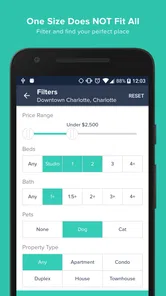
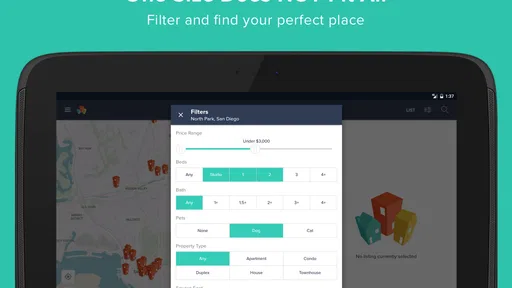
On a first search, I’d enter the area I actually need and set only the constraints I’d refuse to compromise on, such as a realistic budget or the kind of home I need. It’s tempting to filter for every preference immediately, but that can hide workable places before you know what the local market looks like. Once you see the range, refine the search with the details that matter most.
The current version is 6.14.8, and the app is listed for devices running Android 10 or later. It is rated for Everyone, so it’s suitable for a broad audience. If you’re helping a relative search, the map can also make it easier to discuss areas together: you can compare locations and saved possibilities without relying only on neighborhood names that may mean little to someone new to town.
Turning browsing into a useful shortlist
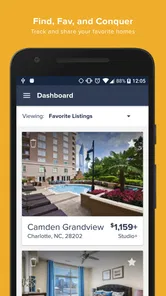
A practical first win is not finding a perfect home in one sitting; it’s building a shortlist you can revisit. Save promising places and searches so you can compare them later instead of repeatedly starting over. I’d also make a note outside the app of questions to ask about each serious option, such as what is included in the rent and whether the move-in timing fits. That keeps a polished listing from becoming a substitute for checking the details.
Map browsing has a trade-off: a convenient location marker cannot tell you everything about daily life there. A short trip on the screen may feel different at rush hour, and nearby amenities don’t guarantee that a home itself meets your needs. Use the map to decide what deserves a closer look, then verify the route and property details through your own checks.
More From Our News Desk

 Block Blast!
 Makes Every Clear Feel Like One More Turn
A clean little block puzzle becomes a study in space, risk, and self-control. Its best moments come from one satisfying clear; its toughest test is knowing when to stop.

 Super Stylist Fashion Makeover
Super Stylist Turns Dress-Up into a Runway Career
Its makeover-to-client loop turns quick outfit decisions into shareable style theater. The question is whether the closet keeps giving players a reason to return.

 Block Craft 3D:Building Game
Block Craft 3D Under Pressure: How Well Does It Recover When Building Goes Wrong?
A failure-focused look at Block Craft 3D’s forgiving building loop, its uncertain recovery edges, and the moments that demand more than a cheerful village.

 Woodturning
 Trades Creative Freedom for a Satisfying Carving Loop
If your usual creative game is about building, decorating, or styling, Woodturning trades open-ended projects for a tactile, tightly guided carving loop. Here is what that switch really costs.

 PUBG MOBILE
 Shows What Battle Royale Must Get Right
PUBG MOBILE shows how battle royale has matured: bigger systems matter less than meaningful choices, readable fights, and a reason to return after every loss.

 Braindom: Brain Games Test
Braindom’s Social Life Happens Between Puzzles
Braindom turns quick logic traps into a personal ritual, but its community value is more about comparing answers than building together.
Latest News



Why HotPads Stands Out
If you’re anything like me, hunting for an apartment can feel like searching for a needle in a haystack. But with HotPads Rent Apartments, that process gets easier to organize. It’s a rental-search tool whose strongest practical distinction is the way it puts location at the center, rather than asking you to judge a home from a text-heavy list alone.
Features You’ll Love
First off, the app’s user-friendly interface deserves a shoutout. Navigating through HotPads feels intuitive, thanks to its clean design and straightforward functionality. Whether you’re looking for a cozy studio or a spacious family home, the app’s filters let you tailor a search around location, price, amenities, and other preferences. I’d still begin with just the essentials, though: too many filters can leave you with a narrow result set before you understand what is typical in the area.
Another standout is the interactive map. It lets you explore available homes in relation to places that matter to you, such as work or a regular destination. That’s especially helpful when you are new to town and neighborhood names don’t yet mean much. A pin is only a starting point, not a verdict on whether a street feels right, so I’d use it to decide what to investigate rather than to make the final choice.
Keeping You in the Loop
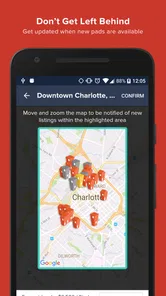
HotPads supports saving searches and listings, which gives you a way to return to candidates without rebuilding your hunt every time. For a first-time user, that is more than a convenience: it lets you separate browsing from deciding. I’d save a promising place, then revisit it when I can compare its stated details with the rest of my shortlist instead of treating the first attractive result as the obvious winner.
The app also offers ways to contact landlords, schedule viewings, and apply online. These options can help move a search from browsing toward action, but I would approach each step deliberately. Before arranging a viewing, check the listing’s key terms and make a short list of what still needs clarification. Before sharing information or applying, make sure you understand the process and are dealing with the appropriate listing contact.
A first search that leads somewhere
For a reassuring first session, I’d choose one area, set a budget I can genuinely manage, and browse without expecting to settle the whole move in one sitting. I would save a small group of plausible homes, then compare the practical details side by side: location, stated rent, home type, and anything the listing says about amenities. This turns an open-ended scroll into a concrete next step: deciding which candidates are worth checking more closely.
Imagine you are moving for work and have a lunch break to start looking. You know the general area of the office but not which nearby neighborhoods would suit you. A quick map search can show where options cluster; saving a few candidates gives you something specific to discuss with a roommate or family member later. At home, you can check routes at the times you would travel and write down questions for the listing contact. The useful result is not a rushed application, but a shortlist with clear reasons for following up.
Using it alongside other search methods
I find HotPads most helpful as a visual discovery tool, especially when the neighborhood is still up for debate. A classifieds-style rental site may be better if you prefer scanning dense lists quickly, while a property manager’s own page can be more direct when you already know which building interests you. I wouldn’t rely on one app alone for a move with a tight deadline; cross-check a promising home and contact the listing source promptly, because availability can change while you’re comparing options.
A realistic routine is to check the map during a lunch break, save a few candidates near the areas you can manage, and then review them at home with a clearer head. If two places look similar, compare the location first, then the rent and stated amenities; don’t let a pin that appears close to a favorite destination decide the whole matter. I’d also keep practical questions ready before contacting anyone, so the next step is useful rather than simply asking whether the home is still available.
Where it helps—and where it doesn’t
This app is a good fit for renters who are flexible about exact neighborhoods, people relocating to a city they don’t know well, and anyone who likes seeing options geographically. It can also help roommates discuss a search by pointing to the same area and comparing saved candidates. If you already have a specific building in mind, a direct property search may get you to relevant information faster. And if you need a guaranteed current inventory or a complete picture of local rental conditions, treat HotPads as one discovery route rather than the final authority.
It is less suited to someone who has already chosen a precise address and only needs the management company’s application instructions. In that situation, going straight to the building or manager may cut out an unnecessary discovery step. Likewise, renters who prefer evaluating a large number of listings as compact rows may find a map-led session slower at first. I’d choose the view that matches the decision I’m making: geographic comparison when the area is uncertain, direct sources when the property is already known.
One useful habit is to separate “interesting on the map” from “ready to pursue.” A listing earns a place on my shortlist only after I’ve checked its details, considered whether the location works at the times I’ll actually travel, and decided what I still need to ask. This avoids spending a viewing slot on a home that looked ideal at a glance but fails a basic requirement. The map helps me find candidates; my own checks determine whether they deserve a call.
Small checks that prevent wasted effort
When several pins look promising, I’d avoid comparing them from memory. I make a compact note for each serious option: the rent stated in the listing, the location relative to my regular destinations, the features I care about, and one unresolved question. This is particularly useful when discussing homes with another person, because it keeps the conversation about actual trade-offs rather than whichever listing was opened most recently.
I’d also distinguish between a preference and a deal-breaker before filtering. For example, if an extra room would be nice but the budget is firm, keep the budget constraint and remain open about the room. That approach can surface homes you might otherwise exclude too early. Conversely, if a requirement is genuinely non-negotiable, apply it early so you don’t invest time in candidates that cannot work. The value of the map depends partly on being honest about which boundaries matter.
Common points of confusion
A map pin can make two homes appear close in a way that is not useful for everyday planning. The route between them may involve different streets, transit options, or travel conditions, so I wouldn’t treat visual distance as commute time. I’d check the route independently for the hours that matter to me, then use that information alongside the listing rather than assuming the map has answered the travel question.
Another easy mistake is reading a saved listing as a confirmed opportunity. Saving is a way to organize your search, not proof that a home is still available or that its stated terms suit you. Before arranging a viewing or moving toward an application, I’d verify the current status and ask about details that affect the decision, including what the rent covers and whether the timing works. That simple pause helps keep browsing enthusiasm separate from commitment.
Final Thoughts
In a rental search, time matters, but so does choosing a place that works beyond the screen. HotPads Rent Apartments is most useful to me as a companion for the uncertain early stage: it helps me see where options sit, gather candidates, and decide what deserves a closer look. Its map-led approach gives the search a practical shape, while the final checks still belong to the renter.
So, if you’re ready to begin looking, I’d give HotPads a try when you need to compare areas as well as homes. Start with a realistic search, keep the filters focused, and save candidates for a calmer review. Finding a suitable rental still takes judgment and follow-up, but the app can make the first steps feel less scattered.
My honest recommendation is to use HotPads to organize the early, uncertain part of a move: seeing which areas have options, saving plausible homes, and deciding what deserves follow-up. It won’t make the final choice for you, and I’d still confirm details directly before committing, but that’s a sensible role for a rental-search app. If comparing homes by location is central to your decision, it’s worth trying; if you only want a quick route to one known building, a more direct search may suit you better.
HotPads Rent Apartments Frequently Asked Questions
Does HotPads help me search by neighborhood or location?
HotPads is built around map-based search, so you can explore apartments and homes for rent by the areas that interest you. This can be useful when you want to compare what is available in different parts of a city rather than relying only on a list of properties. You can browse the map and use search criteria to focus on listings that better match your plans.
Can I use HotPads to compare apartments and houses in one place?
Yes. HotPads is intended for searching both apartments and homes for rent, which makes it convenient to consider different types of housing in the same app. You can browse available rental listings and review their descriptions and photos as you compare possibilities. The map-based approach also helps you see where properties are located, making it easier to assess which options are worth exploring further.
Is HotPads available for my phone, and what should I check before installing it?
HotPads is a rental-search app for Android and iOS users looking for apartments and homes. Before downloading, check that your device runs a compatible operating system; the Android minimum is version 10. The app is free, and its content rating is Everyone, so it is presented as suitable for a general audience. Once installed, you can use its map-based search to explore rental listings.
Who develops HotPads, and how do renters rate it?
HotPads is developed by HotPads and focuses on finding homes and apartments for rent. It has a 4.6 average from around 44,000 ratings, with roughly 13,000 written reviews, giving prospective users a substantial body of feedback to browse. As with any rental-search app, individual experiences can differ, so it can be useful to read recent reviews and consider whether the app’s search approach suits your needs.
What is HotPads and how does it work?
HotPads is a rental property search app designed to help users find apartments, houses, and other rental properties across the United States. The app provides a simple interface where users can search for properties based on location, price range, and other criteria. By using HotPads, users can easily browse listings, view photos, read property descriptions, and contact landlords directly from the app.
Pros
- Wide variety of listings available.
- User-friendly interface for easy navigation.
- Real-time updates on new listings.
- Detailed property descriptions included.
- Advanced search filters for precise results.
Cons
- Limited availability in rural areas.
- Some listings may be outdated.
- Occasional app crashes reported.
- Limited customer support response.
- In-app ads can be intrusive.