Home by ShowingTime
- 2.01K
- 3.4
- Installs
- 500.00K
- Price
- Free

Screenshots





Analysis by Reviewed
I think the most important thing to know about Home by ShowingTime is that it is built around the practical, appointment-heavy side of a move. ShowingTime makes it for house-and-home tasks, and its focus on showings, tours and feedback is useful when several people need to stay coordinated. I would treat it as a companion to an agent-led process, not as a replacement for property research or the conversations that help you decide whether a home is right for you.
Where it fits in a busy home search
A realistic use is a buyer trying to see several homes around work, family plans and travel time. Instead of relying on a string of texts to remember what is happening, I’d use the app to keep viewing arrangements and updates together. That can be especially helpful when a partner or another person is involved in the search: agree on who is checking notifications and who will share feedback, so a change does not get lost between separate conversations.
It should suit people whose agent or transaction already uses ShowingTime and who want a more organized mobile way to follow the process. If you are casually browsing listings on your own, or mainly need maps, mortgage estimates and broad neighborhood comparisons, a property-search app may be a better first choice. This app’s value is in the showing workflow, rather than trying to be an all-purpose real-estate research tool.
For sellers, the practical benefit is keeping track of visits and responses without treating every message as a separate task. I would check the details after each appointment and make a note of useful feedback while it is fresh. That gives you something more concrete to discuss with your agent than a vague impression of how the week went. The trade-off is that the quality of this workflow depends on the people involved using it consistently.
Home by ShowingTime is free, rated for Everyone, and has an average rating of 3.6 from around 5,200 ratings, with more than 500,000 installs. Those figures suggest a well-used but not universally loved tool. I would not read them as a verdict on whether it will suit your particular agent’s process; the key question is whether the people coordinating your showings actually use it.
Making the workflow work for a household
One detail I would settle early is who is responsible for keeping the rest of the household informed. If two people are attending some visits and only one is handling the scheduling, agree on a simple routine: check the current appointment, pass along changes, then compare impressions afterward. That avoids the common trap of assuming everyone saw the same notification. The app can centralize appointment-related information, but it cannot decide who in your household should act on it.
I would also separate immediate reactions from longer-term judgments. Right after a showing, jot down one memorable strength, one concern, and one question for the agent. Later, compare those notes when several properties start to blur together. This is a useful way to turn visits and feedback into a clearer conversation, without expecting the app to make the buying decision for you.
More From Our News Desk

 Block Blast!
 Makes Every Clear Feel Like One More Turn
A clean little block puzzle becomes a study in space, risk, and self-control. Its best moments come from one satisfying clear; its toughest test is knowing when to stop.

 Super Stylist Fashion Makeover
Super Stylist Turns Dress-Up into a Runway Career
Its makeover-to-client loop turns quick outfit decisions into shareable style theater. The question is whether the closet keeps giving players a reason to return.

 Block Craft 3D:Building Game
Block Craft 3D Under Pressure: How Well Does It Recover When Building Goes Wrong?
A failure-focused look at Block Craft 3D’s forgiving building loop, its uncertain recovery edges, and the moments that demand more than a cheerful village.

 Woodturning
 Trades Creative Freedom for a Satisfying Carving Loop
If your usual creative game is about building, decorating, or styling, Woodturning trades open-ended projects for a tactile, tightly guided carving loop. Here is what that switch really costs.

 PUBG MOBILE
 Shows What Battle Royale Must Get Right
PUBG MOBILE shows how battle royale has matured: bigger systems matter less than meaningful choices, readable fights, and a reason to return after every loss.

 Braindom: Brain Games Test
Braindom’s Social Life Happens Between Puzzles
Braindom turns quick logic traps into a personal ritual, but its community value is more about comparing answers than building together.
Latest News



A Seamless Home-Buying Companion
The first thing you'll notice about Home by ShowingTime is its user-friendly interface. I was immediately taken by how simple it was to navigate through the various features. The app provides a comprehensive platform that connects buyers, sellers, and real estate agents, making communication as smooth as silk. No more missed messages or forgotten appointments!
Scheduling Made Easy
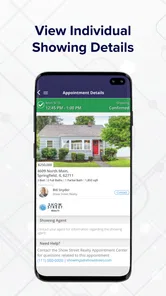
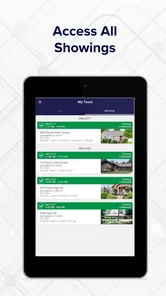
One of the standout features is the scheduling tool. I remember the days when coordinating home viewings felt like solving a Rubik's cube. With this app, you can easily schedule showings, and the best part? You receive instant confirmations. It’s like waving a magic wand and seeing everything fall into place.
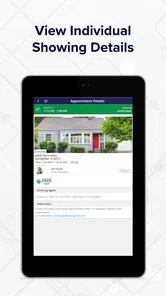
A small habit makes scheduling more useful: check the day’s appointments before leaving, rather than relying on an old notification in isolation. When plans are changing quickly, confirm the time and address in the current appointment details and share any change with everyone going to the viewing. The app can help keep arrangements visible, but it cannot prevent confusion if one person is working from a different conversation or calendar.
This is also where it differs from the usual alternatives. A shared calendar or group chat can record a time, but they often leave the request, confirmation and follow-up scattered across messages. A general listing app may help you find homes, yet it is not necessarily designed to manage the visit itself. I would use ShowingTime for coordination when it is part of the agent’s workflow, and keep other tools for broader research or personal notes.
Real-Time Updates
Another feature that caught my attention was the real-time updates. The app keeps you in the loop with notifications about any changes in your scheduled showings. You’re always up to date, whether there are changes in the timing or updates from your agent. It's like having a live news feed dedicated to your home buying journey.
Notifications are helpful, but I would not let them become the only record of a plan. If you have a packed day, open the app to review the schedule before setting out, and make sure anyone meeting you knows where to look for the latest details. That extra check is a sensible safeguard when a viewing affects work or childcare plans.
For an existing user, the main question is not whether a newer version will transform the experience, but whether the current workflow continues to fit the way your agent handles appointments. Version 2.3.4 is the current version, while the app first appeared on February 25, 2019. Those facts show a product with an established history, but they do not by themselves tell me what changed between releases. I would judge it by how reliably it supports the showings and feedback you need now.
When a separate tool is still useful
I would not expect a showing-management app to replace a dedicated property-search service, a map, or a household calendar. Those tools solve different problems: finding candidates, comparing locations, and fitting plans around everyone’s day. The useful trade-off here is specialization. When the agent is already using this system, one focused place for showing activity can be clearer than trying to make a general calendar handle every step. When the agent is not using it, adding another app may create more checking rather than less.
For someone selling a home, the same distinction matters. Keeping visit activity and feedback together can make it easier to notice patterns worth discussing with an agent, but feedback is still only one input. I would avoid treating a single comment as a reliable verdict on price or buyer interest. Look for recurring observations and ask the agent how they interpret them in the context of the wider process.
Keeping Track of Favorites
For those of us who are a bit indecisive (guilty as charged), the app allows you to keep track of your favorite listings. You can easily compare different properties, and having them all in one place just makes life easier. It's a bit like having your own personal Pinterest board for houses.
When comparing homes, I find it useful to add a short personal note after each visit: what stood out, what needs a second look, and what question to ask the agent. That turns a saved favorite into a decision aid rather than just a collection of addresses. Keep the notes specific; after several similar kitchens or floor plans, a small detail can be surprisingly hard to recall.
What to expect from the current app
ShowingTime has an average rating of 3.6, and its listing has about 2,000 written reviews. I see that as a reason to keep expectations practical: this is a focused tool, and a smooth experience depends partly on how appointments are managed around it. Before relying on it for a busy week, ask your agent whether they use it for scheduling and feedback, and decide how your household will share updates.
The app is available free and supports devices running Android 7.0 or later. If you are already comfortable with your agent’s email and calendar routine, switching may add another place to check without solving a real problem. I would skip it if your transaction does not use ShowingTime or if you only want to browse homes independently. If appointment coordination is currently scattered, though, it is worth trying as a dedicated place to follow the process.
What to watch as you start using it
Before building your routine around the app, ask the agent which parts of the showing process they expect you to follow there and how they prefer you to send questions. That is a practical way to avoid duplicate messages or uncertainty about where a change belongs. It also gives you a chance to decide whether the app is genuinely replacing a messy process or simply sitting beside one that already works.
ShowingTime is developed by ShowingTime, and its current version is 2.3.4. I would treat the version number as a useful way to identify the app you are using, not as evidence of a particular feature change. For current users, the sensible thing to watch is whether appointment details and feedback fit their actual routine. For someone considering it for the first time, the best test is whether the agent and other participants are ready to use the same channel.
The Verdict
In conclusion, Home by ShowingTime is a game-changer for anyone navigating the real estate market. Whether you’re a first-time buyer or a seasoned mover, this app takes the hassle out of home hunting. It’s efficient, easy to use, and keeps everything organized, which is exactly what you need during such a significant life event. So, give it a whirl and make your home buying or selling process as smooth as possible!
My more measured recommendation is to start by checking whether your agent and the other people involved will use the same workflow. If they will, the app can make showings easier to follow and feedback less likely to disappear in a busy week. If they will not, a shared calendar and clear messages may be simpler. For me, that practical fit matters more than any promise of a perfect home search.
Home by ShowingTime Frequently Asked Questions
Is Home by ShowingTime free to download?
Home by ShowingTime is free to download and is listed for everyone. It is a House & Home app from ShowingTime for managing showings, tours, feedback and more. If you are deciding whether to install it, the free price makes it possible to try the app without a purchase to download.
What is Home by ShowingTime and how does it work?
Home by ShowingTime is a real estate app designed to streamline the home buying and selling process. It allows users to schedule home showings, receive feedback from agents, and manage appointments all in one place. By providing real-time notifications and updates, it enhances communication between buyers, sellers, and real estate professionals, making the home viewing experience more efficient and organized.
Is Home by ShowingTime free to use?
Home by ShowingTime is free to download. Its main purpose is to help users manage showings, tours and feedback. Whether the app suits your needs will depend on how you are involved in the showing process and what access is available to you. The app has a 3.6 average rating from around 5,200 ratings, so you may also want to consider user feedback when deciding whether to install it.
Can I use Home by ShowingTime for both buying and selling homes?
Yes, Home by ShowingTime is designed for both home buyers and sellers. Buyers can use the app to schedule viewings and receive updates, while sellers can manage their listings, track showings, and gather feedback from prospective buyers. The app facilitates communication and coordination, making it a versatile tool for anyone involved in the real estate market.
How secure is my personal information on Home by ShowingTime?
Home by ShowingTime prioritizes user privacy and data security. The app employs robust encryption protocols to safeguard personal information and ensure secure transactions. Moreover, it complies with industry standards and regulations to protect user data. Users can feel confident that their information is handled with the utmost care and security.
Pros
- User-friendly interface for easy navigation.
- Real-time property availability updates.
- Secure messaging between agents and clients.
- Customizable notifications for showings.
- Integration with multiple listing services.
Cons
- Limited to certain regions and markets.
- Requires stable internet connection.
- Some features are agent-specific.
- Occasional app crashes reported.
- Limited customer support options.