Holafly eSIM: Unlimited Data
- 572.00
- 4.8
- Installs
- 5.00M
- Price
- Free

Screenshots
Analysis by Reviewed
For me, the value of a travel data app is easiest to judge at the moments when I need directions, a booking confirmation, or a quick message—not when I’m sitting on reliable Wi-Fi. Holafly eSIM Prepaid Card is built around that practical need: it helps travelers arrange mobile internet before a trip instead of searching for a SIM after landing. The app is free to download, and Holafly: international eSIM develops it. It has a 4.7 average from around 33,000 ratings, with more than a million installs, which suggests it has found a sizable audience among travelers.
What to expect from speed on the road
An eSIM removes the need to visit a shop or handle a physical SIM, but it cannot make mobile networks equally fast everywhere. I would think of this as a way to get online more conveniently, not a promise of identical performance in every destination. A map or messaging app may feel perfectly usable while a large upload or video call exposes the limits of the local signal. Your experience still depends on where you are and what network service is available there.
That distinction matters when deciding whether this suits your trip. For checking a train platform, translating a sign, or telling someone you have arrived, having a data connection ready is often more valuable than chasing the fastest possible speed. If your work depends on uninterrupted high-bandwidth calls or moving large files, I would keep dependable Wi-Fi or another connection option in mind rather than treating any travel eSIM as a guarantee.
Effortless Connectivity with a Tap
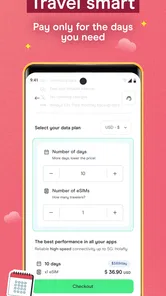
The first thing that struck me about the Holafly eSIM Prepaid Card is its sheer convenience. Gone are the days of fumbling with tiny SIM cards at the airport. With Holafly, you simply download an eSIM directly onto your phone before you jet off. It's as easy as ordering your favorite coffee online—no sweat, no stress. This app caters to both Android and iOS users, making it a versatile choice for any traveler.
Wide Range of Coverage
One of the app's standout features is its extensive coverage. Whether you’re sunbathing in Bali or exploring the streets of Rome, Holafly’s got you covered. They offer data plans for over 100 countries, ensuring you’re never out of touch with your world. I was particularly impressed by how quickly the connection kicked in upon arriving at my destination—it's like having a local SIM card without the hassle of finding one.
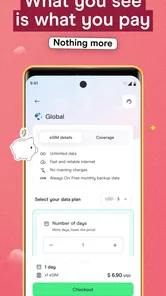
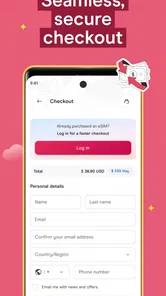
Moreover, the app automatically connects you to the best available network, so you don’t have to worry about weak signals or spotty coverage. This is especially handy in remote areas where finding a decent connection can be a challenge. Plus, with the prepaid option, you know exactly what you’re spending, avoiding those dreaded roaming charges that can sneak up on you.
When travel gets data-heavy
A realistic test is a travel day with several small tasks piled together: checking a route, messaging your host, pulling up a digital ticket, and letting family know your arrival time. That is where I see the strongest case for setting up an eSIM in advance. It can reduce the scramble for airport Wi-Fi and leave your home SIM in place, which is useful if you still need its number for calls or verification messages.
More From Our News Desk

 Remini - AI Photo Enhancer
Remini Is Our App of the Week for Bringing Old Photos Back to Life
A quick AI restoration tool earns its place by making faded portraits and soft, older photos feel vivid again—provided you know where its polish ends.

 PayPal - Pay, Send, Save
PayPal Reviewed: Who Benefits from Its Reach, and Who Should Skip It
PayPal is most useful when its reach and familiar checkout solve a real payment problem. These reader-by-reader recommendations show where it earns a place—and where friction wins.

 Millionaire 2026 Quiz & Trivia
 Makes Every Answer Count
A familiar quiz-show format succeeds or falters on tiny design decisions: how clearly the game guides a first answer, handles hesitation, and invites one more round.

 Decor Life - Home Design Game
Decor Life Turns Short Breaks Into Bite-Sized Decorating Jobs
A room-by-room decorating game built for quick sessions gains from modern phone habits, but its gentle pace still depends on patience, repetition, and a steady stream of design jobs.

 Sniper 3D:Gun Shooting Games
Sniper 3D’s Quick-Shot Appeal Faces the Upgrade Treadmill
The appeal is immediate: line up a target, steady your aim, and fire. The harder question is whether Sniper 3D can keep players returning after the first rush.

 Blockudoku®: Block Puzzle Game
Blockudoku vs. the Puzzle Pack: A Quick Puzzle With a Repetitive Edge
Blockudoku turns a clean grid into a quiet test of foresight. Against match-three polish and head-to-head simplicity, its lasting appeal is also its biggest limitation.
Latest News



For heavier use, I would be more deliberate. Video streaming, hotspot use, cloud backups, and long calls can consume data quickly or demand steadier service than basic browsing. Before relying on a travel plan for those jobs, check its current terms and whether it fits your destination and phone. A practical tip is to download maps, tickets, and key travel details on Wi-Fi before leaving; that makes essential tasks less dependent on signal quality and saves mobile data for things you cannot prepare offline.
Easy Peasy Setup and Management
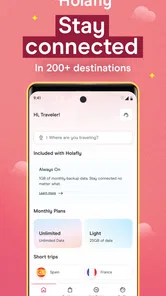
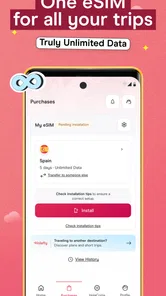
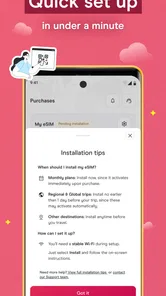
Setting up the Holafly eSIM is a breeze. Once you purchase a plan, you receive an email with a QR code. Just scan it, and voila, your eSIM is ready to go. Managing your data is also straightforward with their user-friendly app interface. You can monitor your data usage, top up if needed, and even switch between different plans if you’re hopping across countries.
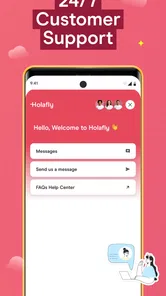
What’s more, their customer service is top-notch. I had a minor hiccup with the initial setup (totally my fault for not reading the instructions properly!), but their support team was responsive and got me sorted in no time. It’s always reassuring to know there’s someone to help when tech doesn’t play nice.
Plan the connection around the day
There is a useful difference between having an eSIM installed and relying on it as soon as you step off a plane. I would do the preparation somewhere calm, with Wi-Fi and enough time to read the instructions, then wait to use the travel connection until it makes sense for the trip. That small separation helps avoid trying to solve setup questions while juggling luggage, finding a ride, or following signs in an unfamiliar terminal.
I would also think through which line should handle each job. A travel eSIM is primarily a data option, while a home SIM may still matter for calls, texts, or account verification. Keeping the home line available can be useful, but it is worth checking the phone’s data and roaming settings so ordinary mobile use does not accidentally go through the wrong line. The exact menu differs by handset, so I would verify the settings on my own device before departure rather than assume that installation alone selects the right arrangement.
For a trip with several stops, I would check the destination details before paying and match the plan to the route rather than treating “travel eSIM” as a universal pass. A connection that suits a city break may not be the right fit for a journey that includes islands, rural drives, or time spent crossing borders. This is not a criticism unique to Holafly; it is the practical limitation of choosing mobile service by destination. The less predictable the itinerary, the more valuable it is to review coverage and terms before leaving home.
Setup, device fit, and recovery
The main trade-off is that an eSIM depends on a compatible device and a careful setup. The app supports Android and iOS, but that does not mean every phone can use an eSIM; I would check the handset’s eSIM support before buying a plan. Installing it while you still have stable Wi-Fi is a sensible precaution, especially if you are unfamiliar with adding a mobile plan. Keep the setup instructions accessible so you can follow them without relying on the connection you are trying to establish.
If service does not appear as expected after arrival, I would first check the phone’s mobile-data and eSIM settings, then revisit the plan’s setup instructions and contact support if needed. I would not repeatedly remove or reinstall a profile without guidance, since that can turn a small setup issue into a harder one to diagnose. For a short visit where a local physical SIM is easy to buy, that familiar option may be simpler; for a multi-stop trip, avoiding SIM swaps can be worth the extra preparation.
It is also sensible to keep essential information available offline. Save the plan instructions, accommodation address, and any transport details somewhere you can open without mobile data. This is less about expecting the eSIM to fail than about not making one connection responsible for every step of a journey. If the phone needs a settings change or a signal takes time to settle, you can still find your way and work through the issue without losing access to the basics.
Who will appreciate it—and who may not
I think this app makes the most sense for people who want internet soon after landing, travelers who move between destinations, and anyone who would rather arrange connectivity from home than hunt for a shop. It is less compelling if you spend most of a trip on trusted Wi-Fi, already have an affordable roaming arrangement, or need a physical local number for calls and texts. A travel data eSIM is not automatically a replacement for every part of a mobile plan, so I would keep that distinction clear when choosing.
The app is rated for Everyone, and its current version is 3.14.1; it requires Android 10 or later. Those details are useful when checking a device before travel, but compatibility still comes down to whether that specific phone supports eSIM. The download costs nothing, while the travel plan itself is a separate purchase, so I would compare the plan’s destination and terms with roaming from my carrier and a local SIM rather than assuming one option is cheapest for every itinerary.
How it compares with familiar alternatives
Compared with carrier roaming, the appeal here is having a travel-specific data option arranged through an app rather than simply leaving the home plan to handle everything abroad. Whether that is a better deal depends on the roaming terms already attached to your account and how much data you expect to use. I would check both before departure; convenience is valuable, but it is not a reason to skip a price comparison.
A local physical SIM can be a better choice when you need a local number, want to speak with a nearby shop, or prefer a familiar card-based setup. It can also suit someone who is happy to handle the purchase after arrival. The eSIM approach is more attractive when avoiding that errand matters, particularly on a short stop or a journey with several destinations. Neither choice is automatically superior: the right one depends on whether your priority is simplicity before travel, a local number, or the terms available for that particular place.
Portable Wi-Fi is another alternative for people traveling with companions or several devices, but it means carrying and managing an extra piece of equipment. A phone-based eSIM keeps the connection close at hand, while a separate hotspot may be preferable if you routinely need to connect devices that cannot use eSIM or want one connection shared among a group. I would not choose Holafly solely because it is convenient on a phone if the real requirement is dependable service for a laptop-heavy workday; in that case, test the work setup and keep a backup connection in mind.
A realistic arrival-day routine
Imagine landing after a long flight with a hotel address in a message, a train to catch, and someone waiting to hear that you have arrived. If the eSIM was prepared ahead of time, the first steps can be to check that the phone is using the intended data line, open the route, and send a short message. That is a modest use case, but it is exactly where I value travel connectivity: it removes a few small points of friction when attention is already divided.
If the connection is slower than expected, I would avoid assuming that the app itself is the cause. A crowded station, a weak indoor signal, or the available network in that location can affect what the phone can do. I would move to a clearer spot if practical, use offline directions or saved tickets for immediate needs, and try data-heavy tasks later on Wi-Fi. This is a realistic way to use a travel eSIM without expecting it to behave like a guaranteed high-speed home connection everywhere.
Final Thoughts: A Must-Have Travel Companion
All in all, the Holafly eSIM Prepaid Card is a fantastic tool for anyone who loves to travel without boundaries. It’s simple, effective, and offers peace of mind knowing you’re always connected. Whether you’re a digital nomad, a frequent flyer, or just someone who likes to share their adventures on social media, this app makes sure you’re never more than a tap away from the online world.
So, if you’re planning your next getaway and want a stress-free way to stay online, give Holafly a whirl. Trust me, once you go eSIM, you’ll never want to go back to the old ways of staying connected! It’s like having a little slice of home, wherever you roam.
Holafly eSIM: Unlimited Data Frequently Asked Questions
Is Holafly eSIM Prepaid Card free to download?
Yes, the Holafly app is free to download. Keep in mind that downloading the app and purchasing an eSIM are separate steps: the app helps you explore Holafly’s prepaid eSIM service, while the eSIM itself is for getting mobile data during travel. Before making a purchase, consider your destination, phone compatibility, and how you want to use your phone while away.
What devices and operating systems can run the Holafly app?
The app is designed for mobile use, and its current version is 3.14.1. To install it, your device must meet the minimum operating-system requirement of version 10. App compatibility is separate from eSIM compatibility: even if the Holafly app runs on your phone, the device must also support eSIM technology to install and use a digital SIM.
Can I install the Holafly app before deciding whether to buy an eSIM?
Yes. Holafly eSIM Prepaid Card is offered through a free communication app, so you can install the app and explore it before deciding whether to purchase an eSIM. The app’s focus is helping travelers get online with a prepaid eSIM. Check that your phone supports eSIM technology and that you understand the setup steps before buying, so you can plan how you’ll use it during your trip.
What is Holafly eSIM Prepaid Card and how does it work?
Holafly eSIM Prepaid Card is a digital SIM card that allows you to stay connected globally without the need for physical SIM cards. Once purchased and activated, it downloads directly onto your smartphone, enabling you to access mobile data in various countries without incurring roaming charges. It's particularly useful for travelers as it eliminates the hassle of swapping physical cards and offers affordable data plans tailored to your destination.
Is Holafly eSIM compatible with all smartphones?
Not all smartphones are compatible with eSIM technology, including Holafly eSIM Prepaid Card. Currently, most modern devices from manufacturers like Apple, Samsung, and Google support eSIMs. It's crucial to check your device's specifications or consult your smartphone's manufacturer to ensure compatibility before purchasing the Holafly eSIM. This will ensure you can easily download and use the eSIM without any technical issues.
Pros
- Easy to set up and activate instantly.
- Supports multiple countries without extra fees.
- No need to swap physical SIM cards.
- Offers flexible data plans for travelers.,24/7 customer support available.
Cons
- Limited coverage in remote areas.
- Higher cost compared to local SIM options.
- Data speed may vary by location.
- No option to share data with hotspot.
- Requires internet for initial setup.