Healthy Benefits+ (Classic)
- 20.63K
- 3.6
- Installs
- 1.00M
- Price
- Free

Screenshots
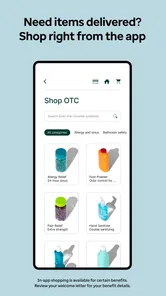
Analysis by Reviewed
I’d treat Healthy Benefits+ as a practical companion to an eligible health-benefit plan, not as a general health app. Its value is in helping you understand and use benefits you already have: checking what is available, identifying eligible products, and keeping purchases organized. If you’re new to it, the most reassuring first goal is simple: sign in, find the information tied to your plan, and confirm one item before relying on the app for a full shopping trip.
What to expect from a benefits app
Unlike a typical wellness tracker, pharmacy app, or general shopping service, this medical app is focused on benefits and rewards. That distinction matters: it is useful when a purchase may qualify under your plan, but it is not a replacement for medical advice or a universal catalog of health products. Solutran, Inc. develops it, and the app is free. It has an average rating of 3.7 from around 132,000 ratings, with more than 1 million installs, so people clearly use it, though the rating also suggests that experiences are not uniformly smooth.
The app is rated for everyone, and version 3.8.1 runs on Android 8.0 or later. It was released on December 21, 2018. Those details make it easy to judge basic compatibility, but the deciding question is whether your particular benefits are supported. I’d check that before planning a basket around the app. If your goal is simply to compare ordinary prices or manage prescriptions, your retailer’s app or pharmacy service may be a better fit.
Getting started without guessing
Setting up the app was a breeze. As soon as I downloaded it, I was guided through a straightforward registration process. A few taps here and there, and I was in! The interface is user-friendly, designed with simplicity in mind, which means even if you’re not tech-savvy, you’ll find navigating through the app a walk in the park. For a first-time user, I’d still take a moment to check that the account details and plan information match what you expect before treating a displayed balance or eligibility result as a shopping decision.
A helpful habit is to explore before you shop. Look through the available benefit information and store options, then make a short list of items you genuinely need. That way, your first use is a low-pressure test rather than a rushed checkout decision. If you share shopping duties with someone else, compare the list with what is already at home; benefits are most useful when they help with planned essentials, not when they encourage an unnecessary purchase.
Make the first store visit a small test
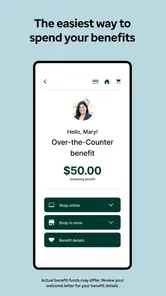
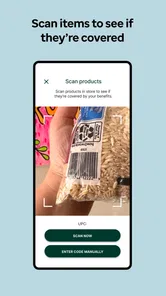
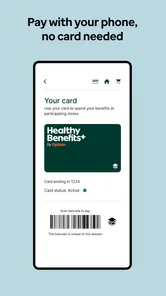
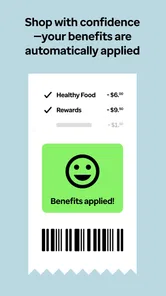
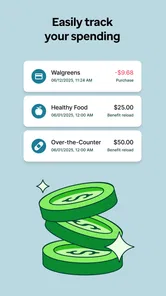
Now, I wouldn’t be doing justice if I didn’t highlight some of the features that make this app a must-have. Firstly, the app allows you to view your benefit balance in real-time. No more second-guessing how much you have left to spend on eligible items. The product scanner feature is another gem. Imagine being at the store and wondering if a product is covered by your plan. Just whip out your phone, scan the barcode, and voila, you have your answer.
My practical advice is to scan an unfamiliar item while you still have time to choose something else. Product packaging can look very similar across brands and sizes, so checking the exact item is more useful than assuming that a whole product type qualifies. A barcode result can help you decide what to put in your basket, while a quick balance check helps you avoid counting on more benefit than you have available. If the answer is unclear, keep the item optional until you can verify it through your plan information.
More From Our News Desk

 Block Blast!
 Makes Every Clear Feel Like One More Turn
A clean little block puzzle becomes a study in space, risk, and self-control. Its best moments come from one satisfying clear; its toughest test is knowing when to stop.

 Super Stylist Fashion Makeover
Super Stylist Turns Dress-Up into a Runway Career
Its makeover-to-client loop turns quick outfit decisions into shareable style theater. The question is whether the closet keeps giving players a reason to return.

 Block Craft 3D:Building Game
Block Craft 3D Under Pressure: How Well Does It Recover When Building Goes Wrong?
A failure-focused look at Block Craft 3D’s forgiving building loop, its uncertain recovery edges, and the moments that demand more than a cheerful village.

 Woodturning
 Trades Creative Freedom for a Satisfying Carving Loop
If your usual creative game is about building, decorating, or styling, Woodturning trades open-ended projects for a tactile, tightly guided carving loop. Here is what that switch really costs.

 PUBG MOBILE
 Shows What Battle Royale Must Get Right
PUBG MOBILE shows how battle royale has matured: bigger systems matter less than meaningful choices, readable fights, and a reason to return after every loss.

 Braindom: Brain Games Test
Braindom’s Social Life Happens Between Puzzles
Braindom turns quick logic traps into a personal ritual, but its community value is more about comparing answers than building together.
Latest News



Plan the trip, then handle the surprises
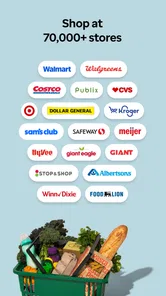
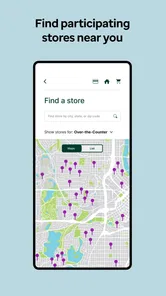
Moreover, the app provides a comprehensive list of stores where you can use your benefits. From big retail chains to local pharmacies, it’s like having a health-benefit directory at your fingertips. And let’s not forget the integrated shopping list feature. It’s perfect for planning your purchases and ensuring you don’t forget any essentials.
For example, before a weekly grocery run, I’d check the store options, add likely eligible necessities to the list, and use the scanner in the aisle for anything I’m unsure about. That workflow is more dependable than choosing items first and hoping they qualify at checkout. The trade-off is that a list and directory still require a little preparation: if you are making a spontaneous stop, you may need to pause and check eligibility rather than assume every branch or product will work the same way.
When another option may be simpler
The app is most worthwhile when the benefit is part of your regular routine: you buy eligible essentials often enough that checking a balance or product saves repeated guesswork. If your needs are occasional, using the plan’s existing guidance before a single purchase may be less effort than installing another app and learning its account flow. I would also skip it as a primary tool if what you really need is prescription refills, medication reminders, or clinical advice; those jobs call for a pharmacy or care service built around them.
Compared with a retailer’s shopping app, Healthy Benefits+ has a different purpose. A retailer app is usually the more natural place to check that retailer’s ordinary stock, prices, and shopping services; this app is useful for the benefit-specific questions that a general store catalog may not answer. Neither replaces the other. I’d use the benefits app to plan and check eligibility, then rely on the store’s own service for details about the actual shopping trip.
That distinction can prevent a frustrating assumption: a participating store does not make every item in its aisles eligible, and a product result does not necessarily settle every checkout question. Think of the app as a decision aid, not as a promise that every purchase will be accepted exactly as expected. For an expensive or essential item, it is sensible to verify the plan’s guidance before making it the centerpiece of your trip.
Who will get the most from it
So, why should you consider downloading Healthy Benefits+? If you’re someone who likes to keep track of their health expenses and wants to ensure they’re maximizing their benefits, this app is for you. It saves time, reduces stress, and helps you make informed decisions about your purchases. Plus, it’s free, so there’s really no reason not to give it a try.
It is especially useful for people who regularly buy eligible everyday items and want a quick way to check their balance, locate a participating store, or avoid guessing about a product. It may be less helpful if you rarely use the benefit, prefer to do all shopping in person without checking a phone, or mainly want a broad medical organizer. In those cases, the plan’s usual materials or a retailer’s own app may be enough, and adding another account may not be worth the effort.
Common points of confusion
One thing I would keep in mind is that an eligible product and an eligible store are separate checks. Finding a store in the directory does not mean every item there qualifies, and seeing an item described as suitable does not by itself tell you how much of your available benefit remains. I’d use the balance, store information, and product check as complementary tools rather than treating any single screen as the whole answer.
Another sensible question is what to do if an item does not scan or a result surprises you. I would not keep trying to force the purchase through based on a similar package or a guess. Set that product aside, check the plan details in the app, and choose a clearly eligible alternative if you need to finish shopping. This small pause is especially useful when buying a multipack or a different size from the one you usually purchase, since the exact barcode is what you want to verify.
A useful routine for a busy day
Imagine you are heading to the store after work and only have time for a quick stop. Before leaving, check the balance and your short list rather than opening the app for the first time in the aisle. At the store, scan only the items you are uncertain about; there is little value in slowing down to recheck products you already know fit your plan. If one scan gives you a result you did not expect, choose an alternative you can verify instead of turning a rushed errand into a debate at checkout.
This routine also helps when more than one person contributes to the household shopping. A shared list can make the intended purchases clearer, but the person doing the shopping should still check the exact product and plan information rather than assume that another household member’s memory is enough. I find that dividing the task this way—planning at home, checking exceptions in the aisle—keeps the app useful without making every grocery run revolve around the phone.
Keep expectations grounded
After using the app for a while, I can confidently say it has made managing my health benefits much more straightforward. The convenience of having everything in one place, from checking balances to shopping for eligible items, is a game-changer. It’s not just about saving money; it’s about making smart, informed choices regarding health and wellness.
Even so, I would not treat it as a guarantee that every step of a purchase will be effortless. Benefit rules can make the experience more specific than ordinary shopping, so a little checking is part of the deal. The average rating of 3.7 reflects a mixed overall impression, which is a useful reminder to approach it as a helpful tool rather than a flawless checkout shortcut. I’d also keep the plan’s own guidance close at hand when a balance or eligibility result affects an important purchase.
One trade-off is that the most useful checks depend on having your phone available while planning or shopping. If you prefer to leave it in your pocket, or if you are helping someone who finds phone-based shopping awkward, the app may add friction instead of removing it. In that situation, a printed plan guide or help from the benefit provider may be easier to consult. I would not make app use a condition of using a benefit; it is an aid for people who find these quick checks convenient.
My recommendation for a first try
In conclusion, if you’re looking to streamline your health benefits management, the Healthy Benefits+ app is worth a try. It’s practical, user-friendly, and most importantly, it helps you make the most out of your health plans. Go ahead and give it a whirl; you might find it as indispensable as I did!
For your first meaningful use, I’d avoid building a large shopping trip around it. Sign in at home, check the plan details and balance, make a short list, then verify one or two uncertain products during an ordinary store visit. If that process fits your routine, you can make the app part of future planning. If you find that you prefer a quick conversation with your plan or retailer, or you seldom buy eligible products, sticking with those existing options is perfectly reasonable.
My bottom line is that this is a focused utility rather than an all-purpose health companion. Give it a small, practical trial with a purchase you already planned, and judge it by whether it helps you understand your specific benefits with less uncertainty. When it does, keep it in your shopping routine; when it does not, the plan’s own materials and the retailer’s tools remain sensible alternatives.
Healthy Benefits+ (Classic) Frequently Asked Questions
Can I browse Healthy Benefits+ before I have an eligible plan?
You can download Healthy Benefits+ for free and open the app, but its benefit-management features are intended for people with access through a participating health plan or program. Eligibility affects what benefits and rewards are available to you. Before relying on the app for a particular benefit, check whether your plan or program participates and whether you are eligible to use it.
What can I use Healthy Benefits+ for?
Healthy Benefits+ is designed to make benefits and rewards easier to access. Its features can help eligible users explore available benefits, find items that qualify, and manage the benefits connected to their plan or program. What you can do inside the app depends on your eligibility and the benefits offered through your specific plan, so the experience may vary from one user to another.
Who develops Healthy Benefits+, and what kind of app is it?
Healthy Benefits+ is a medical app developed by Solutran, Inc. It is intended to give users easy access to benefits and rewards, with tools for exploring the benefits available to them. The app is free to download, but access to particular features depends on whether a user is eligible through a participating health plan or program.
What is Healthy Benefits+ and how does it work?
Healthy Benefits+ is a wellness app designed to help users manage and utilize their health benefits effectively. It offers features such as tracking benefits, finding eligible items, and accessing exclusive discounts. Users can simply download the app, register their accounts, and start exploring the various features that aid in improving their health and lifestyle.
Is Healthy Benefits+ free to use?
Yes, Healthy Benefits+ is free to download and use. However, the app is typically available to users who are part of participating health plans or programs. It's important to verify with your health provider if your plan includes access to the app and what specific benefits you can manage through it.
Pros
- Easy access to healthcare rewards.
- User-friendly navigation interface.
- Regular updates with new features.
- Secure personal data handling.
- Wide range of participating retailers.
Cons
- Limited to specific insurance plans.
- Occasional app crashes reported.
- Requires stable internet connection.
- Some features are region-restricted.
- Customer support response time varies.