HairApp: Hair Styler App, Bald
- 1.83K
- 3.4
- Installs
- 1.00M
- Price
- Free

Screenshots
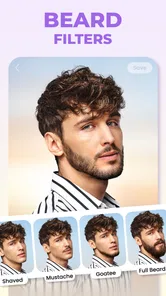
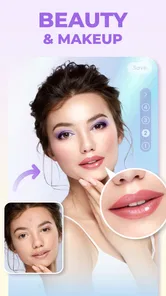
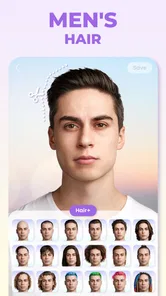
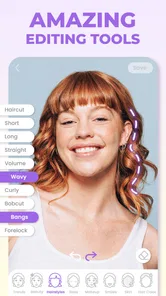
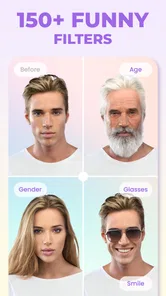
Analysis by Reviewed
When I want to test a haircut without booking an appointment or making a real-life commitment, I find a virtual try-on useful as a first sketch, not a final promise. HairApp: Hair Styler App, Bald is a photography app from Lyrebird Studio Teknoloji Limited Şirketi built around that simple idea: use a photo or the camera to explore hair changes, including going bald. I’d treat the results as inspiration and a conversation starter rather than a guarantee of how a cut will look on me.
A simple baseline workflow
I get the most useful comparison by starting with a clear, front-facing photo and keeping the lighting and expression neutral. Then I try a few noticeably different shapes instead of tapping through every option at random: a shorter cut, a longer style, curls, and a bald look make a more informative set. With the same photo as a baseline, it’s easier to notice how much the silhouette changes and which direction feels right.
If I’m deciding whether to change my hair, I save the experiment for a moment when I can look carefully rather than treating the first preview as a verdict. A hairstyle overlay can help me explain what I like—such as more length around the face or a tighter outline—but I’d still bring that reference to a stylist and ask what suits my actual hair. The useful habit is to compare a small, deliberate set of looks, not to mistake a convincing preview for a salon consultation.
Discovering Your Style
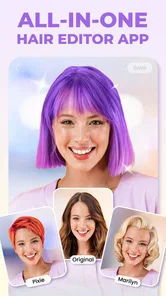
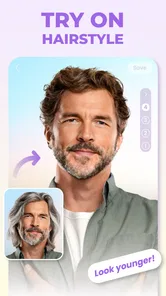
The first thing that caught my attention with HairApp: Hair Styler App, Bald is its incredible range of hairstyles. You can virtually try on anything from a sleek bob to luscious curls, and yes, even a bald look! The app uses advanced facial recognition technology to ensure that each style fits your face perfectly. It’s like having a virtual salon at your fingertips. I found it particularly handy for those days when I was feeling adventurous but not ready to take the plunge in real life.
User-Friendly Interface
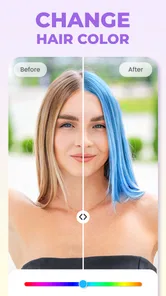
Now, let's talk about the interface. It’s neat, intuitive, and super easy to navigate. Even if you’re not tech-savvy, you’ll find yourself breezing through the options. The app allows you to upload a photo or use your camera in real-time, making it incredibly versatile. One of my favorite features is the ability to adjust the color and length of the hairstyles, giving you endless possibilities to explore.
Sharing and Feedback
What’s fun about trying new styles if you can’t share them, right? HairApp makes it super easy to share your new look with friends on social media or even get feedback from them. There's even a feature where you can create a poll to let your friends vote on which hairstyle suits you best. Trust me, it's a blast seeing everyone's reactions and opinions!
For more useful feedback, I’d send a small, consistent set of options rather than a stream of near-identical edits. Ask friends which one feels most like me or which outline they prefer; that gives them a clearer choice than asking whether a single dramatic filter looks good. For a more serious decision, I’d use their reactions as a prompt for discussion, not as a vote that settles what I should do.
More From Our News Desk

 MX Player
 and the Small, Private Rituals of Mobile Viewing
A practical video player reveals how mobile viewing has become private, portable, and woven into the spare minutes of ordinary life.

 Piano Fire: Edm Music & Piano
Piano Fire Tested: How Well Does It Recover When a Run Breaks?
A rhythm game lives or dies by recovery as much as reflexes. Piano Fire makes a brisk, colorful loop, but its rough edges matter most after a missed note or interrupted run.

 Ludo King®
Ludo King Turns Quick Matches Into a Lasting Social Ritual
A close look at how quick matches, private rooms and familiar rivalries turn this digital Ludo game into a small, durable social ritual—and where that community has limits.

 YouTube Music
 Turns Video Discovery Into Listening Power
A capable music service with an unusually strong route into discovery, YouTube Music shows how Google can turn a video habit into control over what listeners hear next.

 Netflix
 Is Building a Daily Habit Beyond Its Biggest Shows
A familiar streaming app is gaining new weight as Netflix pushes games, live programming, and discovery into the same daily habit. The growth is real, but so are the limits.

 Ramp Car Games: GT Car Stunts
Ramp Car Games: The Risk-and-Reward of Every Jump
A stunt racer built around one deceptively rich decision: how much speed to carry into a jump, and how much control to keep for the landing.
Latest News



Perfect for All Ages
Whether you're a teenager looking to experiment or someone a bit more mature wanting a change, this app caters to all age groups. It’s a great way for parents to have fun with their kids as well, trying out wacky and wild hairstyles together. Plus, it’s hilarious to see your dad rocking a mohawk or your mom with a neon pink buzz cut!
It also suits a practical, low-pressure moment: before a family gathering, a friend can try a bold color or a relative can see whether a shorter outline feels appealing. I’d keep the conversation light, especially with children, so the edits stay playful instead of becoming a judgment about someone’s real appearance. Since the app is rated for Everyone, it can be an easy group activity, though younger users may still need help deciding what to share and with whom.
Realistic Results
One of the standout features of this app is how realistic the results are. The app does a fantastic job of blending the hairstyles with your actual hair and skin tone, making it look surprisingly lifelike. It’s perfect for those who are seriously considering a change and want to see how it would look in reality before making any commitments.
Settings and practical trade-offs
Before comparing styles, I’d check the photo itself: hair blending is easier to judge when the face is unobstructed and the light falls evenly. A shadow across the forehead, a tilted angle, or hair covering the outline can make the preview less persuasive, even if the chosen style is appealing. If the first result looks off, I’d retake the photo before deciding the app is a poor fit.
Color and length adjustments are most useful when I change one at a time. If I alter both immediately, I can’t tell whether I like the cut, the shade, or the combination. I’d also keep an unchanged original beside the edited preview when sharing, so friends understand what they’re comparing. These small habits make the try-on more informative without assuming the app can reproduce every detail of a real haircut.
Who will get the most from it
I’d recommend this for someone who is curious, undecided, or simply looking for a playful way to picture a dramatic change. It can help before a salon visit by narrowing down a general direction, and it’s particularly handy when the question is broad—shorter or longer, curls or a smoother shape, hair or no hair. It is less suitable for anyone who needs a precise technical preview of a particular cut, or wants a stylist’s assessment of texture, upkeep, and face-framing details. For those needs, a consultation and reference photos are better tools.
Compared with a general photo editor, this app is focused on trying hair changes rather than making a broad set of image adjustments. That focus keeps the task straightforward, while a more comprehensive editor may offer finer control over retouching or the whole image. I wouldn’t use either kind of preview to judge how a cut will behave after washing or how much daily styling it needs; those are real-world questions to ask a hair professional.
Faster patterns and sensible limits
When I’m short on time, I use a repeatable sequence: choose one good photo, test a few distinct shapes, adjust color or length only after I find a shape I like, then keep the strongest comparisons. That avoids getting lost in endless variations and makes it easier to revisit the decision later. For a quick laugh, I’d do the opposite and try the most unexpected looks; the point is different, so there’s no need to overthink the match.
The preview can still be affected by the source image and by how well a chosen style lines up with the person in it. I wouldn’t read a mismatch as proof that a real haircut would look bad, nor would I treat a flattering edit as a promise. If I need a close match to my hair’s curl pattern, density, or growth, I’d take the image to a stylist and discuss what is actually achievable.
Cost, access, and the decision to try it
The app is free to download, with in-app purchases listed from $4.99 to $39.99 per item, so I’d explore the experience before spending and check the purchase prompt carefully. Its average rating is 3.6 from around 16,000 ratings, which suggests a mixed response rather than universal satisfaction. It has over a million installs, was released on January 25, 2024, and version 1.3.0.0 supports Android 7.0 and later. Those details make it easier to judge whether it fits your device and expectations; they don’t guarantee that every preview will work equally well for every photo.
My practical answer to “Can I use it to choose a real cut?” is yes, as a starting point, but not as the only input. “Can I use it just for fun?” also gets a yes: trying a bald version or an exaggerated style is a low-stakes way to share a laugh. If I want exact salon planning, detailed image editing, or advice about maintenance, I’d choose a professional consultation or a more controllable editor instead.
Making a useful decision from a preview
A good everyday use is to open the app before a routine appointment, not while I’m already in the stylist’s chair trying to make a rushed choice. I can test a few broad directions at home, then note what I want to keep: perhaps the length at the sides, a softer fringe, or simply a less severe outline. That gives me clearer language for the consultation without pretending the edited image is a cutting guide.
If I’m comparing looks with someone else, I’d keep the viewing conditions similar. The same source portrait, screen brightness, and crop make it easier to spot differences in the hairstyle rather than reacting to changes in the photo. I’d also avoid asking a group to choose among many tiny variations; a couple of distinct options usually leads to more useful comments and less noise.
Choosing the right tool for the job
HairApp makes most sense when the question is specifically about imagining a different hairstyle. A general-purpose photo editor is the better choice if I want to retouch skin, reshape the full image, or fine-tune a composite manually. A salon consultation is better when the question depends on the way my real hair grows, its texture, or the time I’m willing to spend styling it. These tools overlap a little, but they answer different questions.
I’d also be cautious about using a polished-looking image as evidence that a particular shade or cut will suit me in every setting. A screen preview is useful for exploring a direction, while daylight, hair condition, and a stylist’s technique affect the real result. The app can help me arrive with a preference; it cannot replace the practical conversation about what is achievable and maintainable.
When I would skip it
If I already know the exact cut I want and need a precise preview of its layers, fringe, or blending, this would not be my main planning tool. I’d take reference images from real people with a similar hair type and ask a stylist how to adapt them. I’d also skip a virtual try-on if I’m looking for a realistic answer about daily effort: a photo cannot show how much product, drying, or regular shaping a style may require.
It is also not the right fit for someone who expects every selected style to align perfectly with every portrait. A difficult angle or partly covered hairline can undermine the result, and repeatedly adjusting a poor source photo may waste time. In that situation, retaking the portrait is worth trying once; if the result still does not help, moving to a different planning method is more sensible than forcing the app to answer a question it handles only approximately.
A more deliberate way to explore
For a serious change, I’d separate exploration from decision-making. First I’d use the app to discover broad preferences, then I’d save only the few images that communicate those preferences clearly. After that, I’d talk through the real-world details with a stylist. This keeps the app useful at the stage where it is strongest—visualizing possibilities—without letting a digital overlay dictate a decision about length, texture, or upkeep.
For a casual session, I’d use a different standard: the result does not need to be a faithful forecast if the aim is to see an unexpected version of myself and have a laugh. That distinction matters. The same bald preview can be a playful experiment for one person and a serious point of comparison for another, so I’d decide what I want from the session before judging whether the result is successful.
Mastering the app’s sweet spot
In my view, the best habit is to treat each edit as one piece of visual evidence, not a final answer. Start with a decent portrait, make comparisons that are different enough to teach you something, and use the clearest result to explain your taste. If the image is unconvincing, check the photo before blaming the style; if the preview is appealing, still ask whether the real cut fits your hair and routine.
In conclusion, HairApp: Hair Styler App, Bald is a delightful tool for anyone looking to have fun with their appearance. It's easy to use, offers plenty of features, and provides a realistic preview of what different hairstyles would look like. Whether you’re looking to experiment with new styles, get a laugh out of trying something outrageous, or seriously considering a new look, this app is definitely worth a download. So why not give it a go and discover a new you today?
HairApp: Hair Styler App, Bald Frequently Asked Questions
Is HairApp easy to use for a first-time user?
HairApp is designed around trying hairstyles on photos, so its basic appeal is straightforward: explore a look visually before deciding whether it suits you. You can start by choosing a photo and seeing how the hairstyle-editing experience works for your image. If you are new to photo-editing apps, take a little time to browse the available options and compare results rather than expecting a finished style recommendation immediately.
Can HairApp help me decide whether a hairstyle will suit my face?
HairApp can be useful as a visual aid when you are considering a haircut or a different hair color. Seeing a style on a photo may help you compare possibilities and discuss an idea with a stylist, but a virtual preview is not the same as trying the hairstyle in real life. Treat the result as inspiration, and consider how your hair texture and everyday styling preferences affect the final choice.
Can I save or share the hairstyle edits I make in HairApp?
HairApp focuses on hairstyle photo editing, which makes its previews useful for comparing potential looks or showing an idea to someone else. Before relying on a particular export or sharing option, check the controls available in the app and review what happens when you finish editing. If you want to keep a result, make sure it has been saved to your device or shared successfully before closing the editor.
What should I know about HairApp before downloading it?
HairApp is a photography app by Lyrebird Studio Teknoloji Limited Şirketi, with a focus on trying out hairstyles in photos. It has over one million installs and a 3.6 average from around 16,000 ratings. The app is free to download and is rated for everyone, so it may be worth exploring if you want a visual way to consider a new look.
What is HairApp and how does it work?
HairApp is a versatile hair styling application designed to help users virtually try on different hairstyles and colors before making real-life changes. By using advanced facial recognition technology, the app allows you to upload a photo and experiment with various styles, including short, long, curly, or straight hair, as well as different color options. It's a great tool for those looking to explore new looks without any commitment.
Pros
- User-friendly interface for all ages.
- Wide range of hairstyles to try on.
- Realistic hair color simulations.
- Offers hair care tips and advice.
- Supports both selfies and portraits.
Cons
- Limited free hairstyle options.
- Occasional app crashes reported.
- In-app purchases can be pricey.
- Requires good lighting for best results.
- No option to save favorite looks.