Grubhub for Drivers
- 15.23K
- 4.5
- Installs
- 1.00M
- Price
- Free
Screenshots
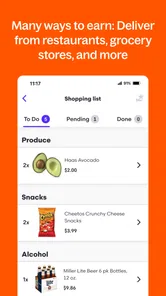
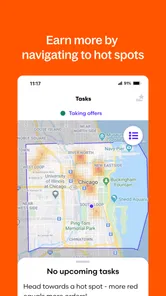
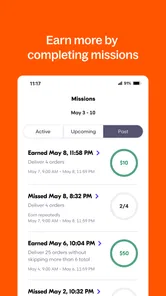
Analysis by Reviewed
When I judge a delivery-driving app, I look past the sign-up pitch and ask a practical question: can it fit around the work I already have, and does each trip make sense once I account for time and vehicle costs? Grubhub for Drivers is aimed at people who want to take restaurant deliveries rather than order food, so it makes most sense if you already have a suitable way to get around and are comfortable handling pickups, directions, and customer drop-offs. I’d treat it as a possible source of flexible work, not a promise of steady income.
Decide what a useful shift looks like
Before installing a driver app, I’d decide what I need it to do: fill a short gap in my week, give me a way to work around another job, or provide a substantial share of my income. Those goals call for different expectations. A few hours around a meal period may be easy to test; relying on delivery work for essential bills means demand and expenses deserve much closer attention.
For this kind of work, a useful comparison is not simply one app’s advertised earning potential against another’s. I’d compare how well each option fits my actual neighborhood, available hours, transport, and tolerance for waiting. Restaurant delivery involves a particular rhythm—travel to a pickup, wait if an order is not ready, then complete a drop-off. Someone who prefers not to enter restaurants or deal with changing directions may find a different kind of part-time work less stressful.
Choose it for the kind of work you want
Before committing, think about your local routine. A driver who can work around busy meal periods may find delivery shifts easier to fit between other responsibilities than a job with fixed hours. Someone who needs a guaranteed weekly amount, predictable demand, or a role without driving should be more cautious. The app is free and comes from Grubhub, a familiar name in food delivery, but free to install does not mean the work has no costs: fuel, vehicle wear, parking, and unpaid time can all affect what a shift is worth to you.
A useful habit is to assess an offer in context rather than focusing only on its displayed payout. Consider the distance to the restaurant, the likely route to the customer, and whether the delivery takes you somewhere you can continue working or far from other opportunities. I’d also keep a simple personal record of time and mileage for a few shifts. That gives you a more realistic picture of your own net return than a busy-looking earnings screen alone.
Where the restaurant focus can help
The main reason I’d consider this app over a general gig-work platform is its restaurant-delivery focus. If I already know the streets around the places I might work, I can think through pickup and drop-off as one familiar kind of task instead of weighing unrelated jobs. That focus is also a limitation: it will not suit someone who wants a mix of errands or other task types within the same work session.
There is a practical way to test whether that focus works for you without making a big commitment. Choose a time you can spare, work in an area you know, and pay attention to the whole trip rather than only the delivery itself. Include the journey to the restaurant, any wait, the route to the customer, and where you end up afterward. A trip that looks attractive at the moment of acceptance may be less useful if it leaves you far from places where you are willing to continue.
More From Our News Desk

Weather by Xiaomi Review: Clear at a Glance, Less Clear Up Close

X Under Pressure: Can It Recover When Posting Goes Wrong?

Clash of Clans Is Won Between the Battles

Android Auto Makes the Case for Quieter Car Software

MobiOffice: Transforming Mobile Productivity with Seamless Integration

EA SPORTS FC™ Mobile Soccer: Redefining Mobile Sports Gaming
Make a realistic first-shift plan
Imagine you have a free evening after your regular job, but need to be home in time for a personal commitment. I’d set a firm stopping point before opening the app, allow some margin for a restaurant delay, and avoid taking an order that could push the return journey too close to that deadline. This is one situation where flexibility helps: you choose whether to start. It does not mean every accepted trip will fit neatly into a tight schedule.
For an early trial, I’d also use a familiar area and keep the first session simple. Learn where you can safely pull over, how you prefer to check directions, and how much time you want to allow for finding a pickup entrance. That small preparation can make a first shift less hectic. It also gives you a fairer test of the work than starting somewhere unfamiliar during a rushed window.
The Onboarding Experience
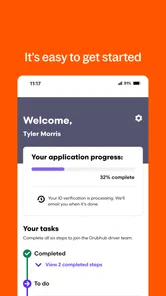
First things first, signing up with Grubhub for Drivers was a breeze. The app guides you through the process with a step-by-step approach, ensuring that you’re not left scratching your head. There's a quick background check and some basic requirements like having a valid driver’s license and a reliable vehicle. Once you’re in, the app gives you a warm welcome with a user-friendly interface.
Navigation and Interface
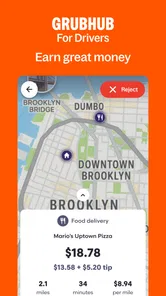
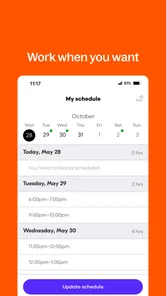
Navigating through the app is smooth sailing. The home screen is neatly organized, offering quick access to your earnings, scheduled blocks, and delivery history. I particularly loved the map feature that provides real-time updates on restaurant locations and customer addresses. It's like having your own personal GPS. Plus, the app’s design is easy on the eyes, which is a huge bonus when you’re glancing at your phone between deliveries.
In everyday use, I’d set up a safe routine before the first order: check the destination and instructions while parked, then rely on the map for the route instead of trying to read the screen on the move. Restaurant entrances and pickup areas can be less obvious than a map pin suggests, so a moment to confirm the address before leaving can prevent an avoidable detour. I also recommend checking that your phone is charged and mounted where it is easy to glance at; this is a driving tool, not a reason to handle your phone in traffic.
Making Deliveries
Now, onto the meat and potatoes – the deliveries! Grubhub makes it super simple to accept and complete deliveries. You get a ping for new orders, and with a quick tap, you’re on your way. The app provides detailed instructions for each delivery, including customer preferences and special instructions. I found this incredibly helpful, especially when dealing with complex orders. The best part? You have the flexibility to choose your own working hours. So, if you're a night owl or an early bird, you can tailor your schedule to fit your lifestyle.
That flexibility is useful, but it is not the same as guaranteed work at every hour. For example, someone finishing a day job could open the app for an evening meal period, see how the local flow feels, and stop when the shift no longer seems worthwhile. A parent with a narrow free window may value being able to choose when to log on, but should leave room for restaurant delays and the time it takes to complete a delivery. If you need to be home at an exact minute, I would avoid accepting work too close to that cutoff.
Compared with doing courier work through a general gig-work platform, this app is specifically centered on restaurant orders. That focus can be appealing if food pickup and drop-off suits you, while a broader platform may fit better if you want to compare different kinds of tasks in one place. A restaurant-delivery rival may also be worth considering if it has stronger demand where you live; local availability matters more than a national reputation. I would not switch based on a single slow shift. Try a few comparable periods, then compare time, distance, and net earnings using your own records.
Small habits that reduce friction
One detail I would pay attention to is the gap between the map and the real pickup. A pin can get you near a restaurant without making the entrance or pickup point obvious, particularly around busy streets or shared buildings. Before driving off, I’d check that I have the right destination and any useful delivery instructions in mind. If something is unclear, sorting it out while safely stopped is less stressful than trying to improvise in traffic.
I would also treat the delivery history as a learning aid rather than just a record to glance at after work. After a few sessions, look for patterns in your own experience: which areas are comfortable to navigate, which kinds of routes create dead time, and whether your chosen hours leave you in a useful location. This is not a promise that the app will provide a particular volume of orders; it is a way to make your own decisions based on what actually happened.
Earnings and Incentives
Let’s talk money because let’s face it, that’s why we’re here! The app offers a transparent breakdown of your earnings, so you always know what you’re making. There are also opportunities for bonuses during peak hours, which is a nice little perk. I liked that Grubhub pays out weekly, making it easier to manage your finances. Plus, they offer a mileage tracker, so you can keep tabs on your expenses come tax season.
For a realistic evening, I’d choose a window I can afford to spend working, note the starting mileage, and review the completed trips afterward. The mileage tracker can help organize expense information, but I’d still keep my own records and receipts rather than treating an in-app figure as a complete tax plan. Weekly payouts can help with routine budgeting, yet they do not remove the need to set aside money for vehicle expenses or taxes. Bonuses are best treated as a possible extra, not as the amount that makes an otherwise unappealing trip worthwhile.
That distinction matters when comparing delivery apps, too. A temporary incentive can make one session look unusually strong, but it does not tell me what an ordinary shift will feel like. I’d compare like with like: similar days, similar time windows, and the full time spent working. If another restaurant-delivery option appears busier locally, it may be worth testing, but I would include the cost of learning a new interface and changing routines in that decision.
Who should try it—and who should compare first
The app has a 4.5 average from around 74,000 ratings, and it has passed one million installs. It is free, rated for Everyone, and version 5.23 requires Android 8.0 or later. Those details make it easy to consider, but they do not tell you whether there will be enough work in your neighborhood or whether the driving will suit you. I’d recommend trying it if you want restaurant-delivery work with flexible scheduling and can evaluate your costs carefully. If you dislike driving, need stable guaranteed pay, or cannot absorb vehicle expenses, a non-driving part-time job is likely a better fit.
Its business-app category reflects the practical purpose here: it is a working tool, not a food-ordering app for customers. Grubhub is the developer, and the app is free to install. I’d still approach onboarding as the start of evaluating a work arrangement, not as a commitment to keep driving. The useful question is whether the app’s restaurant-focused workflow makes sense for your own location and schedule after you have experienced it directly.
There is also a switching cost that is easy to overlook: once you learn one platform’s layout, pickup flow, and earning screens, moving to another takes time, and the new option may not be busier nearby. Keep your decision simple—compare a few similar shifts, not one unusually good or bad night. If this app’s restaurant-focused workflow matches your area and schedule, it can be a practical tool for earning on your terms; if the numbers only work when you assume constant orders or peak bonuses, I would keep looking.
My recommendation after weighing the trade-offs
I’d put this app on the shortlist for someone who already drives, wants to try restaurant deliveries on a flexible schedule, and is willing to keep track of the less visible costs. It is especially worth considering if you can work in an area you know and have enough room in your day for pickups that do not go exactly to plan. The clearest reason to pass is not the interface; it is a mismatch between the work and your need for dependable hours, predictable take-home pay, or a job without vehicle expenses.
Before making it a regular part of your week, I’d run a modest personal trial and decide what would count as a good result in advance. Track time, mileage, and the practical inconvenience of each session, then compare those notes with what you need from the work. If you are evaluating another delivery platform, test it under similar conditions rather than judging by reputation or a single unusually busy period. That gives you a more grounded answer about whether switching is worthwhile.
So there you have it, folks. Grubhub for Drivers is a solid option for anyone looking to make some extra cash on the side or even as a full-time gig. It's intuitive, flexible, and designed with the driver in mind. Whether you're cruising through city streets or navigating suburban neighborhoods, this app has got you covered.
Grubhub for Drivers Frequently Asked Questions
Can I use Grubhub for Drivers in my area?
Grubhub for Drivers is designed to connect drivers with delivery orders, but the app is most useful when the service operates where you plan to work. Before downloading, consider whether Grubhub offers driver opportunities in your area and whether local restaurant deliveries fit your routine. Your experience will depend on the availability of orders and the locations you choose to cover.
Does Grubhub for Drivers help me manage delivery requests and routes?
The app is intended to help drivers handle delivery requests and get to restaurant and customer locations. It can make it easier to organize the steps involved in a delivery, from accepting an order to completing the trip. If you are considering using it, think about whether you are comfortable relying on a smartphone while driving and plan to use navigation safely.
Is Grubhub for Drivers free, and what devices can run it?
Grubhub for Drivers is free to download and is intended for drivers using a smartphone to manage deliveries. The app is available for Android, with version 5.23 requiring Android 8.0 or later. Before installing, check that your device meets this requirement and has enough battery and connectivity for the app to remain useful while you are on the road.
Who develops Grubhub for Drivers, and what is it rated for?
The app is developed by Grubhub and is categorized as a business app. Its content rating is Everyone, so it is suitable for a general audience. Grubhub for Drivers has an average rating of 4.5 from around 74,000 ratings, giving prospective drivers a broad set of user feedback to consider before downloading.
What is Grubhub for Drivers and how does it work?
Grubhub for Drivers is an app that connects delivery drivers with orders from local restaurants. As a driver, you use the app to accept delivery requests, navigate to restaurants and customer locations, and track your earnings. The app provides a flexible way to earn money by delivering food orders in your area, with features that help you manage your delivery schedule and optimize your routes.
Pros
- Flexible working hours for drivers.
- User-friendly interface for easy navigation.
- In-app earnings tracking for transparency.
- Access to customer support within the app.
- Opportunity to earn bonuses and incentives.
Cons
- High competition among drivers in busy areas.
- App glitches can occur during peak times.
- Limited delivery radius in some regions.
- Earnings depend heavily on tips.
- Fuel and maintenance costs on drivers.












