Grubhub: Food Delivery
- 202.75K
- 4.5
- Installs
- 10.00M
- Price
- Free

Screenshots


Analysis by Reviewed
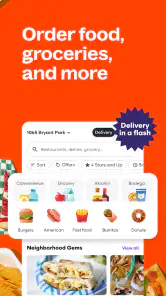
My first useful step with Grubhub is to enter the address where I actually want the food delivered, then browse what is available nearby. That small choice matters: options can change with location, so I would not build a dinner plan around a restaurant until I have checked the delivery area. Grubhub: Food Delivery is a free Food & Drink app from Grubhub, and I find it most helpful when I treat it as a way to compare nearby choices rather than a promise that every place I like will be available.
Start with the delivery details
For a first order, I would choose a familiar meal and a restaurant whose menu is easy to understand. That makes it simpler to spot whether the order is complete before checkout. If you are sending food to an apartment, office, or another person, take a moment to make the delivery location and any instructions clear. A useful note should explain the practical detail a driver needs, not repeat information already obvious from the address.
I also recommend checking the full order summary before paying. Menu prices are only one part of the decision; the checkout total and the arrival estimate are what help you decide whether delivery suits this particular meal. If either feels unreasonable, comparing another nearby restaurant is a better move than rushing through the order because you have already chosen a dish.
Where it earns a place in your routine
The app is especially convenient when several people need to agree on dinner but nobody wants to cook. I might compare a couple of menus, let everyone choose a familiar item, and then place one order rather than juggling separate restaurant searches. It can also help when a workday runs late and I need a straightforward meal without spending the evening planning recipes or driving to pick food up.
For a realistic first success, imagine getting home tired and wanting something dependable. I would enter the home address, choose a restaurant with a clear menu, check the total and timing, and place a modest order. Once it arrives, I would know whether that restaurant travels well and whether its portions suit me. That is more useful than judging the app by a single ambitious order for a special occasion.
How to judge the choices
Ratings and food photos can narrow a long list, but I would use them as clues rather than guarantees. A highly rated place may still be a poor fit for a particular craving, and a photo cannot tell you whether a dish will hold up during delivery. For items where texture matters, such as crisp food, I would favor a nearby option and check the expected arrival time before ordering. For a group, menu clarity and choices that are easy to share can matter more than having the widest selection.
Compared with calling a restaurant directly, browsing in the app makes it easier to look across menus and keep the order details together. Calling may be preferable if you need to discuss a complicated request or clarify something important about a dish. Compared with picking up food yourself, delivery saves the trip but gives you less control over timing and how the meal fares on the way. I see Grubhub as a convenient middle ground, not automatically the cheapest or best choice for every order.
You May Like

Clash of Clans Is Won Between the Battles

Android Auto Makes the Case for Quieter Car Software

MobiOffice: Transforming Mobile Productivity with Seamless Integration

EA SPORTS FC™ Mobile Soccer: Redefining Mobile Sports Gaming

How Microsoft OneDrive Became a Mobile Productivity Giant

How Google Translate Breaks Language Barriers Effortlessly
Good fit, with sensible limits
I would recommend trying it if you value browsing nearby restaurants and want delivery to be part of the decision from the start. It is less compelling if you already know exactly where you want to eat and can collect the food easily, or if your priority is the lowest possible total. In those cases, checking a restaurant’s own ordering options or picking up in person may make more sense. Availability and delivery estimates also depend on the location and order, so I would keep a backup plan when dinner timing is critical.
If you are wondering whether it is only for restaurant meals, the app also includes alcohol and other nearby orders. The practical answer is to check what is available at your location and review the order details before committing. It is rated for Everyone, has a 4.5 average from around 955,000 ratings, and has been installed over 10 million times. Those figures suggest a widely used service, but they cannot guarantee that every local delivery will go smoothly.
Another useful habit is to save a successful restaurant in your own mental shortlist, even if you do not order from it every week. Remember what traveled well, what arrived as expected, and what you would change next time. That turns the app from an endless browsing session into a quicker decision tool. For a shared order, agree on the restaurant and delivery address first; then each person can focus on choosing food, which helps avoid last-minute confusion about where the order is going.
Before installing, it is worth knowing that the app’s release dates back to October 4, 2010, and its current version is 2025.49, with Android support from version 7.0. I would not choose a delivery service based on version numbers alone; what matters more is whether restaurants serve your area and whether the final cost works for you. Still, a long-running app with a familiar ordering flow can be reassuring for a first-time user who simply wants to get one meal delivered without a steep learning curve.
Getting Started with Grubhub
Setting up the Grubhub: Food Delivery app was a breeze. I downloaded it from the app store, and within minutes, I was ready to explore the dining options available in my area. The interface is user-friendly, which is a plus for someone like me who isn't the most tech-savvy. With just a few taps, I could browse local restaurants, filter by cuisine, and check user reviews to help make a decision.
Exploring the Menu
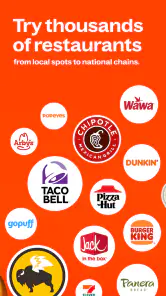
One of the things I love about Grubhub is the variety of food options. Whether I'm in the mood for spicy Thai food, a classic New York-style pizza, or a hearty burger, I can look through menus in one place. The app lets me compare restaurants, check ratings, and view dish photos. That makes browsing useful when I know what kind of food I want but have not decided where to order from.
For a first visit, I would avoid scrolling without a plan. Start with a cuisine or dish you already enjoy, then compare a small handful of menus. Look closely at how the restaurant describes each item and whether the portions or sides match what you have in mind. This is especially helpful for a shared meal: a menu that clearly explains what comes with a dish makes it easier to order for several people without discovering at the table that an expected side was not included.
Ordering Made Easy
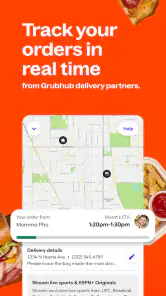
Once I made my choice, placing an order was simple. Grubhub's checkout process is straightforward, with multiple payment options including credit cards, PayPal, and more. What I found particularly handy was the ability to track my order in real time. Seeing the delivery progress kept me updated about when the food might arrive.
Before confirming, I would check that the selected items, address, and any delivery notes are correct. This final pause is more valuable than it sounds when ordering for someone else or sending food to a workplace, where a small address mistake can create a needless delay. I would also treat the displayed timing as an estimate, not a guarantee. If you have a hard deadline, such as needing to leave soon, delivery may not be the dependable choice even when the app gives a reassuring arrival window.
For groups, it helps to settle the practical details before passing around the phone: who is choosing the restaurant, where the food should go, and whether everyone has agreed on the total. That reduces the chance of a last-minute change after people have picked dishes. For a solo order, I find the simplest route is to select a meal I know I will enjoy, review the complete checkout screen, and avoid adding extras just because they are visible.
Delivery Experience
My delivery experience with Grubhub has generally been positive. Estimated times have usually been useful, and I have rarely waited longer than expected. The delivery instructions are handy for apartment complexes or locations that can be tricky to find. A concise note about an entrance or a drop-off point can make the handoff clearer, particularly when the street address alone does not tell the whole story.
Food quality after a trip is not controlled by the app alone. A nearby restaurant and dishes that travel well are safer choices than fragile items ordered from farther away. If crispness matters, I would order a meal that is still enjoyable if it softens slightly, or choose pickup instead. For soups, drinks, and other spill-sensitive items, I would be cautious about placing a large order for a group unless everyone is comfortable with the delivery trade-off.
Tracking is useful for planning, but I would not build the rest of an evening around watching the screen. Use the estimate to decide whether you have time to set the table or finish a task, then check again if the timing matters. If something about the order looks wrong, review the order details before assuming the restaurant has missed an item. Keeping the receipt and checking the bag promptly also makes it easier to notice a problem while the order is still fresh in your mind.
Choosing between delivery and other options
Grubhub is most useful when I want to compare available restaurants without opening several menus or making calls. A restaurant’s own ordering route may be better if I already know exactly where I want to eat, especially when I want to ask a detailed question before ordering. Pickup is the stronger option when I care most about controlling the timing or avoiding the uncertainty of a trip from restaurant to door. These are not flaws unique to Grubhub; they are the ordinary compromises of getting a prepared meal delivered.
Against other delivery apps, I would judge Grubhub by the restaurants it actually shows for my address, the clarity of its checkout, and the final amount for the meal I want. A service with a familiar name is not automatically the best choice if another option has a more suitable local restaurant or a better total for that order. I would compare the same meal rather than compare app screens in the abstract: availability, delivery timing, and the complete cost are what affect the decision.
Who should try it, and who may not need it
I think it suits people who want a straightforward way to browse nearby food, occasional delivery users who do not want to memorize restaurant ordering systems, and households trying to coordinate one meal. The option to browse food as well as alcohol and other nearby orders gives it broader everyday uses, though what appears depends on location. The Everyone content rating is a general age classification, not a substitute for checking local rules or the details of a particular order.
You may not need it if you usually cook, have easy access to the restaurants you like, or are focused on spending as little as possible. Delivery adds convenience, but the final checkout total should decide whether that convenience is worth it on a given day. I would also look elsewhere if you need certainty about a complicated dietary concern: a menu description may not answer every question, and contacting the restaurant directly is the more sensible step when an ingredient detail could affect your health.
For someone trying the app for the first time, my advice is to make the first order deliberately uncomplicated. Pick a familiar dish from a restaurant with a clear menu, enter the exact destination, check the full total, and keep the order small enough that an imperfect choice is not a major disappointment. Once you have learned which nearby places deliver well, you can use that experience to make future decisions faster rather than starting from scratch each time.
Final Thoughts
Overall, the Grubhub: Food Delivery app has become a useful option in my routine. It's convenient for comparing nearby dining choices, and the ordering flow is easy to follow. Whether you're too busy to cook, looking for a change from your usual meal, or coordinating dinner at home, it is worth considering. I would still compare the total and timing with pickup or direct ordering when cost or certainty matters most. For a first-time user, the best way to see whether it fits is to place a simple order from a nearby restaurant and judge the experience by the food, the handoff, and the final cost.
Grubhub: Food Delivery Frequently Asked Questions
Can I browse nearby restaurants before placing an order?
Yes. Grubhub is designed to help you find food and other offerings from nearby places, so you can explore available options before deciding what to order. The selection can depend on your location, and menus or items may differ between restaurants. Browsing first is a practical way to see whether the app has choices that suit what you are looking for.
Can I order alcohol through Grubhub?
Grubhub’s store summary describes ordering food, alcohol, and more from nearby places. Whether alcohol is available depends on the options offered around you, so you may see different selections in different locations. The app is rated Everyone, but that rating does not mean every item is intended for every user; alcohol purchases are subject to applicable age requirements.
Is Grubhub available for both Android and iPhone?
Grubhub is available for Android and iOS, so it can be used on supported Android phones and iPhones. On Android, the current version is 2025.49 and requires Android 7.0 or later. The app is free to download, but ordering food or other items through it involves separate purchase costs and any applicable order charges.
Is Grubhub free to download, and which devices can run it?
Grubhub is free to download and is available for Android and iOS. The current version is 2025.49, and Android users need version 7.0 or later. The app is for food and drink ordering, and its age rating is Everyone. The price of downloading the app is separate from the cost of food, delivery, and any other order charges.
Who develops Grubhub, and what age group is the app for?
Grubhub is developed by Grubhub, and the app is rated Everyone, making it suitable for a broad audience. It focuses on ordering food, alcohol, and other items from nearby places, so users should keep in mind that the products available can vary by location. The app itself is free to download, while purchases made through it may have their own costs.
Pros
- Wide variety of restaurant options
- User-friendly interface
- Real-time order tracking
- Scheduled delivery options
- Multiple payment methods
Cons
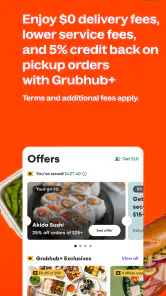
- Delivery fees can be high
- Occasional late deliveries
- Limited availability in rural areas
- Inconsistent customer support
- Service fees on small orders

- Category
- Food & Drink
- Version
- 2025.49