Grifols Plasma Donor Hub
- 4.45K
- 4.7
- Installs
- 1.00M
- Price
- Free
Screenshots
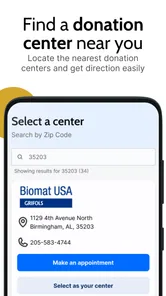
Analysis by Reviewed
When I’m deciding whether a dedicated donation app is worth keeping on my phone, I look for one thing first: does it make the practical side of donating easier without getting in the way? Grifols Plasma Donor Hub is built for people who donate plasma through Grifols, bringing donation-related tasks into one place. I see its strongest appeal in helping regular donors stay organized; it is less useful if you want a general health app or information about donating at other organizations.
Getting to Know the App
So, what's the deal with this app, you ask? The Grifols Plasma Donor Hub is designed specifically for those who regularly donate plasma. It's like having a personal assistant in your pocket, keeping track of your donation schedule, rewards, and more. Right off the bat, the app impresses with its sleek and user-friendly interface. Navigating through its features is as smooth as a hot knife through butter.
That focused purpose matters. Unlike a general calendar, health tracker, or notes app, Donor Hub is meant to support the donor relationship with Grifols rather than manage every part of your health. Grifols SA develops it, and its medical category reflects the context, though I would treat it as an organizer for donation-related activity, not as medical advice or a substitute for a conversation with donation-center staff.
Why It’s Worth Your Time
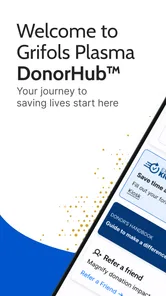
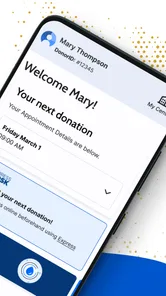
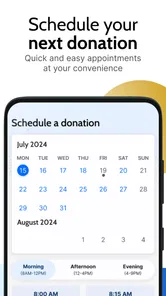
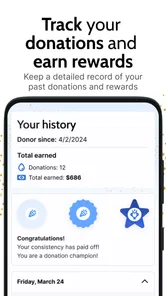
Here's the scoop: this app is all about making your life easier. First off, the scheduling feature is a game-changer. No more fumbling around trying to remember your next appointment or sifting through emails. The app sends you timely reminders for upcoming donations, ensuring you never miss a beat. Plus, it keeps a detailed history of your past donations, so you can easily track your contribution to this noble cause.
In everyday use, the history can be more than a record to look back on. If you have a question about when you last donated, checking the app before contacting the center gives you a useful starting point. I’d still confirm anything that affects eligibility or timing with the center itself: an app reminder helps with planning, but it should not be treated as a decision about whether you are medically ready to donate.
Imagine fitting a visit around work or family plans. You can check your donation details while planning the week, then use a reminder to avoid relying on memory alone. If your schedule changes, the sensible next step is to check the app for available options and contact the center if you need help. That small distinction matters: a digital record can simplify preparation, but it does not guarantee that a particular appointment or donation will work out.
A practical way to get more from that routine is to check the app before you start planning around a visit, rather than treating a notification as the whole plan. For example, if a work shift changes, look at the donation information first, then adjust your personal calendar and confirm anything uncertain directly with the center. This avoids duplicating reminders while keeping the app’s record and your actual plans aligned. It is a small workflow choice, but it makes a dedicated donor tool more useful than a notification you swipe away and forget.
More From Our News Desk

 Block Blast!
 Makes Every Clear Feel Like One More Turn
A clean little block puzzle becomes a study in space, risk, and self-control. Its best moments come from one satisfying clear; its toughest test is knowing when to stop.

 Super Stylist Fashion Makeover
Super Stylist Turns Dress-Up into a Runway Career
Its makeover-to-client loop turns quick outfit decisions into shareable style theater. The question is whether the closet keeps giving players a reason to return.

 Block Craft 3D:Building Game
Block Craft 3D Under Pressure: How Well Does It Recover When Building Goes Wrong?
A failure-focused look at Block Craft 3D’s forgiving building loop, its uncertain recovery edges, and the moments that demand more than a cheerful village.

 Woodturning
 Trades Creative Freedom for a Satisfying Carving Loop
If your usual creative game is about building, decorating, or styling, Woodturning trades open-ended projects for a tactile, tightly guided carving loop. Here is what that switch really costs.

 PUBG MOBILE
 Shows What Battle Royale Must Get Right
PUBG MOBILE shows how battle royale has matured: bigger systems matter less than meaningful choices, readable fights, and a reason to return after every loss.

 Braindom: Brain Games Test
Braindom’s Social Life Happens Between Puzzles
Braindom turns quick logic traps into a personal ritual, but its community value is more about comparing answers than building together.
Latest News



And let’s talk about rewards. Who doesn’t love a little recognition for their good deeds? The app offers a rewards program that’s quite literally, rewarding. You accumulate points with each donation, which can be redeemed for various incentives. It’s a nice little pat on the back for your time and generosity.
I’d think of rewards as a secondary benefit, not the main reason to donate. They can make the experience feel acknowledged, but the practical value depends on the reward options and the donor’s own priorities. If you mainly want to remember your activity and keep donation-related details together, the schedule and history are likely more consistently useful than checking points. It is also worth reviewing the reward information inside the app rather than assuming that every incentive suits every donor.
Features That Stand Out
One feature that really caught my eye is the health tracker. It’s not just about donations; it’s about ensuring you're fit and healthy to give. The app provides insights into your health parameters, helping you stay on top of your game. It's like having a mini health check-up without the fuss.
For me, the important trade-off is how to interpret that information. Any health-related figures or prompts in a donor app are best used as context for a visit, not as a diagnosis or a promise of eligibility. If something seems unusual or you feel unwell, the safer choice is to ask qualified staff rather than relying on an app screen to settle the question. That keeps the tracker in its proper role: a practical aid, not a clinician.
Another highlight is the community feature. This app doesn’t just connect you to your donation center, but it also links you up with other donors. Sharing experiences, tips, and support makes the whole process feel more communal and less like a solo journey.
Community can be reassuring for a first-time donor who wants to hear how others approach the routine, but personal experiences should not be mistaken for official guidance. Donation circumstances differ, so I would use peer discussion for encouragement and everyday tips while taking eligibility, health, and procedure questions to the center. That balance lets the social side help without asking it to answer questions it cannot reliably settle.
For someone new to donating, a sensible use of the community side is to collect practical questions before a visit, not to crowdsource a personal health decision. A donor might learn what other people find helpful when fitting a visit into a busy day, then ask center staff about anything specific to their own circumstances. This keeps the social feature in its lane and turns browsing into preparation rather than a substitute for professional advice.
Donor Hub is a better fit than a generic calendar when you want donation-specific records and rewards alongside reminders. A calendar may be enough if all you need is a nudge, while a general wellness app is a better choice for tracking broader exercise, sleep, or health goals. The trade-off is focus: this app is most relevant to Grifols donors, rather than people looking for a universal plasma-donation directory or a full medical record.
Compared with the usual alternatives, the main question is whether you want a single-purpose companion or a flexible tool you already use. A calendar is simpler and may be preferable for occasional donors who only need to reserve time. Notes can hold a personal checklist, but they do not bring the same donation-centered combination of schedule, history, and rewards described here. A general wellness app can cover wider habits, yet may leave the Grifols-specific routine scattered elsewhere. I’d choose Donor Hub when that recurring relationship is the reason I need an app, not simply because it belongs in the medical category.
Who Will Get the Most from It
I’d recommend it most to existing Grifols donors who make repeat visits and want one place to check their donation routine. New donors may also find the reminders, history, and community useful as they get accustomed to the process. Someone who donates elsewhere, rarely donates, or only wants general medical information may get little from installing a center-specific tool; a basic calendar or the donor organization’s own guidance may be a better fit.
A realistic example is a repeat donor who plans a week around rotating work hours. Instead of relying on memory, they can check their donation history and scheduling details while choosing a workable time, keep the reminder as a prompt, and contact the center if a change raises a question. Afterward, the history gives them a place to review the visit, while rewards can be checked separately when they have a reason to do so. The app helps organize the routine, but the donor still makes the real-world arrangements and follows the center’s guidance.
It is also worth asking what you expect the app to do before installing it. If your goal is a record of visits and a reminder tied to Grifols, its narrow focus is an advantage. If you want a tool that coordinates appointments across different organizations, tracks every aspect of your health, or answers clinical questions, this is not the right kind of product. I’d skip it if I were not a Grifols donor or if my existing calendar already handled the only task I cared about.
The app is free and rated for Everyone, which makes trying it straightforward for a broad audience. It has a 4.7 average from around 31,000 ratings and more than 500,000 installs, suggesting that many people have found a reason to use it, though those figures cannot tell you whether its workflow will suit your own center or routine. I’d judge it by whether its schedule and records match the way you actually donate.
What to Expect as It Evolves
The current version is 13.4.2, and the app first arrived on November 9, 2021. That gives existing users a clear point of reference for the product’s age and current release, but a version number alone does not tell me which individual features changed or how a particular update affected someone’s account. I would check the release notes when updating if a change to a familiar workflow matters to you, and avoid assuming that a new version has altered donation procedures.
For someone already using it, the most useful way to approach a new release is to check whether the parts they rely on still fit their routine: reminders, past donation information, reward details, or the health and community areas. If something looks different, taking a moment to verify the relevant information is more reliable than assuming the app works exactly as it did before. The current release establishes where the product stands now; what future changes will mean for existing donors is something to judge only when those changes are actually visible.
For a smooth first setup, I’d keep the app’s role narrow: use it to organize Grifols donation details, check the information it presents, and follow up with the center when a question affects your visit. If reminders are not useful to you, the history or rewards may still make it worthwhile; if none of those tasks matter, there is little reason to keep another app installed. The most useful test is whether it saves you a step on the next planned donation.
One useful habit is to separate what the app helps you remember from what you need to verify elsewhere. Donation history can help you explain what you are asking about, and a reminder can keep a planned visit on your radar. Neither should become the sole basis for deciding eligibility, changing a visit, or interpreting a health concern. That boundary is not a weakness unique to this app; it is a sensible way to use any digital tool connected with a medical setting.
Final Thoughts
In the grand scheme of things, the Grifols Plasma Donor Hub is more than just an app; it's a movement towards making plasma donation as seamless and rewarding as possible. It’s perfect for both seasoned donors and newbies, offering a multitude of features that cater to all your donation needs. So, if you’re looking to make a difference, this app is your gateway to doing just that while keeping everything organized and on track.
My recommendation is more measured: if you donate through Grifols and want donation-specific organization, it is a useful companion to try. I would not rely on it for medical decisions or expect it to replace direct communication with the center. Used for the practical tasks it is designed to support, it can make a recurring routine easier to manage; outside that routine, a simpler alternative may be all you need.
Before deciding whether to keep it, I’d give it a fair test across the parts of a normal donation cycle: check the details ahead of a planned visit, notice whether the reminder helps, and see whether the history or rewards are genuinely convenient afterward. If those steps save effort, the app has earned its place. If you find yourself still managing everything in another calendar and never opening Donor Hub, there is no need to maintain a second system out of habit.
For existing donors, I would watch for changes that affect familiar tasks rather than treating a new version number as proof of a major redesign. For prospective users, the central question stays simple: do you donate through Grifols often enough to benefit from donation-specific organization? If yes, Donor Hub has a clear purpose. If not, a general calendar, a broader wellness tool, or the guidance of the organization you use is likely the more practical choice.
Grifols Plasma Donor Hub Frequently Asked Questions
What should I know about Grifols Plasma Donor Hub before downloading it?
Grifols Plasma Donor Hub is a medical app for people who donate plasma through Grifols. Its purpose is to make the donation experience smoother by bringing donor-related tools and information together in one place. If you are looking for a general wellness or health-tracking app, this is more specialized: its focus is the Grifols plasma donation experience.
Who publishes Grifols Plasma Donor Hub, and how can I identify the right app?
The app is published by GRIFOLS SA and is listed as Grifols Plasma. Checking the developer and app name before installing can help you distinguish it from unrelated medical apps. It is intended for Grifols plasma donors, so its usefulness depends on whether you want to manage or follow parts of that specific donation experience.
Is Grifols Plasma Donor Hub free, and what devices can run it?
Grifols Plasma Donor Hub is free to download and is intended for everyone. It is a medical app developed by GRIFOLS SA, with a minimum operating-system requirement of version 7.0. Before installing, check that your device meets that requirement and has enough available space. The app is designed to make the donation experience smoother for Grifols plasma donors.
Who is Grifols Plasma Donor Hub designed for?
The app is designed for people who donate plasma through Grifols and want a convenient place to manage parts of that experience. Its donor-focused features can be useful to both new and returning donors, especially if they want to stay organized around appointments and donation activity. It is not a general health-tracking app; its purpose is centered on the Grifols plasma donation experience.
What is the Grifols Plasma Donor Hub app?
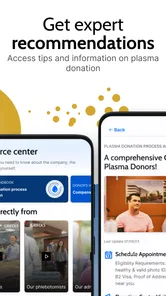
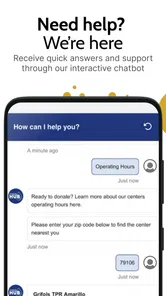
The Grifols Plasma Donor Hub app is a specialized application designed to streamline the plasma donation process. It allows users to track their donation history, schedule appointments, and receive important updates about promotions and eligibility. The app aims to make the donation experience more convenient and rewarding for both new and returning donors.
Pros
- User-friendly interface simplifies navigation
- Tracks donation history efficiently
- Provides reminders for appointments
- Easy access to rewards and incentives
- Secure login for donor data protection
Cons
- Limited features for non-frequent donors
- Requires internet for full functionality
- Occasional app crashes reported
- No integration with other health apps
- Limited language support available