Glucose Buddy Diabetes Tracker
- 5.66K
- 2.0
- Installs
- 500.00K
- Price
- Free
Screenshots
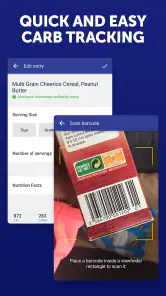


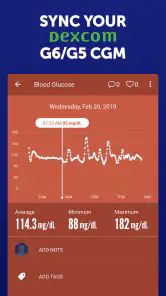
Analysis by Reviewed
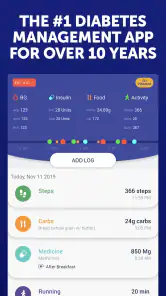
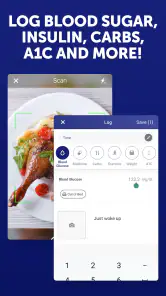
I approached Glucose Buddy Diabetes Tracker as a tool for daily diabetes management rather than a quick health experiment. Its purpose is clear: it brings glucose, A1C, carbohydrates, medication, exercise, and related notes into one place. That combination can make the first few days feel reassuring, especially if your information is currently scattered between paper notes, phone reminders, and memory. At the same time, this is a medical logging app, so its real value depends less on novelty and more on whether it becomes an easy habit.
The app comes from Azumio Inc. and is available as a free medical app for Everyone. It has passed the point where a product is merely new, having been released on June 11, 2012, and its current version is 5.36.9582. I think that history matters: an app like this should be judged by how comfortably it supports repeated entries, not by how impressive it feels during a single setup session.
What the first week feels like
During the first week, the strongest appeal is concentration. Instead of treating blood glucose, food, medication, and movement as unrelated scraps of information, Glucose Buddy gives them a shared home. That makes it easier to look back at a day as a whole. A glucose reading beside a meal note or exercise entry can be more useful than any one item viewed alone.
I found the basic idea especially suitable for someone who has just been asked to become more organized with diabetes care. The app does not require you to create a complicated personal system from scratch. You can begin with the information you already track and gradually make the record more complete. That lower starting barrier is important because the first week is often when enthusiasm is highest but routines are still fragile.
The free entry point also makes experimentation less risky. You can see whether recording information on a phone fits your life before deciding whether any paid extras are worth considering. The app includes in-app purchases ranging from $14.99 to $59.99 per item, so I would not treat the free installation as a promise that every useful part of the experience stays free. I would first use the basic workflow for several days and decide whether it saves effort before spending anything.
A realistic first-week routine might look like this: after breakfast, you record the relevant glucose reading and carbohydrate information; later, you add medication or exercise; in the evening, you review the day rather than trying to remember it from scattered notes. The benefit is not that the app makes a medical decision for you. The benefit is that it can help you arrive at a conversation with a clinician carrying a clearer record.
That distinction is essential. Glucose Buddy is a tracking companion, not a replacement for professional medical advice. I would use it to organize observations and questions, never to change medication or interpret a worrying result without appropriate guidance. For anyone managing diabetes, the quality of the record matters, but so does knowing when the record needs to be discussed with a healthcare professional.
More From Our News Desk

Clash of Clans Is Won Between the Battles

Android Auto Makes the Case for Quieter Car Software

MobiOffice: Transforming Mobile Productivity with Seamless Integration

EA SPORTS FC™ Mobile Soccer: Redefining Mobile Sports Gaming

How Microsoft OneDrive Became a Mobile Productivity Giant

How Google Translate Breaks Language Barriers Effortlessly
The details that make logging more useful
One practical insight is that consistency is usually more valuable than exhaustive detail. It is tempting during the first few days to record everything, including information you will never review. I would begin with the fields that directly support your own routine: glucose, meals or carbohydrates, medication, and exercise when those details help explain patterns. A smaller record that you maintain is more useful than a perfect-looking record abandoned after a week.
A second useful approach is to add context when a reading seems unusual. A short note about an unexpected meal, a change in activity, or a missed routine can make a later review much more informative. The app’s value grows when entries explain one another. A list of numbers alone may be tidy, but a number connected to what happened around it is easier to discuss and remember.
A third trade-off appears when several people are involved in care. If a family member helps with reminders or appointments, decide in advance who is responsible for entering information and who simply reviews it. Shared responsibility can improve consistency, but it can also create gaps if everyone assumes someone else has logged the event. The app does not remove that human problem; it only gives the information a central place.
Why the second month matters more than the first
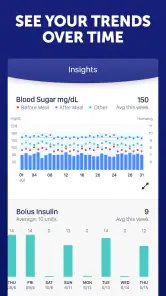
After the initial curiosity fades, the question changes from “Can I record this?” to “Does recording it still help me?” That is where Glucose Buddy has to earn its place. Its recurring value comes from turning individual entries into a history you can revisit. A single day rarely tells the whole story, while a maintained record can help you notice whether certain routines repeatedly coincide with readings you want to discuss.
I would judge the app month by month using a simple test: do I open it because it reduces uncertainty, or only because I feel guilty about not logging? If it helps me prepare for an appointment, remember what happened during a difficult week, or ask a more precise question, it has a durable role. If it becomes another obligation that produces records nobody reviews, the phone icon is no longer earning its space.
The inclusion of A1C alongside everyday entries gives the app a useful long-view perspective. Daily glucose information and a longer-term marker serve different purposes, so I would avoid treating them as interchangeable. A1C belongs in the broader conversation about control over time, while daily logs provide context about particular routines and events. Keeping both kinds of information together can make personal records easier to follow.
Exercise and carbohydrate tracking also become more valuable after the novelty period, but only when used selectively. I would not force myself to produce a detailed exercise report for every minor movement unless that information genuinely helps my care plan. Instead, I would record meaningful changes: a new workout pattern, an unusually active day, or activity that appears relevant to a later reading. This keeps the habit practical rather than turning it into clerical work.
For appointments, I would spend a few minutes before the visit looking through the period I actually want to discuss. The useful preparation is not simply showing that entries exist. It is identifying questions: Did a routine change? Were there repeated gaps? Did a particular type of day deserve attention? That preparation turns the app from a passive diary into a prompt for a better conversation, while leaving medical interpretation to the clinician.
Who gets lasting value from it
Glucose Buddy is most appealing to people who already want a central log and are willing to enter information regularly. It may suit someone newly building a tracking routine, a person who wants glucose and lifestyle notes together, or a user who needs a portable record instead of a paper notebook. It can also help a caregiver-supported routine when everyone agrees on how the record will be maintained.
I am less convinced it is the right choice for someone who already has a glucose meter, health platform, or clinician-approved system that automatically collects the information they need. Manual duplication is a real cost. If another tool already captures readings and connects naturally to your care routine, adding a second log may create more work without adding useful context.
I would also hesitate to recommend it as the only tool for a person who expects automatic guidance, urgent alerts, or a highly specialized clinical workflow. A tracker can organize information, but organization is not the same as diagnosis, treatment adjustment, or emergency support. The more serious or complex the situation, the more important it is to choose tools in consultation with the healthcare team rather than relying on a general-purpose log.
The maintenance burden nobody notices on day one
The main maintenance burden is not installation; it is repetition. Every logging app asks you to remember the moment when information should be entered. A busy morning, a meal away from home, or an evening when you are tired can break the chain. Once a few entries are missing, the record may feel less trustworthy, which can make returning to it harder.
My advice is to attach entries to routines that already exist. A meal, a medication habit, or a quiet moment at the end of the day can act as a natural cue. I would avoid creating a separate, elaborate scheduling ritual unless the app truly makes it easier. The best maintenance system is usually the one that adds the fewest extra decisions.
There is also a review burden. Recording information without looking at it can become a form of busywork. I would set aside a regular, realistic moment to scan the log and note what deserves attention. That review does not need to become a long data-analysis session. Even a short check can reveal missing entries, recurring circumstances, or questions to bring to a professional.
Another maintenance issue is accuracy. A late entry may still be better than no record, but it is important to distinguish remembered information from information recorded at the time. If you reconstruct a day later, I would make a brief note for myself so that I do not accidentally treat an estimate as a precise measurement. The app can store the record, but it cannot know how reliable the memory behind an entry is.
Where fatigue begins
Logging fatigue usually starts when every entry feels equally important. Not every meal requires the same level of detail, and not every exercise event deserves a lengthy note. I would create a personal minimum: the information I can realistically record even on a difficult day. Then I would add detail only when it helps answer a specific question or supports a discussion with my care team.
Fatigue can also come from chasing completeness after a missed day. I would resist spending excessive time rebuilding a week from memory. A clean restart is often more sustainable than turning one gap into a large administrative project. The goal is a useful ongoing record, not a flawless historical archive.
The app’s broad scope is both its strength and its source of friction. Having glucose, A1C, carbohydrates, medication, and exercise in one place reduces fragmentation, but it also presents more categories to maintain. Someone who only wants a very quick glucose note may find the wider system unnecessary. Someone who needs several kinds of context may appreciate the same breadth.
There is a financial fatigue question as well. Because the app is free to start but offers paid items from $14.99 to $59.99, I would make any purchase decision based on repeated usefulness rather than first-week excitement. If a paid feature saves time every week or improves a record you actively use, it may be easier to justify. If it merely adds another layer to maintain, the extra cost and effort point in the wrong direction.
How it compares with familiar alternatives
The usual alternatives fall into three groups: paper notebooks, general health apps, and tools built around a specific glucose meter or healthcare service. A notebook can be faster for a person who dislikes typing and wants complete control, but it is harder to search and easier to misplace. A general health app may handle exercise and food well while offering less diabetes-focused structure. A meter-centered system may reduce manual entry, especially for readings, but can be less comfortable for broader notes depending on the user’s routine.
Glucose Buddy’s particular middle ground is its focus on bringing several diabetes-related categories together without requiring the user to keep separate records. That makes it more purposeful than a generic wellness diary. Its weakness, compared with a connected device ecosystem, is the likely dependence on the user’s willingness to enter information. If automation is your top priority, a different option may fit better.
I would choose this app over paper when I need a portable history that I can maintain on my phone. I would choose paper over it when speed, privacy preferences, or a clinician’s existing paper workflow matters more than organization. I would choose a device-linked system when reducing manual transcription is more important than having a broad, flexible log. The right choice depends on which part of the routine currently causes the most trouble.
My long-term verdict
Glucose Buddy earns lasting space only when it becomes part of a repeatable care routine. Its first-week appeal is easy to understand: it gathers important diabetes information in one medical app, starts free, and gives a new user a clear place to begin. Its month-to-month value is more conditional. The record must be maintained, reviewed, and used for real decisions about what to discuss with a healthcare professional.
I like the app’s central idea and its practical range, particularly for people who want glucose, A1C, carbohydrates, medication, and exercise notes connected in one ongoing history. I also appreciate that it can support a more thoughtful appointment without pretending to replace medical care. Those are meaningful strengths, but they do not cancel the effort of manual tracking or the possibility of paid additions.
The average rating is 2.0 from around 15 thousand ratings, with roughly 5.7 thousand written reviews, while the app has reached over 500 thousand installs. Those figures suggest that interest is substantial but user satisfaction is not something I would assume automatically. I would treat that as a reason to test the daily workflow carefully, not as a reason to dismiss the app without trying it.
My recommendation is cautious but positive for a specific audience: people who need a structured diabetes log and are prepared to make it a modest daily habit. I would skip it if you want automatic collection, emergency monitoring, or a replacement for professional guidance. For everyone else, I would begin with the smallest useful routine, review whether the record genuinely helps after several weeks, and only then consider whether the app deserves a permanent place on the phone.
Glucose Buddy Diabetes Tracker Frequently Asked Questions
Does Glucose Buddy Diabetes Tracker support the kinds of details I want to record?
The app is built to keep several diabetes-related records together, including blood glucose, A1C, carbohydrates, medication, exercise, and other health information. Before downloading, consider which details matter most in your daily routine and whether you want one place to review them. The usefulness of a tracker depends on how well its available logging options fit your personal care plan.
How can I use Glucose Buddy records during a healthcare appointment?
Glucose Buddy can help you keep relevant information organized so it is easier to review before a conversation with your doctor or diabetes care team. Consistent entries may make it simpler to discuss readings, food, medication, and activity in context. Treat the app as a record-keeping aid rather than a clinical report or substitute for professional interpretation, and follow your care team’s instructions.
What information should I have ready before using Glucose Buddy Diabetes Tracker?
It helps to know which details you want to track, such as glucose readings, meals, medication, activity, weight, or personal health notes. The app is intended to bring diabetes-related records together, so deciding what is useful for your routine can make logging more consistent. You can use it to organize information for later discussions with your doctor or diabetes care team.
What is Glucose Buddy Diabetes Tracker used for?
Glucose Buddy Diabetes Tracker is designed to help people record and organize important diabetes-related information in one place. You can generally log blood glucose readings, meals, medication, physical activity, weight, and other health notes. After using it, the main benefit is having a clearer overview of daily patterns that can be discussed with a doctor or diabetes care team. It is a tracking tool, not a replacement for professional medical advice.
Can Glucose Buddy connect with glucose meters or health platforms?
Depending on your device, operating system, account type, and the integrations currently supported by the app, Glucose Buddy may allow data to be entered manually or imported from compatible health and glucose-monitoring services. Compatibility can change over time, so users should check the app’s current settings and official store listing before downloading. If automatic syncing is unavailable, manual logging remains an important option for keeping records complete.
Pros
- Tracks glucose
- meals
- medication
- activity
- and weight in one place.
- Custom reminders can help users stay consistent with daily diabetes routines.
- Charts make it easier to spot trends and share records with healthcare providers.
- Supports personalized goals for different diabetes management needs.
- Useful educational content can help users better understand diabetes care.
Cons
- Many advanced tools and insights require a premium subscription.
- Manual data entry can become time-consuming for frequent readings.
- Some users may find the interface crowded with features and notifications.
- Accuracy depends on careful logging and compatible connected devices.
- Not a replacement for professional medical advice or emergency care.
- Category
- Medical
- Version
- 5.36.9582











