Full Code Medical Simulation
- 504.00
- 4.3
- Installs
- 1.00M
- Price
- Free

Screenshots

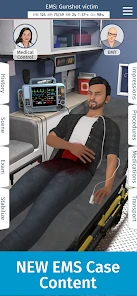

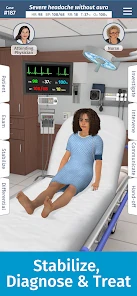




Analysis by Reviewed
My first reaction to Full Code Medical Simulation is that it is best approached as a place to practise clinical thinking, not as a substitute for training or real patient care. It is a medical learning app from Full Code Medical Inc., and its central appeal is the chance to work through virtual emergency cases on a phone. I would use it when I have a little time to reason through a case, then reflect on the decisions I made rather than treating a completed scenario as proof of competence.
Who gets the most from a case-based approach
The app makes the most sense for medical students, clinicians who want a refresher, and learners who already have enough background to understand why a choice matters. A case can give you a prompt to retrieve knowledge and notice gaps; it cannot tell you whether your real-world assessment is safe. If you are completely new to medicine, curious about healthcare, or looking for a casual game, the clinical framing may be more demanding than entertaining. I would start with a textbook, course, or instructor-led resource if I needed concepts explained from the ground up.
That distinction matters when deciding what to do with the feedback. I would treat it as a learning aid: pause after a decision, consider what information led me there, and review the explanation before moving on. The useful question is not simply whether I reached an outcome, but whether I can explain my reasoning and spot what I would want to revisit.
The Ultimate Training Ground
Imagine walking into a virtual ER, where you're the one making the critical decisions. Full Code Medical Simulation provides exactly that. This app is designed to mimic real-life hospital scenarios, allowing you to practice and hone your medical skills. From diagnosing patients to administering treatments, the app offers a comprehensive simulation that’s as close to the real thing as it gets.
From first impression to a useful practice session
One practical way to use a case is to make the first pass without rushing: read the scenario, decide what information you need, and choose actions for a reason rather than tapping quickly to see what happens. Afterward, use the explanations and feedback to identify one decision worth reviewing. That small loop—attempt, reflect, revisit—can make a short phone session more valuable than racing through several cases without thinking about them.
For example, a student waiting between classes could open a case, work through the decisions, and note a topic to ask about in a study group later. That is a realistic benefit of a mobile format: it can turn spare time into a focused prompt for learning. I would avoid doing a complex case while distracted, though. If I cannot give the decisions my attention, I am more likely to remember taps than the reasoning behind them.
Engaging and Realistic Scenarios
One of the standout features of this app is the variety of scenarios it offers. You get to tackle everything from simple cases to complex medical emergencies. Each scenario is meticulously crafted to test your knowledge and decision-making skills. And trust me, the level of detail is impressive. The graphics are top-notch, and the interface is user-friendly, making the whole experience immersive.
More From Our News Desk

Weather by Xiaomi Review: Clear at a Glance, Less Clear Up Close

X Under Pressure: Can It Recover When Posting Goes Wrong?

Clash of Clans Is Won Between the Battles

Android Auto Makes the Case for Quieter Car Software

MobiOffice: Transforming Mobile Productivity with Seamless Integration

EA SPORTS FC™ Mobile Soccer: Redefining Mobile Sports Gaming
The strongest trade-off in this format is focus. A simulation can make choices feel immediate, which helps keep attention on a case, but it still simplifies the uncertainty and teamwork of actual care. I would use it to rehearse how I organize a problem, not to memorise a single sequence as if every patient follows the same script. When a case leaves me unsure, that is a cue to check a trusted learning resource or discuss the issue with a qualified educator.
Learning on the Go
Whether you’re a medical student, a professional looking to refresh your skills, or just someone curious about the medical field, this app is perfect for learning on the go. The app includes detailed explanations and feedback for each case, allowing you to learn from your mistakes and improve. Plus, the convenience of having it on your phone means you can practice anytime, anywhere.
It is free to download, with optional in-app purchases ranging from $3.99 to $99.99 per item, so I would check what is included before spending. The app is rated Everyone 10+, runs on iOS 8.0 or later, and its current version is 3.5.2. It has a 4.3 average from around 6,200 ratings, with more than a million installs. Those figures suggest it has reached a sizeable audience, but they do not tell me whether its cases match a particular course or specialty, so I would judge that fit by trying the available experience first.
Compared with lecture notes or a question bank, a simulated case is more interactive and can make the sequence of decisions easier to picture. Notes are usually better for systematic reference, while questions can be better for quick recall practice. I see this app as a complement rather than a replacement for either: use it to practise applying ideas, then turn to formal study materials when you need depth, citations, or a structured curriculum.
Personal Opinion
Now, let me get personal here. I’ve tried several medical simulation apps, but this one truly stands out. The attention to detail and the realistic scenarios make it not just a learning tool but also a fun experience. It's like having a personal tutor guiding you through each step. It's an excellent resource for anyone wanting to delve deeper into the medical world.
There is still a handoff the app cannot make for you: translating a simulated decision into supervised practice, discussion, and sound clinical judgment. I would keep a brief list of concepts that surprised me and bring those questions to a class, mentor, or clinical learning session. That turns the app into a useful starting point for a conversation instead of an isolated score or result.
In conclusion, if you're looking for an app that combines learning and entertainment in the medical field, Full Code Medical Simulation is your go-to. It's a well-thought-out app that offers value for both newbies and seasoned professionals. So, why wait? Dive into the world of medical simulation and see for yourself!
A routine that turns a case into a learning handoff
I get more from this kind of practice when I decide what I want to learn before opening a scenario. That might be keeping a differential diagnosis organized, noticing which information would change my next step, or seeing where I hesitate. Choosing one aim keeps a case from becoming a hunt for the quickest route to a successful ending. It also gives me a clear question to carry into class or a conversation with a supervisor.
After a run, I would write down the decision that felt least certain and the reason I made it. Then I would compare that reasoning with the app’s feedback, rather than copying an answer without understanding it. If the explanation raises a broader issue, such as a concept I have not studied recently, I would switch to a course text or educator for depth. The useful handoff is from simulation to deliberate review, not from simulation straight to confidence.
This workflow is especially practical for someone preparing for a teaching session or reviewing after a busy day. A learner can use one case to identify a topic for a study group, while a clinician may use it as a prompt to revisit familiar reasoning. In either situation, the exercise works best when the follow-up is specific. “I need to review why I chose that step” is more actionable than “I should do more cases.”
Choosing the right moment and device
A phone makes it easy to fit a case into a gap, but convenience is not the same as suitability for every gap. I would choose a quiet stretch when I can read carefully and think through a sequence, rather than opening a case in the middle of another task. Interruptions can break the chain of reasoning, and hurried tapping weakens the value of feedback afterward. A short, attentive session is a better use of the format than trying to squeeze in a case while distracted.
The app is aimed at medical learning, so I would not recommend it as a source of personal medical advice or a way to make decisions about someone who is ill. A virtual case is practice, not a consultation. If you are a patient seeking guidance about symptoms, a qualified health professional is the right person to contact; if you are a learner, an instructor and trusted educational material remain important checks on what you take away.
It is also worth treating purchases as a separate decision from whether the learning style suits you. Since the app is free to download but includes optional purchases, I would first explore the experience available without paying and consider whether its cases fit my goals. Before buying anything, I would check the item’s details in the app and weigh the cost against how regularly I expect to use it. A paid option is not automatically worthwhile simply because I enjoyed one session.
Where simulation helps—and where it can mislead
Compared with a static case in a book, an interactive scenario can make the order of decisions feel more tangible: I have to choose what to do rather than only read what someone else did. That can expose a gap between recognizing a concept and applying it under a sequence of choices. But the same immediacy can tempt a learner to equate a smooth run with real readiness. I would treat a successful outcome as a reason to examine my reasoning, not as a credential.
There are also situations where another format is plainly better. For foundational explanations, a structured course can build concepts step by step. For checking a precise detail, a reliable reference is more suitable than relying on memory of a simulated case. For practicing communication and teamwork, discussion with people and supervised learning offer interaction a phone scenario cannot replace. Full Code fits most naturally between those methods: it gives learners a way to apply ideas, then points them toward what needs more study.
One non-obvious benefit of reviewing uncertainty is that it can help separate a knowledge gap from a process gap. If I knew the relevant facts but did not know what to ask next, I would focus my review on organizing information and choosing a next step. If I lacked the underlying concept, I would return to formal study instead. That distinction makes the app’s feedback more useful because it directs the next learning activity rather than just encouraging another attempt.
Who should pass, and who should keep it handy
I would recommend trying it if you are already studying medicine or working in a clinical role and want an interactive prompt for reasoning through cases. It is most useful for someone willing to pause, question their choices, and follow up on weak spots. Learners who like applying knowledge rather than only reviewing notes may find the format motivating, particularly when they can bring a question from a case into a discussion with an instructor or colleague.
I would skip it, or at least avoid making it my main resource, if I wanted a beginner-friendly course that explains every medical concept from scratch, a complete reference for clinical work, or entertainment with little effort. It is also not the right tool for checking what to do in a real emergency. The medical subject matter calls for care: a simulation can support learning, but it should not encourage anyone to act beyond their training or replace professional assessment.
For a first session, I would keep the goal modest: choose one case, make deliberate decisions, and finish by identifying one point to verify elsewhere. If that process feels worthwhile, the app can become a repeatable part of study. If I find myself guessing, racing, or treating outcomes as a score to chase, I would change the routine or return to a more structured resource instead. That is the difference between using a simulation thoughtfully and merely tapping through it.
Overall, I see this as a convenient case-based companion for learners who want to practise clinical reasoning in short, focused sessions. Its strongest role is to turn spare study time into a question worth pursuing, with feedback that can guide the next step. Keep textbooks, educators, and supervised experience in the loop, and it can be a useful addition. Expect it to replace those supports, and it is the wrong tool for the job.
Full Code Medical Simulation Frequently Asked Questions
Is Full Code Medical Simulation free to download, and what may cost extra?
Full Code Medical Simulation is free to download, so you can try the app without paying upfront. It also offers in-app purchases, with individual items ranging from $3.99 to $99.99. Those purchases may provide access to additional content or features, so check the options shown in the app before buying and consider whether they suit your learning needs.
Who develops Full Code Medical Simulation, and is it well established?
Full Code Medical Simulation is developed by Full Code Medical Inc. It has been available since July 22, 2018, and has reached more than one million installs. Those details suggest that it has had a sustained presence as a medical learning app, though whether it fits your goals will depend on the kind of practice and learning experience you want.
What is Full Code Medical Simulation?
Full Code Medical Simulation is a comprehensive app designed for medical professionals and students to practice clinical decision-making and patient care skills in a realistic virtual environment. It offers a variety of medical scenarios and cases, allowing users to enhance their medical knowledge and critical thinking abilities.
Is Full Code Medical Simulation suitable for beginners?
Yes, Full Code Medical Simulation is suitable for both beginners and experienced medical professionals. The app offers a range of scenarios, from basic to advanced, catering to different levels of medical expertise. Beginners can start with simpler cases to build confidence and gradually progress to more complex simulations.
What platforms is Full Code Medical Simulation available on?
Full Code Medical Simulation is available on both Android and iOS platforms. Users can download the app from the Google Play Store for Android devices or the Apple App Store for iOS devices. This accessibility ensures that users can engage with the app on their preferred mobile devices.
Pros
- Highly realistic medical scenarios
- Wide range of medical cases covered
- Interactive learning experience
- Enhances critical thinking skills
- Suitable for medical professionals
Cons
- Requires stable internet connection
- High device performance needed
- May be challenging for beginners
- Limited free content available
- Occasional technical glitches
- Category
- Medical
- Version
- 3.5.2











