VPN - Planet VPN Proxy
- 3.85K
- 4.5
- Installs
- 10.00M
- Price
- Free

Screenshots


Analysis by Reviewed
I judge a VPN by more than how quickly I can switch it on. It routes traffic through another service, so I want to know what choices I can make and what a VPN can realistically protect before trusting it with everyday browsing. VPN - Planet VPN Proxy is a free productivity app from Free VPN Planet, and its straightforward approach may work well for occasional use. I’d still treat it as one part of a sensible privacy routine, not as a shortcut to complete anonymity.
What to decide before connecting
Before installing any VPN, I’d ask what I want it to do: add a layer of protection while using public Wi-Fi, change the route my traffic takes, or help with a particular regional service. Those are different goals, and a VPN is not equally useful for every one. It does not make a signed-in account anonymous, protect a weak password, or control what a website learns from information I choose to share.
This distinction helps me avoid switching a VPN on automatically and then assuming every activity is safe. For ordinary browsing, a simple connection can be convenient. For sensitive work, I’d also consider the organization’s rules, the security of the account itself, and whether the provider’s documented practices meet my needs. If I cannot answer those questions, I would not rely on a broad privacy claim alone.
Getting Started with Free VPN Proxy by Planet VPN
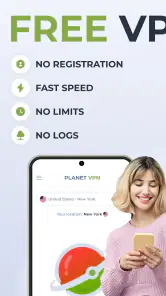
So, you've decided to give Free VPN Proxy by Planet VPN a whirl. Well, you're in for a treat! The installation process is as smooth as butter. Just head over to your respective app store, hit download, and voilà! You're all set to explore the vast world of the internet without any restrictions.
Once installed, the user interface greets you with open arms. It's intuitive and straightforward, making it easy even for the least tech-savvy individuals to navigate. You don’t have to be a tech wizard to understand how to connect or switch servers. Just a few taps, and you’re golden!
What a simple connection does—and doesn’t—tell you
The app’s uncomplicated approach is useful if you want to turn on a VPN for a short browsing session without learning a complicated set of controls. I would still treat the connection as one layer of protection, not a guarantee of anonymity: a VPN does not replace careful account security, and signing into a personal service can still identify you to that service.
For a practical routine, I’d connect before opening a browser or app on a public network, then check that the VPN remains active before sending anything sensitive. If a connection drops, I’d pause banking, work, or account changes until it is back. That small habit matters more than assuming a VPN can prevent every privacy risk.
More From Our News Desk

Weather by Xiaomi Review: Clear at a Glance, Less Clear Up Close

X Under Pressure: Can It Recover When Posting Goes Wrong?

Clash of Clans Is Won Between the Battles

Android Auto Makes the Case for Quieter Car Software

MobiOffice: Transforming Mobile Productivity with Seamless Integration

EA SPORTS FC™ Mobile Soccer: Redefining Mobile Sports Gaming
Features that Shine
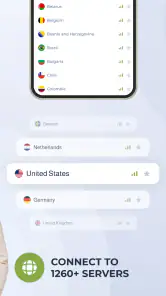
One of the standout features of Free VPN Proxy by Planet VPN is its impressive range of server locations. With servers spanning across numerous countries, you can virtually transport yourself anywhere in the world. This is a lifesaver for accessing content that might be restricted in your region.
Moreover, the app offers unlimited bandwidth. Yes, you heard that right—unlimited! No more fretting about running out of data while binge-watching your favorite series or downloading large files. This is a significant advantage over many other VPN services that impose data caps.
Another feather in its cap is the strong encryption protocols. In an age where data privacy is paramount, knowing that your data is encrypted and safe from prying eyes offers peace of mind. Plus, they have a strict no-logs policy, which means they don’t keep track of your online activities.
Privacy choices deserve a closer look
I’d avoid treating any one privacy statement as a complete audit. Before relying on a VPN for sensitive work, I’d review the app’s permission requests and privacy information on the device and in the app, and only allow access that makes sense for the task. A VPN connection is not the same as control over what other apps collect, what you share in an account, or what a website records after you sign in.
That distinction is especially useful when deciding whether to use a VPN for shopping, email, or a work login. It can change how your traffic is routed, but it cannot make a weak password strong or remove identifying details you submit yourself. I’d use it alongside sensible account protections, not instead of them.
Permissions and everyday decisions
When an app asks for a permission, I try to connect the request to something I’m about to do rather than approve everything by habit. On Android, I’d review the permission controls in the device settings and reconsider them if I later use the app differently. This is a useful general check, not proof of what any service collects or how it handles data.
I’d also make a small pre-connection checklist for a shared network: confirm I’m using the intended VPN connection, avoid accepting unexpected prompts, and keep sensitive tasks paused if the connection is interrupted. A VPN can change the path traffic takes, but it cannot make an untrusted hotspot trustworthy or stop me from opening a convincing phishing page. That is why cautious browsing remains part of the setup.
Performance and Reliability
Now, let’s talk about connectivity. The speed is surprisingly good for a free service. Of course, it might not match up to some of the premium VPNs out there, but for a freebie, it does a commendable job. Streaming videos and playing online games is quite seamless, with only the occasional minor hiccup.
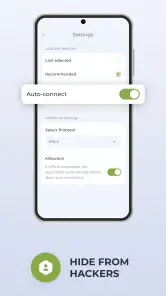
Reliability is another area where this VPN scores well. Connections are generally stable, which is crucial when you're in the middle of an important task. The app handles sudden disconnections gracefully, ensuring that your connection is re-established quickly.
Everyday fit and trade-offs
Picture checking messages and reading news while waiting at a café, then switching to a public Wi-Fi network for a quick personal task. A straightforward VPN can make that routine less fiddly, especially if you value a simple connect-and-browse experience. For a long video call or a competitive online game, though, I’d test the connection first; a VPN route can add friction, and a brief interruption matters more when timing is important.
For a more deliberate routine, I’d connect before starting a task, open the site or app I need, and make sure the session behaves normally before doing anything time-sensitive. If a page refuses to load, repeatedly changing locations may not solve the underlying issue; the destination service might limit access, or the chosen route might simply be unsuitable. I’d switch back or try again later rather than assume that a different location guarantees access.
Compared with the usual alternatives, this app’s free access and uncomplicated controls are appealing for occasional use, while a paid VPN may be a better fit for someone who needs more predictable performance or a particular set of advanced controls. I wouldn’t choose a VPN solely because it offers many locations: the useful location is the one that works for the service and task you actually have. Content access can also depend on the destination service, so changing regions is not a promise that every restricted stream will work.
The app is free, with in-app purchases priced from $4.99 to $59.99 per item, so I’d check the purchase screen carefully before confirming anything. It has a 4.5 average from around 1.9 million ratings and more than 10 million installs, which indicates broad uptake, not a personal guarantee of privacy or reliability. It is rated for Everyone, runs on Android 8.0 and up, and its current version is 8.2.2. If you only need a VPN now and then, the free option may be enough; if you rely on a VPN for work or need specific controls, compare alternatives before committing.
Choosing the right fit
I see this as a better match for someone who wants a simple tool for occasional browsing than for someone who needs a carefully managed connection throughout the workday. A traveler checking ordinary sites on shared Wi-Fi may value an easy on-and-off routine. Someone handling confidential documents, depending on a stable work connection, or needing a clearly defined set of controls should first compare providers’ documented practices and their employer’s requirements.
It is also worth separating “free to start” from “everything I might want is included.” The app is free to download, but in-app purchases are available, so I’d take a moment to read the exact terms shown before confirming a purchase. If I only want brief, occasional use, I would begin with the free option and avoid paying until I had a specific reason to do so.
Final Thoughts
The big question: Is Free VPN Proxy by Planet VPN worth your time? If you're looking for a no-cost solution to enhance your online privacy and access geo-restricted content, then absolutely yes! While it may not have all the bells and whistles of some paid VPN services, it covers the basics exceptionally well.
In conclusion, Free VPN Proxy by Planet VPN is a solid choice for those who want a reliable and easy-to-use VPN service without breaking the bank. So, go ahead and give it a shot. After all, in the world of free VPNs, this one truly shines!
Who I’d recommend it to
I’d suggest trying it if you want an approachable VPN for routine browsing and are comfortable checking the app’s privacy details and permissions for yourself. I’d be more cautious if you handle confidential work, need consistently low latency, or expect a VPN to conceal activity from every service you use. In those cases, take time to compare providers’ documented controls and practices, and choose based on the specific protection you need rather than a broad promise.
A measured last check
Before making it part of a regular routine, I’d try it with a low-stakes task first: connect, browse for a few minutes, and see whether the sites and apps I use behave as expected. Then I’d decide whether its simplicity is enough for my needs. If I need a particular privacy assurance or a work-approved setup, I would look for clear documentation and controls that address that exact requirement instead of relying on popularity or convenience.
VPN - Planet VPN Proxy Frequently Asked Questions
Does Planet VPN work automatically when I connect to public Wi-Fi?
A VPN can be helpful on public Wi-Fi, but you should check that Planet VPN is connected before you browse. The app is designed to protect browsing traffic through a VPN connection, and it can be used over Wi-Fi as well as mobile data. A VPN is only one part of online safety, so avoid sharing sensitive information on unfamiliar networks unless you are confident in the site or app you are using.
Can I choose a server location in VPN - Planet VPN Proxy?
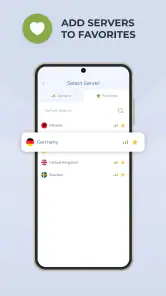
The app lets users choose from available server locations and switch servers, which can be useful if you want to try a different connection for browsing. Server choice may affect how a connection feels, so you can test the options that suit your needs. Keep in mind that a VPN does not guarantee access to every website or service, since individual services may apply their own restrictions.
Is VPN - Planet VPN Proxy free to download, and what should I check before installing it?
VPN - Planet VPN Proxy is free to download and is intended for people looking for a free VPN service. Before installing, check that your device meets the platform requirements and review the permissions and privacy information presented during setup. The app is rated for Everyone, so it is broadly suitable for general audiences, though each user should decide whether its features and privacy approach fit their needs.
Can a VPN app be useful for everyday browsing?
A VPN can be useful when you want an extra layer of privacy while browsing on Wi-Fi or mobile data. Planet VPN is designed for that kind of everyday use, with a straightforward connection flow and server choices to suit different browsing needs. It is still sensible to use strong account passwords and be thoughtful about what information you share online.
What does VPN - Planet VPN Proxy cost, and are there paid options?
VPN - Planet VPN Proxy is free to download and use, so you can try its basic VPN service without an upfront purchase. The app also offers in-app purchases, with options ranging from $4.99 to $59.99 per item. Review the purchase details shown in the app before confirming anything, particularly if you are comparing the free experience with paid features.
Pros
- Unlimited bandwidth for all users
- No registration required to use
- Access to 60+ countries
- Strong encryption for privacy
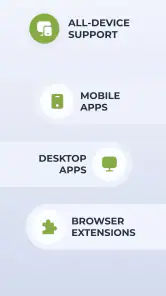
- Supports multiple platforms
Cons
- Ads may interrupt usage
- Limited speed on free version
- Some servers may be overcrowded
- No dedicated customer support
- May not bypass all geo-restrictions
- Category
- Productivity
- Version
- 8.2.2