Fotorama - AI Photo Generator
- 605.00
- 4.2
- Installs
- 1.00M
- Price
- Free

Screenshots
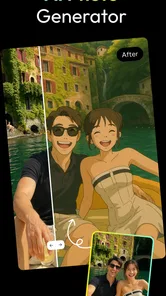
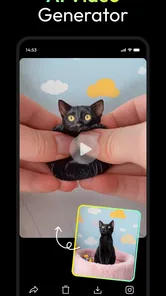
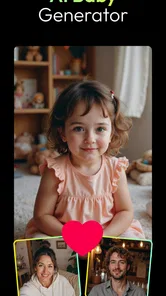
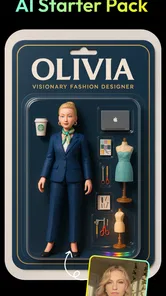
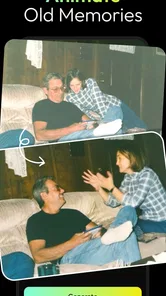
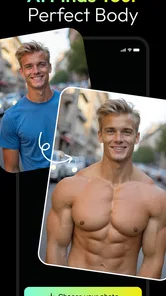
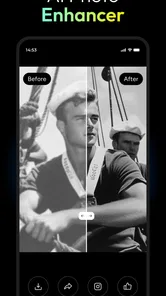
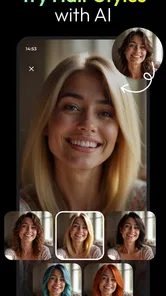
Analysis by Reviewed
I approach AI photo apps as quick creative tools, not replacements for a camera or a full editing suite. Fotorama - AI Photo Generator is aimed at people who want to turn an image into something playful, or explore AI-made visuals without learning complicated editing software. Its appeal is the short path from an idea to a shareable result; its main trade-off is that convenience doesn’t guarantee the image will look exactly as you imagined.
A creative shortcut, with a few caveats
Fotorama is a free photography app from APPNATION AS, with optional in-app purchases ranging from $0.99 to $379.99 per item. It is rated for Everyone, has an average rating of 4.2 from around 30,000 ratings, and has been installed over a million times. Those figures suggest it has found a broad audience, though they don’t tell me whether a particular generated image will suit your taste. I’d treat it as a low-friction way to experiment, rather than assume every result is ready to publish.
The app’s focus spans AI-generated video, photos, and baby images, so it’s not simply a conventional editor for adjusting exposure or removing a distraction. That broader creative direction is useful if you enjoy trying different kinds of generated content in one place. It also means I’d choose a standard photo editor when precision matters more than surprise—for example, when correcting a color cast or preparing a carefully consistent set of product pictures.
Where it fits into an everyday routine
Imagine taking a portrait on the way home, then wanting a more imaginative version for a profile or a group chat. Fotorama’s appeal is that you can start with an existing photo and explore a creative transformation without building the effect from scratch. I’d keep the original, compare several results before sharing, and choose the version that still feels recognizably like the person in the photo. That last check matters: a striking image can be less useful if the AI changes the details your friends would expect to see.
For a casual user, that makes the app more like a prompt for ideas than a dependable retouching workflow. It can help when you want a conversation-starting visual, a playful image for a personal post, or a starting point for a handmade card. If you need exact facial likeness, repeatable brand styling, or fine control over every edit, a traditional editor or a specialist design app is likely a better fit.
One practical habit is to decide what the image is for before generating anything. A joke for friends can tolerate an odd detail; a profile portrait or gift may need a closer look at faces, hands, and background objects. I’d also avoid treating generated images as documentary photos. The creative effect is the point, and checking the output before sending it helps prevent an imaginative result from being mistaken for an untouched photograph.
Unleashing Creativity with AI
Ever wondered what it would be like to have a personal digital artist at your fingertips? Well, Fotorama - AI Photo Generator makes that dream a reality. This innovative app leverages cutting-edge AI technology to morph your mundane photos into stunning pieces of art. Whether you're an amateur shutterbug or a seasoned pro, Fotorama takes your creativity to new heights.
More From Our News Desk

Weather by Xiaomi Review: Clear at a Glance, Less Clear Up Close

X Under Pressure: Can It Recover When Posting Goes Wrong?

Clash of Clans Is Won Between the Battles

Android Auto Makes the Case for Quieter Car Software

MobiOffice: Transforming Mobile Productivity with Seamless Integration

EA SPORTS FC™ Mobile Soccer: Redefining Mobile Sports Gaming
How Does It Work?
The magic begins with a simple upload of your photo. The app’s AI engine analyzes the image and offers a plethora of artistic styles to choose from. Want a touch of Van Gogh’s Starry Night or the surreal vibes of Dali? Just a tap, and the app does the rest. It’s like having a gallery of famous artists right in your pocket!
The user interface is slick and intuitive, making it easy to navigate through the various options. Even if you're not tech-savvy, Fotorama guides you effortlessly through the process, ensuring you get the best results every time. The app’s seamless blending of technology and art is truly a marvel.
Features That Stand Out
What sets Fotorama apart from other photo editing apps is its impressive array of features. The app not only transforms photos but also allows you to tweak and fine-tune the AI-generated art. You can adjust colors, contrast, and even add your personal touch with custom filters. The possibilities are endless!
Another noteworthy feature is its sharing capabilities. With a few taps, you can share your creations directly on social media platforms. Your friends will be amazed at your newfound artistic prowess! Plus, the app supports high-resolution exports, perfect for printing and framing your masterpieces.
A sensible way to test the creative workflow
I’d approach the first session as a small experiment rather than a hunt for one perfect image. Pick a photo with a clear subject and uncomplicated lighting, then try a few different directions and compare what each one preserves. This gives you a useful sense of whether the app’s interpretation suits your taste before you invest time in a more meaningful portrait. A busy background or a face partly hidden by a hat can make it harder to judge what the transformation is doing, so a simple starting image is a fairer test.
It also helps to keep a clean copy of the original in your camera roll. Generated versions are best treated as separate creative options, not as replacements for the source photo. If the result is close but not quite right, you can return to the original and try another approach rather than building on an image with an unwanted change already baked in. That’s a modest workflow choice, but it prevents a fun experiment from becoming frustrating when you later want a faithful version.
For a family group chat, for instance, I’d use a familiar snapshot as a playful prompt and share the result with a note that it has been transformed. For a birthday card, I’d first check whether the person’s expression and recognizable features survive the effect, then decide if the image feels personal enough to use. These are low-stakes situations where an unexpected detail can add charm. A formal invitation, professional headshot, or image meant to represent a real event calls for a more controlled tool.
What to expect from the results
AI transformations involve a different kind of control from sliders in a conventional editor. With a standard editing app, you can usually make a deliberate adjustment and see a predictable change; with generated imagery, the system interprets the source and may alter details along with the overall look. That can be the enjoyable part when you want an imaginative result, but it is also why I wouldn’t rely on a generated version for exact likeness or consistent edits across a set of photos.
When a result looks convincing at a glance, I’d still inspect the small areas before sharing or printing it. Look at eyes, hair edges, jewelry, clothing patterns, and objects near the subject. Those details can reveal whether an attractive overall effect has introduced something distracting. If the image is destined for a small social post, a minor oddity may not matter; if it will be printed or shown prominently, a careful check is worth the extra moment.
Another useful distinction is between making an image more expressive and correcting a photograph. Fotorama is most appealing when the goal is the former: an alternate visual treatment, an amusing variation, or a fresh idea for a personal project. If your actual problem is glare, uneven exposure, or a blemish that needs a precise fix, a conventional editor offers a more direct route and makes it easier to preserve everything else.
How it compares with familiar photo apps
Compared with a basic phone gallery editor, Fotorama points toward creation rather than cleanup. Gallery tools are convenient for cropping, rotating, and making straightforward adjustments, while this app’s AI-centered approach is better suited to changing the character of an image. I’d keep both kinds of tools in mind: use the gallery editor for quick corrections and reach for Fotorama when you want the photo to become something less literal.
Against a full desktop editing program, the trade-off is even clearer. Desktop software is usually the stronger choice for exact masks, consistent color treatment, detailed retouching, and repeatable work. Fotorama’s attraction is the lower barrier to trying a new visual idea on a phone. It doesn’t need to replace a serious editor to be useful; it simply serves a different mood and task. If you regularly prepare client work or need to match a strict visual style, I would not make it the center of that workflow.
It also differs from a design app built around arranging text, shapes, and templates. Those tools are better when a finished post needs typography, layout, or several coordinated elements. Fotorama can help supply an image with a more distinctive look, but I’d choose a separate layout tool when the composition itself matters as much as the picture. Thinking of it as one step in a creative process, rather than an all-purpose publishing desk, sets more realistic expectations.
Who will get the most from it
I can see the strongest fit for people who enjoy experimenting but don’t want to learn a complicated editing interface. It’s also a reasonable choice for someone who makes occasional personal posts, wants a playful image for a message, or likes seeing how a familiar portrait might look after an AI-led transformation. The broader mix of generated photo, video, and baby imagery gives curious users more than one creative direction to explore, while still keeping the app centered on visual play.
On the other hand, I’d skip it if your main need is dependable photo correction, exact likeness, or a repeatable look across many images. It may also be a poor match if you dislike reviewing generated results or would rather control every change yourself. People making business assets should be especially clear about the difference between experimentation and production: use a controlled editor when accuracy, consistency, or a specific brand appearance is non-negotiable.
For parents considering baby-themed generation, I’d treat the result as imaginative entertainment rather than a prediction or meaningful statement about a real child. The same general caution applies to any output involving a person: generated images are creative interpretations. That framing keeps the feature in the realm of fun and avoids asking an AI-made picture to provide certainty it cannot offer.
Practical questions before you settle in
The app is free to get, but optional purchases are part of the experience, so I’d pay attention to what is being offered before confirming anything. A free starting point makes it possible to see whether the style suits you, while the wide range in item prices means it is sensible to decide on a personal spending limit first. If you only want an occasional novelty image, there’s no reason to assume that a purchase is necessary; make the decision based on what you actually use and enjoy.
It is suitable for Everyone and supports operating systems from version 8.0, so the age classification is broad and the minimum software requirement is not especially restrictive. The current release is version 3.9.0, and the app first appeared on August 5, 2023. I’d still check that your device’s operating system is compatible before installing, particularly if you use an older phone or tablet.
A natural question is whether it replaces a dedicated editor. In my view, it doesn’t: it complements one. Use Fotorama to explore a generated direction, then switch to a more precise tool if you need to crop carefully, balance colors, add type, or prepare a consistent set of images. Another sensible question is whether every output is ready to post. I’d say no—review it first, especially when faces or important details are involved. The extra check is part of using AI imagery responsibly, not a sign that the app has failed.
Why You Should Try It
In a world where visual content is king, Fotorama - AI Photo Generator offers a fresh, exciting way to express yourself. It's not just about enhancing photos; it's about exploring new dimensions of creativity. Whether you want to spice up your social media feed or create personalized gifts, this app has got you covered.
For anyone weighing the cost, the app is free to download, but some in-app purchases are available. I’d look carefully at any purchase screen and make sure an option suits how often I expect to use it before committing. The current version is 3.9.0, and it supports devices running iOS 8.0 or later. Its release date was August 5, 2023, so users considering an older device should check that their operating system meets the requirement.
So, why not give it a shot? Download Fotorama today and unlock the artist within you. Trust me, once you start, you won't want to stop. It’s addictive, fun, and incredibly rewarding. Happy creating!
My verdict
I’d recommend Fotorama to a friend who wants a quick, low-pressure way to turn ordinary photos into something more playful, especially if they’re happy to judge the results rather than expect exact control. Its creative breadth is the strongest reason to try it; its dependence on interpretation is the main reason to keep expectations grounded. Start with a casual photo, preserve the original, and treat the first few outputs as experiments. If you want careful retouching or dependable professional consistency, choose a conventional editor instead. For personal visual play, though, this is a convenient place to see where an image can go.
Fotorama - AI Photo Generator Frequently Asked Questions
Do I need to upload a photo to use Fotorama, or can I explore it without one?
Fotorama’s photo-focused tools are built around transforming images, so having a photo ready is a useful starting point for exploring its creative effects. You can try different visual treatments and see how they change an image’s appearance. If you are deciding whether to download it, consider whether you want an app centered on experimenting with photos and AI-generated creations.
What else can Fotorama generate besides photos?
Fotorama highlights AI Video Generator and AI Baby Generator tools alongside its AI photo-generation features. That gives the app a broader creative focus than photo effects alone, although its central appeal remains experimenting with visual content. If you are mainly looking for photo transformations, you can explore those tools first and decide whether the additional generation options suit the way you want to create.
Is Fotorama suitable for beginners who have never used an AI photo app?
Fotorama is designed around transforming images with a few taps, so its basic creative approach should feel approachable even if you have not used an AI photo app before. You can explore different looks and editing effects without needing professional photo-editing experience. Its focus is on experimenting with visual styles and making an existing photo feel different.
What devices can run Fotorama - AI Photo Generator?
Fotorama is a photography app for mobile devices, and its current version is 3.9.0. It requires iOS 8.0 or later, so check your device’s operating system before downloading. The app is free to download, while some optional features may involve in-app purchases. This makes compatibility and your preferred way of using creative tools worth considering beforehand.
Who develops Fotorama, and is it intended for all ages?
Fotorama is developed by APPNATION AS and is rated for Everyone. Its purpose is creative photo generation and editing, making it an option for users who want to explore artistic effects on their images. The age rating describes the app’s content classification; parents can still decide whether its features and any optional purchases are appropriate for their family.
Pros
- Easy to use interface.
- Fast photo generation.
- High-quality image output.
- Supports various art styles.
- Fun and engaging features.
Cons
- Requires internet connection.
- Limited free features.
- Occasional app crashes.
- In-app purchases can be pricey.
- Ads can be intrusive.