Arch - AI Home Design
- 453.00
- 4.3
- Installs
- 1.00M
- Price
- Free

Screenshots

Analysis by Reviewed
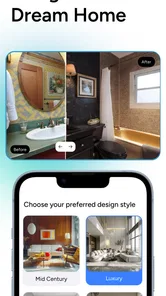
I like starting room projects with a visual idea, but inspiration boards rarely tell me whether a look will work in my own space. Arch - AI Home Design is aimed at that gap: it uses AI to turn room photos and design preferences into ideas you can consider before making changes. I’d treat it as a way to explore possibilities, not as a substitute for measuring a room or checking whether furniture will fit.
Start with a question, not a shopping list
Before opening a room-design app, I find it helpful to name the decision I’m trying to make. Is the room too dark? Does the furniture feel mismatched? Am I curious whether a different style would suit the space? A specific question makes the results easier to assess, because I can compare each idea with a real need instead of judging it only by whether the image looks polished.
That approach is particularly useful for small projects: choosing a palette for a spare room, thinking through a living-room refresh, or deciding whether a home office needs a calmer look. I wouldn’t expect an AI-generated concept to settle every detail. I would use it to identify possibilities worth testing, then check those possibilities against the room’s actual proportions, existing furniture, and budget.
From inspiration to a room-specific idea
Arch is a free art and design app from APPNATION AS, with optional in-app purchases priced from $4.99 to $89.99 per item. It has a 4.3 average from around 33,000 ratings and over a million installs. The app is for everyone, and its current version is 2.13.2. Those figures suggest it has found an audience, but they don’t tell me whether any particular generated design will suit my home; that depends on the room and the choices I make.
Honestly, I was a bit skeptical at first. An app that can help me redesign my home? Sounds too good to be true. But after playing around with Arch - AI Home Design, I was pleasantly surprised. The interface is super intuitive. You don’t need to be a tech wizard to navigate through it, which is a relief for someone like me who occasionally struggles with tech.
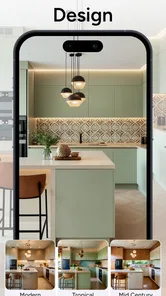
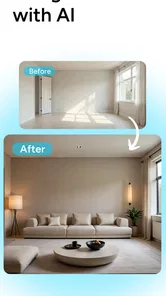
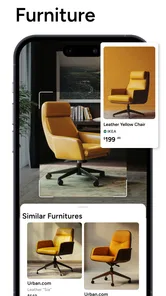
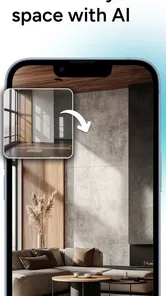
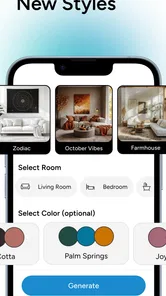
The app uses AI to give you personalized design recommendations based on your preferences. You start by taking a few pictures of your room, and voila, the app suggests different styles and layouts. It’s like magic! Plus, the app provides a detailed list of where to buy the suggested furniture and decor items. Talk about convenience!
Use the first result as a draft, not a decision
A practical way to use the photo-based workflow is to begin with a room you can photograph clearly, then compare ideas against the pieces you already own. If a suggestion changes the room’s overall style, ask what you would actually keep, move, or replace before treating the image as a shopping plan. A generated look can help you notice a direction you like, but it is not a measurement drawing: check dimensions, door clearance, and walkways yourself before buying anything.
More From Our News Desk

Weather by Xiaomi Review: Clear at a Glance, Less Clear Up Close

X Under Pressure: Can It Recover When Posting Goes Wrong?

Clash of Clans Is Won Between the Battles

Android Auto Makes the Case for Quieter Car Software

MobiOffice: Transforming Mobile Productivity with Seamless Integration

EA SPORTS FC™ Mobile Soccer: Redefining Mobile Sports Gaming
That distinction matters when you are deciding whether to use an AI room planner or a conventional design tool. A mood board gives you broad inspiration but may not relate closely to your own room; a manual floor-plan app is usually better for exact placement and dimensions. Arch’s appeal is the quick visual bridge between your room photo and a fresh style idea. For a renter deciding whether a new color palette or furniture arrangement feels right, that can be more useful than collecting another folder of unrelated reference images.
When a room photo helps—and when it doesn’t
For a realistic everyday test, imagine that I have a free evening and want to make a cramped living room feel less cluttered. I would photograph the room in daylight, stand far enough back to show the main furniture, and first decide which items must stay. Then I’d compare a few visual directions with that constraint in mind. If an idea seems appealing, I’d write down the practical change it suggests—perhaps moving a chair or changing the color balance—rather than assuming I need to replace everything pictured.
This is where a photo-based concept can be more useful than browsing catalog images: it gives me a starting point tied to my own surroundings. But the reverse is also true. A room with a narrow angle, a mirror, strong shadows, or a lot of visual clutter may be harder to evaluate from a generated image. If the result makes the space look noticeably different from what I see in person, I’d treat it as a mood reference and not as evidence that a layout will work.
A Playground for Creativity
What I love most is how Arch - AI Home Design lets you play with different styles. Want to see how a vintage couch would look in your ultra-modern living room? Go ahead! The app allows you to experiment without any consequences. It’s like a sandbox for adults, where you can unleash your inner designer without breaking the bank.
One useful trade-off is that a photo is only a snapshot. Lighting, clutter, camera angle, and objects partly blocking the room can affect how easy it is to judge a proposed look. I’d take a tidy, well-lit photo from a position that shows as much of the room as possible, and keep the angle consistent when comparing ideas. This makes the comparison more useful without assuming the visual result will perfectly predict real materials or lighting.
Small workflow choices that improve the comparison
I’d avoid changing several things mentally at once. If I’m unsure about color, I’d focus on whether the overall palette feels better before judging furniture styles or accessories. If I’m thinking about a new arrangement, I’d pay attention to circulation and what must remain accessible. This is not a special technical setting; it is simply a way to make the visual suggestions easier to compare with the room I actually have.
It also helps to keep a short note beside each idea: what I liked, what seems unrealistic, and what I could test without spending money. For example, a generated image might make me notice that the room needs a lighter accent, even if the exact furniture shown would not fit. Separating the useful design cue from the literal objects keeps the app from turning inspiration into unnecessary shopping.
Inspiration is useful; privacy deserves a pause
Because the workflow starts with pictures of a home, I would think about what appears in the frame before uploading one. A room photo can unintentionally show personal items, family photos, documents, or details of the home that I would rather keep private. I’d clear those from view and choose an image that shows the design problem without revealing more than needed. That is a simple, practical step even when an app feels casual to use.
I also wouldn’t assume that a design suggestion or a product list means I need to buy anything. The ideas are most valuable when they help me make a decision: perhaps I test a warmer style before repainting, or see whether a furniture change is worth researching. If the suggested items do not match my budget, measurements, or taste, I can use the visual direction and look for alternatives elsewhere. The app’s free entry point makes experimentation accessible, while the range of optional purchases is a reason to check what is included before committing to a paid option.
What to check before sharing or paying
My trust judgment here is deliberately limited to choices I can make myself. I can decide whether to take a room photo, what to include in it, and whether a proposed purchase is worth exploring. I would not treat that control as a guarantee about how images or other information are handled behind the scenes. If privacy is a deciding factor for you, review the app’s current permission prompts and privacy information before sharing anything, and decline access that is not needed for the task you want to try.
The same careful approach applies to optional purchases. Since the app is free to start but offers paid items, I’d check what a particular option includes and whether it addresses a need I already have before confirming it. I wouldn’t pay just to make a design feel more “finished” if I still haven’t measured the room or established a realistic budget. A useful visual idea should remain useful even if I choose to shop elsewhere—or not shop at all.
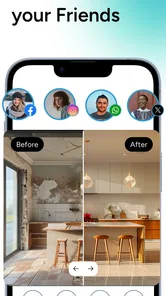
The app also features a community section where you can see what others are doing with their spaces. It’s a great place to get inspiration and even share your own creations. You’ll find folks swapping tips and ideas, which makes it feel like a supportive community rather than just another app.
How the community fits into the process
Other people’s room ideas can help me identify styles and combinations I might not have searched for on my own. I’d still separate community inspiration from advice about fit, durability, or cost: another person’s attractive result does not establish that the same choice will work in my home. If I decide to share a creation, I’d apply the same privacy check as I would to an uploaded room image and avoid including personal details I don’t want visible.
Compared with a standalone mood-board app, Arch is more directly connected to the room I’m considering because its design process begins with a photo. Compared with a measurement-first planner, it is less suited to proving that a sofa clears a doorway or that a proposed layout respects exact dimensions. I see those tools as complementary rather than interchangeable: use Arch to explore a look, then switch to measuring, a floor plan, or in-person advice when the decision depends on exact fit.
Who will get the most from it
I think Arch is best for someone who wants a low-pressure starting point: a first-time decorator, a homeowner weighing up a refresh, or a renter testing styles before spending on portable furniture and decor. It can also help when two people have different ideas; comparing visual directions gives you something concrete to discuss instead of debating vague labels like “modern” or “cozy.” For structural planning, precise layouts, or professional specifications, I’d use a measurement-focused tool or consult a designer instead.
I would skip it if my main requirement were exact room measurements, construction guidance, or a reliable preview of how a particular real product will look under my home’s lighting. I’d also choose a manual process if I did not want to use room photos at all. In those situations, a tape measure, a simple floor plan, paint samples, or advice from a qualified professional can answer the important question more directly than a visual concept can.
Final Thoughts
In conclusion, Arch - AI Home Design is a game-changer for anyone looking to refresh their space. Whether you're a professional designer or someone just looking to spruce up a room, this app caters to all levels of expertise. It’s like having a design buddy that’s available 24/7.
If you’re contemplating a home makeover but don’t know where to start, give this app a try. It might just be the tool you need to turn your design dreams into reality. And remember, the best part is, you can do it all without leaving your couch!
My cautious recommendation is to use Arch for inspiration and comparison, while keeping decisions that affect cost, fit, and privacy firmly in your hands. If you enjoy trying out visual ideas and can treat them as prompts rather than promises, it is an approachable place to begin. If you need exact plans or want to avoid sharing room photos, a manual approach will be a better fit.
Arch - AI Home Design Frequently Asked Questions
Who develops Arch - AI Home Design?
Arch - AI Home Design is developed by APPNATION AS and focuses on AI-assisted interior design and room planning. If you are considering it for a home project, its purpose is to help turn design preferences into visual ideas for your space. It is listed in the Art & Design category, so it is aimed at creative planning rather than general home-management tasks.
What can I use Arch - AI Home Design for when planning a room?
Arch - AI Home Design is intended for exploring interior-design ideas and planning how a room might look after a makeover. Its store summary presents it as an AI interior designer and room planner for redecorating your home. That makes it relevant if you want to consider possible styles and visual directions before committing to changes in your actual space.
Is Arch - AI Home Design available in my language?
Arch - AI Home Design is an interior-design app in the Art & Design category, built around AI-assisted home planning and visual ideas. Before downloading, check the app’s interface on your device to make sure it is comfortable to use in your preferred language. The store summary describes it as an AI interior designer and room planner for redecorating your home.
What devices and operating systems can run Arch - AI Home Design?
Arch - AI Home Design is available for Android and iOS, so you can use it on a compatible phone or tablet. On Android, the minimum operating-system requirement is version 8.0. The app is developed by APPNATION AS, and its current version is 2.13.2. Check your device’s software version before installing to help avoid compatibility issues.
What is Arch - AI Home Design and how does it work?
Arch - AI Home Design is an innovative application that leverages artificial intelligence to assist users in designing and visualizing their home spaces. By inputting your room dimensions and design preferences, Arch generates a variety of design options tailored to your taste. It uses advanced algorithms to suggest furniture placement, color schemes, and decor items, making home design accessible to everyone, from amateurs to professionals.
Pros
- User-friendly interface for easy navigation.
- Extensive library of design templates.
- Real-time 3D visualization of designs.
- Seamless integration with smart home devices.
- Regular updates with new features.
Cons
- Requires a stable internet connection.
- Limited free version functionalities.
- Occasional app crashes reported.
- High battery consumption during use.
- Subscription needed for premium features.













