Focus To-Do: Pomodoro & Tasks
- 3.28K
- 4.6
- Installs
- 10.00M
- Price
- Free
Screenshots
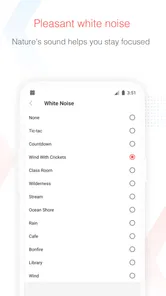
Analysis by Reviewed
Ever feel like your to-do list is longer than a CVS receipt? Yeah, me too. Enter Focus To-Do: Pomodoro & Tasks, the app that's got your back when it comes to getting stuff done. I've been on the hunt for that perfect productivity app, and this one comes pretty close to nailing it.
A practical fit for focused work
What makes this app worth considering is the connection between a task and the time you spend on it. Instead of keeping a list in one place and running a separate timer elsewhere, I can choose a task and make a focused session part of doing it. That link is useful when I want to start rather than spend another few minutes deciding how to organize my day.
I wouldn’t treat every item on a list as a timer assignment. The approach works best for tasks that benefit from a deliberate start, such as drafting, studying, or clearing a defined batch of messages. For a quick reminder like picking up groceries, timing the task adds little. Keeping those small errands untimed makes the list easier to scan and the work records more relevant.
Who benefits from the combined workflow
I’d recommend trying it if you’re a student with several subjects to rotate through, an independent worker who wants a clearer picture of how work hours are spent, or someone who tends to delay starting a large task. Projects can separate different areas of life, while a timer gives a work session a clear beginning and end. That combination is more purposeful than a bare checklist when the challenge is not remembering a task but getting underway.
It is less compelling for someone who already has a comfortable system and only needs occasional reminders. If you mainly plan around appointments, a calendar is the more natural home for your day. If your work depends on shared deadlines, assigning tasks to other people, or coordinating a team, a personal timer and task list may not cover the central need. I’d choose a tool around the part of planning that causes the most trouble, rather than trying to make one app handle every kind of organization.
Making the time records useful
There’s a small but important difference between tracking time and improving how you use it. A report can show which tasks received attention, but it can’t decide whether that time was valuable. I’d use the record as a prompt for a short review: Did the planned work get a meaningful block? Did a task take longer than expected? Should I make its next step smaller? That turns tracking into a planning aid instead of a scorecard.
For a more honest picture, name tasks specifically enough that the record makes sense later. “Prepare slides” is easier to interpret than “work,” while splitting a project into a long list of tiny actions can create needless upkeep. I’d aim for a task that represents one clear stretch of effort. That middle ground keeps the timer attached to useful work without requiring me to document every movement of the day.
More From Our News Desk

Weather by Xiaomi Review: Clear at a Glance, Less Clear Up Close

X Under Pressure: Can It Recover When Posting Goes Wrong?

Clash of Clans Is Won Between the Battles

Android Auto Makes the Case for Quieter Car Software

MobiOffice: Transforming Mobile Productivity with Seamless Integration

EA SPORTS FC™ Mobile Soccer: Redefining Mobile Sports Gaming
It also helps to decide in advance what a session means for a particular task. A writing session might be for drafting a section, not polishing every sentence; a study session might be for reviewing a particular topic, not “study everything.” The more concrete the intended outcome, the easier it is to judge whether the interval helped. This is a practical way to keep the app’s tracking from becoming a substitute for deciding what the work actually is.
What’s the Buzz About?
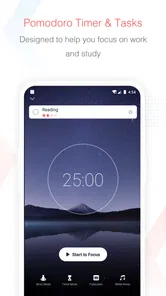
So, what's the deal with Focus To-Do? It's a smart blend of the Pomodoro technique and task management. For those of you who haven’t heard of Pomodoro, it’s basically a time management method that uses a timer to break down work into intervals, traditionally 25 minutes in length, separated by short breaks. Sounds simple, but it’s a game-changer.
Features That Stand Out
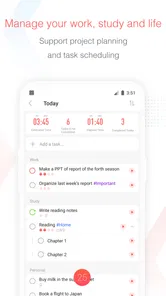
First off, the app's interface is super intuitive. You don't need to be a tech guru to navigate it. Setting up tasks is a breeze, and the Pomodoro timer is front and center, ready to keep you on track. I love how you can organize tasks into different projects, making it easy to switch gears without losing focus.
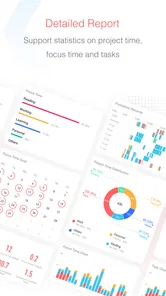
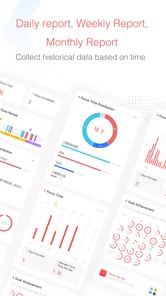
One of the coolest features has to be the ability to track how much time you spend on each task. It gives you a neat little report at the end of the day, so you can see where your time went. It’s kind of like a Fitbit for your productivity habits.
Why It's a Keeper
If you're like me and tend to procrastinate (come on, we all do it), this app is a lifesaver. The Pomodoro technique is all about creating a sense of urgency, and it works surprisingly well. Those ticking minutes are a great motivator to keep you moving forward.
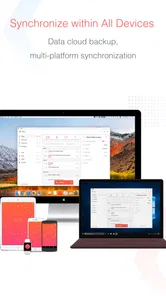
Plus, the app syncs across all your devices. Whether you're on your phone, tablet, or computer, your to-do list follows you around like a loyal puppy. No more excuses for not getting things done because you left your list at the office!
Room for Improvement
Of course, no app is perfect. While Focus To-Do is pretty solid, I did notice that the notifications can be a bit overzealous. Sometimes it felt like my phone was buzzing more than a beehive. But hey, a little tweaking in the settings and you're good to go.
Another thing to note is the premium features. While the free version is pretty robust, there are some nifty features locked behind a paywall. If you're serious about upping your productivity game, it might be worth the investment. The app is free to start, with optional purchases ranging from $1.99 to $11.99 per item, so I’d use it for a while before deciding whether a paid extra solves a real need.
Readability and Navigation
The screen layout puts the timer and task list close to the heart of the experience, which makes it easy to move from deciding what matters to actually starting a work interval. Projects are useful when a single list becomes crowded: I’d separate schoolwork, household errands, and a longer personal project rather than build one elaborate hierarchy. That keeps switching simple and makes the time reports more meaningful, because the tracked minutes remain attached to the work I intended to do.
For someone who finds dense productivity dashboards tiring, the focused timer is a practical advantage. Still, a timer-led screen is not automatically comfortable for everyone. I’d try creating one task and running a short session before importing a large backlog. That small test shows whether the controls, text, and pace feel manageable on your own device, without turning setup into another project.
Motor and Sensory Considerations
Pomodoro timing can help people who struggle to begin by giving the next step a clear boundary: work until the interval ends, then pause. It can also be a poor fit for tasks that require uninterrupted concentration or frequent hands-on movement. I wouldn’t force a standard interval onto a long call, caregiving, or work where stopping at a timer would be disruptive; the task list can still be useful without treating every activity as a timed sprint.
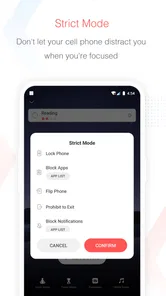
Notifications deserve particular care if sound, vibration, or repeated prompts are distracting. Since they felt too frequent in my use, I’d adjust them before relying on the app through a full workday. A useful compromise is to keep only the reminders that help you return to a task and silence the rest. If alerts are inaccessible or unpleasant on your phone, the timer’s value may not outweigh that friction.
Situational Access
A realistic day for me might start with a report due before lunch, a few messages to answer, and errands competing for attention. I’d put the report in its own project, turn its next concrete action into a task, and start the timer before opening email. After a session, I can decide whether to continue or switch to messages, then use the time record later to see whether the report actually got the attention I planned. This is more useful than merely checking off a vague item such as “work on report.”
The app is best for people who want tasks and focused work periods tied together, especially students, independent workers, or anyone trying to understand where their effort goes. It may be less suitable if you need a highly specialized calendar, team coordination, or a flexible timer that adapts to unpredictable work. A simple notes app can be quicker for occasional reminders, while a dedicated calendar is usually better when appointments and shared schedules are the main concern.
Remaining Barriers
Combining a task organizer with a timer is convenient, but it also asks you to manage two habits at once: maintaining a useful list and deciding when to time each item. If you add every tiny chore, the list can become noisy; if you time everything, tracking may feel like administration rather than support. I’d reserve timed sessions for work that benefits from a deliberate start, and leave quick, incidental tasks untimed.
Focus To-Do is a productivity app from Pomodoro Timer & To Do List - SuperElement Soft. It has a 4.6 average from around 270,000 ratings and more than 10 million installs, which suggests it has found a broad audience without making it the right fit for every routine. It is free to use, rated for Everyone, and has been available since February 1, 2018. Those details make it approachable to try, but I’d judge it by whether its timer and task workflow suit your day rather than by popularity alone.
A routine that keeps the app out of the way
When I have a day with several kinds of work, I’d use the project structure to give each area a home, then choose only a few tasks that deserve focused sessions. For example, I might plan a report, a study block, and a batch of replies, leaving spontaneous calls and small household jobs on the list without trying to time them. That avoids the common trap of planning an ideal day so tightly that one interruption makes the whole schedule feel broken.
At the end of the day, I’d look at the record alongside what actually changed, not just how many minutes were logged. If a planned task barely received attention, the next step may be to make it smaller or protect a more realistic block tomorrow. If the record shows time spent on low-priority work, I can adjust what I choose first. The point is not to chase a perfect total; it is to make the next decision with better context.
For students, a useful pattern is to assign each session a specific topic and stop when attention is fading rather than leaving a timer running through a break. For independent workers, the same approach can help distinguish time spent producing work from time spent handling messages. Neither use requires timing every part of life. Selective tracking is often more revealing because it keeps the record focused on the activities you genuinely want to understand.
How it compares with simpler tools
Compared with a basic checklist, this app adds a built-in reason to start now and a way to associate focused time with a task. That is valuable if starting is the hard part. The trade-off is a little more interaction: you need to decide what to track and keep the list in usable shape. If you only need to remember a handful of errands, a notes app or plain list is likely faster and less demanding.
A standalone timer can be better if you already manage tasks elsewhere and want only an interval prompt. A calendar is stronger when the day revolves around appointments, fixed commitments, and events that must happen at particular times. Focus To-Do sits between those approaches: it is most convincing when you want a personal task list and time tracking to work together, but it is not a replacement for every planning tool. I’d avoid duplicating the same tasks in several apps, since that creates extra maintenance and makes it harder to trust any one list.
Testing the fit before committing
If you’re wondering whether the timer can work around an unpredictable day, I’d test it on one task whose interruption cost is low. A short writing, reading, or sorting session can show whether the prompts help you resume or simply break your concentration. For work that cannot pause safely or politely, leave the timer off and use the task organizer on its own. That distinction matters more than trying to follow a technique perfectly.
Another sensible trial is to use the app for a few days with a deliberately small list, then decide whether its reports answer a question you actually have. Do you want to know where study time goes, or do you simply need reminders to submit assignments? The former may benefit from tracking; the latter may be handled with a basic list or calendar. Starting small also makes it easier to judge navigation and notification comfort before you build a routine around them.
The Final Verdict
Overall, I'd say Focus To-Do is a solid choice for anyone looking to boost their productivity. It's got a nice mix of task management and time tracking, all wrapped up in a user-friendly package. If you’re tired of drowning in tasks and want a reliable app to help you stay afloat, give this one a shot. Just remember to adjust those notifications unless you want your phone to turn into a mini rave party.
My practical recommendation is to begin with a small project, a handful of actionable tasks, and notifications set to a level you can live with. Then ask yourself whether the timer helps you start and whether the report changes how you plan tomorrow. If it does, the combined approach earns its place. If you mainly need quiet reminders, flexible scheduling, or a tool that never interrupts your rhythm, a simpler list or calendar may serve you better. For me, its inclusive strength is the choice to use task tracking alongside timed focus; its limit is that the timer-and-alert style won’t suit every sensory preference or working pattern.
Focus To-Do: Pomodoro & Tasks Frequently Asked Questions
Can I use Focus To-Do to set reminders for important tasks?
Yes. Reminders are part of Focus To-Do’s task-planning toolkit, helping you keep upcoming responsibilities visible alongside your timed work sessions. You can use them to support a schedule of assignments, errands, or work tasks, rather than depending on memory alone. They are most useful when you add tasks as you plan and check the app as your day progresses.
Who develops Focus To-Do, and is it a widely used app?
Focus To-Do is developed by Pomodoro Timer & To Do List - SuperElement Soft. It has over 10 million installs and an average rating of 4.6 from around 270,000 ratings, making it a well-established productivity app. Those figures can offer a useful sense of its reach, though whether its timer and task-planning style suits you will depend on how you prefer to organize your day.
Can I use Focus To-Do to plan my day as well as time individual work sessions?
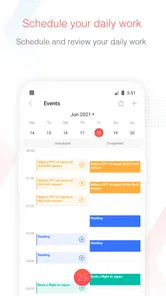
Yes. Focus To-Do is designed to bring task organization and time planning together, so you can list what needs doing and use timed focus sessions while working through it. Its organizer, schedule planner, time tracker, and reminder tools make it useful for shaping a day around both tasks and focused work, rather than relying on a timer alone.
What is Focus To-Do: Pomodoro & Tasks and how does it work?
Focus To-Do: Pomodoro & Tasks is a productivity app that combines the Pomodoro Technique with task management. The Pomodoro Technique is a time management method that uses a timer to break work into intervals, traditionally 25 minutes in length, separated by short breaks. The app helps you organize tasks, set priorities, and track your productivity over time, making it easier to stay focused and efficient in your work or study sessions.
Is Focus To-Do: Pomodoro & Tasks available on both Android and iOS?
Yes, Focus To-Do: Pomodoro & Tasks is available for download on both Android and iOS platforms. Users can find the app on the Google Play Store for Android devices and the Apple App Store for iOS devices. This cross-platform availability ensures that users can maintain their productivity regardless of the device they are using.
Pros
- Intuitive user interface
- Effective time management
- Cross-platform syncing
- Customizable task lists
- Pomodoro timer boosts productivity
Cons
- Limited free version features
- Ads in free version
- Premium version is pricey
- No dark mode
- Occasional sync issues











