Flyers, Poster Maker, Design
- 13.78K
- 4.7
- Installs
- 10.00M
- Price
- Free
Screenshots
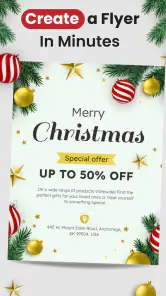


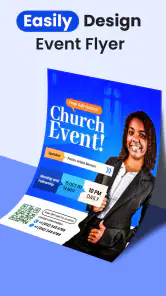
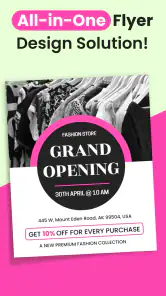
Analysis by Reviewed
When a promotion needs to go out today, I care more about getting a clear, presentable graphic made on my phone than mastering a complicated design process. Flyers, Poster Maker, Design is built for that practical moment: creating flyers, posters, and other business visuals without starting every layout from a blank canvas. I find it most useful when convenience matters more than exact control over every design detail.
Who benefits from a phone-based design tool?
This app makes the most sense for people who need to communicate a straightforward message visually: a shop announcing a sale, a club promoting a gathering, or a freelancer sharing a service. It can also help someone who handles their own social posts and wants a designed announcement rather than a text-only update. The key question is not whether you can make something elaborate, but whether the available layout and editing approach suit the piece you need to publish.
I’d be less likely to choose it for a campaign that requires several coordinated designs, strict brand rules, or precise print preparation. In those situations, a desktop publishing or professional design program gives more room to control alignment, typography, and output. If you only need an occasional invitation, a basic editor or a ready-made social template might also be enough. The app earns its place when a quick promotional graphic is useful often enough to justify keeping a dedicated tool on your phone.
Making a quick announcement feel considered
Imagine a small bakery has a seasonal item available for one afternoon and wants to tell nearby customers. I’d begin by deciding on the one fact people must notice, such as the time it is available, then choose a layout that gives that detail room to stand out. A tempting image can help, but it should not compete with the essential wording. After editing, I’d check the graphic at the size people are likely to see it in a social feed or message, rather than judging it only while zoomed in.
That last check is an easy step to skip when there is a deadline. I’d also read the finished copy from top to bottom, especially dates, opening hours, and contact details. A polished-looking poster can still cause confusion if one small piece of information is wrong. This is a practical reason to keep the final review separate from the creative part of the task: first make the graphic attractive, then inspect it as a customer who has never seen the offer before.
When I need several related announcements, I’d treat the first finished layout as a starting point, not as a file to overwrite carelessly. Keeping a version with stable business details and changing only the event-specific wording helps maintain a recognizable look. It also makes it easier to compare the new message against the old one and catch details that should not carry over. Before sharing, I’d confirm that the revised wording still fits the available space instead of assuming a previous layout will accommodate longer text.
Getting Started and Working at a Phone’s Pace
From the moment I opened the app, I was greeted with a user-friendly interface that felt intuitive and inviting. You don’t need to be a professional designer to navigate Flyers, Poster Maker, Design. The app seamlessly guides you through the process, offering a plethora of templates that cater to just about any occasion. Whether you're planning a community event, a business meeting, or a personal celebration, there’s a template ready to be customized.
You May Like

Clash of Clans Is Won Between the Battles

Android Auto Makes the Case for Quieter Car Software

MobiOffice: Transforming Mobile Productivity with Seamless Integration

EA SPORTS FC™ Mobile Soccer: Redefining Mobile Sports Gaming

How Microsoft OneDrive Became a Mobile Productivity Giant

How Google Translate Breaks Language Barriers Effortlessly
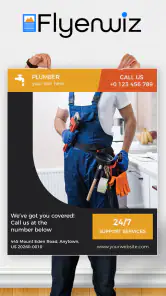
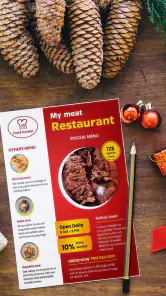
That template-first approach is useful when the clock is ticking. For example, if a café needs to announce a change to its opening hours, I’d start with a layout that already has a clear headline and image area, then replace the sample wording and adjust the colors to suit the business. It is easier than building a composition from scratch, though I would still check the finished graphic at normal viewing size: small text that looks fine while editing may be hard to read on a phone screen.
Design Choices and Useful Trade-offs
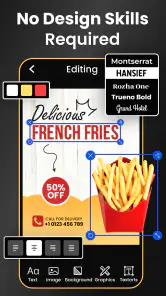
One of the things that impressed me was the variety of customization options. You can tweak everything from fonts to colors, and there’s a library of stock images and icons at your disposal. I particularly enjoyed the drag-and-drop feature, which makes it super easy to adjust elements to your liking. It’s like having a mini design studio in your pocket!
A practical tip is to decide on the key message before choosing decorative elements. A flyer usually has a short window to catch someone’s attention, so I’d make the event, offer, or contact detail prominent first and use images and icons to support it. The trade-off with ready-made layouts is that other people may choose similar designs. Changing the palette, type choices, and image together can make a template feel more personal without requiring a complete redesign.
Another nifty feature is the ability to save your designs in multiple formats, making it a breeze to share your creations directly from the app. Whether you want to post it on social media or send it via email, the app has you covered.
For repeated promotions, I’d keep a copy of a design that already has the correct business name, colors, and contact details, then adapt the date or offer for the next post. That workflow can save editing time and reduce the chance of leaving old details in a new announcement. Before sharing, I’d also review the wording and crop: a layout intended for one destination may not frame its text and image equally well in another.
Choosing the right amount of customization
Drag-and-drop editing is handy for moving elements into a more balanced arrangement, but it can also invite unnecessary tinkering. I’d make one change at a time: adjust the headline position, check the spacing, then move on to the image or colors. If I keep changing several things at once, it becomes harder to tell which edit improved the design and which made it less readable. A restrained layout is often a better result than filling every open area with another icon or decorative detail.
For a small business, consistency can matter more than novelty. I’d choose a limited set of colors and a clear text hierarchy, then reuse those choices across announcements where they fit. That does not mean every flyer should look identical; it means customers can recognize the business while still seeing what is new. A template is a useful framework, but the message and the choices I make within it are what keep the finished piece from feeling generic.
Who Gets the Most from It
So, why should you give this app a shot? Well, if you’re someone who enjoys dabbling in design or needs to create promotional materials on the fly, this app offers a good balance of functionality and ease of use. It’s like having a personal graphic designer on standby, ready to help you make a statement with your designs.
I can see it suiting a small shop owner announcing a weekend sale, a community organizer sharing event details, or someone putting together a simple celebration invitation. It also makes sense for people who prefer editing on a phone rather than opening a desktop program for a one-off graphic. If your work depends on exact brand rules, layered control, or carefully prepared print files, though, a dedicated desktop design tool is likely the better choice. This app is best treated as a convenient maker of everyday promotional pieces, not a replacement for a full professional workflow.
Performance, Stability, and Device Fit
For a typical one-page design, I’d expect the template-led process to feel more direct than starting in a general-purpose drawing app, because the basic structure is already there. More involved edits—trying different images, rearranging several elements, and checking multiple versions—naturally take longer. I would make changes in small passes and save a version I like before experimenting further, so a late design decision does not force me to rebuild the whole piece.
As with any graphics app, a design with several visual elements may be more demanding than a simple text announcement, and the experience can vary by device. I would avoid promising the same responsiveness on every phone. If editing feels cramped or sluggish, simplifying the layout and working with fewer decorative elements is a sensible first step. The app’s current version is 165.0 and it requires Android 8.0 or later, so older devices that do not meet that requirement are not a fit.
Keeping the workflow dependable
When I’m working against a deadline, I’d avoid leaving all the decisions until the final minute. I’d settle the wording first, choose a suitable template, and then make visual adjustments. That order reduces the chance of spending time perfecting an image only to discover that the real message needs more space. If I’m testing alternative layouts, I’d keep the stronger version intact before trying a more dramatic change, so I have a clear fallback rather than relying on memory to recreate it.
For a graphic with several elements, I’d also pause after each meaningful set of edits and check that the text remains legible against the background. A decorative image can make a design feel lively while still making a headline harder to read. If that happens, I’d simplify the visual choices rather than keep adding effects to compensate. This is one reason I see the app as a practical production tool: the best result usually comes from clear choices, not from using every available option.
In reliability terms, I’d treat saving and checking the final output as part of the design routine rather than assuming every draft is ready to send. Preview the image, confirm the important details, and make sure the chosen format suits where you plan to share it. That small review matters especially for time-sensitive promotions, where a typo or outdated date can undermine an otherwise polished graphic.
Cost, Alternatives, and My Verdict
In a world where visual appeal can make or break your message, having an app like this at your fingertips is invaluable. Plus, the fact that it’s regularly updated with new templates and features means it’s always improving.
The app is free to install, with in-app purchases ranging from $2.99 to $99.99 per item. I’d try the free experience against the kind of work I actually need before paying for anything: occasional event notices and simple promotions may not call for extra spending, while frequent design work could make additional options more worthwhile. It is rated for Everyone, and Apps You Love is the developer. Its 4.7 average comes from around 368,000 ratings, and it has over 10 million installs, which suggests it has reached a broad audience without telling me whether it will suit my specific workflow.
Compared with a basic photo editor, this is more focused on assembling a ready-to-share promotional layout; compared with professional design software, it favors convenience over deep control. That middle ground is the point. I’d choose it for quick business announcements and casual event graphics, but look elsewhere for intricate illustration, strict print specifications, or a tightly controlled brand system. For everyday phone-based design, the template-led approach is a helpful shortcut, provided I take a moment to check readability and details before sharing.
Final Thoughts
In conclusion, Flyers, Poster Maker, Design is a solid choice for anyone looking to step up their design game without the steep learning curve. It's useful for both personal and professional projects, and its ease of access makes it a handy tool for quick design work. So, next time you find yourself in need of a last-minute flyer or poster, give this app a try—you might just find it becoming your go-to tool for everyday promotional designs.
Flyers, Poster Maker, Design Frequently Asked Questions
Is Flyers, Poster Maker, Design suitable for business promotions?
Yes. Flyers, Poster Maker, Design is built around creating promotional visuals, including flyers, posters, and banners. Its AI flyer generator may help you get a starting point for business materials, while the design tools let you adjust the result to suit your needs. It could be useful for preparing marketing graphics directly on a mobile device.
Can I use the app for personal projects as well as business designs?
The app is focused on promotional design, but the tools described for flyers, posters, and banners can also suit personal projects. You might use it to make a visual for an event or another purpose where a designed graphic is useful. Its business orientation is clear, though, so consider whether its templates and workflow fit the kind of project you have in mind.
How much does Flyers, Poster Maker, Design cost to download and use?
Flyers, Poster Maker, Design is free to download, so you can try its flyer and poster design tools without paying upfront. The app also offers in-app purchases, with items priced from $2.99 to $99.99. Those purchases may be relevant if you want access to optional paid features or content, so check the purchase details in the app before confirming a transaction.
What Android version do I need to run Flyers, Poster Maker, Design?
The app requires Android 8.0 or later. Before downloading, check your device’s Android version in its settings to make sure it meets that requirement. If your phone or tablet runs an older version, the app may not install or work as intended. Flyers, Poster Maker, Design is rated for Everyone, making its stated age classification suitable for a general audience.
What features does the Flyers, Poster Maker, Design app offer?
The Flyers, Poster Maker, Design app provides a comprehensive suite of design tools for creating stunning visuals. Users can access a rich library of templates suitable for various occasions, customize text, colors, and images, and apply artistic filters. The app also allows users to add their personal branding, making it ideal for both personal and professional use.
Pros
- User-friendly interface for quick edits.
- Wide variety of templates available.
- High-quality export options.
- Supports multiple languages.
- Affordable premium features.
Cons
- Limited free version capabilities.
- Occasional in-app ads.
- Requires internet for full features.
- Some templates feel generic.
- Premium version needed for advanced tools.
- Category
- Business
- Version
- 165.0












