Fluid Magic: 3D Live Wallpaper
- 679.00
- 4.6
- Installs
- 5.00M
- Price
- Free

Screenshots

Analysis by Reviewed
I like the idea of a wallpaper that gives my home screen a little movement without turning it into a busy collage. Fluid Magic: 3D Live Wallpaper is built around animated, flowing color, so its appeal is less about displaying photos or useful information and more about giving the screen a visual mood. If you enjoy changing how your phone looks, this is a distinctive option to consider.
What to expect from the moving visuals
The effect is most noticeable when I pause on the home screen: the fluid shapes shift and blend, making an otherwise static background feel more alive. That can be a pleasant small break during a busy day, though it is still a wallpaper rather than a full-screen art or relaxation tool. I would choose it for visual character, not for a specific practical feature.
Because the animation is the main attraction, it helps to think about where icons and widgets sit before settling on a look. A bright, high-contrast pattern may compete with app labels, while a calmer palette can make the screen easier to scan. My useful tip is to judge a setting with your normal home-screen layout in place, not just in a preview: legibility matters more once notifications and icons are back in view.
Choosing a look that works beyond the preview
I would also test the background at the times I actually use my phone. A color combination that looks striking in a quiet setup screen can feel too loud beside a calendar widget or a crowded row of app icons. If I rely on small labels, I would leave a relatively calm area behind them where possible and avoid changing several visual settings at once. That makes it easier to tell whether a new choice improves the home screen or simply adds more motion.
One useful way to approach customization is to settle the practical side first: keep the icons and widgets I use every day, then tune the wallpaper around them. The reverse can lead to a pretty preview that becomes awkward once the phone is back in normal use. I would treat the fluid effect as the finishing layer, not the reason to rearrange an otherwise comfortable layout.
What’s the Buzz About?
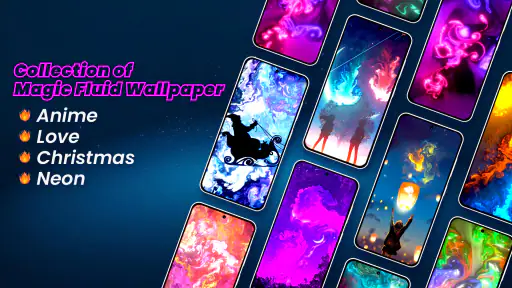
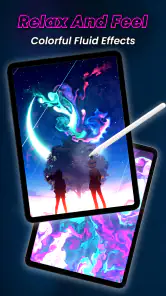
So, what makes Fluid Magic: 3D Live Wallpaper stand out in the ocean of wallpaper apps? Imagine this: vibrant colors swirling, mixing, and creating mesmerizing patterns that dance across your screen. It’s almost hypnotic, and dare I say, a little magical. The app uses fluid simulation technology to create these stunning visuals, which are not only eye-catching but also incredibly soothing to watch. It’s perfect for those moments when you need a quick escape from reality.
Features That Will Wow You
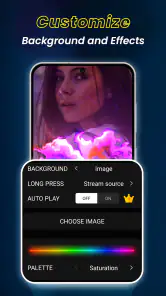
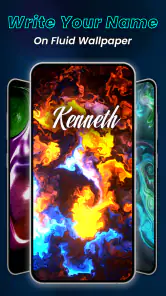
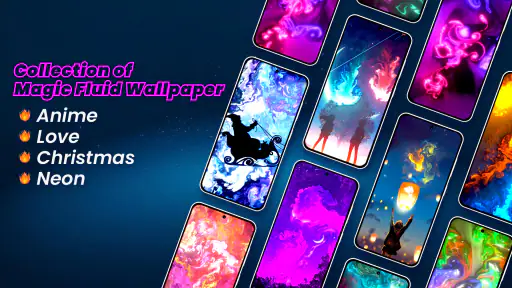
Let’s dive into some of the features. First off, the customization is top-notch. You’re not stuck with just a few presets. You can tweak the colors, patterns, and even the speed of the animation to suit your mood or style. Feeling fiery? Go for bold reds and oranges. Need something more calming? Cool blues and greens have got you covered.
More From Our News Desk

Weather by Xiaomi Review: Clear at a Glance, Less Clear Up Close

X Under Pressure: Can It Recover When Posting Goes Wrong?

Clash of Clans Is Won Between the Battles

Android Auto Makes the Case for Quieter Car Software

MobiOffice: Transforming Mobile Productivity with Seamless Integration

EA SPORTS FC™ Mobile Soccer: Redefining Mobile Sports Gaming
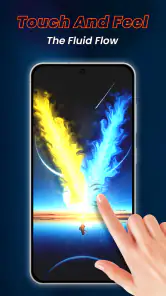
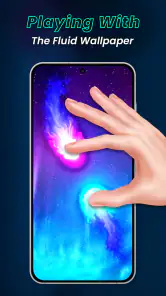
Another cool feature is the interactive touch response. As you swipe or tap your screen, the fluid reacts, creating an interactive experience that feels almost like painting with your fingers. It’s these little touches that make the app feel personal and engaging.
A touch effect with a practical trade-off
The touch response is most rewarding when I have a spare moment to play with the screen; it makes the wallpaper feel less like a fixed image and more like a small visual toy. I would not mistake that interaction for a drawing tool, though. It is a way to stir the display briefly, not a substitute for an app made to create or save artwork. If I want to make something precise, I would use a dedicated creative app; if I just want a responsive background while waiting, this is a better match.
There is a small habit worth considering, too: frequent tapping can turn a calm backdrop into a distraction. I would enjoy the response intentionally, then let the screen sit still while reading or checking a message. That balance preserves the playful quality without making every unlock feel like an invitation to fiddle with the phone.
Personalization without the usual clutter
Compared with wallpaper apps centered on static photographs, this one makes motion and touch the point. That suits me when I want a consistent abstract look instead of choosing a new image every few days. It is less suitable if I want a recognizable photo, a matching icon pack, or a complete theme that changes several parts of the interface; a conventional wallpaper or broader customization app would be a better fit for that.
There is also a practical trade-off in customization: the most vivid colors are not always the easiest backdrop for small icons. I would start with a restrained palette and animation speed, then make one adjustment at a time. That makes it easier to find a look that feels lively without distracting me whenever I unlock the phone.
Another difference from a gallery of static backgrounds is that the visual character comes from movement, not from a particular photograph or scene. That makes the app easier to pair with changing app layouts, but it also means the effect may feel repetitive if I want a recognizable image to look at. I would choose it for a color atmosphere that stays in the background, rather than expecting a rotating collection of pictures or a complete redesign of the phone.
Network moments and everyday use
A wallpaper like this is mainly something I interact with on the device, rather than a service I need to check throughout the day. Still, setup, updates, or any store-related actions can involve a connection, so I would handle those when reliable access is available instead of planning a customization session around a weak signal. I would not assume that every part of the app behaves the same way without a network connection.
For example, I might choose the colors at home, then use the animated screen during a commute or between tasks. On a crowded train, I would keep the phone locked rather than leave a bright, moving display running; the wallpaper is most enjoyable when I deliberately glance at it, not when it competes with whatever I am doing. If the effect stutters or the app does not respond as expected, I would first close and reopen it, then revisit the wallpaper setup once the phone is behaving normally. That is a sensible first step, not a promise that it fixes every issue.
Planning around patchy connectivity
For someone who often changes settings while away from home, the practical question is not whether a live wallpaper needs constant attention, but whether the setup or any later store activity is convenient at that moment. I would make my choices when I have a stable connection and a few minutes to check the result on the actual home screen. That avoids confusing a temporary delay with a problem in the visual effect itself.
If a setting does not appear to take effect, I would avoid repeatedly tapping through menus or making several changes at once. I would return to the wallpaper setup, make one adjustment, and check the screen again. This is a useful troubleshooting habit because it helps identify whether the issue is a display choice or a momentary response problem, without assuming a particular cause or promising that every interruption has the same fix.
Performance and User Experience
Now, you might be wondering about the app’s performance. After all, live wallpapers can sometimes be a drain on battery life. But here’s the kicker: the developers have optimized it so well that it barely affects your phone’s performance. Whether you’re using a high-end device or something more budget-friendly, Fluid Magic runs smoothly, making it accessible to everyone.
Installing and navigating the app is a breeze, even for those who aren’t particularly tech-savvy. The user interface is intuitive, and everything is laid out in a way that makes sense. Plus, regular updates mean any bugs are quickly squashed, and you get fresh new features to play with.
Even so, I would check battery use on my own phone after a normal day rather than treating any general performance claim as a guarantee for every device or routine. Live backgrounds are a visual extra, and their impact can depend on how often I wake the screen and how my phone handles animation. If battery life is my priority, a still image is the simpler choice. If I keep the live effect, a slower animation is a reasonable first setting to try.
For a fair test, I would compare a typical day with the wallpaper against my usual routine rather than judging from a few minutes of use. I would also pay attention to whether the motion feels comfortable when I unlock the phone repeatedly. The key trade-off is not only battery: an animation that looks beautiful in a preview may be too noticeable when I am checking messages or switching quickly between tasks. If that happens, adjusting the speed or returning to a still background is a sensible response, not a failure to use the app correctly.
Who will get the most from it?
This is a good match for someone who enjoys abstract visuals, likes adjusting colors, and wants a more tactile home screen. The touch response gives the wallpaper a small interactive quality, so it feels more personal than simply selecting a picture. I would skip it if I prefer a clean, motion-free screen, rely on a detailed photo background, or want a package that also changes icons and widgets.
It is a free personalization app from Maxlabs Personalization Tools, with optional in-app purchases ranging from $2.99 to $39.99 per item. It is rated for Everyone and has a 4.6 average from around 32,000 ratings, with more than 5 million installs. Those figures suggest it has found a sizable audience, but the best test is still whether animated color suits your own screen and habits.
A realistic use case is a quick reset between work and personal time: I might unlock my phone after finishing a task, see the colors move for a moment, and enjoy a small change of pace before opening the next app. It can also suit someone who keeps a simple home screen and wants one expressive element without adding more widgets. In both situations, the wallpaper adds atmosphere rather than information, so it is most useful when that is exactly what I want from personalization.
I would be more cautious if my phone is already set up around a photo that helps me identify the device at a glance, or if I use the home screen as a quiet workspace. A still image is also the more straightforward choice for anyone who wants the same appearance with no animation. The app makes sense when I value movement enough to accept that extra visual activity; it is not automatically an upgrade for every style of phone use.
The optional purchases are worth keeping in mind if I am trying to avoid spending inside apps. The app is free to start, but purchases are available at different price points, so I would look carefully at any offer before deciding whether it adds enough value for my use. I would not treat paid customization as necessary to enjoy the basic idea: first I would see whether the fluid look itself fits my routine.
Why You Should Give It a Go
In a world where customization is king, Fluid Magic: 3D Live Wallpaper feels like a breath of fresh air. It’s not just about looks; it’s about creating an experience. Whether you want to impress your friends or simply want something beautiful to look at during a hectic day, this app delivers on all fronts.
So, if you’re ready to transform your boring old home screen into a dynamic work of art, give Fluid Magic: 3D Live Wallpaper a try. You might just find yourself getting lost in the magic. And let’s be honest, who doesn’t want a little magic in their life?
My overall recommendation is simple: try it if changing the feel of your home screen sounds fun, and take a moment to see whether the motion stays comfortable during ordinary use. The current version is 1.7.9 and it requires Android 6.0 or later, which is useful to check before installing. If you prefer a quiet, predictable background, a static wallpaper will probably serve you better; if you like a responsive splash of color, this one is an easy way to make the phone feel more yours.
My connectivity verdict
Connectivity is a practical consideration around setup and store-related activity, rather than the central reason to use this wallpaper. I would make changes when I can give the screen a proper check, then judge the experience by how it behaves during my ordinary routine. That approach keeps expectations grounded without making assumptions about what will or will not work when the signal changes.
Overall, I see this as a focused personalization choice: animated fluid color and a touch response, rather than a photo library, a full theme system, or a utility. If that is the part of the home screen I want to change, it is worth trying; if I need a static, low-distraction background or a broader set of interface changes, another kind of wallpaper app is likely to suit me better.
Fluid Magic: 3D Live Wallpaper Frequently Asked Questions
What should I know about Fluid Magic: 3D Live Wallpaper before installing it?
Fluid Magic is a personalization app for turning a device background into a moving display of fluid effects. Its short description is “Fluid Magic,” and the central idea is to satisfy your interest in magic fluids moving as a live wallpaper with 3D effects. It is free to download, with optional in-app purchases, so you can consider its animated style before deciding whether it suits your home screen.
Who develops Fluid Magic, and which Android version does it support?
Fluid Magic: 3D Live Wallpaper is developed by Maxlabs Personalization Tools. It requires Android 6.0 or later, making the operating-system requirement an important check before downloading. The app is intended for use as a live wallpaper, so your device also needs to support live wallpapers. If your device meets those requirements, you can explore its animated background and personalization options.
Is Fluid Magic: 3D Live Wallpaper free to download, and what does it offer without paying?
Fluid Magic: 3D Live Wallpaper is free to download and sits in the personalization category. Its main appeal is turning a device background into an animated fluid display, with color and effect customization for a more personal look. Optional purchases are available for users who want more, but the app is not presented as a paid download.
What is Fluid Magic: 3D Live Wallpaper?
Fluid Magic: 3D Live Wallpaper is an innovative and interactive application that allows users to transform their device's background into a mesmerizing 3D fluid simulation. This app offers a unique visual experience with customizable colors, patterns, and effects, making your home screen come alive with dynamic fluid animations. It's a perfect app for those who enjoy personalization and a touch of artistic flair on their devices.
How can I customize the fluid effects in Fluid Magic?
Customizing the fluid effects in Fluid Magic is simple and intuitive. The app offers a user-friendly interface where you can adjust color schemes, flow patterns, and animation speed to suit your preferences. You can also experiment with different themes and presets provided within the app, allowing you to create a truly unique and personalized 3D live wallpaper experience. Access these customization options through the app's settings menu.
Pros
- Stunning 3D visuals enhance phone aesthetics.
- Highly customizable settings for personalization.
- Smooth animation with minimal battery impact.
- Easy to use interface for quick setup.
- Regular updates with new features and designs.
Cons
- Limited free features
- most are paid.
- Occasional lag on older devices.
- Ads can be intrusive for free users.
- Consumes more battery on high settings.
- Requires internet for full functionality.
- Category
- Personalization
- Version
- 1.7.9












