Messenger - Color SMS
- 2.28K
- 4.3
- Installs
- 10.00M
- Price
- Free

Screenshots
Analysis by Reviewed
I would approach Messenger - SMS Messages as a practical choice for someone who wants to make everyday texting feel more personal without switching to a complicated chat service. Its focus is SMS messaging, with visual customization as the main attraction. If you mostly need a straightforward place to handle text conversations, that emphasis can be appealing; if your friends and family rely on a separate internet-based messenger, it may not replace that service.
How it fits a real texting routine
Picture a busy weekday: a family member texts about dinner, a clinic sends an appointment reminder, and a friend asks when you will arrive. These are different conversations, but they all compete for attention in the same inbox. A distinct look for a few important threads can help me spot the right one before I open it. I would reserve the strongest visual cues for conversations where recognizing the sender quickly matters, rather than decorating every chat equally.
That approach is especially useful if you revisit older text threads to check an address, a pickup time, or a brief instruction. A personalized thread can be easier to identify than a long list of visually identical conversations. The payoff is modest but practical: it can reduce the moment of hesitation before opening a message, not change the way SMS itself works.
For a household, the app may appeal to people who already rely on ordinary texting and want their interface to feel less generic. It is less compelling for a group that coordinates through an online messenger with shared media, large group spaces, or other internet-based tools. I would choose based on where the people I contact actually communicate, not on customization alone.
What a busy texting day feels like
The useful test for a messaging app is not how it looks when opened once, but whether it stays manageable when conversations pile up. For example, I might want a different background for a family thread than for appointment reminders, so I can recognize the conversation at a glance. Per-chat styling is more than decoration in that situation: used selectively, it can help distinguish contexts without changing how I write or send a message.
There is a trade-off, though. A bright theme can be pleasant for a few chats and distracting across every thread. I would start with a restrained style, apply stronger colors only where they genuinely help, and check that text remains easy to read. That small bit of curation is more useful than changing every conversation just because the option exists.
Speed, stability, and practical expectations
The app is developed by AZ Mobile Software and sits in the communication category. Its appeal is a familiar texting workflow with extra room to tailor the appearance, rather than a promise that messages will arrive faster than they do through another messaging service. In ordinary use, I would judge responsiveness by how quickly the inbox opens and how easy it is to reach a conversation; network conditions and the phone itself still shape the experience.
More From Our News Desk

 Lark Player:Music Player & MP3
Switching to Lark Player: A Better Fit for Music Stored on Your Phone?
Lark Player makes sense if your music already lives on your phone. Here is what changes, what does not transfer by assumption, and how to test the switch without regret.

 Tile Master® - Matching Game
Tile Master Finds Its Place in the Gaps of a Noisy Phone
OS changes rarely transform a tile puzzle, but they reshape the small rituals around it. Tile Master’s appeal lies in how well its brief, tactile rounds fit the modern phone.

 Google Docs
 Shows What Mobile Writing Still Gets Wrong
Google Docs still makes a strong case for the shared document, but its real significance is how it exposes the gap between cloud convenience and genuinely capable mobile work.

 YouTube Studio
 Is Becoming a Creator’s Daily Control Room
As publishing turns into a daily, data-led habit, YouTube Studio is becoming the control room creators reach for between uploads—not another tool for making videos.

 Tiles Hop Music & Ball Game
Tiles Hop Review: When the Beat Is Clear, Every Miss Counts
Tiles Hop turns a simple bouncing-ball premise into a sharp test of timing. Its best design is immediate and readable; its weakest moments come when recovery feels less clear than the beat.

 Piano - Music Keyboard & Tiles
: Inviting Rhythm, Unproven Recovery
A tile-tapping piano game lives or dies by timing. This resilience-focused review separates what its format promises from what players still need to verify.
Latest News



For someone who receives frequent texts, the distinction between visual customization and messaging capability matters. Themes and bubble colors can make a thread easier to scan, but they do not change the basic limits of SMS. If your main need is group coordination with rich online features, or chatting across platforms in one shared service, a dedicated internet messenger may be the better fit. I would choose this app for the texting routine I already have, not assume it can consolidate every kind of chat.
It is free to install, with in-app purchases listed from $4.99 to $49.99 per item. I would try the free experience first and consider a purchase only if the available customization is something I know I will use. The app is rated for Everyone, and its broad audience makes it a reasonable option for a household where different people simply want a more personal-looking texting app.
Why Messenger - SMS Messages Stands Out
First off, the interface is as smooth as butter. You know that feeling when you open an app and everything just makes sense? That's what Messenger - SMS Messages delivers. It's clean, intuitive, and doesn’t bombard you with unnecessary features. Everything you need is right where you'd expect it to be.
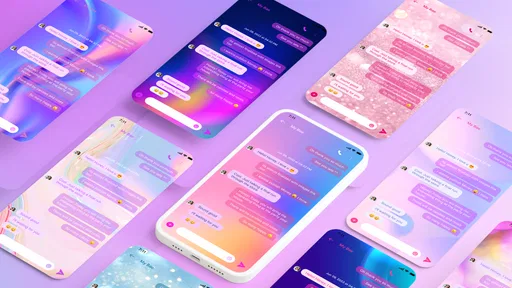
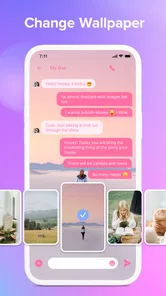
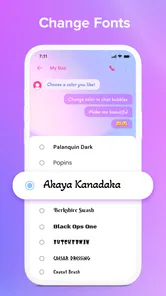
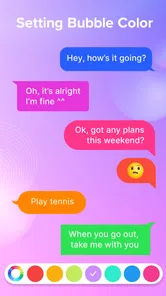
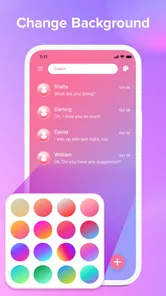
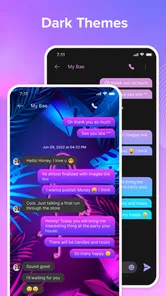
One of the coolest features I found is the customization options. I mean, who doesn't love a little personalization, right? You can change themes, colors, and even the font style. This makes every chatting experience feel uniquely yours. It's like dressing up your messages for the occasion!
Making customization useful rather than noisy
The best way I can see to use those appearance choices is as a small visual filing system. For instance, I might keep a calm, high-contrast style for a thread I need to read quickly, and use a more playful look for a close friend. The point is not to make each conversation look impressive; it is to make the important ones easier to recognize without sacrificing legibility.
I would also take a moment to review the result in the actual conversation view, not just while choosing a theme. A color combination that looks attractive in a settings preview may feel tiring when read repeatedly. If the text becomes harder to scan, the customization has worked against the main job of the app. A restrained background and clear bubbles are usually more useful than a dramatic design.
Functionality and Features
Now, let's talk about the nuts and bolts. Messaging is a breeze with this app. From sending quick SMS to multimedia messages, it handles everything effortlessly. I also appreciated the quick reply feature, which lets you respond directly from the notification bar. Perfect for those times when you're in a rush!
Another standout feature is the integration with other messaging platforms. It consolidates your communications, so you don't have to hop between apps. It's like having a universal inbox, and trust me, it saves a lot of time and energy.
Security is another big win here. With end-to-end encryption, you know your messages are safe and sound. In today's world, where privacy is paramount, having that extra layer of security is a reassuring touch.
Performance and User Experience
Performance-wise, the app is a champ. It runs smoothly without any noticeable lag, even on my older device. Battery consumption is minimal, which is a huge plus for those of us who are always on the go and don't want to carry a charger everywhere.
The user experience is top-notch. It's clear that a lot of thought went into the design. The app supports various languages, making it accessible to a wider audience. Plus, the customer support is responsive and genuinely helpful, which isn't something you find often these days.
When speed matters more than styling
For quick exchanges, the useful question is whether I can find the right thread and reply without extra steps. A visual distinction between a couple of high-use conversations can help with that, but customization will not rescue an overloaded inbox by itself. I would keep the number of specially styled chats small and use the normal conversation list as the main way to navigate.
If I am in a hurry, I would favor a readable setup over a carefully curated one. A design that slows down scanning is a poor trade, even if it looks good. That is also why I would test the app during a normal day rather than judge it after a quiet setup session: the real measure is whether the interface stays comfortable when messages arrive between other tasks.
Who will get the most from it
I see this as a better fit for people who use SMS regularly and care about making separate threads easier to recognize. A practical routine is to give only high-priority chats distinct colors, then leave low-traffic threads alone. That keeps visual cues useful rather than turning the inbox into a patchwork. It may also suit someone who wants a familiar texting app but finds a plain default interface dull.
If you rarely send SMS, prefer a minimal interface with no cosmetic choices, or depend on encrypted online group chats, I would look elsewhere. The app is free, but optional purchases range from $4.99 to $49.99 per item, so it makes sense to decide whether personalization is worth paying for before buying anything. Its 4.3 average from around 41,000 ratings and more than 10 million installs suggest it has reached a sizeable audience, though those figures alone cannot tell you whether its style suits your habits.
Reliability when a message seems delayed
I would keep expectations grounded about what this kind of app can control. A text message’s arrival depends on the phone and mobile service as well as the app, so a delay is not automatically evidence of a problem with the interface. When something seems missing, I would check the conversation and the phone’s service first, then reopen the app before sending the same message again. That simple pause can help avoid duplicate texts.
For anyone moving from another texting app, I would also make the switch in a low-pressure way: try a familiar conversation, confirm that replies appear where expected, and keep the previous routine in mind until the new one feels comfortable. The app’s visual choices are easiest to judge after ordinary messages have come and gone, rather than during a one-time setup. I would not use themes or bubble colors as evidence of message privacy; appearance and protection are separate questions.
Choosing it and getting started
Before making it my daily texting app, I would check that it works comfortably with the way I handle SMS on my phone. Android version 6.0 is the minimum requirement, and the current release is 2.5.9. A sensible first step is to set up one or two frequently used conversations, send a test message, and see whether the layout and notification behavior feel natural. That is more revealing than spending time styling every thread before you know you like the workflow.
It is also worth deciding what you want the app to improve. If the answer is “make familiar SMS threads easier to tell apart,” its customization has a clear purpose. If the answer is “put all of my online chats in one place” or “make messages arrive regardless of reception,” the app is not the right tool for that expectation. Starting with a specific need makes it easier to tell whether the change is worthwhile.
For reliability, I would separate the app’s interface from the delivery of a message: texting still depends on the phone and mobile service, so a delay does not automatically mean the app has failed. If a conversation seems out of date, I would first check whether the message appears in the usual SMS thread and whether the phone has service, then reopen the app. I would also avoid treating a decorative theme as a privacy feature; appearance customization is not a substitute for choosing a service with the privacy properties you need.
Where it fits among messaging choices
Compared with a phone’s basic SMS app, the reason to choose this one is the opportunity to make individual conversations feel distinct. Compared with internet-first messengers, its strongest fit is the familiar text-message routine rather than a shared platform for every contact and group. That distinction matters if you are choosing one app for a household: people who mainly exchange ordinary texts may appreciate the personal touches, while those who expect all-in-one online chat tools may prefer a different option.
Messenger - SMS Messages was released on December 16, 2020, and has an Everyone content rating. I would treat it as a focused alternative for people who want control over how SMS conversations look, not as a universal replacement for every communication app. AZ Mobile Software has built a clear appeal around that choice, and I would recommend trying the no-cost version if customization is a genuine draw. If you only want the simplest possible texting screen, the phone’s existing option may be enough.
My performance verdict
For me, this is best judged as a visual alternative for everyday SMS, not as a performance upgrade or an all-purpose communications hub. Its most convincing value is practical and small-scale: making a few conversations easier to identify while keeping a familiar texting routine. I would start with the free version, style only the threads where a visual cue helps, and keep the design easy to read.
If that narrow benefit sounds useful, the app is worth trying. If your priority is a plain screen, advanced online group communication, or a different privacy model, I would stick with the phone’s existing texting option or choose a messenger built around those needs. I would recommend this one to someone who enjoys a little control over the look of SMS, provided they keep those limits in view.
In conclusion, if you're searching for a reliable, feature-rich messaging app, give Messenger - SMS Messages a shot. It's user-friendly, secure, and packed with features that enhance your messaging experience. So go ahead, download it, and let it become your go-to app for all things messaging!
Messenger - Color SMS Frequently Asked Questions
Can I choose a different look for each conversation?
Yes. Messenger - SMS Messages focuses on personalizing chats, with vibrant themes, bubble colors, and backgrounds that can be selected for individual conversations. This is useful if you want to distinguish chats visually rather than apply one appearance across the whole app. You can make each conversation feel more personal while keeping the same basic purpose: messaging.
Is Messenger - SMS Messages intended for Android or iPhone?
Messenger - SMS Messages is a communication app for Android devices, and it requires Android 6.0 or later. Before downloading, check your phone’s operating system version to make sure it meets that requirement. The app is free to download, and its Everyone content rating makes it suitable for a general audience. Compatibility and age suitability are useful first checks before setting it up.
Can Messenger - SMS Messages be used on my phone?
Messenger - SMS Messages is a communication app for Android, and it requires Android 6.0 or later. Before downloading, check your phone’s operating system version to make sure it meets that requirement. The app is free to download, and its Everyone content rating makes it suitable for a general audience. Compatibility and age suitability are useful first checks before setting it up.
Who develops Messenger - SMS Messages, and how popular is it?
Messenger - SMS Messages is developed by AZ Mobile Software. It has an average rating of 4.3 from around 41,000 ratings, with roughly 2,200 written reviews and over 10 million installs. Those figures give a sense of its reach and user feedback, though individual experiences can differ. The app is listed in the Communication category and is presented simply as “Messenger.”
What is Messenger - SMS Messages app and what features does it offer?
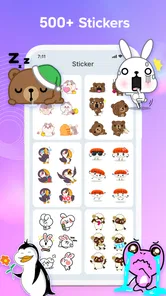
Messenger - SMS Messages is a versatile app designed to streamline your texting experience by bringing all your SMS and messaging needs into one place. It offers features like group messaging, multimedia sharing, emojis, and customizable themes. The app also supports dual SIM functionality, allowing users to manage multiple numbers efficiently. With its clean, user-friendly interface, it aims to enhance communication by making texting more enjoyable and organized.
Pros
- User-friendly interface for easy navigation
- Supports multimedia messages seamlessly
- Low data usage for text messaging
- Customizable themes and backgrounds
- Fast syncing across multiple devices
Cons
- Limited support for encrypted messages
- Ads can be intrusive at times
- No dark mode for night use
- Occasional delays in message delivery
- Limited integration with other apps