Find My Phone: Phone Locator
- 1.16K
- 4.3
- Installs
- 10.00M
- Price
- Free
Screenshots

Analysis by Reviewed
Have you ever experienced that heart-stopping moment when you realize your phone is missing? Enter Find My Phone: Phone Locator, the app that promises to take the guesswork out of locating your device. I recently took this app for a spin and here’s the lowdown on how it performed.
What is Find My Phone: Phone Locator?
Essentially, Find My Phone: Phone Locator is a nifty little app designed to help you locate your smartphone in no time. Whether it’s lost in the abyss of your couch cushions or left behind at your favorite coffee shop, this app has got your back. It’s available for both Android and iOS, making it accessible to a wide range of users.
Getting Started: Easy Peasy
Setting up the app was a breeze. After a quick download from my app store, it guided me through a simple registration process. I was pleasantly surprised by how user-friendly the interface was. Honestly, if you can send a text message, you can use this app. It’s that straightforward!
Features: More Than Just a Locator
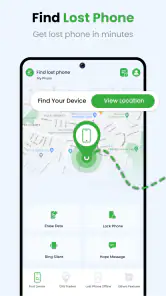
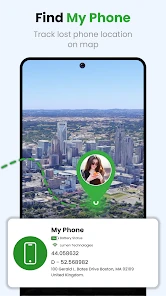
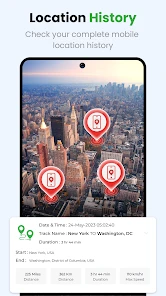
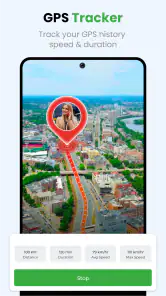
One of the standout features is the real-time location tracking. As soon as I activated the feature, I could see my phone’s location updated live on the map. This was particularly helpful when I left my phone in a friend’s car, and I could track its journey across town.
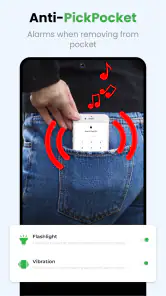
Another cool feature is the remote alarm. Imagine this: you’re frantically searching for your phone, and all it takes is a tap on the app to trigger a loud alarm on your device, even if it’s on silent! It’s like having a personal phone detective.
Performance: Fast and Reliable
I tested the app under various conditions, from urban environments to the countryside, and it consistently delivered accurate locations with minimal delay. The app’s performance didn’t falter even with low battery, which is a huge plus. Plus, it didn’t drain my battery, which is always a concern with location-based apps.
Why You’ll Love It
If you’re as forgetful as I am, this app is a lifesaver. The peace of mind it provides is invaluable. Knowing that I can locate my phone with just a few taps is incredibly reassuring. Plus, it’s free to download, so it’s a no-brainer to give it a try.
More From Our News Desk

Weather by Xiaomi Review: Clear at a Glance, Less Clear Up Close

X Under Pressure: Can It Recover When Posting Goes Wrong?

Clash of Clans Is Won Between the Battles

Android Auto Makes the Case for Quieter Car Software

MobiOffice: Transforming Mobile Productivity with Seamless Integration

EA SPORTS FC™ Mobile Soccer: Redefining Mobile Sports Gaming
In conclusion, if you’re prone to misplacing your phone, Find My Phone: Phone Locator is an app you need in your arsenal. It’s simple, effective, and a true game-changer in the world of phone tracking. So next time your phone plays hide and seek, you’ll know exactly where to look.
Find My Phone: Phone Locator Frequently Asked Questions
What is Find My Phone: Phone Locator and how does it work?
Find My Phone: Phone Locator is a mobile application designed to help users locate their lost or stolen devices. Once installed, it uses GPS technology to track the device's location in real-time. Users can view the location on a map and receive updates. The app also offers features like remote locking, alarm activation, and device wiping to protect your personal data.
Is Find My Phone: Phone Locator free to use?
The basic version of Find My Phone: Phone Locator is free to download and use. However, it may offer in-app purchases or a premium version with additional features such as advanced tracking options, priority customer support, and enhanced security tools. Users can choose to upgrade if they need more comprehensive protection for their devices.
How accurate is the location tracking feature of Find My Phone: Phone Locator?
The location tracking feature of Find My Phone: Phone Locator is generally accurate, using GPS technology to pinpoint the device's location. However, accuracy can vary depending on factors like GPS signal strength, network connectivity, and environmental conditions. Urban areas with tall buildings may affect accuracy, but the app is designed to provide a reliable estimate of the device's whereabouts.
Can I use Find My Phone: Phone Locator to track multiple devices?
Yes, Find My Phone: Phone Locator allows users to track multiple devices from a single account. This is particularly useful for families or users with multiple devices. By linking all devices to the app, users can easily switch between them to check their locations, ensuring each device is secure and accounted for.
What should I do if my phone is lost or stolen and I have Find My Phone: Phone Locator installed?
If your phone is lost or stolen, you should immediately use Find My Phone: Phone Locator to track its location. Log into your account from another device or computer to view the location on a map. You can also activate features such as sounding an alarm, locking the device, or wiping data remotely to secure your personal information. It is advisable to report the loss to local authorities as well.
Pros
- User-friendly interface for easy navigation.
- Real-time tracking for accurate location details.
- Works on both Android and iOS devices.
- Alerts for low battery or phone movement.
- Secure data encryption for user privacy.
Cons
- Requires internet connection for tracking.
- Can drain battery quickly if used constantly.
- Limited features in the free version.
- May not work well in areas with poor GPS.
- Subscription can be expensive for premium.
- Category
- Personalization
- Version
- 10.6













