Photo Video Maker with Music
- 384.00
- 3.8
- Installs
- 10.00M
- Price
- Free

Screenshots
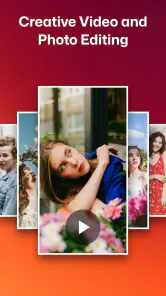



Analysis by Reviewed
Alright folks, gather around because I've stumbled upon an app that could be your next favorite tool for creating stunning videos. If you've been on the hunt for an app that helps you transform your photos into captivating videos with a touch of music magic, then Photo Video Maker with Music might just be what you need!
Turning Memories into Masterpieces
Imagine being able to take a bunch of your favorite photos and seamlessly turn them into a video that tells a story. That's exactly what Photo Video Maker with Music does. You start by selecting the photos you want to include in your video. The app's interface is pretty intuitive, so even if you're not tech-savvy, you’ll find your way around it without much hassle.
A Symphony of Features
One of the standout features is the music integration. You can pick your favorite tracks from the app's built-in library or choose your own music files. Trust me, there's nothing like adding that perfect background score to your video to give it that emotional punch. Plus, the app allows you to adjust the length of the video to match the music, ensuring that everything syncs perfectly.
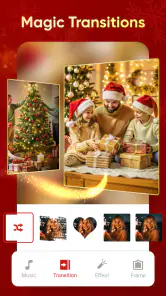
Now, if you're someone who loves to add a bit of flair to your videos, the app offers a variety of effects and transitions. From subtle fades to eye-catching animations, there’s a little something for everyone. It’s like having a mini video editing studio right in your pocket!
Sharing is Caring
Once you’ve crafted your masterpiece, sharing it is a breeze. The app supports direct sharing to popular social media platforms like Instagram, Facebook, and WhatsApp. So, whether it's a birthday montage or a travel diary, you can easily share your creations with friends and family.
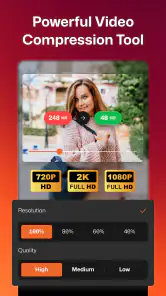
Another cool feature is the ability to save videos in different resolutions. Whether you want something quick for your Instagram story or a high-resolution video to keep for posterity, the app has you covered.
Final Thoughts
In a nutshell, Photo Video Maker with Music is a fantastic app for anyone looking to create beautiful, music-infused videos without diving into complex editing software. It’s user-friendly, packed with features, and makes the whole process fun and rewarding. So go ahead, unleash your creativity and start turning those precious moments into unforgettable stories!
More From Our News Desk

Weather by Xiaomi Review: Clear at a Glance, Less Clear Up Close

X Under Pressure: Can It Recover When Posting Goes Wrong?

Clash of Clans Is Won Between the Battles

Android Auto Makes the Case for Quieter Car Software

MobiOffice: Transforming Mobile Productivity with Seamless Integration

EA SPORTS FC™ Mobile Soccer: Redefining Mobile Sports Gaming
Photo Video Maker with Music Frequently Asked Questions
What is Photo Video Maker with Music, and how does it work?
Photo Video Maker with Music is an app designed to help users create stunning video slideshows using photos, music, and various special effects. The app allows you to import images from your gallery, select background music, and apply filters and transitions to craft a personalized video. It’s user-friendly, making it accessible for anyone looking to create memorable video presentations for personal or professional use.
Is Photo Video Maker with Music free to use, or are there any in-app purchases?
While Photo Video Maker with Music is free to download and offers a range of basic features at no cost, it also includes optional in-app purchases. These purchases can unlock premium features like additional filters, effects, and music tracks, providing users with more creative freedom. Users can decide if these extras are worth the investment based on their needs.
What file formats does Photo Video Maker with Music support for importing and exporting?
Photo Video Maker with Music typically supports a variety of popular file formats. For images, you can usually import JPEG and PNG formats, while audio files can often include MP3 and WAV formats. When exporting your final video, the app generally provides options like MP4 or AVI, ensuring compatibility with most playback devices and platforms.
Can I share videos created with Photo Video Maker with Music directly to social media?
Yes, Photo Video Maker with Music is designed with social media enthusiasts in mind. The app often includes options to share your creations directly to platforms like Instagram, Facebook, or Twitter after exporting your video. This seamless integration makes it easy to showcase your work and engage with your audience across various social channels.
What kind of editing features does Photo Video Maker with Music offer?
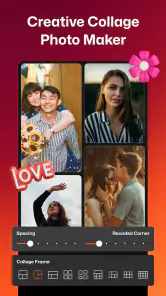
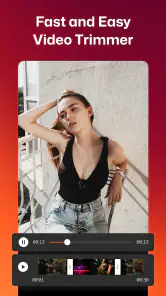
Photo Video Maker with Music comes packed with a variety of editing features to enhance your videos. Users can apply filters, add text or stickers, and choose from multiple transition effects to make their videos pop. Additionally, the app often allows for trimming, splitting, and rearranging clips to refine the video’s flow, catering to both beginners and experienced editors alike.
Pros
- Easy to use interface for beginners.
- Wide variety of music options.
- Multiple transition effects available.
- Supports HD video export.
- Frequent updates with new features.
Cons
- Limited free version features.
- Ads can be intrusive.
- Music library lacks popular tracks.
- Occasional app crashes.
- No direct social media sharing.
- Category
- Video Players & Editors
- Version
- 10.7.8













