Caller ID - Block Spam Call
- 45.00
- 3.7
- Installs
- 50.00M
- Price
- Free

Screenshots


Analysis by Reviewed
Ever been bugged by unsolicited calls just when you're about to take a nap or dive into a good book? We’ve all been there, and it’s downright annoying. That’s where Caller ID - Block Spam Call steps in to save your day. Let's dive into what makes this app a must-have for anyone dealing with spam calls.
Identify and Block Those Pesky Calls
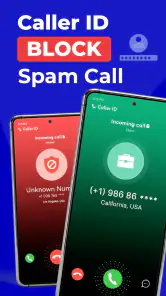
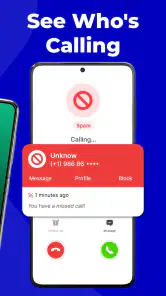
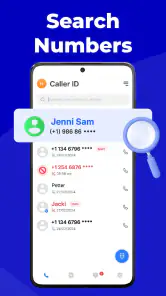
The first thing you’ll notice about Caller ID - Block Spam Call is its intuitive interface. It doesn’t take a tech wizard to figure it out. Just install the app, and you’re good to go. The app instantly starts identifying incoming calls, letting you know who’s on the other end. It’s almost like having a personal assistant who whispers who’s calling before you even pick up.
Simplicity Meets Efficiency
You might think, "Oh great, another app to bog down my phone’s memory." But trust me, this one’s worth every megabyte. It’s lightweight yet incredibly powerful. The app efficiently blocks spam calls, so you don’t have to deal with those incessant telemarketers or pesky robocalls. It’s like having a bouncer for your phone, only allowing the good calls through.
Customized Experience
What I love about this app is the customization it offers. You can set it up to block specific numbers, or let it automatically screen known spam numbers. It’s like having your own personal call filter. You can also create a list of contacts that should never be blocked, ensuring that important calls always get through.
Community-Based Spam Reporting
One of the standout features is the community-based spam reporting. Users can report spam numbers, which helps everyone in the network. It’s like being part of a neighborhood watch, but for your phone. This collective effort makes the app’s database robust and ever-evolving, ensuring you’re protected against new spam numbers.
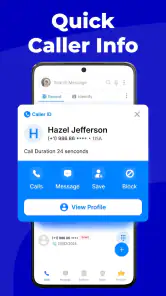
Another cool feature is the ability to see the name and photo of the caller, if available. No more "Who is this?" moments! You get to decide whether to answer or let it go to voicemail, with full knowledge of who’s trying to reach you.
Final Thoughts
In a world where spam calls are as common as morning coffee, having an app like Caller ID - Block Spam Call is a game-changer. It’s easy to use, highly effective, and offers a sense of control over your phone that’s incredibly liberating. So if you’re tired of unwanted calls interrupting your day, give this app a try. Your peace of mind is just a download away!
More From Our News Desk

Weather by Xiaomi Review: Clear at a Glance, Less Clear Up Close

X Under Pressure: Can It Recover When Posting Goes Wrong?

Clash of Clans Is Won Between the Battles

Android Auto Makes the Case for Quieter Car Software

MobiOffice: Transforming Mobile Productivity with Seamless Integration

EA SPORTS FC™ Mobile Soccer: Redefining Mobile Sports Gaming
Overall, Caller ID - Block Spam Call isn’t just an app; it’s a lifeline in today’s digital age, making sure the only calls that get through are the ones you actually want to take. Say goodbye to spam and hello to uninterrupted bliss!
Caller ID - Block Spam Call Frequently Asked Questions
What is Caller ID - Block Spam Call and how does it work?
Caller ID - Block Spam Call is a mobile application designed to help users identify incoming calls from unknown numbers and block unwanted spam calls. It works by cross-referencing the incoming caller's number with an extensive database of known spam numbers and user-reported entries. The app displays the caller's information on your screen, allowing you to decide whether to answer or block the call. This feature helps users manage their calls more effectively and avoid potential scams.
Is Caller ID - Block Spam Call free to use?
Caller ID - Block Spam Call offers both free and premium versions. The free version includes basic features such as caller identification and spam blocking. However, to access advanced features like ad-free usage, automatic updates, and enhanced call blocking capabilities, users can upgrade to the premium version through an in-app purchase. This flexibility allows users to choose the level of service that best fits their needs.
How accurate is the caller identification feature?
The caller identification feature of Caller ID - Block Spam Call is highly accurate, thanks to its extensive database that is regularly updated. The app relies on community reports and advanced algorithms to identify and categorize numbers. While no app can guarantee 100% accuracy, users have reported high satisfaction with its ability to correctly identify and flag spam or unknown numbers, significantly reducing the risk of falling victim to phone scams.
Can I customize the spam call blocking settings?
Yes, Caller ID - Block Spam Call provides users with customizable settings to tailor the spam call blocking experience to their preferences. Users can choose to block all unknown numbers, only numbers not in their contact list, or specific numbers reported by the community. Additionally, the app allows users to create a personal block list, ensuring that unwanted callers are automatically blocked in the future.
Does the app require internet access to function?
Caller ID - Block Spam Call requires internet access to update its database of spam numbers and caller information. While the app can identify and block calls using locally stored data, regular internet access ensures the database remains up-to-date, providing users with the most accurate caller identification and spam protection. Users are advised to connect to the internet periodically for optimal app performance.
Pros
- Identifies unknown callers accurately
- Blocks spam calls effectively
- User-friendly interface
- Customizable settings for call management
- Works offline for caller identification
Cons
- May drain battery quickly
- Contains in-app ads
- Occasional false positives
- Limited free features
- Requires frequent updates
- Category
- Communication
- Version
- 6.50