Family Tracker by Phone Number
- 1.20K
- 4.5
- Installs
- 5.00M
- Price
- Free

Screenshots

Analysis by Reviewed
I see the appeal of a family locator most clearly in the small gaps of an ordinary day: a child is on the way home, a relative is travelling across town, or plans have changed and a quick check could spare several calls. Family Tracker by Phone Number is a parenting app from SoulApps Studio built around that kind of reassurance. In my view, it works best as a shared convenience between people who agree to use location sharing, not as a substitute for communication or supervision.
When a location check depends on connectivity
A live location view is only as useful as the phone and connection behind it. If someone is indoors, travelling through a weak-signal area, or has a depleted battery, the location you see may not reflect their exact situation at that moment. I would treat the map as a helpful clue rather than proof that someone is safe or in a particular place. If a check matters, a message or call is still the sensible next step.
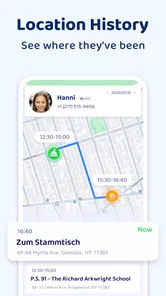
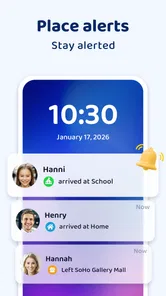
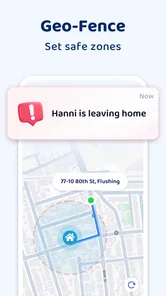
The app’s location history can help make a day’s movements easier to understand, while geofencing can notify you when a family member enters or leaves a chosen place such as home or school. These tools are most useful when you set expectations together: agree which places matter, who should receive updates, and when a direct check-in is more appropriate than relying on an alert.
How it fits into family routines
For a parent coordinating school pickup, a location check can answer a practical question without interrupting a child who is walking with friends. For adult siblings sharing care for a relative, it can offer a quick way to coordinate arrival times. I would keep the circle small and use sharing by consent; that makes the app feel like a shared household tool rather than a way to monitor someone without their knowledge.
Compared with texting, a locator can save repeated “Where are you?” messages when several people are meeting. Compared with a phone’s built-in location-sharing tools, its appeal is a family-focused setup with location history and place alerts in the same experience. Those who only need an occasional check may find a simple text is less effort, while people already comfortable with their phone’s built-in sharing may not need another app.
Practical checks for smoother use
Before relying on a location alert for a routine, try it with the family member who will be sharing and confirm that invitations and sharing settings are understood on both ends. Choose only useful zones instead of adding every destination; too many alerts can become noise, and people may start ignoring the ones that matter. It is also worth agreeing on a backup plan, such as sending a message if a phone’s location looks stale or an expected notification does not arrive.
Location tools can also affect battery and mobile data, particularly when they are used frequently. The app is designed to be light on both, but I would still avoid treating constant map checks as a harmless habit. A more considerate routine is to check when there is a real coordination need, rather than refreshing the screen just because it is available. The app is free to download, with optional in-app purchases ranging from $0.99 to $49.99 per item.
More From Our News Desk

Weather by Xiaomi Review: Clear at a Glance, Less Clear Up Close

X Under Pressure: Can It Recover When Posting Goes Wrong?

Clash of Clans Is Won Between the Battles

Android Auto Makes the Case for Quieter Car Software

MobiOffice: Transforming Mobile Productivity with Seamless Integration

EA SPORTS FC™ Mobile Soccer: Redefining Mobile Sports Gaming
What to expect when something goes wrong
If a location seems out of date, first check whether the person can respond directly and whether their phone has a usable connection and enough battery. A map cannot explain why an update is missing, so I would not interpret silence from the app as evidence of trouble—or as reassurance that everything is fine. A call, agreed meeting point, or another family contact is a better fallback when timing matters.
Privacy is part of that practical conversation, too. The original experience describes location sharing as something family members can choose, and says location data is encrypted. I would still talk openly about who can see a location and when, especially with older children and adults. A safety tool is easier to trust when everyone understands its purpose and can raise concerns without feeling watched.
Getting Started with Family Tracker
So, what’s the deal with this app? Basically, Family Tracker by Phone Number is designed to help you track the location of your family members using their phone numbers. Sounds pretty straightforward, right? It’s available on both Android and iOS, so no matter what kind of phone your family is using, you’re covered.
Easy Peasy Setup
Setting it up is a breeze. Once you’ve got it installed, you just need to register your phone number and invite your family members to join. They’ll get a request, and once they accept, you’re all set. The app uses GPS technology to pinpoint where everyone is. But don’t worry, it’s not like Big Brother is watching. Everyone gets to choose whether they want to share their location, which is a nice touch.
Features That Make Life Easier
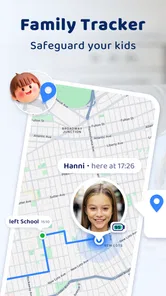
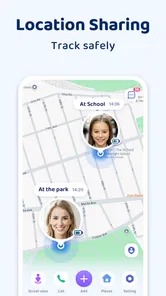
Let’s talk about features because this app is packed with them. You can see real-time locations of your family members, which is super handy when you’re trying to coordinate meetups. Plus, there’s a cool geofencing feature. You can set up zones, like home or school, and get notifications when someone enters or leaves these areas. It’s perfect for keeping track of the kids without having to call them every five minutes.
Another neat feature is the location history. You can check out where your family members have been during the day. It’s like having a little detective in your pocket, minus the trench coat and magnifying glass.
The Nitty-Gritty Details
Using the Family Tracker by Phone Number app feels intuitive because of its user-friendly interface. Everything is laid out nicely, so you won’t find yourself getting lost in a sea of menus. The app is designed to be light on data and battery usage, which is crucial for those who are always on the go.
Privacy is a big deal here. The app ensures that all location data is encrypted, so you can have peace of mind knowing your family’s whereabouts aren’t being shared with the world. Plus, you can customize who sees your location and when, putting you in control.
A Few Thoughts
In a world where staying connected with family is more important than ever, Family Tracker by Phone Number is like a digital guardian angel. It’s perfect for parents, siblings, or anyone who just wants to make sure their loved ones are safe. The peace of mind it offers is truly invaluable.
If you’re looking for a way to stay connected with your family without being intrusive, I’d say give this app a shot. It’s reliable, easy to use, and most importantly, it respects your privacy. So, go ahead, download it, and keep your family close, even when they’re far away.
Who should choose it—and who may prefer something else
I’d recommend it to families who want a shared map for practical coordination and are willing to make location sharing a mutual agreement. It is less suitable for anyone expecting a phone number alone to reveal a person’s whereabouts, or for people who want covert monitoring. The app’s setup involves invitations and acceptance, so the useful unit is a participating family group, not a number searched in isolation.
A realistic routine might be a parent checking whether a teenager has left school before heading to pickup, then using a message to confirm a changed plan if the map does not update. That division of labor matters: alerts and location history can reduce unnecessary calls, but they do not replace consent, a conversation, or a backup plan. I would also avoid treating a geofence notification as a precise arrival report; it is a prompt to check, not a guarantee about what is happening at the destination.
Making the map useful without making it a habit
One practical way to keep this tool from taking over family routines is to decide in advance what counts as a reason to open it. For example, I might check once when someone is due to arrive, rather than repeatedly watching their movement across the map. That boundary makes the app serve a specific purpose and can prevent a normal delay from turning into a chain of anxious refreshes. If plans change, a short message is often clearer than trying to infer the new plan from a moving dot.
Location history also calls for restraint. It can help clarify a practical question about the day, but I would not turn it into a routine inspection of every trip. Before using it, families should agree on what they expect the history to be used for and whether everyone is comfortable with that. This is especially important when children grow older: a setup that feels reassuring to a parent may feel intrusive to a teenager unless the purpose and boundaries are discussed plainly.
Choosing between a family locator and simpler options
The most useful comparison is not simply which app has the most features, but how much coordination your household actually needs. A text works well when one person needs to confirm a single arrival. A call is better when a delayed update needs an explanation or a decision. Built-in phone location sharing may suit a family that already uses it comfortably. This app makes more sense when several relatives want one shared routine that combines a map, place alerts, and a look at location history.
That convenience comes with a trade-off: everyone who participates has to be comfortable with the arrangement, and location-based updates depend on phones and connectivity behaving well enough to report them. If a family member does not want ongoing sharing, pushing them to join is likely to damage trust more than a locator can improve coordination. In that case, agreed check-in messages or a shared meeting point are the better fit.
Questions worth settling before relying on it
Before making this part of a safety routine, I would ask the family a few practical questions: who needs to share, which places are genuinely useful for alerts, and what should happen if the map has not refreshed? Agreeing on those answers in advance is more useful than adding lots of zones and hoping the notifications solve every uncertainty. It also gives everyone a clear alternative, such as contacting the person directly or asking another relative to check in.
Another sensible question is whether everyone has a compatible phone and is willing to install the app and accept an invitation. A phone number by itself is not a shortcut around participation. The experience depends on a shared setup, so it is worth explaining what location sharing is for before sending an invite. If someone declines, I would treat that as a boundary and choose another way to coordinate rather than trying to work around it.
Version, cost, and the final trade-off
The app is free, rated for Everyone, and currently at version 2.21.4; it requires Android 5.0 or later. It has a 4.5 average from around 117,000 ratings and more than five million installs, which suggests many people have tried it, though popularity cannot tell you whether it suits your household. Optional purchases are available, so I would review any purchase choices before confirming them rather than assuming every part of the experience is free.
My overall take is that Family Tracker is most useful when connectivity is good, the family agrees on sharing, and the goal is simple coordination—not constant surveillance or emergency response. If your household needs occasional reassurance and place-based updates, it may be a convenient fit. If you need guaranteed real-time accuracy, prefer not to share location continuously, or already have a phone-based tool everyone uses comfortably, a call, text, or existing location-sharing option may be the better choice.
Family Tracker by Phone Number Frequently Asked Questions
Who develops Family Tracker by Phone Number, and what is it intended for?
Family Tracker by Phone Number is a parenting app from SoulApps Studio. Its stated purpose is family location sharing, helping relatives coordinate and support one another’s safety. The app is described as a family locator and GPS tracker, so it is best considered a shared tool for families rather than a way to locate someone without their participation.
What age rating does Family Tracker by Phone Number have?
Family Tracker by Phone Number has an Everyone content rating, which makes it relevant to families looking for a location-sharing app. That rating does not replace a parent’s judgment about how a child uses a phone or shares location. Talk through who can view the family map, why sharing is being used, and when it is appropriate before setting it up.
Does Family Tracker by Phone Number require every family member to install the app?
The app is designed for family members to join a shared circle so their devices can contribute location updates to the private map. For the family to use the tracker as intended, each person whose location is being shared should participate through a device running the app. It is best to agree on location sharing together before setting up a circle.
Is Family Tracker by Phone Number free to download, and are there in-app purchases?
Family Tracker by Phone Number is free to download, and it offers in-app purchases ranging from $0.99 to $49.99 per item. You can start by downloading the app without paying, then decide whether any optional purchase suits your needs. Check the purchase details shown in the app before confirming a transaction, especially if children use the device.
What is Family Tracker by Phone Number?
Family Tracker by Phone Number is a mobile application designed to help families keep track of each other's locations in real-time. It uses GPS technology to provide accurate location updates and ensures that family members can stay connected and informed about each other's whereabouts, enhancing safety and coordination. It is a parenting app from SoulApps Studio, intended to support family location sharing.
Pros
- Easy location sharing with family
- Real-time location updates
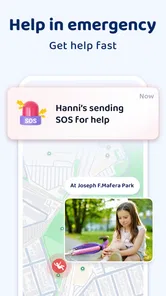
- SOS function for emergencies
- Battery-efficient tracking
- User-friendly interface
Cons
- Requires GPS and internet access
- Privacy concerns for some users
- Subscription for premium features
- Battery drain on continuous use
- Limited features on free version