Link360: Phone Tracker
- 297.00
- 4.1
- Installs
- 1.00M
- Price
- Free

Screenshots


Analysis by Reviewed
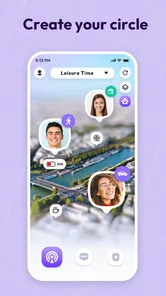
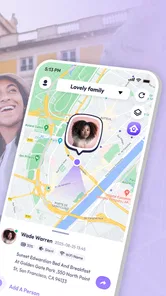
I found Link360: Phone Tracker most useful when I treated it as a simple family-location tool rather than an all-purpose safety system. Its purpose is easy to understand: keep selected people connected through location sharing, help locate a phone, and give families a more convenient way to check where someone is. That focused idea is the app’s main strength, but it also sets the right expectations. This is a lifestyle app for everyday coordination, not something I would rely on as a replacement for emergency services, careful communication, or a dedicated professional tracking solution.
What makes it worth considering is the low barrier to trying it. It is free to download, aimed at Everyone, and works on devices running Android 6.0 or later. SoulApps Studio has built an app that should make sense to someone who does not want to spend time learning a complicated dashboard. I also like that the central use case is practical rather than flashy: checking in on family members, sharing a location when plans change, or finding a misplaced phone without turning the task into a technical project.
How Link360 works in ordinary family routines
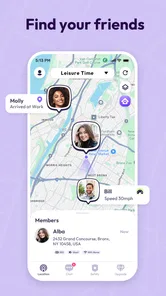
The best way to understand the app is to imagine a normal weekday. A parent is waiting for a child to arrive, a partner is traveling home, or an older relative is heading to an appointment. Instead of sending several messages asking for an update, the people involved can use shared location information to get a clearer picture of the journey. That does not remove the need to talk, but it can reduce unnecessary back-and-forth when everyone is busy.
I think this is where the app feels more helpful than a basic phone-locator utility. A locator is usually something I open only after losing a device. Link360 is designed around an ongoing connection between people, so its value comes from repeated, everyday use. The distinction matters: if you only need to find your own phone once in a while, a built-in device-finding service may be the simpler answer. If your household regularly coordinates movements, a dedicated family tracker can feel more natural.
The location-sharing idea also works well for temporary situations. For example, when I am meeting someone in an unfamiliar area, sharing my position can be easier than describing a street corner or sending several updates. On a busy day, the map becomes a quick reference point rather than another conversation that needs constant attention. That convenience is small, but it is the kind of small improvement that can make an app earn a place on a phone.
There is an important social detail here: tracking only works well when the people involved understand and accept how it is being used. I would introduce this app as a mutual convenience, not as a way to watch someone without discussion. A family member may be comfortable sharing a location during a trip but not all day. That distinction should be agreed on before anyone depends on the app. The technology can support trust, but it cannot create trust.
The strongest part is its focused purpose
Many safety and family apps try to combine messaging, alerts, maps, device recovery, and a long list of extra tools. That can be useful, but it can also make the main task harder to find. Link360’s appeal is that its identity is clearer. The app centers on staying linked, locating phones, and sharing positions. I found that focus easier to understand than a crowded collection of unrelated functions.
More From Our News Desk

Weather by Xiaomi Review: Clear at a Glance, Less Clear Up Close

X Under Pressure: Can It Recover When Posting Goes Wrong?

Clash of Clans Is Won Between the Battles

Android Auto Makes the Case for Quieter Car Software

MobiOffice: Transforming Mobile Productivity with Seamless Integration

EA SPORTS FC™ Mobile Soccer: Redefining Mobile Sports Gaming
For a household with mixed technical confidence, simplicity matters. One person may be comfortable adjusting every setting on a smartphone, while another may prefer a direct screen with obvious actions. An app that keeps the core purpose visible has a better chance of being used consistently. That consistency is more valuable than a sophisticated feature that nobody remembers how to open.
Another practical advantage is that the app can serve more than one need without requiring separate tools. A family may use it for location sharing during travel and for finding a phone at home. Those tasks are related, but they are not identical. Combining them can reduce the number of apps people need to remember, especially for users who want a straightforward lifestyle utility instead of a large safety platform.
The public response is encouraging without being a reason to ignore personal fit. Link360 has a 4.1 average from around 17 thousand ratings, and it has passed over one million installs. I read those figures as signs of broad interest rather than proof that every household will have the same experience. Location apps depend heavily on how people configure them, how often they use them, and whether the surrounding phones and accounts remain available.
A useful workflow for trips and appointments
One of the less obvious ways to use the app is to prepare before a trip instead of installing it in the middle of a problem. I would first decide who actually needs to be connected, then agree on when location sharing is useful. For a day out, that might mean sharing during the journey and meeting period, rather than leaving the arrangement vague. Clear expectations prevent the app from becoming a source of tension.
For appointments, the app can help a family coordinate without requiring the person attending to answer messages immediately. Someone waiting at home can check whether the traveler appears to be moving toward the destination, while the traveler can focus on the appointment. This is not a guarantee that the person is safe, and it should not be treated as one. It is simply a way to reduce uncertainty during ordinary movement.
For a misplaced phone, I would keep expectations realistic and act quickly. A tracker is most useful when the phone still has enough power and can communicate its position. If the device is switched off, disconnected, or somewhere that prevents a current location from being available, the app cannot turn an unavailable signal into a precise answer. That is not a flaw unique to Link360, but it is an important limitation for anyone expecting magic from a locator.
A small habit can make the experience less frustrating: check the app before a journey begins, not only after something goes wrong. Confirm that the intended people are connected and that everyone knows what the location sharing is for. This turns the app from an emergency reaction into a prepared part of the family routine. It also gives users a chance to notice setup problems while there is still time to solve them.
Where the experience can become less comfortable
The main weakness is not the idea itself; it is the uncertainty that surrounds any location-based service. A map can look reassuring, but a displayed position may not represent a person’s exact current situation. Movement, signal conditions, device settings, and delays can all affect what another person sees. I would never interpret a stationary marker as evidence that someone is in danger, nor would I use a changing position as a substitute for calling when the situation is urgent.
Privacy is another area where the app requires mature handling. Continuous location sharing can feel intrusive even inside a close family. The person being tracked should know who can see the location and why. If the app is introduced as a control mechanism, it may create more conflict than convenience. In my view, Link360 is best when everyone has a clear choice and the arrangement can be changed when circumstances change.
There is also a possible cost issue for people who want more than the basic free experience. The app is free, but in-app purchases range from $0.49 to $99.99 per item. That is a wide range, so I would inspect each purchase screen carefully before confirming anything. A free download does not automatically mean every useful option is free. Anyone managing a family budget should decide in advance whether paid features are necessary or whether the basic setup already covers the intended use.
The app’s broad device compatibility is helpful, but older phones may not deliver the same smooth experience as newer hardware. A phone running Android 6.0 meets the stated minimum, yet minimum compatibility is not the same as ideal performance. Before building a household routine around tracking, I would test the app on the actual phones involved. That is especially important when one family member uses an older device and another uses a recent model.
I would also avoid treating the app as a complete emergency plan. A family should still know how to call local emergency services, share an address verbally, and contact one another directly. Location sharing can provide useful context, but it does not replace a conversation, a medical alert arrangement, or a professional response system. This distinction is central to my recommendation: Link360 is a convenience and coordination tool, not a guarantee of protection.
Who will get the most from it
I would recommend Link360 to families who want a shared location tool without committing immediately to a large, complicated safety ecosystem. It suits people who regularly coordinate school pickups, commutes, errands, visits, or travel. It may also help relatives who want a simple way to stay connected while giving one another room to move independently.
It is particularly useful when the problem is uncertainty rather than danger. If someone is late, a shared position can answer whether they are still traveling. If a group is trying to meet, a location view can reduce confusion. If a phone has been misplaced, a locator function may provide a starting point. These are modest tasks, but they happen often enough to justify a dedicated app for the right household.
I would be more cautious about recommending it to someone who wants advanced fleet management, formal employee monitoring, or a highly specialized elder-care system. Those users may need stronger administrative controls, documented response procedures, or equipment designed for a professional environment. Link360’s lifestyle focus is an advantage for ordinary families, but it is also a reason not to stretch the app beyond its natural role.
People who are very sensitive about privacy should think carefully before installing it. The question is not simply whether the app can share a location; it is whether the household can establish respectful boundaries around that sharing. Someone who wants occasional, manual location sharing may prefer the built-in sharing tools already available in their messaging or map apps. Those alternatives can be better when the need is temporary and there is no reason to maintain a family tracking circle.
How it compares with simpler alternatives
Compared with a phone’s built-in locator, Link360 is more family-oriented. A built-in service is usually the first choice for recovering one’s own device, and it may already be installed and connected to the phone’s account. That makes it attractive for users who rarely share locations. Link360 becomes more compelling when the goal is to keep several people connected for routine coordination rather than handle a single lost-device incident.
Compared with sending a location through a messaging app, Link360 offers a more dedicated setting for people who expect to repeat the process. Messaging is excellent for sharing a position once, such as when meeting at a café or asking someone to find a parked car. A family tracker makes more sense when the same group needs a continuing arrangement. The trade-off is that a dedicated tracker demands more setup and more thought about boundaries.
Compared with a full-featured family safety platform, Link360 may feel less overwhelming. That can be a genuine benefit for users who do not want a dashboard filled with features they will never use. On the other hand, someone who specifically needs a broad emergency toolkit may find a more specialized service a better match. I would choose based on the household’s actual routine, not on the longest feature list.
One practical test is to ask what you would do if the app stopped being available for a day. If your family still has clear phone numbers, meeting points, and a way to communicate, Link360 is serving as a helpful layer. If everyone would be unable to coordinate without the map, the household has allowed the tool to become too central. That is a useful trade-off to consider before relying on any tracking app.
Installation, version, and day-to-day expectations
The current version is 2.7.10, and the app was released on November 25, 2022. Those details place it as an established lifestyle product rather than something appearing only recently, while the ongoing version number suggests continued iteration. I would still update it through the official app store when updates are offered, because location utilities depend on working smoothly with changing phone software.
Since the app is rated for Everyone, it is positioned for general household use. That rating does not remove the need for adult judgment, especially when children’s locations are involved. Parents should explain the arrangement in language the child understands, use it for a clear reason, and avoid presenting constant tracking as the only measure of safety. The app can support a family agreement, but the agreement matters more than the icon on the screen.
My preferred setup would be deliberately small. I would begin with the people who genuinely need to participate, use the app during a real but low-pressure situation, and then decide whether it improves coordination. Starting small reveals whether location updates are understandable, whether everyone is comfortable, and whether the app adds value over existing tools. It also avoids turning a useful experiment into a permanent tracking arrangement by accident.
Be especially careful when reviewing payment prompts. Because individual in-app purchases can be as low as $0.49 and as high as $99.99, I would not tap through quickly just to dismiss a screen. Check what is being offered, whether it is recurring or one-time if that information is shown, and whether the free functions already meet your needs. This is sensible behavior for any free app with optional purchases, but it matters more when several family members may be using the same service.
After using it, I came away with a clear view of its proper place. Link360 is strongest when it quietly reduces everyday coordination work: checking a journey, meeting up, or locating a phone. It is weaker when users expect perfect real-time precision, automatic emergency intervention, or a substitute for honest communication. The app’s usefulness depends less on dramatic features than on whether a family can use location sharing in a limited, respectful, and predictable way.
My final recommendation is positive for families seeking straightforward location sharing, with sensible boundaries. SoulApps Studio’s app has a clear purpose, a free entry point, and enough flexibility to cover both family connection and phone-finding needs. I would try it if repeated location coordination is part of your routine, especially when existing messaging tools feel too temporary. I would skip it if you only need to recover your own phone, dislike ongoing location sharing, or require a formal emergency and monitoring system. Used for the right job, it is a practical companion; used as a promise of complete safety, it will disappoint.
For me, that balanced role is the reason to recommend it. Link360: Phone Tracker does not need to solve every safety problem to be useful. It only needs to make ordinary family movement easier while leaving room for privacy, direct contact, and common sense. If your household can agree on those limits, the app is worth trying.
Link360: Phone Tracker Frequently Asked Questions
Can I invite someone to my Link360: Phone Tracker circle before they install the app?
Link360 is built around location sharing with family members or trusted contacts, so everyone who participates needs access to the app on their own device and should agree to join. Before inviting someone, explain what the circle is for and who will be able to see their location. That makes setup clearer and helps ensure sharing is voluntary from the start.
Is Link360: Phone Tracker free to download, and what should I know about the app’s age rating?
Link360 is free to download and is rated Everyone, making it available to a broad audience. It is a Lifestyle app from SoulApps Studio, and its current version is 2.7.10. Although the age rating is suitable for general audiences, location sharing involves personal information, so families should still talk about privacy, consent, and when it makes sense to share a location before getting started.
Can I use Link360: Phone Tracker to coordinate with family or friends?
Yes. Link360 is designed around sharing locations with family members or other trusted contacts, making it useful for everyday coordination, travel, and safety. Each person should understand who can see their location and agree to participate. It works best as a mutual sharing tool within a private circle, rather than as a way to monitor someone without their knowledge.
Which devices and operating systems can run Link360: Phone Tracker?
Link360 is a mobile app for Android and iOS. On Android, it requires version 6.0 or later, so check your device’s software version before downloading. Location sharing also depends on the permissions and settings available on each phone. If members of your circle use different platforms, review the app’s store page on each device to make sure it is available and compatible.
Who makes Link360: Phone Tracker, and is it suitable for all ages?
Link360: Phone Tracker is developed by SoulApps Studio and is listed in the Lifestyle category. Its content rating is Everyone, though families should still discuss privacy and location-sharing expectations before setting it up. The app has an average rating of 4.1 from around 17,000 ratings, with roughly 300 written reviews, and has been installed over a million times.
Pros
- Real-time location sharing helps families coordinate quickly.
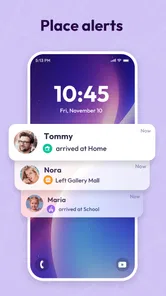
- Geofencing alerts can notify you when someone enters or leaves a place.
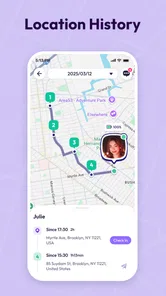
- Location history makes it easier to review recent movements.
- Emergency features may provide extra reassurance during unexpected situations.
- Supports family-oriented tracking with multiple connected members.
Cons
- Continuous GPS use can noticeably reduce battery life.
- Accurate tracking depends on GPS
- mobile data
- and permission settings.
- Some useful features may require a paid subscription.
- Location updates can be delayed in buildings or areas with weak coverage.
- All members must agree to share their location
- raising privacy concerns.













