Express Scripts
- 16.50K
- 4.7
- Installs
- 1.00M
- Price
- Free

Screenshots
Analysis by Reviewed
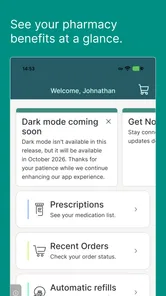
I see this as a practical companion for people whose prescription routine involves more than remembering to take a pill. Express Scripts is a free medical app from Express Scripts, Inc., built around managing prescriptions and pharmacy care. It has been available since 2011, and its current version is 13.2.0. Its 4.8 average across around 39,000 ratings and more than a million installs suggest that plenty of people find it useful, though the best fit depends on whether your pharmacy needs line up with the service.
What I would check before making it part of my routine
Because this app is tied to Express Scripts, I would first confirm that my prescriptions and plan information are available after signing in. That quick check is more useful than judging the app by its menus alone: the real question is whether it reflects the pharmacy care I actually use. If you manage prescriptions through several organizations, decide which tasks belong here and which still need another app, website, or phone call.
I would also treat the app as a place to organize pharmacy tasks, not as a substitute for a personal medication record. Keeping a current list with medication names, doses, and relevant instructions makes appointments and pharmacy conversations easier, especially if you switch providers or need help away from home. That habit also gives you something to compare against when reviewing prescription details in an account.
Who benefits most from having it handy
I’d consider it when repeat prescriptions, coverage questions, and refill planning all compete for attention. A useful habit is to check a medication’s refill status before you are close to running out, rather than waiting until the last dose. That gives you time to spot a delay or resolve an account issue while you still have room to act. For a caregiver helping a family member keep track of several medicines, having prescription details and related tasks together can also make routine coordination less scattered.
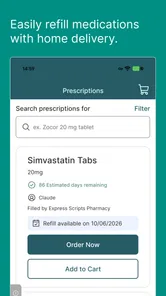
Picture a busy weekday: you notice a prescription is running low during breakfast, open the app, and place a refill request without interrupting the rest of your morning. Later, checking its status can help you plan around the expected arrival instead of making a second trip or guessing whether the request went through. I would still keep a backup plan for an urgent medication; a digital refill workflow is most helpful when used ahead of time, not as a substitute for immediate pharmacy assistance.
How it fits beside other pharmacy tools
Compared with a general medication-list or reminder app, this one is more useful when you want to handle prescription and pharmacy tasks through Express Scripts. A simple tracker may be a better choice if your main need is logging doses across medicines from different pharmacies. Conversely, switching between a plan’s website, phone support, and separate reminder tool can be more cumbersome if your prescription care already runs through Express Scripts. The trade-off is that the app’s usefulness is tied to that relationship; it is not a universal hub for every pharmacy.
Before relying on it, I’d sign in and confirm that the prescriptions you actually need appear correctly. For a new refill, check the medication and quantity carefully before submitting, then revisit the order status rather than assuming a request is the same as a completed delivery. Those small checks are especially worthwhile when managing medicines for someone else or coordinating several refills at once. If the account view does not match what your clinician or pharmacy has told you, contact the relevant support channel instead of treating the screen as medical advice.
More From Our News Desk

 Block Blast!
 Makes Every Clear Feel Like One More Turn
A clean little block puzzle becomes a study in space, risk, and self-control. Its best moments come from one satisfying clear; its toughest test is knowing when to stop.

 Super Stylist Fashion Makeover
Super Stylist Turns Dress-Up into a Runway Career
Its makeover-to-client loop turns quick outfit decisions into shareable style theater. The question is whether the closet keeps giving players a reason to return.

 Block Craft 3D:Building Game
Block Craft 3D Under Pressure: How Well Does It Recover When Building Goes Wrong?
A failure-focused look at Block Craft 3D’s forgiving building loop, its uncertain recovery edges, and the moments that demand more than a cheerful village.

 Woodturning
 Trades Creative Freedom for a Satisfying Carving Loop
If your usual creative game is about building, decorating, or styling, Woodturning trades open-ended projects for a tactile, tightly guided carving loop. Here is what that switch really costs.

 PUBG MOBILE
 Shows What Battle Royale Must Get Right
PUBG MOBILE shows how battle royale has matured: bigger systems matter less than meaningful choices, readable fights, and a reason to return after every loss.

 Braindom: Brain Games Test
Braindom’s Social Life Happens Between Puzzles
Braindom turns quick logic traps into a personal ritual, but its community value is more about comparing answers than building together.
Latest News



Using the app for everyday prescription care
From the moment you download the Express Scripts app, you’ll notice how user-friendly it is. Setting it up is a breeze—just sign in with your account details, and you’re ready to go. The interface is clean and intuitive, making it easy for even the least tech-savvy among us to navigate. I was pleasantly surprised by how swiftly I could access my prescription details and start managing my medications.
Features That Stand Out
One of the standout features of the app is its medication reminder system. If you’re anything like me, remembering to take your meds can be a bit of a challenge, but with this feature, I received timely notifications that kept me on track. No more missed doses! Plus, the app allows you to set up reminders for multiple medications, so no worries if you’re managing meds for the whole family.
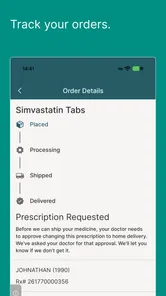
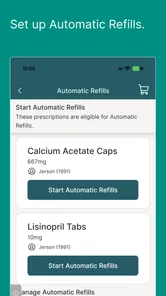
Another cool feature is the option to order refills directly through the app. It’s super convenient—you can literally reorder your prescriptions while sipping your morning coffee. And if you’re curious about the status of your refill, there’s a tracking feature that lets you follow your order from the moment it’s placed until it arrives at your doorstep.
Turning routine checks into a useful workflow
For me, the best way to use refill tools is to make them part of a regular check rather than an emergency response. When I review prescriptions, I would handle one medicine at a time: confirm the name, check whether a refill is available, submit only what is needed, and then return to the order status later. This reduces the chance of confusing a submitted request with a completed order, particularly when several medicines are due around the same time.
For a caregiver, a practical approach is to agree on who checks the account and who follows up if something looks unusual. That avoids duplicate requests and the uncertainty of wondering whether another family member already handled a refill. It is also sensible to confirm that the person using the app has the right account access before relying on it to coordinate someone else’s prescriptions. The app can make routine tasks easier to keep together, but clear communication still matters when care is shared.
Managing Costs and Coverage
Now, let’s talk money. The app provides a detailed breakdown of your medication costs and coverage. It’s like having your personal financial advisor for healthcare expenses. You can view your plan’s coverage details, see how much you’ll pay out-of-pocket, and even compare costs if there’s a generic alternative available. This transparency is a game-changer for anyone wanting to manage their healthcare budget effectively.
I would use cost information as a prompt for a better question, not as a reason to change treatment on my own. If a price looks higher than expected or a generic option appears, it is worth checking whether the prescription, coverage details, and pharmacy arrangement are the ones you intended. A clinician or pharmacy professional can help explain whether a change is appropriate. Cost visibility is valuable, but the cheapest-looking option is not automatically the right medical choice for every person.
Where convenience has limits
The app is most useful when the task is administrative: looking at prescription information, planning a refill, or checking a status. It is not the right tool for deciding whether to start, stop, or alter a medicine. If a dose is missed, symptoms change, or an urgent supply is needed, I would contact a qualified professional or the pharmacy directly rather than wait for an app workflow to resolve the situation.
That distinction matters because a digital status can answer only the question it represents. A refill request being visible does not necessarily settle a coverage concern, explain a clinical decision, or guarantee that a delivery will suit a last-minute need. I would use the app to reduce avoidable calls and keep routine details close at hand, while keeping direct support available for exceptions and time-sensitive problems.
Security and Support
Of course, with any app handling sensitive information, security is key. Express Scripts takes this seriously, employing robust security measures to protect your data. Plus, their customer support is top-notch. Whether you have questions about the app or need help with your prescriptions, their team is just a call away, ready to assist you.
Since prescription details are personal, I would use the app on a device I can access safely and avoid leaving an account open where someone else can view it. If you share a device with family, make signing out part of the routine. For account access problems or information that does not match what you have been told, the most useful next step is to contact support or the pharmacy involved, with the prescription details available so you can explain the issue clearly.
Compatibility and expectations
The app is rated for everyone and requires iOS 9 or later, so people with older devices should check compatibility before planning their routine around it. The service is most relevant if Express Scripts is already part of your prescription care; if your medicines are handled elsewhere, your local pharmacy’s own app may offer a more direct route. I would also keep a current medication list outside any single app, so you can still share accurate information during an appointment or if you change pharmacies.
It is free to download, and its long-running presence says something about its continuing role in prescription management, but an app’s age alone does not tell me whether it will suit a particular plan. The current version is 13.2.0, so existing users should judge it by how well their own account tasks work today rather than assuming that every past workflow remains unchanged. When a screen or process differs from what you expect, checking the current account information and asking support is safer than relying on an old set of instructions.
Who may prefer another option
I would skip it if I wanted one independent place to record doses for medicines filled at unrelated pharmacies, or if I did not use Express Scripts for prescription care. A dedicated medication tracker may be more convenient for reminders across different providers, while a local pharmacy app may be simpler for people whose prescriptions are all handled there. The right choice depends less on which app has the longest feature list and more on where your prescriptions are actually managed.
It may also be a poor fit as the only tool for someone who needs immediate help with a refill or depends on hands-on support to navigate health services. In those situations, a phone call or in-person conversation can be clearer and faster. I would keep the app as an optional convenience for routine administration, not make it the sole route to essential medication or urgent advice.
For me, the strongest reason to use it is having prescription tasks and coverage information close at hand, rather than relying on memory or searching through separate messages. The main limitation is that an app cannot settle every pharmacy or insurance question on its own. If a refill looks wrong, a cost does not make sense, or a dose needs changing, use a qualified clinician or the appropriate support team; convenience should not replace professional guidance.
In conclusion, if you’re looking for a reliable, comprehensive tool to manage your prescriptions, the Express Scripts app is worth checking out. It brings convenience, transparency, and peace of mind right to your fingertips. So why not give it a shot and take control of your medication management today?
Express Scripts Frequently Asked Questions
Can Express Scripts help me keep track of prescription information in one place?
Express Scripts is intended to help users manage prescriptions and pharmacy care from a mobile device. Its store summary describes managing prescriptions and pharmacy care anytime, anywhere, which may be useful if you prefer to check medication details while away from a computer. The app is a medical tool, so it is best considered alongside the way you already organize prescription information and communicate with your pharmacy.
Who develops Express Scripts, and what kind of app is it?
Express Scripts is a medical app developed by Express Scripts, Inc. It focuses on prescription management and pharmacy care rather than general wellness tracking or fitness features. If you are looking for a mobile way to engage with your prescription-related services, its purpose is clear; whether it fits your needs depends on your access to Express Scripts and the services available through your account.
Is Express Scripts free to download, and who can use it?
Express Scripts is a free medical app from Express Scripts, Inc. that helps users manage prescriptions and pharmacy care. Its free download does not necessarily mean every medication or pharmacy service is free; those costs depend on your own coverage and circumstances. The app is rated for Everyone, but you will need to be able to access an Express Scripts account and its services to make practical use of its prescription tools.
What should I check before installing Express Scripts on my phone?
Before downloading, make sure your device meets the app’s operating-system requirements and that you can access the app through the official store for your platform. Express Scripts is available for Android and iOS, and its current version is 13.2.0. It is a medical app for prescription management, so consider whether you want to use a mobile tool to check and manage pharmacy care while away from a computer.
What is Express Scripts and how does it work?
Express Scripts is a pharmacy benefit management app designed to help users manage their prescription medications more efficiently. The app allows users to order refills, track prescription history, and receive medication reminders. It also offers tools to compare medication costs and find the best prices, as well as access to pharmacists for support. Users can manage their prescriptions directly through the app, making it a convenient option for those looking to streamline their medication management.
Pros
- User-friendly interface simplifies navigation.
- Prescription management is highly efficient.
- Automatic refill reminders prevent missed doses.
- Secure messaging with healthcare providers.
- Offers cost-saving suggestions for medications.
Cons
- Occasional app crashes disrupt usage.
- Limited customer support response time.
- Some features require stable internet.
- Account setup can be cumbersome for new users.
- Notifications can be overly frequent.