ecobee
- 10.39K
- 4.3
- Installs
- 1.00M
- Price
- Free

Screenshots


Analysis by Reviewed
Let me tell you about my latest find that has been changing the way I manage my home’s climate - the ecobee app. If you're someone like me who enjoys a cozy home without the hassle of fiddling with the thermostat all day, then you might want to stick around.
Setting Up with Ease
I’ve always been a bit wary about setting up new gadgets, but the ecobee app made it a breeze. Right from the get-go, the app guides you through the installation process with clear instructions. I didn’t have to spend hours on YouTube searching for tutorials, which was a huge relief. Once installed, the app seamlessly connected to my Wi-Fi, and I was ready to start my journey towards a smarter home.
Intuitive User Interface
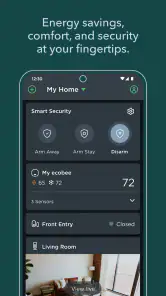
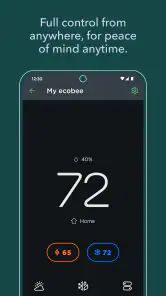
One of the first things I noticed about the app is its sleek and user-friendly interface. It’s like having a personal assistant right in your pocket. The dashboard is intuitive, displaying all the essential controls without overwhelming you with information. Adjusting the temperature, setting schedules, or even switching to vacation mode is just a tap away. I especially love the way it predicts my preferences over time, making automatic adjustments that fit my lifestyle perfectly.
Energy Efficiency at Its Best
The real game-changer for me has been the energy efficiency features. With the rising cost of energy, I’m always on the lookout for ways to cut down on my bills. The ecobee app provides insightful energy reports that help me monitor my usage habits. It’s fascinating to see how even small tweaks can make a big difference. Plus, the app’s smart algorithms optimize heating and cooling, ensuring that I’m not wasting energy when I’m not at home.
Integration with Smart Home Devices
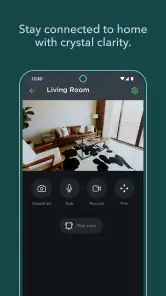
Another highlight is the app’s ability to integrate with other smart home devices. Whether it’s Alexa, Google Assistant, or Apple HomeKit, the app plays well with others, allowing me to control everything with voice commands. This integration not only enhances convenience but also adds an extra layer of efficiency to my daily routine.
Final Thoughts
In conclusion, the ecobee app has truly revolutionized the way I manage my home’s climate. It’s not just about comfort; it’s about creating a smarter, more efficient living space. If you’re looking for a way to simplify your life while being kind to your wallet and the planet, I’d definitely recommend giving this app a go. Who knew being eco-friendly could be this easy and enjoyable?
Pros
- Easy to set up and use interface.
- Compatible with smart home devices.
- Remote temperature control feature.
- Energy-saving insights provided.
- Supports multiple user profiles.
Cons
- Premium features require subscription.
- Limited customization options.
- Occasional connectivity issues.
- High initial cost for some users.
- App updates can be infrequent.

- Category
- House & Home
- Version
- Varies with device