DubStep Music & Beat Creator
- 1.01K
- 4.7
- Installs
- 10.00M
- Price
- Free
Screenshots
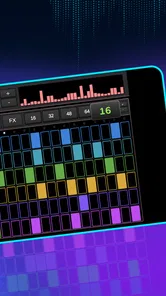
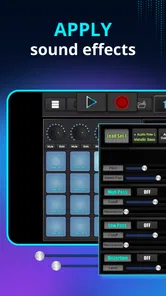
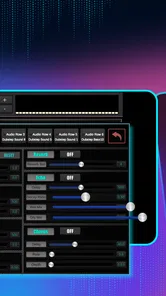
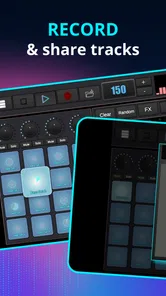
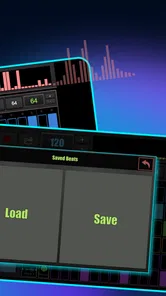
Analysis by Reviewed
I like the idea of making a beat in the spare moments of the day, without turning a phone into a complicated studio project. DubStep Music & Beat Creator is built around that quick, hands-on kind of music making: tap into a beatpad, combine sounds, and see where a rhythm takes you. I’d treat it as a playful sketchbook for dubstep ideas rather than a replacement for a full production setup.
A simple starting routine
For a first session, I’d begin with one basic rhythm and add sounds gradually. That makes it easier to hear what each layer contributes instead of filling every available space at once. Once a groove feels coherent, try changing one element at a time; if the beat loses its shape, you can tell which addition caused it. This small habit is more useful than chasing a perfect result on the first try.
A realistic use is a short break between errands or classes: build a rough pattern, listen back, and note which combination has potential. The app is especially suited to people who enjoy experimenting by tapping rather than programming music on a timeline. It can also be a friendly first step for someone curious about rhythm production but not ready to learn a desktop workstation.
Getting Started with Beat Making
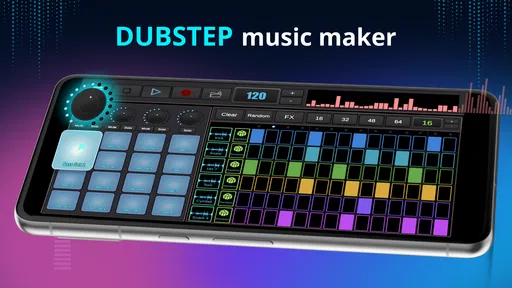
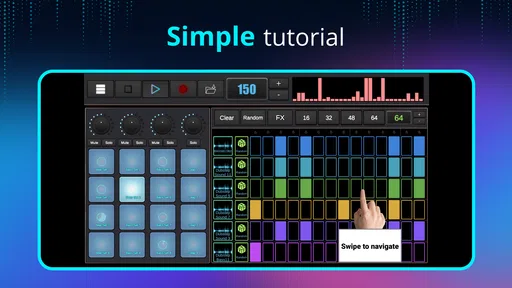
The moment you open the DubStep Music & Beat Creator app, you're greeted with a sleek and intuitive interface that even a novice can navigate. It's like stepping into a DJ's world without leaving your couch. The app offers a variety of pre-loaded samples and loops that you can mix and match to create your unique sound. And the best part? You don't need any prior experience to start making some serious beats.
Settings and listening habits
Before settling into a longer session, I’d check the app’s available settings and make sure the sound is comfortable for the way you’re listening. A beat that seems balanced through phone speakers can feel quite different through headphones, especially when low-end sounds dominate. Listening back at a moderate volume and then checking on another playback device is a practical way to catch a mix that feels crowded or harsh.
It also helps to leave a little space in a pattern. In dubstep, it’s tempting to make every pad or sound compete for attention, but a simpler arrangement can make each change feel more deliberate. I’d keep a version of a rhythm with only its core layers, then add extra sounds selectively. That gives you a useful reference point if experimentation starts making the beat harder to follow.
Features That Stand Out
What I love about this app is its user-friendly interface. It doesn’t overwhelm you with options but still provides enough tools to unleash your creativity. The drag-and-drop functionality makes it super easy to layer different sounds and effects. Plus, with the real-time editing feature, you can tweak your music on the fly. Imagine crafting a beat, then instantly adjusting the bass or adding a kick drum with just a swipe.
More From Our News Desk

Weather by Xiaomi Review: Clear at a Glance, Less Clear Up Close

X Under Pressure: Can It Recover When Posting Goes Wrong?

Clash of Clans Is Won Between the Battles

Android Auto Makes the Case for Quieter Car Software

MobiOffice: Transforming Mobile Productivity with Seamless Integration

EA SPORTS FC™ Mobile Soccer: Redefining Mobile Sports Gaming
The sound quality is top-notch too! The app doesn’t compromise on audio fidelity, ensuring that your creations sound crisp and professional. Whether you’re playing them back on your phone or through a high-end speaker, the quality holds up.
Make short sessions more productive
I get more out of a beatpad by giving each session one small goal: try a different rhythm, find a stronger combination of sounds, or make an existing idea feel less busy. That prevents casual tapping from turning into a pile of layers with no clear direction. If you find a groove you like, pause to listen before changing it; the first version may already have the best energy.
Compared with a conventional digital audio workstation, a beatpad app is usually better for immediate, tactile experimentation than detailed arrangement and fine control. That trade-off is the point here. This is a more inviting place to test an idea than a full production environment, but anyone who needs precise editing, a complex multi-track workflow, or a polished release pipeline may prefer a dedicated music-production tool.
Why It's a Game-Changer
This app isn’t just for hobbyists. It’s a tool that can help budding musicians and producers experiment with sounds and develop their style. The ability to export your tracks means you can easily share your creations with friends or even upload them to music platforms. Who knows, your next track might just be the next big hit!
Moreover, the app keeps things fresh by providing regular updates and new sound packs. This continuous flow of new content ensures that you’ll never run out of inspiration. It’s like having a never-ending supply of musical possibilities.
Who should give it a try
Beat Blend Labs makes this free music-and-audio app, and its broad appeal is reflected in an average rating of 4.8 from around 26,000 ratings, with over 10 million installs. It’s rated for Everyone, and the current version is 4.1.3. I’d recommend it to curious beginners and casual beat makers who want a low-pressure way to play with dubstep sounds; someone already working on detailed arrangements may find a full desktop or mobile DAW a better fit.
The app is free to download, with optional in-app purchases ranging from $0.99 to $99.99 per item. I’d start with the free experience and decide whether any paid content is useful to your own routine rather than buying it just to make a first beat. It first arrived on June 2, 2020, and runs on Android 6.0 or later.
Making a repeatable habit
When I want to return to a half-finished musical idea, I find it useful to give the session a simple name in my own notes, such as “heavy bass with a sparse top layer,” and remember the one change I want to test next time. That keeps the beatpad from becoming a place where every session starts from zero. It also helps separate a promising sketch from a random burst of tapping: the sketch has a clear next step.
A practical routine is to make a few versions of the same basic groove by changing only one sound or accent at a time. Even without treating the app like a full arrangement workstation, this comparison can teach you what makes a pattern feel punchier, darker, or less crowded. I’d listen to each version in sequence rather than judging it while I’m still editing. A short pause makes it easier to notice whether the change genuinely improves the rhythm.
Choosing the right place to use it
This is a good fit for a commute break, a quiet evening at home, or a shared music session where friends take turns suggesting sounds. The tap-based approach makes it easy to show someone an idea without first explaining a timeline or a set of production terms. For a beginner, that can make experimenting feel social and low-pressure rather than like homework.
There are situations where I would skip it. If I needed to record vocals, make a long-form arrangement, or control every detail of a finished track, I’d choose a more complete music-production app instead. If I wanted a broad library of songs to listen to rather than a way to build rhythms, a streaming music app would be the more useful choice. This one makes most sense when the goal is to play with dubstep-flavored beat ideas directly.
What to expect from the sound and workflow
A beatpad can make a sound feel exciting because it is immediate, but that doesn’t automatically make the result ready to share as a finished song. I’d treat the first satisfying loop as a draft, then ask whether its bass, accents, and gaps work together when heard repeatedly. Loops are unforgiving: a small clash that seems minor once can become tiring when it cycles. Keeping the pattern uncluttered is often a better improvement than adding another layer.
Headphones are handy for checking how the low end feels, but I wouldn’t use them as the only judge. A quick listen through the phone speaker can reveal whether the rhythm still reads when the deepest sounds are less prominent. This is a useful reality check for a beat that might otherwise sound impressive only on one playback setup.
Paid content and a sensible first try
Because optional purchases are available, I’d take a little time with the free download before deciding whether to spend anything. The useful question is not whether more content sounds appealing in theory, but whether the sounds already available support the kind of beat you actually want to make. If you keep reaching for a particular style and find the free selection limiting, then it may be worth exploring the in-app options; if you’re still learning what you enjoy, there’s no need to rush.
That approach also helps beginners avoid mistaking a larger collection for better musical judgement. A smaller palette can be easier to learn: once you know which sounds provide the pulse, bass weight, and contrast, you can make more deliberate choices. The trade-off is that anyone who needs a very specific sound or a carefully curated production library may outgrow a casual beatpad workflow.
Final Thoughts
If you’ve ever wanted to dive into the world of music production, the DubStep Music & Beat Creator app is a fantastic starting point. It’s accessible, fun, and packed with features that let you create music that’s uniquely yours. Plus, it’s perfect for both short jam sessions and more extended creative projects.
So, what are you waiting for? Get those creative juices flowing and start making some epic beats. You might just surprise yourself with what you can create!
My main reservation is that an easy beatpad workflow can encourage quick layering without the deeper control that serious production calls for. For a spontaneous dubstep sketch, that immediacy is a strength; for detailed editing or work that needs a carefully managed studio process, it’s a limitation. I’d use it to spark ideas and enjoy making rhythms, then move to a more capable production app if those sketches need extensive development.
My verdict on getting comfortable with it
For me, the best way to judge this app is by whether it makes me want to try one more variation, not by whether a first loop sounds like a finished release. Its strength is the short distance between an impulse and hearing a beat take shape. A repeatable habit—start sparse, change one thing, listen again, and stop when the idea has said what it needs to say—makes that immediacy more useful without pretending the beatpad offers the precision of a studio tool.
I’d recommend giving it a try if you want an approachable way to make dubstep-oriented rhythms, especially if tapping sounds feels more inviting than learning a production timeline. I’d pass if you already know you need detailed editing, a full recording setup, or a dependable route from sketch to polished release. For everyone in between, it can be an enjoyable place to test musical instincts and find out whether beat making is something you want to explore further.
DubStep Music & Beat Creator Frequently Asked Questions
Can I use DubStep Music & Beat Creator to make music without prior production experience?
Yes. DubStep Music & Beat Creator is aimed at music enthusiasts across skill levels, and its interface is designed to make getting started approachable. The app offers pre-made loops and drag-and-drop controls, so you can experiment with arranging sounds before learning more advanced production techniques. It can be a practical starting point for exploring dubstep beat creation on a mobile device.
Is DubStep Music & Beat Creator free, and what might I have to pay for?
The app is free to download, so you can try its music-making tools without paying upfront. Optional in-app purchases are available for extra content and features, with individual items priced from $0.99 to $99.99. Check the price and what each item includes before confirming a purchase, especially if you are downloading the app for a younger user or want to keep spending within a set budget.
What kind of music can I create with DubStep Music & Beat Creator?
DubStep Music & Beat Creator focuses on making dubstep-style beats with a beatpad interface. You can combine beats, loops, and sound effects, then customize a track with tempo adjustments, effects, and layered sounds. Its main appeal is hands-on experimentation with electronic music elements, whether you want to sketch out an idea or spend more time shaping a track.
Is DubStep Music & Beat Creator appropriate for children?
The app has an Everyone content rating, indicating a broad age classification. It is a music-making app, but it also offers optional in-app purchases, so parents may want to review purchase settings and discuss them with children before use. The rating does not replace a parent’s judgment about a child’s readiness to explore music tools and handle optional spending.
Do I need an internet connection to use DubStep Music & Beat Creator?
DubStep Music & Beat Creator is a music-making app for creating dubstep-style beats, and it is free to download. Whether all tools and content work offline can depend on the feature being used, so it is sensible to check the app’s behavior after installation before planning a session without internet access. In-app purchases are available for users who want to expand what they can access.
Pros
- User-friendly interface for beginners.
- Wide range of sound effects available.
- Real-time beat editing feature.
- Export tracks in high quality formats.
- Frequent updates with new features.
Cons
- Limited free version capabilities.
- Occasional app crashes reported.
- Some sound packs require purchase.
- Ads can be intrusive at times.
- High battery consumption on use.













