Drum Kit - Play Drums
- 2.09K
- 4.3
- Installs
- 10.00M
- Price
- Free

Screenshots
Analysis by Reviewed
I reach for a drum app when I have a rhythm in my head but no kit nearby, or when I want to try a pattern without turning a quiet room into a rehearsal space. Drum Kit - Play Drums is built for that quick start: it turns a phone screen into a playable percussion setup, making it easy to tap out an idea wherever I am. Beat Blend Labs makes this free music app, and its broad audience is reflected in its Everyone age rating. Its 4.3 average from around 39,000 ratings suggests plenty of people find it useful, though a popular app still has to suit your own playing style.
From a spare moment to a first beat
My most practical use is a short session between other tasks: I open the app, tap a simple kick-and-snare pattern, then add cymbal hits to test whether the groove feels right. That is less about replacing a real drum kit and more about catching an idea before I forget it. With more than 10 million installs, it is clearly a familiar option for casual mobile drumming, but I would judge it by how well it fits that small, immediate job.
Building a pattern and deciding what it needs
Ever felt the rhythm in your veins while tapping your fingers on the table? Well, you're not alone! I recently dove into the world of virtual drumming with the Drum Kit - Play Drums app, and let me tell you, it’s like having a full drum set right in your pocket. Whether you're a seasoned musician or a curious newbie, this app promises to unleash the drummer in you.
The Beat Drops Here
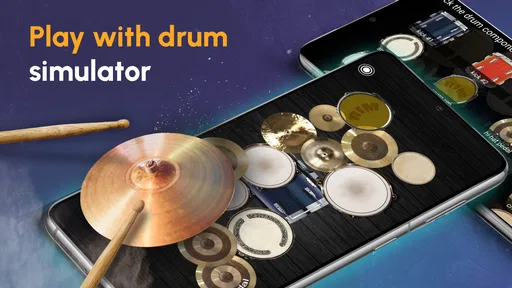
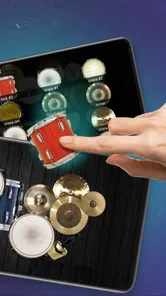
From the moment I launched the app, I was greeted with a vibrant interface that’s incredibly user-friendly. It’s almost like the app knew what I wanted before I did. The Drum Kit - Play Drums app boasts a variety of drum sounds that mimic real-life percussion instruments. You get to play with bass drums, snares, tom-toms, cymbals, and even electronic pads. Each tap on the screen felt responsive and immersive, giving me the sensation of hitting actual drum skins.
Features That Hit the Right Note
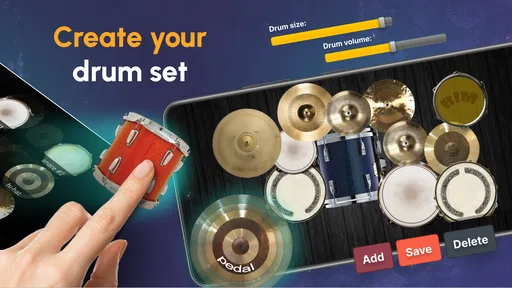
One of the standout features is the wide range of drum kits available. Whether you're into rock, jazz, or electronic, there’s something for everyone. I particularly enjoyed the option to customize my drum kit, allowing me to mix different sounds and create a setup that’s uniquely mine. It’s like being in a candy store for drum enthusiasts!
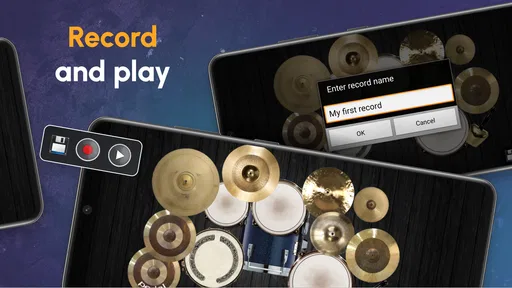
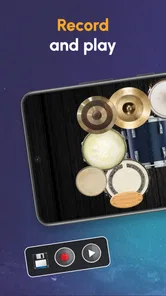
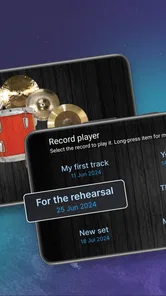
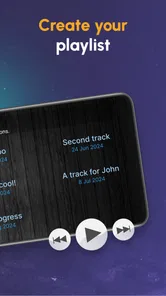
Another feature worth mentioning is the recording option. This is a game-changer for those who want to track their progress or share their drumming skills with friends. I found myself jamming along to my favorite tracks and recording my sessions to listen back later. It’s a fantastic way to improve your rhythm and timing.
Taking the idea beyond the screen
Recording is most useful when I give the playback a clear purpose. I can listen for whether the backbeat stays steady, whether fills crowd the main groove, and whether a cymbal accent lands where I intended. A helpful routine is to record one short take, choose just one thing to improve, then play it again; trying to fix everything at once makes practice feel scattered. The recording feature also creates a simple handoff from a spontaneous tapping session to a more deliberate listen, though a phone recording is best treated as a personal sketch rather than a polished studio track.
More From Our News Desk

Weather by Xiaomi Review: Clear at a Glance, Less Clear Up Close

X Under Pressure: Can It Recover When Posting Goes Wrong?

Clash of Clans Is Won Between the Battles

Android Auto Makes the Case for Quieter Car Software

MobiOffice: Transforming Mobile Productivity with Seamless Integration

EA SPORTS FC™ Mobile Soccer: Redefining Mobile Sports Gaming
For a beginner, the touchscreen can lower the pressure of learning where a beat sits before investing in physical equipment. For a songwriter, it can provide a quick rhythmic placeholder while working on a melody. I would not use it to judge how an acoustic kit will sound in a room, since screen taps and real sticks have different feel, volume, and dynamics. If realistic technique, limb independence, or band rehearsal is the goal, a physical kit or dedicated practice pad is a better next step.
Who will enjoy this kind of practice
What I appreciate about this app is its inclusivity. Whether you're just starting out or you’ve been drumming for years, the app caters to all skill levels. There are tutorials for beginners, which are a great way to learn the basics without feeling overwhelmed. For the more advanced players, the app provides complex rhythm challenges to keep you on your toes.
Another sweet spot is the practice mode, where you can slow down songs and play along at your own pace. It felt rewarding to gradually increase the speed as I improved, and I loved that the app supported my learning journey every step of the way.
When a quick session becomes a useful routine
A realistic way I use a phone kit is to keep it beside me while writing or arranging a song. If a chorus feels too flat, I can tap a basic groove, record it, and listen back while the melody is still fresh. That quick handoff from playing to reviewing helps me decide whether the rhythm needs a stronger backbeat or fewer accents. I treat the result as a guide for the next draft, not a finished drum part: the point is to make a musical decision while I have the idea, then move on without setting up equipment.
It can also suit a parent or beginner who wants a low-pressure first contact with percussion. A child can explore how kick, snare, and cymbal sounds work together without needing a room for a physical kit, and the Everyone age rating makes the intended audience broad. I would still keep sessions purposeful: choosing one simple pattern and taking turns listening can be more enjoyable than tapping randomly until the novelty wears off. The app works best as an inviting instrument to explore, rather than a complete course in drumming.
Where a phone kit fits among alternatives
Compared with drum-machine or beat-making apps, this is the more direct choice when I want to play parts by tapping instruments rather than arrange a full production. Compared with a metronome, it is more expressive, but it is not as focused for checking tempo alone. I find it most useful for experimenting and casual practice, not for replacing a structured lesson or a proper recording setup. If your main aim is composing layered tracks, look for a music-production tool; if you simply need to keep time, a metronome is less distracting.
A practical tip is to begin with a very small pattern and keep the phone steady on a surface. Fast passages can become awkward when fingers are competing for limited screen space, so I would use the app to work out the shape of a groove before trying elaborate fills. Headphones can make a quick session easier to hear without adding room noise, while a quiet setting helps if you are tapping during a break or around other people.
Choosing a setup that matches the task
The choice between this app and a beat-making tool comes down to whether I want to perform a rhythm or build one up as a production. Tapping individual drum parts feels immediate, and it is a better fit for testing the motion and accents of a groove. A sequencer is usually more convenient when I need exact repetition, layered arrangements, or edits that would be fiddly to play on a small screen. I would start here to find the feel of an idea, then move to a production app only if the sketch needs precise editing or a larger arrangement.
There is a similar trade-off with lessons and practice tools. A lesson can explain technique and give a progression to follow, while this app offers a more open space to try sounds and patterns. If I already know what I want to practice, that freedom is useful; if I need someone to correct posture, stick control, or timing habits, a touchscreen cannot provide that feedback. It is a companion for exploration, not a replacement for instruction.
What to expect before installing
The app is free to download, with in-app purchases ranging from under a dollar to just under a hundred dollars per item, so I would check purchase prompts carefully and decide whether the basic experience already meets my needs. It has been available since late 2010, and its current version is identified as 20240319; it requires Android 7.0 or later. The app has around 2,100 written reviews, which can offer extra perspective beyond its overall rating. Those details make it easy to assess compatibility and cost before setting aside time to practice.
Before opening it for a quick session, I would also think about what I need from the phone itself. A screen that is comfortable to tap makes a bigger difference than an elaborate setup, and keeping the device still avoids chasing it around a table during a pattern. If I am working on a rhythm for a song, I make a short take and listen once before deciding what to change. That keeps the app in its strongest role: capturing a musical thought without letting setup or editing take over.
Where the flow breaks
One limitation is inherent to phone drumming: a flat touchscreen cannot give the rebound, spacing, or physical response of drumheads and cymbals. Long sessions may also feel cramped, especially if you are trying to play quickly with both hands. I would skip it if you need realistic acoustic dynamics, precise production controls, or a substitute for lessons. For a quick rhythm sketch, a beginner’s low-pressure practice, or a bit of musical fun while waiting for the bus, those compromises matter much less.
There is also a difference between tapping a convincing pattern and developing the coordination to play it on a kit. The app can help me hear whether an idea works, but it cannot make a phone feel like sticks, teach physical endurance, or reproduce the interaction between a drummer and other musicians in a room. That distinction matters if I am deciding what to practice next. For a first experiment, the screen is enough; for technique or ensemble timing, I would move to a practice pad, a real kit, or a teacher.
Wrapping Up the Beat
In a nutshell, this drum app is a worthwhile pick for anyone who wants a portable way to explore rhythms. It’s not just an app; it’s a gateway to a world of rhythm and creativity. The ease of use, combined with the variety of options, makes it a handy choice for casual players and people building basic confidence.
So, if you’re looking to channel your inner drummer and make some noise, this app is your jam. I’ve had a blast exploring different beats, and I’m sure you will too. Go ahead, download it, and let the rhythm take over!
Drum Kit - Play Drums Frequently Asked Questions
How much storage space should I have before installing Drum Kit - Play Drums?
It is sensible to make sure your device has some free storage before downloading Drum Kit - Play Drums, as with any app. The space available can also affect how comfortably you use an app alongside other content on your device. Once installed, the central idea is straightforward: use the touchscreen to play a virtual drum kit and explore drum beats.
Can Drum Kit - Play Drums help me practice rhythm and timing?
Drum Kit - Play Drums is presented as a way to experience a drum kit, drum set, and drum beats, so it may be appealing if you want to tap out rhythms on your device. The published feature description also mentions a built-in metronome and play-along tracks, which can support timing practice. It is a convenient digital activity, though it is not the same physical experience as playing an acoustic kit.
What devices and operating systems can run Drum Kit - Play Drums?
Drum Kit - Play Drums is an app in the Music & Audio category, and its minimum operating-system requirement is version 7.0. Before downloading, check that your device meets this requirement and has enough room for the app. The experience is built around tapping a screen to play drums, so a responsive touchscreen can make practicing and trying out rhythms more comfortable.
Who developed Drum Kit - Play Drums, and is it widely used?
Drum Kit - Play Drums is developed by Beat Blend Labs. It has passed 10 million installs and has an average rating of 4.3 from around 39,000 ratings, giving prospective users a useful sense of its reach and reception. Those figures do not guarantee that every player will enjoy the app, but they show that it has attracted a substantial audience.
What features does Drum Kit - Play Drums offer?
Drum Kit - Play Drums offers a wide range of features designed to enhance your drumming experience. Users can enjoy a realistic drumming experience with high-quality drum sounds and customizable drum kits. The app also includes a built-in metronome, recording options, and various play-along tracks to practice with. Whether you're a beginner or a professional drummer, the app provides features that cater to different skill levels.
Pros
- Realistic drum sounds and effects.
- Customizable drum kits available.
- Responsive touch controls.
- Supports MIDI over USB.
- Includes drum lesson modes.
Cons
- Ads can be disruptive.
- Limited free features.
- Requires internet for some features.
- Lacks advanced editing tools.
- Occasional app crashes.













