Real Electro Drum Pad: Hip Hop
- 114.00
- 4.6
- Installs
- 10.00M
- Price
- Free
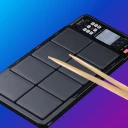
Screenshots
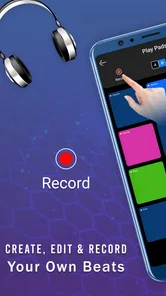
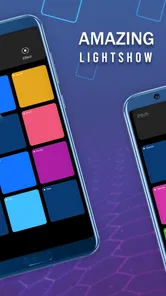
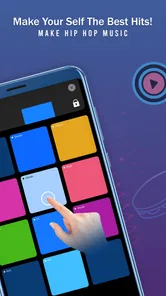
Analysis by Reviewed
When I want to sketch a rhythm without setting up instruments or opening a full music workstation, a phone drum pad is a handy place to start. Real Electro Drum Pad: Hip Hop is aimed at that quick, hands-on kind of beat-making: tap pads, listen to how sounds work together, and see whether an idea has potential. I’d treat it as a compact creative tool rather than a replacement for a dedicated production setup, which makes its appeal clearest for casual sessions and early experiments.
Where a quick beat fits into the day
A phone-based drum pad is most useful when the goal is to explore an idea, not finish a track in one sitting. I can picture opening it during a quiet break, trying a few rhythms, and keeping the one that feels promising for later. That is a different job from building a complete arrangement: the screen puts sound-making close at hand, while a full workstation is better when I need a large timeline, detailed editing, or several stages of production.
For a beginner, that small first step can be less intimidating than facing a page full of tracks and controls. I’d start by tapping a steady pulse, then bring in one extra sound and listen for whether it adds movement. This is a practical way to learn how rhythm layers interact without needing to know music-production terminology. If I already have a clear arrangement in mind, though, I’d choose a sequencer or desktop tool where timing and structure are easier to inspect.
Getting Started with the Beat
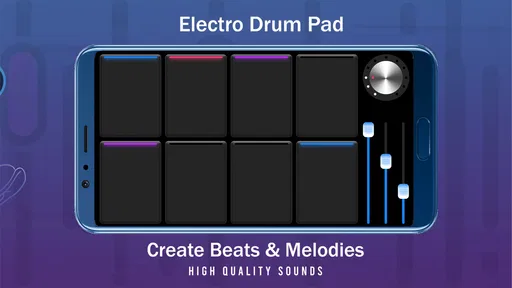
When I first opened Real Electro Drum Pad: Hip Hop, I was greeted with a vibrant interface that's as user-friendly as it is visually appealing. The app doesn’t waste time with unnecessary frills – it’s all about getting you straight to the beat-making action. You’ve got a neat layout of colorful pads, each one representing a distinct sound. Tap away, and you’re already crafting your first track!
What the Pad Experience Is Best For
That immediate layout suits short bursts of experimentation. I can imagine opening it while waiting for a ride, tapping a rhythm, and deciding whether the pattern feels more relaxed or punchy before the moment passes. A useful habit is to begin with a simple pulse and add only one sound at a time; on a touch screen, that makes it easier to hear which layer improves the groove and which merely crowds it. The trade-off is that quick tapping favors instinct over fine control, so anyone trying to program tightly edited parts may prefer a desktop workstation or a more detailed sequencer.
Features That Hit the Right Note
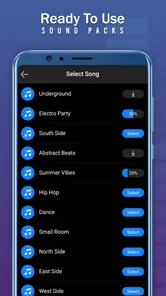
The standout feature here is the variety of sound packs available. Whether you’re into classic hip-hop, trap, or something more experimental, there’s a pack for you. I was particularly impressed with the quality of the sounds – they’re crisp, clear, and exactly what you’d expect from a professional studio setup. Plus, the app allows you to record your sessions, which is perfect for when you stumble upon that killer beat you don’t want to forget.
Another feature worth mentioning is the built-in sequencer. It’s a nifty tool that lets you arrange your beats into a full track without needing to switch to another app. It’s intuitive, and even if you’re a beginner, you’ll find your way around it in no time. The ability to layer different sounds and create complex rhythms is where this app truly shines.
More From Our News Desk

Weather by Xiaomi Review: Clear at a Glance, Less Clear Up Close

X Under Pressure: Can It Recover When Posting Goes Wrong?

Clash of Clans Is Won Between the Battles

Android Auto Makes the Case for Quieter Car Software

MobiOffice: Transforming Mobile Productivity with Seamless Integration

EA SPORTS FC™ Mobile Soccer: Redefining Mobile Sports Gaming
Making Ideas Easier to Revisit
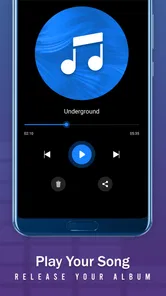
Recording is most useful when I treat a take as a sketch, not a finished song. I’d capture a promising pattern as soon as it appears, then listen back before adding more layers. That small pause helps avoid the common trap of piling sounds onto a rhythm simply because the pads make it easy to keep tapping. If a recording is worth developing, I can use it as a reference while rebuilding the idea in a fuller music app; the drum pad is better suited to getting the first spark down than handling every stage of a polished release.
A simple workflow makes those sketches more useful: record a basic groove, listen once without playing over it, and decide what is missing before trying another take. I find that this separates a rhythm that works on its own from one that only feels exciting while I’m actively tapping. It also helps when I want to compare a sparse version with a busier one. Keeping those versions distinct is more informative than layering everything into a single take and later wondering which sound made the beat lose its shape.
Speed, Stability, and Longer Sessions
The quick pad-first approach gives the game a low-friction feel: there is little to learn before trying a rhythm, and that matters when I only have a few minutes. I would still judge responsiveness on the device and in the moment rather than assume every phone behaves identically. Fast playing is more demanding than casual tapping, especially when several sounds are layered, so I’d test a short session before relying on it for a live performance or an important take. If anything interrupts a session, recording useful ideas along the way is a sensible safeguard; I wouldn’t build a long arrangement around an untested workflow.
Keeping a session manageable
During a longer creative stretch, I’d use the sequencer to give an idea a little structure, then pause to check whether the arrangement still has space. That check matters because the ease of tapping can encourage endless additions; a beat can become harder to follow even as it gets busier. I would rather save a clear, simple pattern and build on it deliberately than try to keep every spontaneous variation in one go. This approach is useful whether I’m practicing rhythm or just making something entertaining to listen back to.
For anyone asking whether it is suitable for a live set, my answer is more cautious. A touch pad can be enjoyable for informal playing, but I would not make it the only part of a performance plan without first testing how it responds under pressure on the device I intend to use. A short trial reveals whether the screen feels comfortable and whether my timing stays consistent. For a planned show or a recording that cannot be repeated, a physical controller or a production setup designed around performance gives me more confidence and tactile control.
Jam Anytime, Anywhere
One of the things I love most about Real Electro Drum Pad: Hip Hop is its portability. Since it’s available on both Android and iOS, you can literally take your music-making on the go. Whether you’re on a bus, chilling at home, or even taking a break at work, you can whip out your phone and start jamming. It’s an ideal way to make productive use of downtime and keep those creative juices flowing.
Portability does not mean every setting is equally comfortable. On a crowded bus, for example, I might use the app to test a simple rhythm quietly rather than try fast, two-handed playing while balancing a phone. At home, setting the device on a stable surface gives my fingers more freedom and makes it easier to repeat a pattern. Headphones can also help me pay attention to the beat when the surrounding room is noisy, although the key benefit is simply being able to explore an idea without carrying a separate instrument.
And let’s not forget about the community aspect. The app encourages you to share your creations, and there’s something incredibly satisfying about getting feedback from other users. It’s a great way to improve your skills and maybe even collaborate with other budding artists.
I’d approach sharing as a way to invite reactions to a rough idea, rather than as a substitute for keeping my own working notes. Feedback can help me notice whether a rhythm feels repetitive or whether its main pulse comes through, but it is still only one listener’s response. For learning, I’d ask a focused question about a specific part of the beat instead of presenting an unfinished sketch as though it were a finished track. That makes the social side more useful to a beginner who wants practical encouragement.
Who Should Try It—and Who Might Prefer Another Tool
I’d recommend it to curious beginners, casual beatmakers, and anyone who enjoys making rhythms by touch without first learning a complicated production interface. It can also be a useful warm-up for a musician who wants to test a groove before moving to instruments or a larger setup. If your priority is detailed editing, precise arrangement, or a dependable stage instrument, a dedicated production app or physical controller is the better fit. A phone screen is convenient, but it cannot offer the same tactile spacing or work surface as hardware.
It is free to install, with optional in-app purchases ranging from $0.99 to $99.99 per item, so I’d explore the basic experience before spending. Beat Blend Labs is the developer, and the game is rated Everyone. Its average rating is 4.8 from around 20,000 ratings, with 84 written reviews and more than 10 million installs. Those figures suggest broad interest, but they don’t tell me whether its particular workflow suits my hands or musical taste; a few minutes of tapping is a better test.
That free starting point makes it easier to judge the core experience before deciding whether any optional purchase is worthwhile. I’d first check whether the sounds and the way I interact with the pads keep me interested through a few short sessions. Someone who only wants an occasional rhythm sketch may have no reason to spend, while a regular user can decide based on what the app actually offers during their own use. The important distinction is between enjoying the basic creative loop and expecting a phone game to replace a full production suite.
Compared with music apps that begin with a multi-track project, this one puts immediate tapping first. That makes it approachable when I have a rhythm in my head but no patience for setting up a project. Compared with a physical drum pad, it wins on convenience but loses the feel of separate, raised controls. And compared with a traditional instrument, it offers a quick way to experiment with electronic-style beats without practicing a full playing technique, but it is not a substitute for the expressive range of a complete instrument.
Device Fit and Everyday Practicalities
The Android version requires Android 5.0 or later, while the game is also available on iOS. Since a drum pad depends on quick touch input, screen size and how you hold the phone can affect comfort more than they would in a reading app. I’d try it with the device resting on a table if one-handed tapping feels cramped, and use headphones when listening closely to a pattern in a noisy place. Those simple choices make it easier to focus on timing without assuming the app needs any particular accessory.
On a smaller phone, I’d keep the playing simple until I know how comfortably my fingers reach the pads. A tablet can offer a roomier surface, but the best fit is ultimately the device I can position steadily and use without straining. If tapping feels awkward, changing how I hold or rest the screen is a better first step than deciding the rhythm itself is difficult. These small adjustments matter most during quick repeated patterns, where a cramped hand can interrupt the flow.
Resource demands are another reason to test it in an ordinary session rather than make assumptions. A music app that plays several sounds can feel different from a lightweight reading or messaging app, but the experience depends on the phone and what else is running. I’d close distracting tasks if the device feels sluggish, try the pads again, and see whether that changes anything before blaming the app. That is a practical check, not a promise that every device will behave the same way.
The current version is 11.0.1, and the game was released on May 18, 2022. For my purposes, the key question is not how long I can keep a session going but whether the app makes it easy to capture an idea before I lose it. I’d save or record promising work at natural stopping points instead of trusting an unfinished session to remain available indefinitely. That is a practical habit for any mobile creative tool, especially when a quick experiment turns into something I want to revisit.
Final Beat
So, if you’ve ever had that itch to create music but didn’t know where to start, Real Electro Drum Pad: Hip Hop is your answer. It’s fun, easy to use, and packed with features that cater to all levels of expertise. Whether you’re making beats for fun or aiming to produce the next big hit, this app is a fantastic tool to have in your arsenal. Go ahead, give it a try, and let your inner DJ shine!
My practical verdict is that this game is at its best as a quick idea machine: open it, tap out a groove, record what works, and move on with a clearer sense of what you want to make. It is not the choice I’d make for meticulous editing or a performance where every control needs to feel dependable, but that is not the job I expect a phone drum pad to do. If you want an accessible way to play with beats during ordinary pockets of free time, it is an easy one to try; if precision and a full production workflow come first, I’d reach for a more specialized tool.
Real Electro Drum Pad: Hip Hop Frequently Asked Questions
Can I try Real Electro Drum Pad: Hip Hop without musical experience?
Yes. The game is built around tapping pads to make beats, so you can explore rhythm by experimenting rather than needing to know how to play a traditional instrument. It may be a comfortable starting point for casual music-making, while people with more experience can use the drum-pad format to try out their own ideas.
Is Real Electro Drum Pad: Hip Hop a game or a music-production tool?
It is a music game focused on playing drum-pad sounds and creating beats. Its electric drum pad simulator concept is aimed at hands-on rhythm play on a mobile device. If you are looking for a full desktop-style production studio, consider whether a tap-based game is the kind of music experience you want before downloading.
What does the Everyone age rating mean for this game?
Real Electro Drum Pad: Hip Hop has an Everyone content rating, making it suitable for a broad audience. Its central activity is tapping drum pads to make music, which can be approachable for different ages. Parents may still want to review the game’s purchase settings with younger users, especially if the device allows in-app purchases.
What kind of game is Real Electro Drum Pad: Hip Hop?
Real Electro Drum Pad: Hip Hop is a music game built around tapping drum pads to create beats. Its store description presents it as an electric drum pad simulator designed to help you play sounds like a real drum setup. It may appeal to people who want a hands-on way to experiment with rhythm and hip hop-style music on a mobile device.
Is Real Electro Drum Pad: Hip Hop free, and are there optional purchases?
The game is free to download, but it also offers optional in-app purchases. You can start using its free content without buying anything, while purchases may unlock additional options or content. The available purchase prices range from $0.99 to $99.99 per item, so it is worth checking the purchase details on your device before confirming anything.
Pros
- User-friendly interface for easy navigation
- High-quality sound samples
- Customizable drum kits enhance creativity
- Responsive touch controls for real-time play
- Variety of genres for diverse music creation
Cons
- Limited free features without in-app purchases
- Occasional app crashes reported by users
- Lack of advanced editing tools
- Ads can be intrusive during use
- Requires internet for full functionality













