Docusign - Upload & Sign Docs
- 27.26K
- 4.5
- Installs
- 10.00M
- Price
- Free

Screenshots

Analysis by Reviewed
I find DocuSign - Upload & Sign Docs most useful when a document needs attention now, not after I have found a printer, signed a paper copy, and scanned it back. It is a productivity app from Docusign built around signing and sending documents on a phone. That focus makes it handy for everyday agreements, but it also means it is worth checking the workflow before relying on it for a complicated document process.
Where people can get stuck
The first hurdle is often not the signature itself but getting the right file ready. If a document is buried in an email thread or cloud folder, I would locate it before starting the signing flow and make sure I am opening the intended version. That small check helps avoid the awkward situation of signing an outdated draft. A phone screen can also make it harder to review dense pages, so I prefer to read the document carefully before placing a signature rather than treating a quick tap as proof that everything is in order.
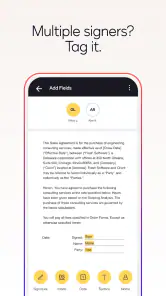
Another point to keep in mind is that signing your own document and asking someone else to sign are different tasks. Before sending anything, I would check the recipient details and review the document from beginning to end. If a form needs several people to complete specific fields in a particular order, take time to understand those requirements first; a simple signature workflow may not be the best fit for every multi-party process.
For a document that needs several people to act, I would also clarify the handoff before opening the app: who signs, who fills in other details, and who keeps the completed copy. That is not busywork. It prevents a signed file from being mistaken for a finished agreement when someone still needs to review or complete it. If the sender has supplied instructions, I would follow those rather than assuming that every blank space is meant for my signature.
Setup checks that save time
Once installed, I would begin with a low-stakes document and learn where the app places its signing and sending controls. The app is free to download, is rated for Everyone, and version 3.55.0 is the current release. It has a 4.5 average from around 154,000 ratings and more than 10 million installs, so it is a widely used option rather than an obscure utility. In-app purchases range from $9.99 to $479.99 per item, which makes it sensible to check what a particular task requires before committing to a paid plan.
For a smoother first attempt, keep the source file somewhere you can find again, confirm that it opens clearly on your phone, and make sure you can access the email or cloud account where it lives. I would also check the finished document after signing: confirm the signature appears in the right place and that the saved or sent copy is the one I intended to use. These habits are simple, but they prevent many avoidable retries.
I would treat the first session as a test of the whole route, not just the signature button. Choose a non-sensitive, straightforward file, locate it, inspect its pages, and see how the final copy is handled. This reveals whether the source location is convenient and whether the mobile screen suits the kind of paperwork you deal with. It also gives you a chance to learn the sequence without a deadline or an important agreement hanging over the attempt.
You May Like

Clash of Clans Is Won Between the Battles

Android Auto Makes the Case for Quieter Car Software

MobiOffice: Transforming Mobile Productivity with Seamless Integration

EA SPORTS FC™ Mobile Soccer: Redefining Mobile Sports Gaming

How Microsoft OneDrive Became a Mobile Productivity Giant

How Google Translate Breaks Language Barriers Effortlessly
Signing on a phone: what works and what takes care
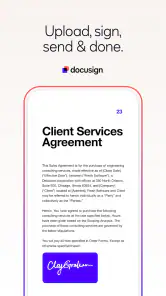
Gone are the days when you needed to print, sign, and scan documents. With DocuSign, it’s all about convenience and efficiency. You can easily upload any document, from contracts to agreements, and sign them digitally. It’s secure, fast, and, honestly, a lifesaver when you’re on the go.
How It Works
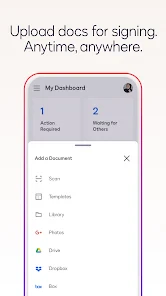
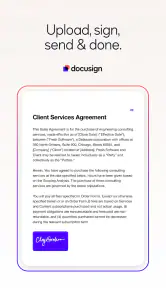
The app interface is super user-friendly. Once you’ve downloaded it, you’ll find it straightforward to navigate. Uploading documents is a breeze; you can do it directly from your email or cloud storage. Then, just tap to add your signature. What I love is how you can either draw your signature or choose a pre-styled one. It’s all about personal preference and ease of use.
A useful everyday example is receiving a permission form or a straightforward agreement while away from home. I can open the file, check the wording, add my signature, and return to the rest of the day without handling paper. I still wouldn’t rush through a contract on a small screen: if the terms are important or the layout is crowded, reviewing it on a larger display first is the safer choice.
There is a useful distinction between signing quickly and signing carelessly. If I receive a short form during a busy day, I can use the phone to avoid delaying the response, but I still pause to check the name, dates, and any filled-in details. When the document is long, I would rather read it on a computer and use the phone only for the final step. That split workflow keeps the convenience without pretending a small display is ideal for every kind of review.
Features That Stand Out
One of the standout features of this app is its integration capability. It syncs seamlessly with popular platforms like Google Drive and Dropbox. This means you’re not restricted to using just your phone’s storage, which is a huge plus for anyone working remotely or juggling multiple projects.
That connection is most helpful when the document already lives in a shared work folder: it can save the extra step of downloading a copy, signing it, and then trying to remember where to put it back. My practical tip is to settle on one clear filing habit—such as returning completed paperwork to the same project folder—so signed and unsigned versions do not get mixed up. For occasional personal forms, a basic phone document tool may be enough; this app makes more sense when signing and sending are recurring parts of your routine.
A small but valuable workflow habit is to keep the original and completed file easy to distinguish. I would use the same project location consistently, then check the filename or folder before sharing anything. That matters most when several versions of a contract or form are circulating: the convenience of opening a file from cloud storage can become a drawback if I lose track of which copy is current. A consistent filing routine is more reliable than trying to remember the last place I saved something.
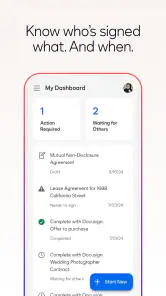
The security protocols are top-notch too. With bank-level encryption, you can rest assured that your documents are safe and sound. Plus, the app keeps a detailed audit trail, so you know exactly who signed what and when.
When another tool may suit you better
While DocuSign is fantastic, it’s always good to be aware of a few things. Some features are locked behind a subscription, which might be a dealbreaker for those looking for a completely free solution. However, the basic functionalities are more than enough for everyday use.
As a productivity app, it is best for people who regularly handle agreements, forms, or contracts and want a recognizable signing workflow on mobile. If all you need is to add a mark to a one-off file, your phone’s built-in markup tool or a desktop PDF editor may feel simpler. Those alternatives are also worth considering when extensive editing or close page-by-page inspection matters more than sending a signature request.
The choice depends on what “signing” means in your situation. A markup tool can be convenient if you only need to annotate a personal copy, while a desktop editor is more comfortable when you must make careful changes or compare pages side by side. I would choose Docusign when the task is specifically to sign and return paperwork, especially if that happens often. If the document needs substantial editing before it is ready, I would prepare it elsewhere first rather than expecting a signing-focused app to replace a full document editor.
For a small business owner, freelancer, or anyone who regularly receives forms from clients, the benefit is less about one dramatic feature and more about cutting out repeated print-scan steps. It can make sense when documents arrive at unpredictable times and a prompt return matters. By contrast, a person who signs only one or two uncomplicated files now and then may not need a dedicated signing workflow or any paid extras. I would base the decision on how often paperwork interrupts your day, not on the assumption that every digital task needs its own app.
Recovering from a stalled workflow
If an upload or send does not work as expected, I would first reopen the file from its original location, check that the correct account or folder is being used, and try again with a stable connection. If the document looks wrong after signing, return to the original rather than repeatedly editing a copy; compare the pages and confirm which version you are about to share. That approach helps distinguish a file or workflow mix-up from a problem with the signing step itself.
When a file seems to have disappeared, I would retrace the route rather than immediately starting over: check the place it came from, confirm which account or folder I selected, and look for the copy I meant to complete. Repeating an upload without checking can create several near-identical files and make the final version harder to identify. If the issue is a delayed send, I would avoid sending multiple copies until I know whether the first attempt completed.
For a recipient who says they cannot act on a document, I would first verify that I used the intended address and that the document I sent is the one they expect. Then I would ask them to check the message and open the file again before creating a replacement. This is a practical way to separate a recipient-side mix-up from a problem with the document itself. It also avoids needlessly changing a completed file when the original request may still be usable.
When the app is not the cause
Some friction may come from the document rather than the app. A blurry scan, an unusually laid-out form, or instructions that require changes beyond adding a signature can make mobile signing awkward. In those cases, I would ask the sender for a clearer file or use a computer to review and prepare it. Digital signing makes paper handling easier, but it does not replace checking that the document is complete, legible, and appropriate to sign.
It is also worth separating a document problem from a signing problem. If text is cut off, pages appear out of order, or the signature area is unclear before I begin, I would stop and ask for a corrected file. Signing does not repair a faulty scan or settle what an ambiguous clause means. For a contract with meaningful consequences, the sensible move is to take the time needed to understand it, even if that means switching to a larger screen or getting advice before signing.
People new to electronic signing sometimes wonder whether the drawn or pre-styled option is better. I would choose whichever is easiest to apply consistently and looks clear in the document; the more important check is that it is placed correctly and the completed file is reviewed. Another common question is whether a phone is enough. For a short, familiar form, it can be; for dense terms, small print, or a crowded layout, I would use a larger display to read first and sign only when I am comfortable with the content.
Additionally, if you’re new to digital document signing, it might take a little time to get the hang of the app’s full potential. But trust me, once you’re familiar with it, you’ll wonder how you ever managed without it.
In conclusion, DocuSign - Upload & Sign Docs is a must-have for anyone looking to streamline their document management. Whether you’re a business professional or just someone who deals with a lot of paperwork, this app is bound to make your life a whole lot easier. Give it a try, and embrace the future of digital signatures!
My practical verdict
I would recommend giving it a try if signing and returning documents is a regular chore, especially when your files already sit in email or cloud storage. The main trade-off is that a quick mobile flow can feel limiting when a document needs careful review, unusual formatting, or more than a straightforward signature. For occasional paperwork, a built-in markup option may be enough; for repeat signing tasks, Docusign offers a more focused route. I would start with a simple form, learn the steps, and decide whether the convenience is worth any paid features your own workflow calls for.
Docusign - Upload & Sign Docs Frequently Asked Questions
Can I download DocuSign for free, and what should I expect after installing it?
DocuSign is free to download and is designed to fill, sign, and send documents, forms, agreements, and contracts electronically. Installing it does not mean every option is free, however, because the app also offers in-app purchases. If you expect to use it regularly, take a moment to review the available options and decide whether they suit the way you handle documents.
Is DocuSign suitable for someone who only needs to sign documents occasionally?
Yes. DocuSign is a productivity app for filling, signing, and sending documents, forms, agreements, and contracts electronically. Its free download makes it possible to try the app, while in-app purchases are available for users who need paid options. If you only sign occasionally, consider whether the free offering meets your needs before choosing a purchase.
What is DocuSign and how does it work?
DocuSign is a digital transaction management platform that allows users to upload, sign, and manage documents electronically. It works by enabling users to add electronic signatures to documents, send them for signature, and track their progress in real time. The process is secure, legally binding, and designed to streamline document workflows, making it ideal for businesses and individuals alike.
Is DocuSign legally binding?
Yes, DocuSign's electronic signatures are legally binding in most countries, including the United States, under laws such as the ESIGN Act and the UETA. These laws recognize electronic signatures as having the same legal standing as handwritten signatures, provided that all parties involved consent to using electronic means for signing.
Can I use DocuSign for free?
DocuSign offers a free version that allows users to send three documents for signature. For more advanced features like unlimited document sending, workflow automation, and integration with other tools, a paid subscription is required. DocuSign provides various pricing plans to suit different user needs, ranging from individuals to large enterprises.
Pros
- Seamless document signing process.
- Intuitive user interface.
- Secure and encrypted data handling.
- Wide range of integrations available.
- Efficient document tracking features.
Cons
- Requires internet connection.
- Limited free version features.
- Occasional app performance lags.
- Subscription can be expensive.
- Complex for first-time users.

- Category
- Productivity
- Version
- 3.55.0











