Doctor On Demand
- 35.41K
- 4.9
- Installs
- 1.00M
- Price
- Free

Screenshots
Analysis by Reviewed
For a health concern that does not seem to need an in-person exam, talking to a clinician from home can be a welcome first step. Doctor On Demand is a medical app from Doctor On Demand, Inc that connects people with care by video. I see its strongest appeal in reducing the effort of arranging a conversation, not in replacing every part of a doctor’s office visit.
Why a video visit can change the first step
With an in-person appointment, even a straightforward question can involve travel, time away from work, and waiting at a clinic. A virtual visit can remove some of that burden. The app’s focus on online doctors, therapy, and urgent care makes it relevant both for a new, non-emergency concern and for people seeking mental health support. It is free to download, but that does not mean every consultation is free; check the cost that applies to you before booking.
One practical way to use a video appointment is to prepare before you join. Write down when the issue started, what has changed, and any questions you want answered. If you are discussing a visible symptom, a clear photo may help provide context, though it cannot replace an examination when a clinician needs to assess you in person. This small bit of preparation can make a short conversation more focused and help you remember the next steps.
Instant Access to Healthcare Professionals
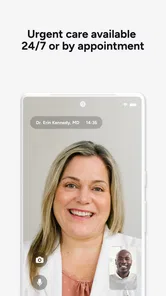
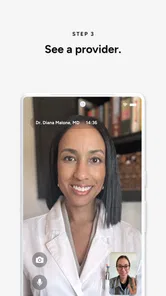
The main draw of Doctor On Demand is its promise of instant access to healthcare professionals. You can literally have a video call with a licensed physician, psychologist, or psychiatrist without stepping out of your home. I tried booking an appointment for a mild concern, and within minutes, I was face-to-face with a doctor. The process was seamless, and the waiting time was much shorter than a traditional doctor visit.
User-Friendly Interface
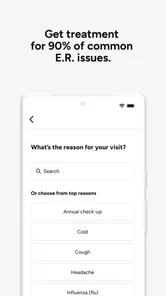
The app's interface is super intuitive, which is a huge plus. I mean, who wants to navigate a complicated app when they're not feeling their best? Everything is laid out clearly, from booking appointments to accessing medical history. You can even upload photos if you need to show the doctor something specific. It’s like having a mini medical center on your phone.
That photo option is most useful when the image adds information the clinician cannot see clearly on camera. I would take it in good light and keep the explanation brief: when the symptom appeared and whether it has changed. For a concern that depends on touch, a detailed physical exam, or tests, a video call has obvious limits. In that situation, the clinician’s guidance about seeking in-person care matters more than the convenience of staying on the screen.
Comprehensive Care Options
What I found really impressive is the range of services offered. It’s not just about quick consultations; you can get treatment for urgent care issues, chronic conditions, and even mental health support. I had a session with a therapist, and it felt no different from an in-person visit. The app also offers preventive health check-ups, so it's not just for when you're already under the weather.
More From Our News Desk

 Block Blast!
 Makes Every Clear Feel Like One More Turn
A clean little block puzzle becomes a study in space, risk, and self-control. Its best moments come from one satisfying clear; its toughest test is knowing when to stop.

 Super Stylist Fashion Makeover
Super Stylist Turns Dress-Up into a Runway Career
Its makeover-to-client loop turns quick outfit decisions into shareable style theater. The question is whether the closet keeps giving players a reason to return.

 Block Craft 3D:Building Game
Block Craft 3D Under Pressure: How Well Does It Recover When Building Goes Wrong?
A failure-focused look at Block Craft 3D’s forgiving building loop, its uncertain recovery edges, and the moments that demand more than a cheerful village.

 Woodturning
 Trades Creative Freedom for a Satisfying Carving Loop
If your usual creative game is about building, decorating, or styling, Woodturning trades open-ended projects for a tactile, tightly guided carving loop. Here is what that switch really costs.

 PUBG MOBILE
 Shows What Battle Royale Must Get Right
PUBG MOBILE shows how battle royale has matured: bigger systems matter less than meaningful choices, readable fights, and a reason to return after every loss.

 Braindom: Brain Games Test
Braindom’s Social Life Happens Between Puzzles
Braindom turns quick logic traps into a personal ritual, but its community value is more about comparing answers than building together.
Latest News



For ongoing concerns, I would use an online visit to discuss a change, clarify a care plan, or work out what kind of follow-up makes sense—not assume that one remote appointment replaces continuing care. Therapy by video can make regular conversations easier to fit into a busy week, while people who strongly prefer a private office or need immediate crisis support should look for a more suitable in-person or emergency resource. Convenience is valuable, but the right setting depends on the need.
Insurance and Payment Flexibility
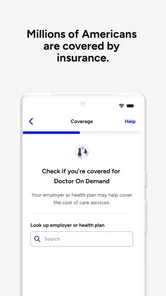
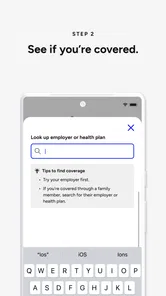
Another great feature is the app's flexibility with insurance. It accepts a wide range of insurance plans, which makes it accessible for many. Even if you don't have insurance, the pricing is transparent and relatively affordable compared to traditional medical costs. You know exactly what you’re paying for, which is quite refreshing.
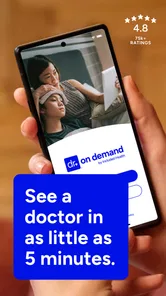
Before choosing a visit, I would check the expected charge and whether the service fits your insurance situation rather than assume coverage. The app is free to install, but fees for care are a separate question. Doctor On Demand has a 4.8 average from around 83,000 ratings, and it has passed one million installs. Those figures suggest plenty of people use it, but they cannot tell you whether a particular appointment type is covered for you.
Where virtual care fits—and where it doesn’t
Compared with calling a local clinic, this approach can make it easier to start a conversation without arranging travel; compared with a walk-in visit, it is less suited to problems that need hands-on assessment. It is not an emergency service substitute. If symptoms are severe or rapidly worsening, I would seek urgent in-person help rather than wait for an app-based consultation. The useful middle ground is a non-emergency question where professional guidance can help decide what to do next.
A realistic example is waking up with a mild, unfamiliar symptom on a workday and being unsure whether it can wait. Rather than guessing or searching endlessly online, you can look into a video consultation, explain what is happening, and ask what signs should prompt in-person care. Keep a note of any recommendations after the call so you can follow them later. That makes the visit more actionable than treating it as a quick reassurance alone.
Who is most likely to benefit
I would recommend the app to people who value remote access, can describe their concern clearly, and want a convenient way to speak with a clinician or therapist. It may also suit someone with a packed schedule who wants to explore care without first making a trip. Doctor On Demand is rated for Everyone, its current version is 2025.47.2, and it requires iOS 10 or later. I would skip it as a first choice if you need an examination, immediate emergency help, or a care relationship that depends on regular in-person contact.
Making a remote appointment more useful
A video visit works best when I treat it as a focused conversation rather than a chance to mention everything at once. Before booking, I would decide what I most need help with: understanding a symptom, discussing a treatment concern, or deciding whether another kind of care is appropriate. Putting that main question first matters if the appointment is brief or the clinician needs to ask several follow-up questions.
I would also keep practical details close by, such as a list of medicines I take and the dates when symptoms began or changed. That is especially helpful when a concern has been coming and going, since it is easy to forget the pattern while speaking. If another person has observed the symptom, their short description may be useful too. These are simple preparations, but they can make a remote assessment clearer without trying to diagnose the problem on my own.
After the call, I would write down the agreed next step in plain language: what to monitor, when to seek in-person care, and what to do if the issue worsens. This is a useful habit with any appointment, but it matters when there is no printed handout or office visit to anchor the discussion. A video consultation is most valuable when it leaves me with a clear plan, not merely a temporary sense of reassurance.
Choosing between an app, a clinic, and a search engine
The alternatives serve different purposes. Searching online is convenient, but it can leave me comparing frightening possibilities without knowing which details matter. A call to a familiar clinic may be better when continuity with an existing care team is important, while a local visit is the sensible choice when an examination or testing is likely. A video appointment occupies the middle ground: I can explain what is happening to a clinician and get guidance without first making the trip.
That middle ground is not automatically the fastest or best option for every person. If I already know I need hands-on assessment, booking a remote visit first could add another step. If I need emergency help, an app is the wrong route. But when I am uncertain whether a non-emergency concern needs a clinic visit, speaking with a professional can be more useful than either waiting without a plan or trying to settle the question through search results alone.
It is also worth thinking about the setting for the call. A quiet place, stable connection, and enough privacy to speak openly are practical requirements for a useful video conversation. For therapy in particular, having a private space can affect how comfortable I feel discussing personal topics. Someone who cannot reliably find that privacy may prefer an in-person option, even if remote access would otherwise save time.
Small tradeoffs that affect the experience
Remote care reduces travel, but it shifts some responsibility to me. I have to explain the concern clearly, make sure the camera and sound work, and be ready to describe details that a clinician might otherwise notice during an office exam. A photo can support that conversation, but it is not a substitute for tests or a physical assessment. If the clinician recommends in-person care, I would take that as useful triage rather than a failure of the app.
There is another tradeoff with convenience: a quick route to a conversation does not guarantee that the app is the right place for every kind of follow-up. If I need care that depends on repeated examinations or close coordination with a clinician who knows my history, my usual provider may be a better anchor. I would use remote care as one part of a broader plan, not assume that every concern can be handled through the same screen.
The app is free to download, and its medical focus is clear, but I would still make the payment check part of the booking decision. Insurance and appointment costs can shape whether a virtual visit is worthwhile for a particular person. The sensible approach is to confirm the amount and coverage that apply before committing, rather than choosing based only on the convenience of an available consultation.
Who should look elsewhere first
I would steer someone toward a local clinic when the problem depends on palpation, a procedure, imaging, or lab work. I would also avoid relying on a video appointment for severe, rapidly worsening, or emergency symptoms. A remote clinician may help explain what kind of care is appropriate, but the app should not delay urgent help when the situation calls for it.
It may be less appealing for people who are uncomfortable describing symptoms aloud, have difficulty using video, or cannot find a private place to talk. Those are not small details: if the format makes it hard to communicate, the convenience is less valuable. Likewise, someone who wants the same in-person clinician for every stage of a long-term condition may prefer to start with a local practice and use virtual care only when it fits that relationship.
For people who can use video comfortably and have a non-emergency question, however, the format can lower the threshold for asking for professional guidance. I see that as the app’s central practical strength. It does not make every medical task remote; it makes the first conversation easier when travel and scheduling might otherwise put it off.
Overall, Doctor On Demand has carved a niche for itself by making healthcare more accessible and less intimidating. It’s perfect for anyone who values convenience and efficiency but doesn't want to compromise on quality care. I’ve found myself recommending it to friends and family, especially those who are always on the go.
So, if you're looking for a reliable way to connect with healthcare professionals without the usual hassle, give Doctor On Demand a shot. It's like having a healthcare facility right at your fingertips.
Doctor On Demand Frequently Asked Questions
Can I use Doctor On Demand for therapy as well as medical care?
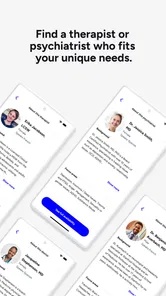
Doctor On Demand’s store summary describes online doctors, therapy, and urgent care, so the app covers more than routine medical questions. It may be useful if you are looking for a virtual option for emotional support as well as physical health concerns. Before booking, choose the type of care that best matches your needs and review the visit details in the app.
Is Doctor On Demand a free app, and how should I think about the ratings?
The app is free to download, and its app-store listing shows an average rating of 4.8 from around 83,000 ratings. Those figures can offer a quick sense of its reception, but ratings do not tell you whether a particular visit will suit your situation. It is worth checking the care options and appointment details for yourself before deciding to use the service.
Do I need a particular device or operating system to use Doctor On Demand?
Doctor On Demand is a medical app for smartphones, designed to make online care accessible from your device. Before downloading, check that your phone runs iOS 10 or later, as the app requires that minimum operating system. The app itself is free to download, so you can install it and explore the experience before deciding whether to arrange a visit.
Who makes Doctor On Demand, and is it a well-established app?
Doctor On Demand is developed by Doctor On Demand, Inc. It has been available since October 7, 2013, and its store presence shows more than 1 million installs. The app has an average rating of 4.8 from around 83,000 ratings, giving prospective users a useful sense of its reach and overall reception before they decide to try it.
What is Doctor On Demand and how does it work?
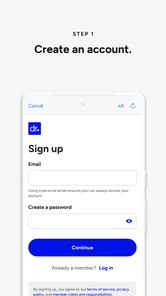
Doctor On Demand is a telemedicine app that connects you with board-certified doctors, therapists, and medical experts over video call. After downloading the app, you can create an account, select the type of care you need, and schedule an appointment at your convenience. The app offers services ranging from urgent care to mental health support, all accessible from your smartphone.
Pros
- Convenient 24/7 access to healthcare.
- Video visits with board-certified doctors.
- Covers a wide range of medical issues.
- Integrates with health insurance plans.
- User-friendly interface.
Cons
- Consultation fees can be high.
- Limited to non-emergency situations.
- Requires stable internet connection.
- Availability may vary by location.
- No in-person follow-up care.