Direct Chat & Messaging
- 310.00
- 4.5
- Installs
- 10.00M
- Price
- Free

Screenshots
Analysis by Reviewed
I’d start with one simple expectation: Direct Chat & Messaging is a small productivity tool for reaching someone without first adding their number to your contacts. That can make a familiar messaging routine quicker, but it is not a replacement for a full messaging service or a universal inbox. I find it most useful when I already know whom I need to contact and want to avoid cluttering my address book just to send one message.
What to expect from the app
Made by Longnine, this free app is rated for Everyone and sits in the productivity category. It has a 4.7 average from around 54,000 ratings and more than 10 million installs, so it has clearly found an audience among people looking for a direct route into chat. The current version is 1.0.19, and the app is listed for devices running Android 7.0 or later. Optional in-app purchases range from $4.99 to $9.99 per item.
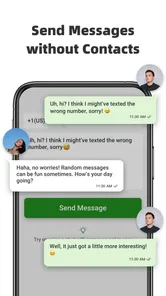
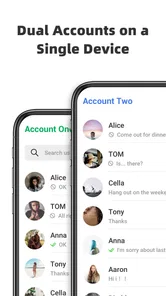
The practical appeal is narrow in a useful way: a contact does not have to become a saved entry before you can start a chat. That is handy for a delivery driver, a seller replying to a buyer, or a person arranging a one-off appointment. The app’s other stated use is handling a dual WhatsApp account on one device, which may suit someone who keeps personal and work conversations separate. I would treat those as two distinct needs rather than assume the app combines every messaging service into one inbox.
Getting set up without overthinking it
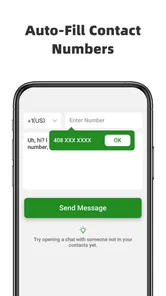
For a first try, I’d begin with the direct-chat task rather than changing several settings at once. Open the app, follow the prompts it presents, and use a number you have a reason to contact. Check the country code carefully before continuing; a small mistake there can send you back to edit the details or, worse, point you toward the wrong person. Once the chat opens, confirm that the conversation is the one you intended before sending anything sensitive.
If you’re interested in the dual-account use, first decide which number belongs to which part of your life. Keeping that distinction clear helps prevent the everyday mix-up of replying to a colleague from a personal identity or vice versa. I’d also check the purchase screen before choosing any optional item: the app is free to install, but some in-app purchases are offered. You can try the basic workflow first and decide whether anything extra is worth paying for.
The first useful success
A realistic first win is contacting a tradesperson who has shared a mobile number for a quote. Instead of saving that number permanently, you can use the direct-chat workflow, ask the question, and keep your contacts list reserved for people you expect to reach again. The same approach works for a marketplace exchange or a short-lived booking conversation. My tip is to save the number only if the relationship becomes ongoing; that keeps the app’s main convenience from turning into a new source of address-book clutter.
That workflow is also where this tool differs from the usual alternatives. In a standard messaging app, starting a conversation may mean adding a contact first or navigating to a new-chat screen. A contact manager can store the number, but it does not remove the extra step if you later decide that entry was temporary. Direct Chat & Messaging is appealing when speed and a tidier contacts list matter more than having every person permanently organized. If you already keep a well-maintained address book, the ordinary messaging app may be simpler.
More From Our News Desk

Weather by Xiaomi Review: Clear at a Glance, Less Clear Up Close

X Under Pressure: Can It Recover When Posting Goes Wrong?

Clash of Clans Is Won Between the Battles

Android Auto Makes the Case for Quieter Car Software

MobiOffice: Transforming Mobile Productivity with Seamless Integration

EA SPORTS FC™ Mobile Soccer: Redefining Mobile Sports Gaming
Streamlined Communication at Your Fingertips
Imagine having all your messages from various platforms in one place. That’s exactly what Direct Chat & Messaging offers. When I first installed the app, I was skeptical. But, oh boy, was I in for a pleasant surprise! The app neatly organizes and consolidates messages from different services into a single, easy-to-navigate interface. No more jumping between apps to keep up with conversations!
User-Friendly Interface
The user interface is as intuitive as it gets. From the moment you open the app, it’s clear that the developers prioritized simplicity and usability. The messages are sorted in a clean manner, and the app’s minimalistic design ensures that I’m never overwhelmed. It feels like the app is saying, "Hey, I've got your back. Let’s make chatting easier for you."
Features That Stand Out
One of the features I absolutely love is the floating chat heads. They pop up whenever I receive a message, allowing me to reply without even opening the app. It’s like magic! Plus, the customization options are top-notch. I can tweak the chat bubble colors and notification sounds to my heart’s content, making the experience uniquely mine.
And for someone who values privacy, the app's encryption ensures that my conversations are safe from prying eyes. It's comforting to know that while I'm chatting away, my data is securely tucked away.
The Cherry on Top
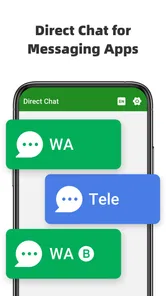
What's the cherry on top of this delightful app? It’s the seamless integration with various messaging platforms. Whether it’s WhatsApp, Facebook Messenger, or even Telegram, Direct Chat & Messaging has got it covered. It’s like having a universal remote for all my chats!
I also think it’s worth checking what a first-time user actually wants from this app before relying on it for daily communication. If your main goal is to open a chat without saving a number, try that one task first and see whether the steps feel quicker than your normal method. If you need two WhatsApp identities on one phone, test that separately and make sure you can recognize which account you are using before sending work or personal messages. These are practical checks, not reasons to overcomplicate setup.
Where the convenience has limits
There is a trade-off to the contact-free approach. Not saving someone’s number helps keep your address book clean, but it can also make an important conversation harder to find later if you have no other way to identify the person. For a client, a school contact, or anyone you expect to speak with repeatedly, saving a clear name may be the better choice. I see this app as a shortcut for temporary or occasional contact, not a substitute for deciding which people belong in your contacts.
I would also avoid assuming that “direct chat” means every chat service works in the same way or that all conversations are collected into a single, complete inbox. The app’s stated uses are direct messaging without saving contacts and dual WhatsApp accounts on one device. If you want a full history across several services, rely on each service’s own app and its own conversation list. That distinction matters: it prevents disappointment if your goal is a single place to manage every account and message.
Who will get the most from it
I’d recommend trying it if you regularly message temporary contacts, handle quick exchanges with customers, or want to keep a second WhatsApp identity apart from your main one. It can be especially useful for people who dislike adding a number just to ask one question. On the other hand, if you rarely start chats with unsaved numbers, or you already manage contacts and accounts comfortably in your usual messaging app, this may add another step rather than remove one.
My next-step advice is simple: use it for one low-stakes conversation, check that the recipient and account are right, and then decide whether the shortcut fits your routine. That gives you a meaningful test without moving all your communication habits at once. I’d keep the regular messaging app available for conversations that need its full contact and account-management features.
In conclusion, if you’re tired of the clutter and want a more organized chatting experience, give this app a whirl. It’s like having a personal assistant who manages all your conversations efficiently. And honestly, who wouldn’t want that?
Direct Chat & Messaging Frequently Asked Questions
Is Direct Chat & Messaging free to download, and are there optional purchases?
Direct Chat & Messaging is free to download, with in-app purchases priced from $4.99 to $9.99 per item. You can try its core direct-chat function first and decide whether any paid extras suit your needs. Before confirming a purchase, review its details in the app so you know what you are choosing.
Who developed Direct Chat & Messaging, and when was it released?
Direct Chat & Messaging is a productivity app developed by Longnine. It was released on August 23, 2024, and its current version is 1.0.19. These details can help you identify the app when browsing for it and understand which version you are considering. Check that the app name and developer match before downloading.
Is Direct Chat & Messaging suitable for everyone?
The app has an Everyone content rating, so it is intended for a general audience. Its main purpose is to let you start a chat without saving a number as a contact, with dual WhatsApp account use also highlighted. Whether it fits your needs depends on how you communicate and which of those functions you plan to use.
What Android version does Direct Chat & Messaging require?
Before installing, check that your device meets the app’s minimum operating system requirement: Android 7.0. Direct Chat & Messaging is a productivity app from Longnine, intended for people who want to start chats without first saving numbers as contacts. If your phone runs a compatible version of Android, you can consider whether that direct-chat workflow suits the way you communicate.
Can Direct Chat & Messaging help me use two WhatsApp accounts on one device?
The app’s description highlights support for using a dual WhatsApp account on a single device, alongside its direct-chat function. That may be useful if you keep separate personal and work accounts and want to reach them from one phone. Review the app’s setup prompts and the permissions it requests before use, and make sure you follow WhatsApp’s own account requirements.
Pros
- Supports multiple messaging apps.
- Quick access to chat heads.
- Customizable chat bubble colors.
- Lightweight and fast interface.
- Doesn't require internet for settings.
Cons
- Ads in free version.
- Limited features without premium.
- Occasional notification delays.
- Not all apps support chat heads.
- Consumes battery on prolonged use.