Deliveroo: Food & Shopping
- 1.66K
- 4.6
- Installs
- 10.00M
- Price
- Free

Screenshots


Analysis by Reviewed
If you've ever found yourself craving that delicious burger from the joint across town or needing some essentials delivered right to your doorstep, Deliveroo: Food & Shopping is here to rescue you. This app isn't just about food delivery; it's a full-fledged service that brings the convenience of shopping to your fingertips.
What makes that mix useful to me is being able to look for a meal and everyday groceries in one place instead of switching between a restaurant app and a separate shopping service. That does not mean every local option will suit every order: what appears depends on where you are, so I would check the choices and delivery details before settling on a plan.
Unwrapping the Features
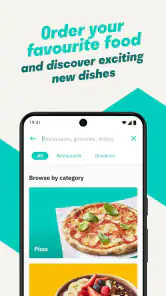
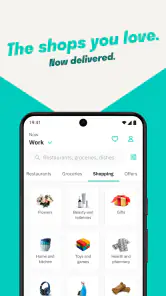
First off, let me say that Deliveroo: Food & Shopping is super straightforward to use. Once you download and open the app, you're greeted with a clean, easy-to-navigate interface. You can search for your favorite restaurants or shops and even discover new places based on your preferences.
A small practical tip: I find it helps to search by the thing I actually need, then compare a few nearby menus or shop selections before adding anything. That makes it easier to spot whether a restaurant has a suitable meal or whether a grocery shop is a better fit for the evening. It also keeps me from treating the first result as the only sensible option.
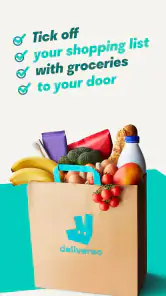
The app's menu is as diverse as it gets. Whether you're in the mood for sushi, a hearty Italian meal, or just some snacks for a movie night, Deliveroo has got you covered. Not only can you order food, but you can also shop for groceries and other essentials. This makes it a one-stop-shop for all things edible and more.
Compared with calling a restaurant directly, browsing in the app is convenient when I want to weigh up different menus without interrupting anyone. Compared with a dedicated grocery service, the appeal is having food and essentials together; the trade-off is that someone planning a full, careful weekly shop may prefer a grocery-focused option that better matches that routine.
I also find the combined approach useful when my needs are small and immediate rather than part of a planned household stock-up. If I am deciding between ordering dinner and picking up a few basics, being able to look at both kinds of options in one place can save me the mental switching. It does not necessarily make a larger shop cheaper or more efficient, and I would not assume that every shop has the same selection as a nearby physical store.
More From Our News Desk

Weather by Xiaomi Review: Clear at a Glance, Less Clear Up Close

X Under Pressure: Can It Recover When Posting Goes Wrong?

Clash of Clans Is Won Between the Battles

Android Auto Makes the Case for Quieter Car Software

MobiOffice: Transforming Mobile Productivity with Seamless Integration

EA SPORTS FC™ Mobile Soccer: Redefining Mobile Sports Gaming
For a more considered order, I would build it in two passes: first decide what the meal or essentials need to accomplish, then inspect the specific menu or item details before adding them. That simple pause matters because an appealing restaurant listing is not the same as a meal that fits everyone at the table, and a short essentials list can still be incomplete if I shop by impulse. I treat browsing as a way to compare choices, not as a substitute for checking the basket.
Real-Time Tracking
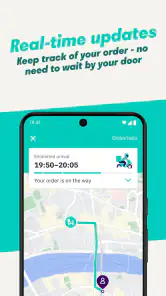
One of the standout features is the real-time tracking system. After placing your order, you can track its progress from preparation to delivery. It's like having your personal GPS for food! Honestly, watching my order make its way to me on the map is strangely satisfying and reassuring.
That tracking is most useful when I need to decide whether to keep working, set the table, or be ready to answer the door. It gives the order a visible progress path, but I still treat it as a guide rather than a promise of an exact arrival moment. For a relaxed meal, that is enough; if I have a hard deadline, I would not rely on delivery timing alone.
The practical benefit is less about staring at a map and more about having a rough sense of what to do next. If I am in the middle of a task, I can check the order status instead of repeatedly guessing whether I should pause. On the other hand, tracking cannot fix a delay or make an order arrive at a time that suits a fixed appointment. When timing really matters, I plan a buffer or choose a different way to get the food.
I also avoid making the tracker the sole basis for coordinating a group meal. People can begin setting out plates or choosing a film while the order is on its way, but I would keep the plan flexible until the delivery is actually at the door. That is a small adjustment, yet it prevents the map from creating more certainty than it can provide.
User Experience
The app runs smoothly, and I haven't encountered any glitches during my time using it. Notifications are timely, letting you know when your order is confirmed, when it's out for delivery, and when it arrives. It's these little things that enhance the overall user experience.
For example, on a busy evening when I am finishing work and do not want to cook, I can look for dinner and a couple of basics in the same app, then use the order updates to plan the gap before it arrives. I would still check each item and the restaurant or shop details carefully before confirming; convenience does not remove the need to make sure the selection fits what I actually need.
That kind of evening is where I see the clearest use case: I get home later than planned, have no time for a proper grocery run, and want to avoid opening several services just to decide what is possible. I can browse meal options first, then consider whether nearby shops have the few basics I have run out of. If either selection looks unsuitable, I can change course before ordering rather than treating the all-in-one setup as a reason to compromise.
For a family or a shared flat, I would use the same approach with a quick list agreed in advance. It is easy for a convenience order to grow as each person adds a snack or an extra item, so deciding what is genuinely needed before browsing helps keep the choice focused. I would also have one person check the final basket for quantities and substitutions in the selection, instead of assuming everyone’s additions make sense together.
Payment is a breeze with multiple options available, including credit/debit cards and even Apple Pay for iOS users. For someone who hates the hassle of counting change, this is a lifesaver.
Deliveroo is a free Food & Drink app from Deliveroo, rated for Everyone, and its current version is 3.254.1. It has a 4.6 average from around 1.3 million ratings and over 10 million installs. Those figures suggest it is a well-established choice, though popularity alone cannot tell me whether the restaurants and shops available near you are the right ones.
It first appeared on May 27, 2016, and the current release requires Android 6.0 or later. I see those details as useful context rather than a reason to install it on their own: the deciding question is still whether the nearby restaurant and shop choices suit your routine. The app is free to download, but I would check the order’s final details before confirming, because the convenience of placing an order should not replace looking carefully at what is in the basket and what the delivery arrangement shows.
The rating and reach make it easier to see that this is not an obscure service, but a large audience does not guarantee a good match for every neighbourhood. Someone in an area with a narrow selection may get less value than a person whose preferred restaurants and useful shops are available. I would judge it by trying a few searches at the location where I expect to use it, rather than assuming the experience will be identical everywhere.
Compared with ordering directly from a restaurant, the app offers a shared browsing place and order progress to check; direct ordering can be better if I already know exactly where I want food from or prefer dealing with that restaurant. Compared with going to a shop myself, delivery saves the trip, but I give up choosing items in person. For fresh produce or a particular product where I care about inspecting it, shopping myself is the safer fit. The best option depends on whether my priority is less effort, a specific source, or control over selection.
One question I would ask before relying on it regularly is whether the local options cover my ordinary needs, not just an occasional treat. I would search for the meals I actually order and the basic items I tend to run out of. A second useful check is whether the app’s displayed order information suits the occasion: a casual dinner can tolerate some uncertainty, while a tightly timed gathering calls for a backup plan. These checks take little effort and give a more honest picture of whether the app belongs in my regular routine.
Ending Thoughts
In conclusion, is Deliveroo: Food & Shopping worth downloading? Absolutely! It's an app that seems to have thought of everything a user might need. From its extensive range of restaurants and shops to the ease of use and efficient delivery service, it's got all the bases covered.
I would recommend it most to someone who values having meals and everyday essentials in one browsing flow, especially when convenience matters more than planning a large shop. If you prefer picking groceries yourself, want to compare options outside the app, or need certainty about a strict arrival time, another approach may suit you better. The app is most convincing when you use its variety and progress updates to make an ordinary busy day easier, rather than expecting delivery to solve every shopping need.
It is less compelling for someone who enjoys choosing produce in person, has a strict budget that depends on careful comparison across several services, or needs a delivery to meet a non-negotiable schedule. In those cases, a local shop visit, a direct restaurant order, or a dedicated grocery routine may give more control. I would also skip it if the places available nearby do not match what I want to eat or buy; an easy interface cannot make a limited local selection useful.
For someone who is unsure, I would start with a low-pressure order rather than making it the plan for an important occasion. Browse the local choices, check the specific items, and see whether the progress updates fit how you like to manage a delivery. That gives a practical sense of the service without expecting it to replace every other way of eating or shopping.
If you value convenience and variety, this app should definitely be on your phone. So next time you're feeling peckish or need a quick shopping fix, you know where to tap!
Deliveroo: Food & Shopping Frequently Asked Questions
Can I browse Deliveroo before deciding what to order?
Deliveroo brings takeout, groceries, and retail shopping together in one app, so you can explore different kinds of options rather than focusing only on restaurant meals. What appears while you browse depends on your location. This makes the app useful for comparing the choices available nearby before deciding whether you want a meal, groceries, or another retail item.
Is Deliveroo suitable for the whole family?
Deliveroo has an Everyone age rating, and its core purpose is to help people browse food, grocery, and retail options. That rating makes it suitable for a broad audience, though adults should use their own judgment about what children may order and how purchases are made. The choices shown in the app can vary depending on where you are.
Does Deliveroo let me order groceries and retail items as well as food?
Deliveroo’s main appeal is having several kinds of shopping in one place. You can browse takeout alongside groceries and retail items, so it may be handy when you want something beyond a restaurant meal. The selection is location-dependent, and the app’s availability does not mean every type of shop or item will be offered in every area.
Is Deliveroo free to download, and what devices can run it?
Deliveroo is free to download, and its age rating is Everyone, so it is suitable for a broad audience. The app runs on Android devices with version 6.0 or later. It brings food, groceries, and retail shopping together in one place, though the availability of the service and shops you can browse depends on your location.
Can I use Deliveroo to order more than restaurant meals?
Yes. Deliveroo is designed for food and shopping, so the app can be used to browse takeout as well as groceries and retail items. Its aim is to bring these options together in one app, which can be useful when you want to explore more than restaurant menus. The specific choices you see depend on where you are.
Pros
- User-friendly interface for easy navigation.
- Wide variety of restaurants and cuisines.
- Real-time tracking of orders.
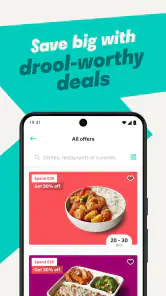
- Offers frequent discounts and promotions.
- Option to schedule orders in advance.
Cons
- Limited delivery areas in some regions.
- Occasional delays during peak times.
- Some items may not be available.
- Service fees can be high.
- Customer support can be slow to respond.
- Category
- Food & Drink
- Version
- 3.254.1











