CSL Plasma
- 3.52K
- 3.9
- Installs
- 1.00M
- Price
- Free

Screenshots
Analysis by Reviewed
If you’re considering donating plasma for the first time, the practical question is what the app can help you do before and between visits. I see CSL Plasma as a companion to the donation process rather than a substitute for speaking with a center. It brings useful tasks into one place, but the real benefit comes when you already plan to use a CSL Plasma location.
Before you install, know what it’s for
This is a free medical app from CSL PLASMA INC., focused on its own donation centers. It is not a general health tracker or a way to compare every plasma provider nearby. That distinction matters: if you want to manage visits with CSL Plasma, the app is relevant; if you are still deciding among unrelated centers, a general map or search may be a better first stop.
The app is rated for Everyone, and it has a 4.0 average from around 9,500 ratings, with over a million installs. Those figures suggest it has a sizable user base, but they don’t guarantee that every step will feel effortless on your phone. I’d treat it as a useful organizer, while keeping the center’s own guidance as the authority for eligibility and donation questions.
That focused role is worth keeping in mind before you make an account. The app is not meant to teach you everything about plasma donation or replace the information a center gives you. I’d use it to get the administrative pieces into one place, then rely on staff for questions about your own circumstances. That division of labor makes the app more useful, not less: it can help you get organized without pretending every donor’s situation is the same.
Make your first setup less frustrating
When you install it, give yourself a little time for registration rather than trying to create an account while walking into a center. The original experience can take longer than expected, so having a quiet moment to enter details and check that you can get back into your account is a sensible first step. The current version is 3.45.22 and it requires Android 9 or later; it is also available on iOS.
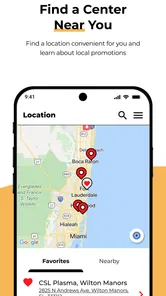
Once you’re in, start with the center locator and confirm that the location shown is the one you actually intend to visit. A nearby result is not automatically the most convenient choice if another center fits your route, work hours, or transport better. Checking the contact details before you travel is a small step that can save a wasted trip if you need to ask the center something specific.
I’d also think about setup as a small check rather than a task to race through. Make sure you can sign in again after registration, and look at the center details you are likely to need when planning a visit. Doing that at home gives you time to sort out a login or location mix-up without adding pressure at the door. It is a modest precaution, but it turns the app from something you downloaded into something ready for an actual errand.
More From Our News Desk

 Block Blast!
 Makes Every Clear Feel Like One More Turn
A clean little block puzzle becomes a study in space, risk, and self-control. Its best moments come from one satisfying clear; its toughest test is knowing when to stop.

 Super Stylist Fashion Makeover
Super Stylist Turns Dress-Up into a Runway Career
Its makeover-to-client loop turns quick outfit decisions into shareable style theater. The question is whether the closet keeps giving players a reason to return.

 Block Craft 3D:Building Game
Block Craft 3D Under Pressure: How Well Does It Recover When Building Goes Wrong?
A failure-focused look at Block Craft 3D’s forgiving building loop, its uncertain recovery edges, and the moments that demand more than a cheerful village.

 Woodturning
 Trades Creative Freedom for a Satisfying Carving Loop
If your usual creative game is about building, decorating, or styling, Woodturning trades open-ended projects for a tactile, tightly guided carving loop. Here is what that switch really costs.

 PUBG MOBILE
 Shows What Battle Royale Must Get Right
PUBG MOBILE shows how battle royale has matured: bigger systems matter less than meaningful choices, readable fights, and a reason to return after every loss.

 Braindom: Brain Games Test
Braindom’s Social Life Happens Between Puzzles
Braindom turns quick logic traps into a personal ritual, but its community value is more about comparing answers than building together.
Latest News



Turn the app into a simple visit routine
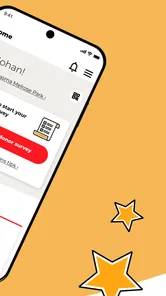
For a first meaningful use, I’d find a center, review its contact information, and then use the app’s appointment and reminder tools if they suit your plans. Keep the visit details easy to find, and check the schedule again before setting out. That routine is more reliable than relying on memory, especially if donation visits are not part of your weekly habits yet.
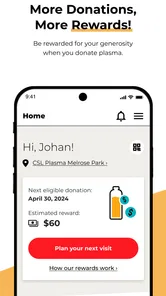
After a visit, the donation history and rewards tracking can help you keep your own record in view. One useful habit is to check those areas after the visit rather than assuming every detail will be top of mind later. If something looks unclear, use the support options or contact the center instead of guessing about what a record or reward entry means.
A helpful way to start is to choose one task and complete it end to end: locate the center you expect to use, check its contact information, and set up a visit plan that you can find again. Once you have done that, the other tools have a practical context. A reminder is more meaningful when it points to a real plan, and a history screen is more useful when you know where to look after a visit.
Getting Started: What’s the Buzz?
First off, the CSL Plasma app is your gateway to a seamless donation experience. I downloaded it the other day, and honestly, it feels like the app has done its homework. From the get-go, it’s incredibly user-friendly. The interface is clean and intuitive, making it easy even for those who aren’t tech-savvy. It’s like having a buddy who knows the ins and outs of plasma donation.
Features That Make Life Easier
One of the standout features is the ability to locate donation centers. Seriously, it’s as easy as pie. The app uses GPS to find the nearest CSL Plasma center, providing directions and even contact information. This feature saves you from the hassle of Googling and calling around, which is a huge plus for someone who's always on the go.
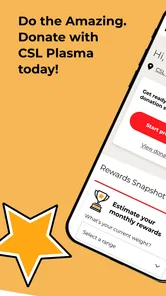
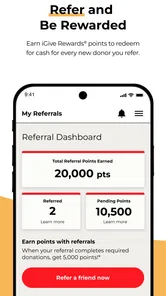
Another cool feature is the personalized donation schedule. You can view your past donations, schedule your next appointment, and even get reminders. It’s like having a personal secretary that keeps your donation calendar in check. Plus, the app also offers rewards tracking. Yes, you heard it right! You can keep track of your rewards points, which is a sweet incentive for regular donors.
The best way to think about these tools is as a connected set of small conveniences rather than a guarantee that every part of a visit happens inside your phone. A map helps you get to a center, appointment planning helps you remember the intended visit, and history gives you a reference afterward. I would still check the center’s contact information directly when a detail could change my travel plans. The app makes routine coordination easier, but good planning still includes a little common sense.
The User Experience: Smooth Sailing or Rocky Waters?
In terms of user experience, I’d say it’s mostly smooth sailing. The app runs without a hitch on both Android and iOS. It’s fast, responsive, and doesn’t crash, which is a relief because nobody’s got time for that. The only hiccup I encountered was during the registration process, which took a bit longer than expected. But once you’re past that, it’s all gravy.
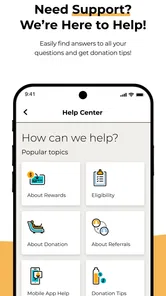
What’s also impressive is the support function. If you ever run into any issues, the app provides a direct line to customer service. You can either chat with a representative or find answers in the FAQ section, which is pretty comprehensive. It’s like having a help desk right in your pocket.
For a first-time user, support is most useful when you have a specific snag to describe, such as trouble accessing your account or uncertainty about an entry you see. I would gather the relevant detail before reaching out and explain what you were trying to do. That keeps the conversation practical. For questions about whether you personally can donate or what to expect at a particular visit, contact the center rather than treating a help article as a medical decision.
Why Should You Download It?
So, why should you download the CSL Plasma app? If you’re someone who regularly donates plasma or is considering it, this app is a must-have. It simplifies the entire donation process, from finding a center to scheduling appointments and tracking rewards. Plus, it’s free, so there’s really no downside to giving it a shot.
In conclusion, the CSL Plasma app is more than just an app; it’s a tool that enhances the donation experience. Whether you’re new to plasma donation or a regular, this app offers convenience, efficiency, and a little bit of fun with its rewards system. So go ahead, download it, and make your plasma donation journey smoother and more rewarding!
Where it helps most—and where it doesn’t
I think the app is most useful for someone who has already chosen CSL Plasma and wants fewer loose ends around visits. A regular donor can use the history as a personal reference, reminders to keep plans from slipping, and the center details when arranging a trip. A first-time donor can use it to get oriented and prepare questions before contacting the location.
It is less useful if you expect it to decide whether you are eligible to donate or explain every medical concern. Donation readiness is personal, and an app should not replace guidance from qualified staff. Likewise, if you only need one address, your phone’s map may be quicker; the CSL-specific tools matter more when you expect to return and want your appointment and rewards information together.
The trade-off compared with ordinary alternatives is clear. A phone calendar is flexible and familiar, but you have to enter and maintain the donation details yourself. A map can help with directions, but it does not keep a donation history or rewards information in the same context. This app brings those CSL-related jobs together; it is less compelling if you prefer a provider-neutral planner or want to keep a one-off trip separate from another account.
A realistic first visit, without rushing
Picture a weekday when you are fitting a visit between errands. Before leaving home, you can check the selected center and its contact details, then review your appointment plan and leave enough time to get there. If a question comes up, contacting the center before setting out is better than assuming the app can settle a detail about your particular situation. Afterward, checking the history and rewards section gives you a straightforward way to keep track without relying on memory.
That sequence also reveals a useful trade-off: convenience depends on having the account ready and the right center selected. The app can organize the parts it handles, but it cannot make travel, waiting, or the donation itself disappear. I’d use it to reduce avoidable admin, not as a promise that every visit will be quick or identical.
For someone juggling work, transport, and other errands, I’d avoid building a tightly packed plan around a screen reminder alone. Treat the app as a prompt to prepare, not as proof that the visit will fit a precise window. Check the route and center contact details before you leave, and keep enough flexibility for real-world delays. That approach is particularly helpful for a first visit, when you may still be learning how the process fits into your day.
What to check when something seems off
If an appointment, reminder, donation entry, or rewards detail does not look right, avoid making assumptions based on a screen alone. Recheck the information, then use the in-app support options or contact the center for clarification. That is especially sensible for anything that could affect your plans. The app’s customer support and help material are useful starting points, while center staff are the more appropriate source for questions tied to an individual visit.
Also think about how you prefer to manage personal information. This app is designed around an account and donation activity, so it may not suit someone who wants to keep everything on paper or does not want another service to manage. If you do use it, a practical habit is to keep your sign-in details accessible and make sure you can still reach the center by phone if the app is inconvenient when you need help.
One small workflow choice can prevent confusion later: use the same source consistently for each part of your plan. Let the app serve as your CSL visit organizer, but use direct center contact for answers that depend on your visit. Avoid copying an uncertain reward or appointment detail into a separate calendar as if it were confirmed; first resolve the question, then update whatever personal reminder system you rely on. That keeps a minor display question from turning into a muddled plan.
My take for a new donor
CSL Plasma has a 4.0 average from around 9,500 ratings and is free, but I would choose it for the focused tools, not the rating alone. Its clearest advantage over a generic calendar or maps app is that center finding, donation scheduling, history, reminders, rewards tracking, and support sit in a CSL Plasma context. A calendar can remind you of a date, and a map can guide you there; neither is built around keeping those donation-related tasks together.
My recommendation is simple: install it if you expect to use CSL Plasma centers and want an easier way to organize repeat visits. Take registration slowly, verify the location you plan to use, and treat support as a route to answers rather than guessing when details matter. If you are only browsing providers or need medical advice, start with a broader search or a conversation with the center instead. For the right user, it is a practical helper; for everyone else, its narrow focus is also its main limitation.
In short, I’d recommend it to a first-time donor who has chosen a CSL Plasma location and wants a calmer way to handle the logistics. The most reassuring first success is not mastering every screen; it is getting into the account, confirming the intended center, and leaving yourself a clear plan for what to do next. If you would rather avoid another account or only need directions once, a map and a direct call may be the simpler choice. For repeat visits, though, keeping the center, schedule, history, reminders, and rewards tools together can make the routine easier to manage.
CSL Plasma Frequently Asked Questions
What does “Good for You. Great for Life.” mean for someone using CSL Plasma?
CSL Plasma is a medical app from CSL PLASMA INC. built around plasma donation. Its store summary, “Good for You. Great for Life.” reflects that focus, while the app itself is intended to help donors manage practical parts of the experience. It is free to download and has an Everyone content rating, making it suitable for a broad audience.
What is CSL Plasma and what does it do?
CSL Plasma is an app designed to support individuals who donate plasma. It provides users with essential information about nearby donation centers, appointment scheduling, and donation history tracking. Additionally, the app offers rewards and incentives for regular donors, making it a convenient tool for those committed to plasma donation.
Is the CSL Plasma app available on both Android and iOS platforms?
Yes, the CSL Plasma app is available for download on both Android and iOS devices. Users can find the app on the Google Play Store for Android devices and the Apple App Store for iOS devices. This cross-platform availability ensures that users can access the app's features regardless of their preferred mobile operating system.
How does CSL Plasma ensure user data privacy and security?
CSL Plasma prioritizes user data privacy and security by implementing robust security measures. The app uses encryption to protect personal and donation information, ensuring that sensitive data is safeguarded against unauthorized access. Users can trust that their information is handled in compliance with relevant privacy laws and regulations.
Can I schedule donation appointments through the CSL Plasma app?
Yes, the CSL Plasma app allows users to schedule donation appointments directly through the platform. This feature helps streamline the donation process, enabling users to select convenient times and locations for their plasma donations. By offering appointment scheduling, the app enhances the overall user experience for donors.
Pros
- User-friendly interface simplifies navigation.
- Quick access to payment and rewards.
- Real-time donation tracking feature.
- Comprehensive donor eligibility info.
- Efficient appointment scheduling.
Cons
- Limited support for non-English languages.
- Some features require stable internet.
- Occasional app crashes reported.
- Limited customization options.
- Restricted to registered CSL Plasma donors.