Cryptoguru: Trading Simulator
- 4.33K
- 4.6
- Installs
- 50.00M
- Price
- Free

Screenshots





Analysis by Reviewed
Cryptoguru: Trading Simulator makes most sense as a practice space, not a shortcut to becoming a successful trader. I like the basic idea: learn the rhythm of crypto trading and try out decisions without putting actual money on the line. That can take some pressure off a beginner, though a simulation is only useful when you treat it as rehearsal rather than proof that real-market gains will follow.
That distinction is the heart of my recommendation. A mock trade can help you notice how you make decisions, but it cannot settle whether a trading idea is sound or whether you would follow it when money is at stake. I’d approach the app with a small learning goal each time: understand one concept, practise one decision, then review what happened. Used that way, it is easier to get value from a simulator without mistaking activity for expertise.
A low-stakes way to learn the routine
In an everyday scenario, I’d use it during a quiet break to practise deciding when to enter or leave a trade, then review what I was thinking instead of chasing every price move. That simple habit can make a beginner more deliberate. Before acting, it helps to write down why a trade seems attractive and what would change your mind; otherwise, a successful mock result may teach confidence without teaching discipline.
A practical variation is to give yourself a single question before opening a session. For instance, you might ask whether you can wait for a planned signal instead of reacting to every movement, or whether you can explain why you would exit. Keeping the exercise narrow makes it easier to review your choices later. If you try to learn vocabulary, test a strategy, and compete for a score all at once, it becomes harder to tell what the session actually taught you.
The key trade-off is that simulated decisions do not recreate the emotional weight of risking savings. A practice win can feel encouraging, but it cannot show how you personally respond to a real loss or whether you can stick to a plan under pressure. I’d use the exercise to learn terminology and test a repeatable process, not as a reason to deposit money or as investment advice.
Getting Started with Cryptoguru
When you first open Cryptoguru: Trading Simulator, you’re greeted with a clean and intuitive interface. It’s like the app is saying, "Hey, don’t worry, I’ve got your back!". The onboarding process is smooth, guiding you through the app’s features with ease. No technical jargon, just straight-up guidance to get you started on your mock trading journey.
That approachable start matters because crypto can feel opaque before you know the basic language. I would still take the introduction at a measured pace rather than tapping through simply to reach the trading activity. A simulator is most useful when you understand what a practice decision is meant to demonstrate. If a term or instruction leaves you unsure, pause and look it up before treating the next result as meaningful.
More From Our News Desk

Weather by Xiaomi Review: Clear at a Glance, Less Clear Up Close

X Under Pressure: Can It Recover When Posting Goes Wrong?

Clash of Clans Is Won Between the Battles

Android Auto Makes the Case for Quieter Car Software

MobiOffice: Transforming Mobile Productivity with Seamless Integration

EA SPORTS FC™ Mobile Soccer: Redefining Mobile Sports Gaming
Features That Make You Go "Wow!"
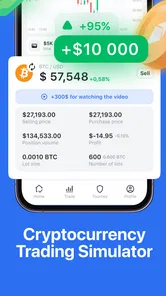
The app comes packed with a bunch of cool features that make it stand out. First off, there’s a real-time market simulation. Yep, you heard that right! You can trade as if you’re in the actual market, but without the risk of losing real money. This feature is a game-changer for beginners who want to get their feet wet.
The useful part of a market simulation is not just seeing a changing price; it is having a place to practise making a decision while that movement is happening. I’d use it to compare a planned response with an impulsive one: decide what would make you enter, then see whether you can stick to that reason as conditions change. This can expose habits that are easy to miss while reading an article, such as changing your rationale after the fact to make a choice feel more convincing.
Still, “real-time” practice should not be confused with a perfect rehearsal of live trading. A simulation removes the financial consequences, and that alone changes the experience. It can help with familiarity and routine, but it cannot tell you how an actual order would feel when you are worried about losing money. I’d judge the feature by whether it helps you think more clearly, not by whether a practice result looks impressive.
Another highlight is the extensive library of resources. From beginner tips to advanced trading strategies, Cryptoguru has got you covered. It’s like having a personal mentor guiding you through the crypto jungle. Plus, the app regularly updates its content, so you’re always in the loop with the latest trends and insights.
For a more disciplined workflow, I’d read a short piece of learning material before opening the simulator, then practise only the idea it introduced. Afterward, I’d make a quick note about what I followed and what I changed under pressure. That simple loop—learn, practise, reflect—turns a broad library into a more useful personal study routine. It also helps prevent the common trap of collecting tips without ever checking whether you can apply them consistently.
What the learning tools are best for
I’d get the most from the learning material by pairing one concept with one practice session. For example, after reading about a trading approach, I’d try to apply it in the simulator and note whether I followed the idea consistently. That is more useful than jumping between lessons and trades without a question in mind. The resources can support learning, but they shouldn’t replace checking claims carefully or understanding that crypto prices can move sharply.
The business-app format makes sense for this purpose: the focus is on learning about trading and building familiarity, rather than on providing a full investment service. Crypto Guru Trading Academy and Simulator is the developer behind it. It is free to try, has an Everyone content rating, and its average rating is 4.5 from around 239,000 ratings. The app has passed ten million installs, but popularity is only a starting point when deciding whether its teaching style will work for you.
On Android, version 1.4.9 supports devices running Android 8.0 or later. That is useful to know if you are checking basic compatibility before installing. The app was released on October 9, 2023, and it has around 3,300 written reviews. I would read user feedback with the same caution I’d apply to trading advice: look for recurring practical comments, not a single dramatic success story or complaint.
Interactive and Engaging
What’s learning without a bit of fun, right? Cryptoguru spices things up with interactive quizzes and challenges that test your trading skills. These features keep you on your toes and make the learning process engaging. You can also track your progress and see how you stack up against other users. It’s a nice touch that adds a competitive edge to the whole experience.
That competitive element is a mixed bag. I’d treat rankings as a prompt to stay engaged, not as evidence that the highest-scoring player has a reliable strategy. If competition makes you rush, ignore it and use quizzes as checks on what you understand. Someone who prefers a quiet, structured course may find the challenges distracting, while a learner who needs regular prompts may appreciate them.
There is also a useful way to keep competition in its lane: separate quiz performance from trading judgment. A quiz can check whether you recognize an idea, while a simulated decision asks whether you can apply it in context. Neither score should become a measure of readiness to risk money. If a challenge encourages you to take trades just to stay active, I’d step back and return to a session with a clear learning question.
Where it fits among the alternatives
Compared with reading articles or watching trading videos, a simulator gives you a place to practise choices rather than only absorb explanations. Compared with a live exchange, it removes the immediate financial stakes, which is helpful for learning but also means it cannot reproduce the consequences of real orders. I’d choose Cryptoguru when I want guided practice and learning material together; I’d choose independent research for deeper verification, and a live platform only when I’m prepared to make real financial decisions responsibly.
That combination is the main reason I’d pick it over a pile of disconnected tutorials when starting out. Reading can explain an idea clearly, but it is easy to finish an article with no sense of how you would respond to a changing situation. Practice adds that decision-making step. On the other hand, a standalone course may suit someone who wants a carefully ordered curriculum, while independent research is better for checking a claim from more than one perspective. The simulator complements those approaches; it does not replace them.
It is a better fit for curious newcomers who want a gentle introduction, or for experienced users who want to rehearse ideas without risking funds. It is less suitable if you need a professional trading terminal, personalized financial advice, or proof that a strategy will work with real money. If you already understand the basics and simply need advanced market analysis, this may feel too introductory; if your goal is to invest safely, a simulator cannot make a volatile asset safe.
I would also skip it if your main aim is to copy someone else’s trades or get a tailored answer about what to buy. That is a different need from practising basic decisions, and a learning simulator is not a substitute for understanding your own financial circumstances. Likewise, if competition tends to make you take unnecessary risks, the leaderboard-style element may be a poor fit unless you can ignore it and focus on the lessons.
Using practice without mistaking it for proof
A good way to test whether the app is helping is to judge your process rather than your virtual outcome. Before a practice trade, note the reason for the choice and what would make you change your mind. Afterward, check whether you acted according to that plan. A loss in a simulation can still be a useful session if you followed a sensible process, and a win may teach very little if it came from an impulsive decision.
Another small but valuable habit is to revisit the same kind of decision instead of constantly switching topics. Repetition can reveal whether you are learning a pattern or simply reacting to whichever market move is most noticeable at the time. I would keep the exercise brief enough to stay focused, and stop if I found myself making extra trades just to feel engaged. In a tool built around practice, restraint is part of the practice.
It is also worth asking what you expect the app to answer. If you want to know whether you understand a term, a lesson or quiz may help. If you want to know whether you can follow a rule in changing conditions, the simulator is more relevant. If you want to know whether a particular asset is right for you, that requires separate research and personal financial judgment. Keeping those questions distinct makes the learning experience more honest and prevents a mock result from carrying too much weight.
Interactive and Engaging
What’s learning without a bit of fun, right? Cryptoguru spices things up with interactive quizzes and challenges that test your trading skills. These features keep you on your toes and make the learning process engaging. You can also track your progress and see how you stack up against other users. It’s a nice touch that adds a competitive edge to the whole experience.
Final Thoughts
In a nutshell, if you’re curious about cryptocurrency trading but not ready to take the plunge, Cryptoguru: Trading Simulator is your perfect go-to companion. It’s user-friendly, packed with valuable resources, and offers a safe environment for you to learn and grow. So why not give it a whirl? Who knows, you might just discover your inner crypto guru!
My recommendation comes with one clear boundary: use the app to practise patience, test whether you understand a lesson, and notice your own habits—not to chase rankings or treat simulated success as a forecast. Its strongest appeal is bringing practice and learning into one approachable place. If you keep that distinction in mind, it can be a useful starting point; if you want guaranteed results or hands-on guidance tailored to your finances, I’d look elsewhere.
Cryptoguru: Trading Simulator Frequently Asked Questions
Is Cryptoguru: Trading Simulator free to download, and what does that mean for using it?
Cryptoguru: Trading Simulator is free to download, so you can install it without an upfront purchase. The app is presented as a crypto trading and investing simulator, with virtual practice rather than real-money trading through the simulator. Before using it, check the app’s purchase details on the store page if you want to understand whether any optional paid features are available.
Is Cryptoguru: Trading Simulator intended for all ages?
Cryptoguru: Trading Simulator has an Everyone age rating, so it is marked as suitable for a broad audience. Its subject is cryptocurrency trading and investing, which can involve financial concepts that younger users may need help understanding. It is best approached as a learning and practice app, not as a recommendation to invest real money.
What does Cryptoguru: Trading Simulator offer before I start trading?
Cryptoguru: Trading Simulator is a Business app from Crypto Guru Trading Academy and Simulator, presented as a crypto trading and investing simulator for beginners and experienced users. It is intended for learning and practice rather than handling real trades through the simulator. The app is free to download, and its Everyone age rating makes it accessible to a broad audience.
What is Cryptoguru: Trading Simulator?
Cryptoguru: Trading Simulator is an educational app designed to help users learn and practice cryptocurrency trading without any financial risk. It simulates real market conditions, allowing users to experience buying and selling cryptocurrencies with virtual money. This makes it a perfect tool for beginners looking to gain confidence in trading.
How does Cryptoguru: Trading Simulator work?
The app provides a simulated trading environment where users can trade a variety of cryptocurrencies using virtual money. It features real-time market data and analytics, enabling users to make informed decisions. By practicing with virtual currency, users can develop their trading strategies and skills without the fear of losing real money.
Pros
- Realistic trading simulation experience.
- Wide variety of cryptocurrencies available.
- User-friendly interface for beginners.
- In-depth analytics and performance tracking.
- Supports real-time market data updates.
Cons
- Limited educational resources for beginners.
- No social trading features available.
- Requires internet connection to function.
- No support for fiat currency trading.
- Lacks advanced trading tools for experts.