TradingGuru: Trading Simulator
- 91.00
- 4.7
- Installs
- 500.00K
- Price
- Free

Screenshots

Analysis by Reviewed
I approached TradingGuru: Trading Simulator as a learning tool rather than a shortcut to making money. That distinction matters. This free finance app, created by Crypto Guru Trading Academy and Simulator, is designed around practicing stock-trading decisions safely, building a personal strategy, and becoming more comfortable with the reasoning behind a trade before real cash is involved. I found that focus more useful than flashy promises, especially for someone who is still trying to understand why a decision worked or failed.
The app has attracted a sizeable audience, with over 500,000 installs and an average score of 4.6 from around 4,000 ratings. Those figures suggest that many people find the concept approachable, but they do not remove the need to use it carefully. A simulator can help you rehearse decisions, yet it cannot reproduce every emotional, technical, or financial consequence of live investing. My overall experience is that this is best treated as a practice environment: useful when I slow down, record my reasoning, and review mistakes instead of chasing impressive virtual results.
Getting past the first points of friction
The first obstacle is often not the trading lesson itself. It is understanding what the app expects from me at the beginning. The store short description simply calls it TradingGuru, while the broader purpose is learning stock trading through simulation. That leaves a new user with an important job: decide whether the goal is basic education, strategy testing, or repeated practice under imagined market pressure.
I recommend choosing one purpose before tapping through the opening screens. If I am learning terminology, I should concentrate on why an action might be taken. If I am testing a strategy, I should keep the rules stable long enough to judge them. Mixing those goals makes the results difficult to interpret. A beginner can easily change the approach after every outcome and then mistake random success for a reliable method.
Another common sticking point is expecting the app to behave like a brokerage account. It is not a replacement for a live trading platform, a personal financial plan, or professional advice. The safest mindset is to regard each simulated decision as a question: what information did I use, what did I assume, and what would make me change my mind? That approach turns a virtual result into something I can learn from.
The age classification is Mature 17+, which is worth taking seriously even though the application is free. Finance content can encourage risky thinking when it is consumed casually, particularly if a user treats simulated gains as proof of skill. I would not hand the app to a younger user without supervision, and I would not use it as a reason to commit money before understanding the risks involved.
Setup checks that prevent avoidable confusion
Before judging the simulator, I would check the basics. The current release is version 1.0.7 and requires Android 8.0 or later. That makes compatibility an early checkpoint: if the app cannot install or behaves strangely, the operating system should be checked before assuming the trading content is at fault. Keeping enough storage available and using a stable connection during installation are equally sensible first steps.
More From Our News Desk

Weather by Xiaomi Review: Clear at a Glance, Less Clear Up Close

X Under Pressure: Can It Recover When Posting Goes Wrong?

Clash of Clans Is Won Between the Battles

Android Auto Makes the Case for Quieter Car Software

MobiOffice: Transforming Mobile Productivity with Seamless Integration

EA SPORTS FC™ Mobile Soccer: Redefining Mobile Sports Gaming
I also suggest opening the app when I have enough time to read each instruction rather than rushing through it. A simulator is easy to misunderstand if I tap past explanations and then wonder why a result looks unexpected. I pay attention to the wording of actions, the difference between an observation and a decision, and any screen that summarizes what happened after an attempt.
A useful setup habit is to keep a small note outside the app. I write down the strategy I intend to test, the reason for each decision, and what outcome would count as a warning. This is more valuable than simply remembering whether the virtual balance rose or fell. It also prevents a subtle problem: changing my rules after seeing the result and then giving myself credit for a plan I never actually followed.
Because the app is free, it is tempting to treat the whole experience as disposable. I found the opposite approach better. I give each practice session a clear objective, close unrelated distractions, and review the outcome afterward. That turns a short session into a repeatable exercise instead of a sequence of impulsive taps.
Recovering when a practice session goes wrong
When a screen does not load as expected, my first response is simple: pause, leave the current flow if possible, and reopen the app. I avoid making repeated decisions while I am unsure whether the previous action registered. A quick restart can separate a temporary display problem from a misunderstanding of the workflow, and it prevents me from building a lesson around an incomplete state.
If the issue continues, I would check the connection, close other demanding apps, and confirm that the device still meets the Android requirement. I would also note the exact step where the problem appears rather than describing it only as “trading does not work.” That detail is useful for troubleshooting and helps me decide whether the problem is installation, navigation, or an incorrect expectation about what the simulator is meant to do.
There is a second kind of recovery that matters more: recovering from a poor simulated decision. My instinct can be to restart immediately until I get a better outcome, but that removes the learning value. Instead, I keep the result, write down the assumption behind the trade, and identify whether the error came from timing, incomplete reasoning, or simply an outcome that could not be predicted with certainty.
This is one of the app’s practical strengths. A simulator gives me room to examine a bad choice without losing real money. The trade-off is that I must supply the discipline myself. If I use resets or repeated attempts only to produce a winning record, the exercise becomes entertainment rather than training. The best workflow is to preserve mistakes long enough to understand them.
I would also avoid making several changes at once. If I alter the strategy, the timing, and the way I interpret the information after one disappointing result, I will not know which adjustment helped. Testing one change at a time is slower, but it produces a clearer lesson. That is a particularly useful technique for users who already know basic market language but have never tested their own rules consistently.
Separating app problems from market-learning problems
Not every frustrating result means the application failed. Sometimes the lesson is uncomfortable because the reasoning was weak. A simulated trade that moves against me may reflect an unrealistic assumption, poor timing, or normal uncertainty rather than a technical fault. I try to separate those possibilities before I blame the software.
A practical test is to ask three questions. Did the action appear to register? Did the result match the information shown in the app? Did I understand what the exercise was asking me to decide? If the action is recorded and the outcome follows the scenario, the problem may be my interpretation rather than the interface. This simple check keeps troubleshooting grounded.
The opposite mistake is also possible. If the screen freezes, a selection disappears, or the app repeatedly returns me to an earlier point, I should not reinterpret that as a trading lesson. I would close and reopen the app, verify the connection, and repeat the same step only after the interface is stable. Keeping a note of the sequence helps distinguish a repeatable technical issue from a one-off interruption.
The simulator is also not a crystal ball. Practice may improve my process, but it cannot guarantee that a strategy will work with real money. Live markets add execution concerns, changing information, emotional pressure, and the possibility of permanent loss. That is why I would use the app to refine questions and habits, not to justify an immediate deposit or a larger position.
Compared with reading articles or watching videos, the app’s advantage is active decision-making. I have to choose, observe the result, and reflect. Compared with a live brokerage account, its advantage is the safer setting; its limitation is that simulated confidence can feel easier than real discipline. Compared with a spreadsheet, it may offer a more guided experience, while a spreadsheet gives me more control over the exact assumptions I want to test. The right choice depends on whether I need structure or customization.
Who will benefit, and who should look elsewhere
I think TradingGuru is a good fit for a curious beginner who wants to practice stock-trading decisions without immediately risking personal funds. It can also suit an intermediate learner who has a strategy in mind but needs a calmer place to test whether the rules are clear and repeatable. The strongest users will be those willing to keep notes, accept losing outcomes, and review their reasoning instead of focusing only on the final virtual result.
I would be more cautious recommending it to someone looking for real-time execution, account management, or a complete investment research workspace. A brokerage app is more appropriate for placing actual orders, while a dedicated research service may be better for detailed company analysis. Someone who wants a fully customizable backtesting system may prefer a spreadsheet or specialist platform. This app’s value is practice and learning, not replacing every financial tool.
It is also not the right choice for anyone who sees a simulator as proof that quick profits are easy. Free access removes a financial barrier, but it does not remove financial risk once real decisions begin. I would skip using it as a confidence machine and choose a more structured educational path if I needed lessons on budgeting, diversification, or personal financial planning rather than trade practice.
A practical routine for using it well
My preferred routine begins with a narrow question. For example, I might decide to examine whether I follow my own entry rule consistently, rather than trying to discover a perfect strategy in one sitting. I then make a small number of deliberate decisions, record the reason before looking at the outcome, and review the result afterward. The point is to compare the plan with the behavior, not to collect a flattering score.
A second useful routine is to separate observation from action. I first describe what I think is happening, then state what would justify a trade, and finally identify what evidence would invalidate that idea. This three-step pause reduces impulsive choices and makes the session easier to evaluate. It is a simple habit, but it gives the simulator more educational value than rapid-fire experimentation.
I also recommend ending a session after a meaningful lesson rather than continuing until a winning result appears. Chasing a better outcome can quietly turn practice into gambling-like behavior. A clear stopping rule protects the purpose of the exercise and makes it easier to compare sessions honestly.
For everyday use, imagine having fifteen minutes during a commute or lunch break. I would not use that time to make a rushed series of decisions. I would review one previous attempt, identify one assumption that needs testing, and complete a focused exercise later when I can concentrate. The app works better as a deliberate learning companion than as something to open whenever I feel an urge to act.
The developer name, Crypto Guru Trading Academy and Simulator, makes the educational angle clear, but I still judge the experience by my own process. The app cannot decide whether my notes are honest, whether my rules are sensible, or whether I am ready for real financial exposure. Those responsibilities remain with me.
My practical verdict
After using TradingGuru as a simulator rather than a promise of easy returns, I see a useful free finance app for practicing the mental steps behind stock trading. Its strongest feature is the distance it creates between learning and losing real money. That distance lets me test a rule, make a mistake, and inspect my reasoning without turning every lesson into a financial event.
The main friction is not necessarily installation or navigation. It is the temptation to treat virtual success as evidence of real expertise. Users need to set their own boundaries, keep records, and distinguish technical trouble from an ordinary losing outcome. The app rewards patience; it is much less useful when approached as a quick game of prediction.
I would recommend it to beginners and developing traders who want structured practice and are prepared to learn from unsuccessful decisions. I would not recommend it as a brokerage replacement, a source of guaranteed signals, or a complete financial education system. In those cases, a live trading platform, a research-focused tool, or a broader personal-finance course would be a better match.
For me, the deciding question is simple: can I use the simulator to improve the quality of my decisions, not just the appearance of my results? If the answer is yes, this app is worth trying. Its free price makes experimentation accessible, and its current version provides a reasonable starting point for Android users who meet the system requirement. Use it as a rehearsal space, keep the lessons honest, and leave real money out of the process until your understanding extends well beyond the simulated screen.
TradingGuru: Trading Simulator Frequently Asked Questions
Is TradingGuru: Trading Simulator free, and what should I know before installing it?
TradingGuru is free to download. Before installing, note that it is rated for Mature 17+ and is intended for an adult audience. It is a finance app focused on practicing trading concepts, rather than a brokerage service. As with any app, review the permissions and terms shown during installation so you understand what you are agreeing to before you begin.
What operating system does TradingGuru support?
TradingGuru requires Android 8.0 or later. Check your device’s operating system before downloading to make sure it meets this requirement. The app is described as a trading simulator, so its main purpose is to let users explore trading concepts in a practice setting. If your device is running an older version of Android, you may need to update it before the app can be installed.
What is TradingGuru: Trading Simulator, and who is it designed for?
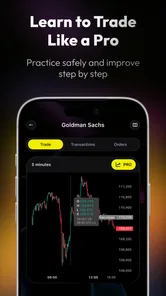
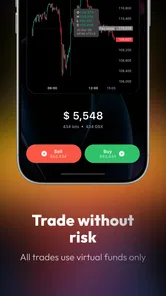
TradingGuru: Trading Simulator is an educational app designed to help users practice trading concepts in a risk-free environment. It is mainly intended for beginners who want to understand how market orders, price movements, charts, and portfolio decisions work before using real money. More experienced users may also find it useful for testing basic strategies, although it should not be considered a replacement for professional trading tools or financial advice.
Can I make real money or trade real assets with TradingGuru?
No. TradingGuru is a simulation and does not normally provide access to real financial markets, brokerage accounts, or withdrawable funds. Any balance, profit, loss, or portfolio performance shown in the app is virtual and intended for practice. This makes it safer for learning, but users should remember that simulated results may differ significantly from real trading because of emotional pressure, fees, liquidity, and changing market conditions.
Does TradingGuru require previous trading experience?
Previous experience is not generally required. The app is built around practice, so beginners can use it to become familiar with market terminology, price charts, buy and sell decisions, and portfolio tracking. However, users may need to spend time exploring the interface and learning basic concepts independently. Anyone unfamiliar with investing should treat the simulator as an educational starting point rather than a complete trading course.
Pros
- Realistic market scenarios help beginners practice without risking real money.
- Useful for testing strategies and building confidence before live trading.
- Simple interface makes simulated trades easy to place and monitor.
- Can help users understand order timing
- price movements
- and portfolio changes.
- Suitable for learning at your own pace without pressure from real losses.
Cons
- Simulation results may not reflect real-world slippage
- fees
- or execution delays.
- Virtual success can create overconfidence when switching to live trading.
- Market data or available instruments may vary depending on the app version.
- Advanced traders may find the educational and analysis tools too limited.
- Requires consistent practice to provide meaningful learning benefits.












