Complete Anatomy
- 442.00
- 3.4
- Installs
- 1.00M
- Price
- Free

Screenshots

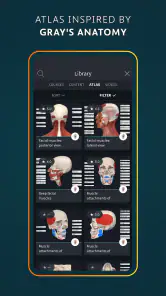
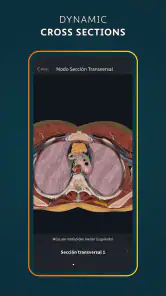
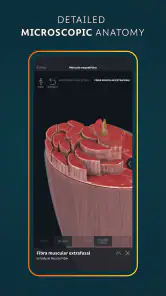
Analysis by Reviewed
If you're anything like me, you've always been fascinated by the intricate workings of the human body. Whether you're a medical student, a professional, or just a curious mind, Complete Anatomy is an app that promises to transform the way you explore human anatomy. I recently dived into this app to see if it lives up to the hype and, let me tell you, it’s quite a journey!
That first impression is easy to understand: a body you can turn and inspect invites exploration in a way a flat diagram rarely does. The more useful question, though, is whether that sense of discovery turns into a study habit rather than a brief novelty. I think it can, particularly when you arrive with a question to answer instead of opening the app just to browse.
The Immersive Experience
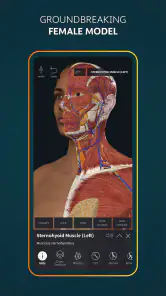
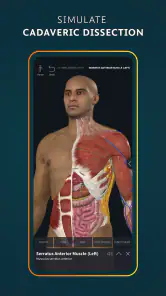
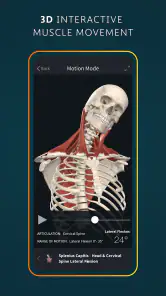
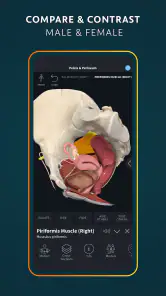
First off, the app offers a 3D interactive model of the human body that's absolutely mind-blowing. You can rotate, zoom, and explore the body in a way that feels almost like holding a real-life model in your hands. The level of detail is impressive, with every muscle, bone, and organ meticulously rendered.
For a focused session, I find it helpful to start with a specific structure and then work outward: identify it, check what lies beside it, and switch between views to understand how the parts fit together. This is more productive than spinning the model without a goal. It also exposes a trade-off: a detailed 3D view helps with spatial relationships, but it cannot replace the deliberate memorization and practice that a course, textbook, or instructor may require.
What I loved most about Complete Anatomy is its ability to customize your learning experience. You can choose to focus on specific body systems, making it easy to tailor your study sessions. For instance, if you're prepping for an exam on the cardiovascular system, you can isolate it and dive deep into every nook and cranny. The app really makes you feel like you have a personal anatomy lab right at your fingertips.
A realistic routine might be to open it before a lecture, locate the structures that are about to come up, and revisit them afterwards to test whether you can orient yourself without relying on the instructor’s diagram. In a short break, a quiz can provide a compact check of recall; for a longer study block, the model is better used to resolve one confusing relationship at a time. That distinction helps the app earn repeat use instead of becoming an impressive object you only show someone once.
Features that Stand Out
One of the standout features is the app's augmented reality capabilities. Imagine projecting a 3D heart onto your living room floor and walking around it to explore its structure. It's an innovative way to learn that blends the virtual and physical worlds seamlessly.
More From Our News Desk

Weather by Xiaomi Review: Clear at a Glance, Less Clear Up Close

X Under Pressure: Can It Recover When Posting Goes Wrong?

Clash of Clans Is Won Between the Battles

Android Auto Makes the Case for Quieter Car Software

MobiOffice: Transforming Mobile Productivity with Seamless Integration

EA SPORTS FC™ Mobile Soccer: Redefining Mobile Sports Gaming
AR is most useful when changing your viewpoint answers a real question—for example, when you want to grasp how a structure’s shape looks from different sides. It is less essential for a quick review at a desk, where the regular interactive model is likely the more practical choice. I would treat AR as an occasional way to make spatial ideas click, not as a reason on its own to keep returning every day.
Another highlight is the extensive library of video tutorials and lectures. These aren't just dry academic lectures; they're engaging and often narrated by experts in the field. I found them incredibly helpful for reinforcing what I learned from the 3D models.
The app also includes a handy quiz feature. This is perfect for testing your knowledge on the go. Whether you're waiting for a bus or have a few minutes to spare, these quizzes are a great way to keep your skills sharp.
There is a useful study sequence here: use a visual model to build an initial mental map, watch a relevant explanation when a concept remains unclear, then use a quiz to see what stuck. Each mode serves a different purpose, so switching between them can be more valuable than spending the whole session in any one of them. The practical limitation is that this kind of sequence takes intention; the app does not make a busy day automatically turn into a disciplined study session.
User Experience
Navigating the app is a breeze. The interface is intuitive and user-friendly, which is essential when you're dealing with complex information. You don't want to be struggling with controls when you're trying to focus on learning, right?
However, I did notice that the app can be a bit resource-heavy. On older devices, it might lag slightly, especially when loading more complex models. But if you’re using a newer device, you shouldn’t face any hiccups.
Because the models are visually rich, a small screen can also make close inspection less comfortable than using a tablet or a larger display. If your device starts to feel slow, I would keep sessions focused and avoid treating every view as something that needs to be explored at once. The app is free to download, but some in-app purchases range from $0.99 to $119.99 per item, so it is sensible to check what access a particular course of study requires before building your routine around it.
Who Will Benefit?
Complete Anatomy is a fantastic tool for a wide range of users. Medical students will find it invaluable for their studies, while professionals can use it as a handy reference tool. Even if you're just someone with a keen interest in human anatomy, the app offers a wealth of information that's both accessible and engaging.
Its medical-learning focus is reflected in its 3.4 average from around 11,000 ratings, alongside more than a million installs. Developed by 3D4Medical from Elsevier, it is a medical app rated for everyone, and it runs on devices with Android 7.0 or later. The current version is 12.0.0. Those details make it accessible to a broad audience, but the depth is most worthwhile for people who have a sustained reason to study anatomy rather than casual curiosity alone.
For educators, the app provides an excellent platform to create detailed lectures and presentations. You can even share customized models with students, which is a fantastic way to enhance learning.
Compared with a conventional anatomy atlas, the main advantage is being able to manipulate a structure and inspect its position from multiple angles; a printed reference can be quicker to scan and easier to use alongside handwritten notes. General medical reference apps may suit someone looking for broad health information, but they are not a substitute for this kind of focused anatomical exploration. If you need a simple diagram for occasional reference, a book or a basic atlas may be more efficient. If you need to understand how structures relate in three dimensions, this app has a clearer purpose.
Keeping It Useful Over Time
For long-term value, I would give each visit a small task: review one system, resolve one point of confusion, or check a few quiz questions. A student can tie that task to current coursework, while a teacher can prepare a visual explanation before class. Professionals may find it handy when they want to refresh anatomical orientation, though it should not be treated as a replacement for clinical judgment or professional references.
The maintenance burden is mostly about time and device comfort: detailed exploration can become a rabbit hole, and lag on an older device can interrupt concentration. I would also avoid buying access simply because a feature looks impressive; first decide whether you will use the relevant material often enough to justify the purchase. That small bit of restraint makes it easier to tell whether the app is becoming part of a useful routine or just occupying storage after the initial excitement.
When a Different Study Tool Makes More Sense
One question I would ask before installing it is whether I need anatomy itself or medical information more broadly. This is a focused learning environment, not a general symptom checker or a substitute for advice from a clinician. Someone trying to understand a diagnosis may be better served by a reliable patient resource and a conversation with a health professional; the detailed model can help with orientation, but it should not be used to draw conclusions about personal health.
It is also worth thinking about how you prefer to revise. If your main method is writing notes, memorizing definitions, or following a fixed course plan, a textbook or flashcard tool may fit that routine better. I would pair those tools with this app rather than expect a rotating model to do all the work. The 3D view is strongest when a flat image leaves you unsure about depth, neighboring structures, or direction; it is less compelling when you only need a quick label or a fact you already know how to find.
For a first session, I would resist the urge to inspect an entire system. Pick one structure from an upcoming class, locate it, and describe its position relative to nearby anatomy before opening a lecture or quiz. That small sequence gives you a way to judge whether the app is actually helping: if the relationships become easier to explain afterwards, the visual exploration has served a purpose. If you spend the whole session admiring the model without being able to recall anything, switch to a more active study method.
Making the Routine Sustainable
The easiest habit to maintain is one connected to something you already do. A student might spend a few minutes checking a structure after reviewing class notes; an instructor could use a model while planning how to explain a difficult region; a curious learner could choose one question rather than opening the app with no plan. These small, bounded visits are less likely to turn into long browsing sessions that feel engaging but are hard to repeat.
I would also use the app differently at different stages of learning. Early on, rotate and inspect to build a rough spatial picture. Later, hide the model or move away from the familiar angle and see whether you can identify the structure from its neighbors. When you get stuck, return to the visual reference, then test yourself again. This simple change makes the model a tool for retrieval practice rather than only a display to look at.
That approach also helps answer whether it is worth keeping installed. If you return because a class, lesson, or teaching task gives you a concrete reason, its depth can justify the space and attention. If weeks pass without a question that benefits from a three-dimensional view, a lighter reference may be enough. I would not treat unused features as a personal failing; the right tool is the one that fits the work you actually do.
Final Thoughts
In the world of anatomy apps, Complete Anatomy truly stands out. With its advanced features, detailed models, and interactive tools, it offers a comprehensive learning experience that’s hard to beat. Whether you’re a student, professional, or enthusiast, this app is a worthy addition to your digital toolkit.
While it isn’t free, the investment is well worth it for anyone serious about understanding the human body. So, if you're ready to take your anatomy knowledge to the next level, give Complete Anatomy a try. You might just find it to be the perfect companion on your learning journey.
I would make that recommendation with one qualification: the app earns its place when you return to it with specific learning goals. For someone who enjoys exploring anatomy now and then, the free starting point makes it approachable, but the depth may be more than they need. For regular study, teaching preparation, or a visual reference habit, the combination of manipulable models, explanations, and quizzes gives it a stronger case for staying installed. My lasting verdict is that it is most rewarding as a companion to structured learning, not a replacement for it.
Complete Anatomy Frequently Asked Questions
What devices and platforms can I use Complete Anatomy on?
Complete Anatomy is available on Android and iOS, and it also has versions for macOS and Windows. That gives students and professionals several ways to explore its 3D human body atlas and courses, whether they prefer using a mobile device or a computer. Check that your device meets the app’s operating-system requirements before downloading.
What platforms is Complete Anatomy available on?
Complete Anatomy is available on both Android and iOS platforms. Users can download it from the Google Play Store for Android devices and the Apple App Store for iOS devices. It is also available on macOS and Windows, making it a versatile tool for students and professionals across different operating systems.
Is Complete Anatomy suitable for beginners in anatomy studies?
Yes, Complete Anatomy is designed to cater to a wide range of users, from beginners to advanced learners. It provides detailed 3D models and allows users to explore anatomy at their own pace. The app includes interactive features and tutorials that make it accessible and educational for newcomers to the field.
Does Complete Anatomy require an internet connection?
Complete Anatomy can be used offline after the initial download of models and features. However, an internet connection is required for downloading additional content and accessing some advanced features, such as cloud sharing and updates. This allows users to study on the go without constant internet access.
Are there any additional costs after downloading Complete Anatomy?
While Complete Anatomy offers a free version with basic features, there are in-app purchases and subscription options available for advanced tools and content. These include access to additional model layers, professional features, and educational resources that enhance the learning experience for serious students and professionals.
Pros
- Comprehensive 3D anatomical models.
- User-friendly interface for easy navigation.
- Regular updates with new content.
- Interactive learning tools enhance understanding.
- Cross-platform sync for multiple devices.
Cons
- Requires a stable internet connection.
- Subscription needed for full access.
- Large app size may affect storage.
- Steep learning curve for beginners.
- Occasional performance issues on older devices.
- Category
- Medical
- Version
- 12.0.0











