QR Code Scanner
- 80.00
- 3.4
- Installs
- 1.00M
- Price
- Free
Screenshots
Analysis by Reviewed
I reach for a QR scanner when I need to open a menu, check a parcel label, or get a web address off a printed notice. For those quick jobs, QR Code Scanner is a straightforward tools app from Smart Choices Limited, and its appeal is easy to understand: it is meant to turn a phone camera into a practical way to read QR codes and barcodes without a long setup. I like the narrow purpose, though it also means the app has to earn its place by being convenient and dependable rather than by offering a broad toolkit.
When a dedicated scanner earns its place
One useful way to decide whether to keep a separate scanner is to notice where your usual camera falls short. If you often have to search through camera modes, wait for a recognition prompt, or reopen a code after accidentally dismissing it, a dedicated tool may make the action feel more deliberate. On the other hand, if your camera identifies codes immediately, installing another app is unlikely to improve your routine just by adding a second icon.
I would also treat QR Code Scanner as an on-demand reader rather than the center of a larger workflow. If a code gives me an address, I can decide whether I need to visit it; if it encodes product information, I can use that result as a starting point for a separate check. This distinction prevents a common misunderstanding: reading a code is not the same as verifying the accuracy, safety, or completeness of what it leads to.
A simple scanner with a focused job
What it is like to use
The app’s role is clear: point the scanner at a code and use the result. That direct approach suits occasional users who do not want to learn a complicated interface just to open a link or inspect a product barcode. In my view, a dedicated scanner is most useful when a phone’s camera app does not recognize the code, or when I want a separate tool I can find quickly and use deliberately.
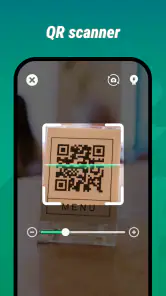
A realistic example is arriving at a café and seeing a QR code on the table. I would open the scanner, frame the printed square, and then pause to check where the result leads before opening it. That last step matters: a code is only a way of encoding information, not a guarantee that the destination is trustworthy. I recommend treating a scanned link with the same caution as one received in a message.
QR Code Scanner is free and has an Everyone age rating, so it is accessible to a wide range of users. It has reached over a million installs, with an average rating of 3.4 from around 13,000 ratings. Those figures suggest that plenty of people have tried it, but the middling score is a reason to keep expectations measured: I would judge it by whether it handles my everyday scans smoothly, not assume that popularity means it will suit every phone or workflow.
Where it fits among alternatives
Before installing a separate scanner, I would first try the camera app already on my phone. Many built-in cameras can recognize common QR codes, which is the simplest option because it avoids switching apps. If that works reliably for you, a dedicated scanner may add little. QR Code Scanner makes more sense when you want a distinct scanning tool, or when the camera experience you already have is inconvenient.
You May Like

Clash of Clans Is Won Between the Battles

Android Auto Makes the Case for Quieter Car Software

MobiOffice: Transforming Mobile Productivity with Seamless Integration

EA SPORTS FC™ Mobile Soccer: Redefining Mobile Sports Gaming

How Microsoft OneDrive Became a Mobile Productivity Giant

How Google Translate Breaks Language Barriers Effortlessly
It is also different from broad barcode and shopping apps, which may connect scanning to product searches, price comparisons, or shopping lists. This app’s stated purpose is scanning QR codes and barcodes, not replacing those larger services. That focus can be an advantage when all you need is to read a code, but it is not the right pick if your main goal is to compare prices or manage a product catalogue.
Useful habits for everyday scans
A few small habits make scanning less frustrating. Hold the phone steady, keep the entire code in view, and avoid casting a strong shadow across it. If a printed code is on glossy packaging, tilt the phone slightly to reduce glare rather than moving closer until the code is cropped. These steps help with scanning in general and are especially useful when a code is small or printed at an awkward angle.
For a code on a screen, increase the distance a little if the camera has trouble focusing; for a large sign, step closer only as far as needed to keep the full square visible. I also avoid scanning a code while walking or in a crowded doorway. Taking a moment to frame it well is safer and often quicker than repeatedly waving the phone around.
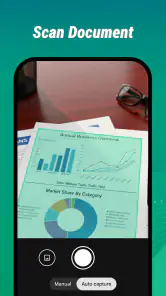
For receipts, labels, and documents, I would use the scanner as a reader rather than assume it is a permanent record-keeping system. If the information matters later, save or copy the useful result through whatever options the app presents, and keep the original document until I know I have captured what I need. That is a practical workflow, not a reason to rely on the scanner as an archive.
Small decisions that make scans more useful
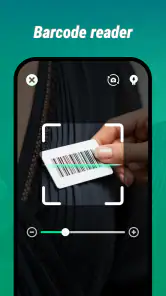
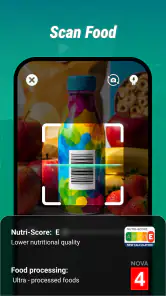
At home, a barcode on packaging can help me identify the product when I am sorting a cupboard or checking which item I need to replace. I would still compare the scan result with the label itself before acting on it, since a code reader only interprets what is encoded. For household lists, a note-taking or inventory app is a better place to keep the final record; the scanner is simply the step that gets information off the package.
For a printed QR code that leads to a form or menu, I find it useful to scan before I am in a hurry to use the result. A moment spent checking the destination can prevent opening the wrong page while standing in a queue. If the link looks unrelated to the sign, I would close it and ask staff or consult the organization’s official materials instead of treating the code as proof of authenticity.
Version, continuity, and what to expect
What the current release tells me
The current version is 2.3.0.0, and the app was released on May 7, 2025. Those facts establish the version available and the release date, but they do not by themselves show what changed between releases. I would not read a version number as proof of a particular feature, speed improvement, or redesign. For a scanner, what matters in practice is whether it opens promptly, recognizes the kinds of codes I encounter, and presents results clearly.
The minimum operating-system requirement is version 7.0. That gives the app a broad compatibility baseline, although the real experience can still differ across devices and camera hardware. If scanning is unreliable on an older phone, I would first check camera focus, lighting, and the code’s print quality before concluding that the app itself is at fault.
What existing users should consider
If you already use QR Code Scanner, I would keep your expectations centered on its core task rather than anticipate a major change from the version label alone. When an app is focused on reading codes, the most meaningful improvements are often practical ones: fewer missed scans, clearer handling of a result, or smoother operation on a particular device. Those are the things worth noticing after an update, without assuming that any one of them has happened.
For someone deciding whether to switch from a built-in camera, I would try the scanner on several real situations rather than only one easy code. Test a printed QR on a menu, a barcode on packaging, and a code displayed on another screen. This gives a better sense of whether the dedicated app earns a spot on your home screen. If it behaves no better than the camera you already use, there is little reason to maintain two tools for the same task.
Limits and sensible caution
A scanner cannot fix every bad code. If a label is damaged, the print is faded, or the code is partly covered, recognition may fail regardless of which app is open. Likewise, scanning a barcode does not automatically tell you whether a product is genuine or suitable; it only helps read encoded information. I would use a retailer or manufacturer’s own source when a decision depends on product details.
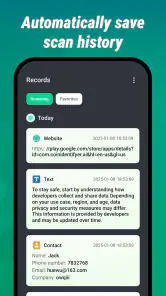
There is another trade-off with any dedicated scanner: it adds an app to manage when some phones already scan QR codes from the camera. That is a small cost in attention and storage, but it matters if you prefer to keep your phone lean. Users who need extensive batch scanning, organized scan history, or specialized inventory workflows should look for a tool built around those needs instead of expecting a basic scanner to become a full business system.
I also recommend checking the destination before following a QR link, particularly when the code is on a sticker placed over another sign or comes from an unfamiliar source. A neat-looking code can still direct you somewhere unexpected. Scanning first and deciding second is a more useful habit than opening every result automatically.
Who I would recommend it to
I would suggest QR Code Scanner to someone who wants a simple, separate tool for occasional QR and barcode reading, especially if their regular camera app is awkward for that job. Its free price makes it easy to try, and the focused purpose keeps the decision uncomplicated. Smart Choices Limited has kept the app within the tools category, which is exactly where I expect a utility of this kind to sit.
I would skip it if your camera already scans reliably and you rarely encounter codes, or if you need advanced cataloguing and analysis rather than basic reading. The average rating of 3.4 is another reason to test it in your own routine instead of installing it on the assumption that it will be flawless. A quick trial with the codes you actually use is more informative than any general promise.
What I would watch for next
As I use a scanner over time, I pay attention to whether it handles the ordinary variety of codes I meet, not just a clean sample on a bright screen. A tool can seem fine in a quick first test yet prove less convenient when the print is small, the lighting changes, or I need to act on the result without losing my place. That is why I would judge this app through recurring errands rather than a single successful scan.
For existing users, the useful question after moving to a newer release is simple: has the everyday process become clearer or more dependable on your device? The version number gives a point of reference, but it is the actual scanning and result-handling experience that should guide whether you keep it. I would welcome practical refinements, while avoiding assumptions about features until they are evident in use.
My verdict
QR Code Scanner is best viewed as a practical backup or dedicated reader, not an all-purpose barcode platform. Its clear scope is a strength for quick tasks, while the overlap with built-in camera scanning and the modest user rating are fair reasons to compare before settling on it. I would keep it if it makes scanning easier on my particular phone; otherwise, the default camera is likely enough.
As the app continues from its current release, I would watch for changes that make everyday scanning more dependable and results easier to handle. Until then, my recommendation is simple: try it on the printed and on-screen codes you encounter most, verify unfamiliar links before opening them, and keep the app only if its dedicated workflow is genuinely more convenient than the camera you already have.
QR Code Scanner Frequently Asked Questions
What does QR Code Scanner do?
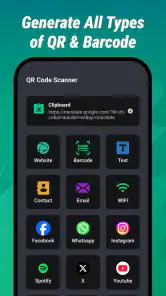
QR Code Scanner uses your phone’s camera to read QR codes and, depending on the code, display information or offer an action such as opening a website, adding contact details, or connecting to a Wi-Fi network. The exact features can vary by app, so check its listing before downloading. Review any link or information shown before you choose to open or save it.
How do I scan a QR code with the app?
Open QR Code Scanner and allow camera access if prompted, then point the camera at the QR code in good lighting. Keep the code within the on-screen scanning area and hold your phone steady until the app recognizes it. Some scanners may also let you import an image containing a code. If scanning does not work, clean the camera lens, adjust the distance, or check that the code is clear and undamaged.
Is QR Code Scanner safe to use?
Scanning a code does not automatically make its contents trustworthy. A QR code can lead to a misleading website, request personal information, or direct you to an unwanted download. Before following a result, inspect the displayed address and avoid entering passwords or payment details on pages you do not recognize. Also review the app’s permissions and privacy information, since data practices differ between QR scanner apps.
Does QR Code Scanner require an internet connection?
The camera-based act of reading a QR code may work without an internet connection, but opening a website or using an online service generally requires connectivity. Some codes contain text or contact information that the app can display locally, while other actions depend on your phone’s settings or a network. Availability of offline scanning, image import, and history features varies, so check the app description and test the functions you need.
Is QR Code Scanner free, and what permissions does it need?
Many QR scanner apps can be downloaded for free, but pricing, advertisements, in-app purchases, and available features depend on the specific app and platform. Camera access is normally needed to scan codes; an app may request other permissions for optional features such as saving scan history or importing images. Review the store listing and permission prompts before installing, and grant only access that makes sense for the features you plan to use.
Pros
- Scans QR codes quickly with little effort.
- Useful for opening links without typing them manually.
- Can read codes from printed materials and screens.
- Simple interface makes it easy for first-time users.
- Handy for checking product
- event
- and contact codes.
Cons
- Requires camera access to scan codes.
- Poor lighting or blurry images can make scanning difficult.
- Some codes may lead to unsafe or misleading websites.
- Does not guarantee that a scanned link is trustworthy.
- Features and interface may vary between versions or devices.
- Category
- Tools
- Version
- 2.3.0.0











