Messages
- 786.00
- 4.2
- Installs
- 1.00M
- Price
- Free

Screenshots


Analysis by Reviewed
I judge a texting app by what happens on an ordinary busy day: can I read a message at a glance, reply without a fuss, and get back to what I was doing? Messages is aimed squarely at that basic job. It is a free Android communication app from Messages Text, and its appeal is a straightforward alternative to making the phone’s default SMS app do everything. I would consider it for someone who wants text conversations to feel simple rather than turning into another feature-heavy social inbox.
That focus is useful, but it also sets a limit on what to expect. Messages handles the familiar idea of texting; it is not a replacement for an internet-based chat service with its own accounts, group community, or media ecosystem. If your priority is dependable access to ordinary text conversations, the stripped-back approach may suit you. If you want richer chat features, your usual messaging platform may remain the better place for most conversations.
Making everyday texting feel manageable
A practical baseline for the inbox
On a typical day, I want an SMS app to help me handle short exchanges: confirming a pickup, answering a delivery question, or checking when a friend will arrive. The sensible way to use Messages is to keep that baseline in mind. Open the conversation, read the latest exchange in context, respond, and leave. That sounds modest, but it is exactly where a focused texting app can be more comfortable than an all-purpose communication tool that mixes chats, calls, channels, and other activity.
A useful routine is to deal with brief messages when they arrive, then return to longer conversations when you have time. For example, if someone texts a change of meeting place while I’m out, I can answer with the new location rather than trying to move the whole conversation to another service. Keeping the exchange in one thread also makes it easier to look back at the practical details later. That benefit comes from SMS as a format, not from a special capability I would assume this app adds.
Before relying on a new messaging app as your everyday default, I’d test it with a few ordinary conversations. Send a message to someone you know, check that replies appear as expected, and make sure you can find the thread again from the conversation list. This small trial is more useful than immediately moving every conversation over. It lets you see whether the app fits your habits without risking missed messages during an important exchange.
The app has a 4.2 average from around 35,000 ratings, and it has been installed over a million times. Those figures suggest that it has found an audience, but they are not a guarantee that it will match your phone, carrier, or personal preferences perfectly. I’d treat the rating as context, then judge the actual experience by how comfortably it handles your regular contacts and daily message volume.
Settings to check before settling in
When switching SMS apps, my first stop is the phone’s messaging settings. Android generally expects one app to serve as the default for SMS, so check whether Messages is selected as that app before concluding that something is broken. If another app still owns the default role, a new app may not behave as you expect when you try to start or manage text conversations. The exact path can vary by phone, so look for the default-app controls in your device settings.
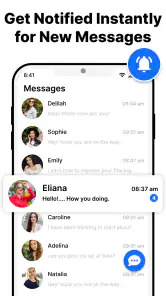
I’d also review the app’s notification settings at both levels: inside the app, if controls are available, and in Android’s system settings. The goal is not to turn on every alert, but to make important texts noticeable without creating needless interruptions. A useful habit is to keep notifications enabled for the conversations you genuinely need to catch quickly while avoiding a setup that makes every routine update demand immediate attention. The phone’s notification controls are the practical place to shape that balance.
Messages is listed for Android 7.0 and later, which makes it relevant to a broad range of Android devices. Even so, an operating-system minimum does not promise identical menus or behavior across every manufacturer. If you use an older handset or a heavily customized version of Android, take a moment to test notifications, the default SMS selection, and your usual reply routine before depending on the app for time-sensitive messages.
The app is rated for Everyone, so its intended audience is broad. That does not remove the need to think about privacy on a shared or unlocked phone. If private texts could appear on your lock screen, review Android’s notification-preview choices. This is a device-level decision worth making with care, especially if other people sometimes see your screen. It is a simple adjustment that can matter more in daily life than any visual preference inside a texting app.
Repeatable habits that save effort
Experienced users usually get more benefit from a consistent workflow than from hunting for tricks. I’d keep common exchanges in their existing threads, answer clearly, and use a quick review of recent conversations at a natural break in the day. When a message includes a time, address, or other detail I’ll need later, I make sure I can find it again in the conversation instead of assuming I’ll remember it. That approach works especially well for appointment changes and plans made on the move.
A second helpful pattern is to separate urgent communication from routine checking. If I’m waiting for a specific confirmation, I can pay attention to that conversation rather than repeatedly opening the app to scan everything. For ordinary messages, a few deliberate checks can be less distracting than constant inbox monitoring. This is not a special scheduling feature; it is a way to make a basic SMS workflow more intentional and easier to sustain.
For repeated practical messages, clarity matters more than speed alone. When confirming a pickup, for instance, I’d include the place and time in one concise reply instead of sending several fragments that can be misunderstood. When a conversation has shifted plans, I’d read the latest messages before responding, rather than relying on an older notification preview. These small habits reduce avoidable back-and-forth in any SMS app and make the simple format feel more dependable.
If you are evaluating Messages alongside the app already on your phone, compare the parts you actually use: how quickly you can reach a conversation, whether notifications suit your routine, and whether the interface feels easy to read. The preinstalled option may have closer ties to your phone’s existing setup, while a separate app can appeal if you prefer its approach to the inbox. I would switch only if the difference improves a real daily task, not simply because installing another app feels like an upgrade.
Where the simple approach reaches its limits
SMS is not the same as internet chat. Depending on your phone and carrier, standard text messaging may have constraints that do not apply to services built around an internet connection, particularly for long conversations or rich media. If your group expects extensive photo sharing, expressive reactions, or a feature-rich shared space, a dedicated chat service is usually the more suitable choice. Messages makes more sense when ordinary texting is the requirement, not when you want one app to reproduce every modern messaging experience.
There is also a difference between an app being described as secure and having a particular security model. I would not assume that Messages provides the same protections as an encrypted chat service simply because security is part of its general positioning. If sensitive communication is your priority, choose a service whose security features and limits you have checked for yourself. For routine coordination and everyday SMS, a basic texting app may be enough; for confidential conversations, it is worth being more selective.
Another trade-off is the role of Android itself. Choosing a different SMS app does not necessarily change how your carrier handles text messages, and it does not turn SMS into a separate messaging network. The app is the interface you use to work with texts on the phone. That distinction helps set realistic expectations: switching can change your day-to-day experience, but it cannot make an ordinary SMS thread behave like a modern internet-based group chat.
Messages is currently at version 1.43, and the app was released on July 2, 2023. I see those details as useful context when deciding whether to try it, not as a reason to expect any particular feature or performance result. The practical question is simpler: does this version work comfortably on your Android device, and does it make your normal text routine easier? A short, careful trial answers that better than a version number alone.
Who I’d recommend it to
I’d suggest giving Messages a try if you want a dedicated place for SMS, prefer a straightforward communication app, and do not need your texting tool to double as a social platform. It is especially worth considering if your use is mostly practical: confirming plans, exchanging short updates, and keeping a readable record of everyday conversations. Because it is free, trying it does not require committing to a paid purchase; you can see whether the workflow suits you before deciding to keep it.
I would be less likely to recommend it to someone who depends on a specific feature-rich chat ecosystem, needs a clearly defined security model for sensitive discussions, or is already happy with the messaging app built into their phone. In those cases, the existing option or a service designed for richer online chat may be a better fit. There is no advantage in switching merely to have another icon if your current setup already handles the messages you care about.
My overall view is that Messages earns consideration through restraint. Its job is to give Android users a focused way to handle texts, and the best results come from pairing that simplicity with sensible notification choices, a checked default-app setting, and a repeatable habit for reviewing conversations. If ordinary SMS is what you need, that can be enough. If you expect advanced chat, broad collaboration, or stronger privacy assurances, I’d choose a tool built specifically around those needs instead.
Messages is a free app for Everyone, developed by Messages Text, and its appeal is clearest when you want texting to stay uncomplicated. I’d install it as a measured test, make it the default only after checking the basics, and keep it if it genuinely makes daily SMS easier. For me, that is a more useful standard than expecting a simple text app to replace every way people communicate.
Messages Frequently Asked Questions
What is Messages, and what can I use it for?
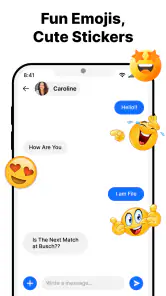
Messages is a messaging app for sending and receiving conversations on a supported phone or tablet. Depending on the device, carrier, settings, and available features, it may support regular SMS and MMS as well as richer messaging options such as sharing photos, videos, and group chats. Before downloading or using it, check that the app is compatible with your device and that the people you contact can receive messages through the same supported services.
Is Messages free to use?
Downloading Messages may be free, but sending messages is not necessarily cost-free in every situation. Traditional SMS and MMS can count toward your carrier plan or incur charges, particularly when messaging internationally or without an included allowance. Data-based messaging features may use Wi-Fi or mobile data, which can also affect your bill. Review your carrier’s rates and your phone plan before sending messages, especially when sharing media or contacting people abroad.
Can I use Messages to chat with people who have different phones?
Compatibility depends on which messaging service is available to both people. Standard SMS and MMS generally work across supported mobile networks, while advanced features may require compatible devices, software, settings, and an internet connection. If a conversation lacks certain features, Messages may use a more basic format instead. Check the app’s current requirements and your device settings if features such as read receipts, typing indicators, or high-quality media sharing are important to you.
Does Messages protect my conversations with encryption?
Privacy protections can vary by message type, device, and service, so it is best not to assume that every conversation has the same level of security. Some supported conversations may offer end-to-end encryption, while traditional SMS and MMS do not provide the same protection. Look for an encryption indicator or relevant status inside the app, keep your device updated, and use a screen lock. Avoid sending sensitive information unless you understand how that particular conversation is protected.
What should I check before downloading Messages?
Confirm that the version you are considering is compatible with your phone, operating system, and region, and download it from the official app store or your device maker’s trusted source. Review the requested permissions and privacy information, and make sure you have enough storage space. You may also need an active phone number, a SIM or supported carrier service, and internet access for some features. Availability and functionality can differ between devices and locations.
Pros
- Simple interface makes everyday texting easy to navigate.
- Supports group conversations for keeping in touch with several people.
- Lets you share photos
- videos
- and other attachments in chats.
- RCS features can add read receipts and typing indicators when supported.
- Spam protection can help flag suspicious messages.
Cons
- RCS availability depends on your carrier
- device
- and the recipient’s setup.
- Some features may differ between Android versions and phone manufacturers.
- Sending messages or media may incur carrier charges without a suitable plan.
- Spam detection can occasionally misidentify legitimate messages.
- The app is primarily intended for Android and may not be available on iOS.

- Category
- Communication
- Version
- 1.43











