ColorNote Notepad Notes
- 257.41K
- 4.9
- Installs
- 100.00M
- Price
- Free

Screenshots

Analysis by Reviewed
When I decide whether a note-taking app deserves a place on my home screen, I ask a practical question: can I capture something quickly, then find it again when I need it? ColorNote Notepad Notes is built for that everyday job rather than for turning notes into a complete knowledge system. If I want a place to jot down errands, short reminders, or a thought I might otherwise forget, its straightforward approach is appealing. If I need a polished workspace for long research projects, though, I would weigh other kinds of apps more carefully.
A quick decision guide
ColorNote is a free productivity app from Notes, with a 4.9 average from around 3.9 million ratings and over 100 million installs. It is rated for Everyone, and version 4.7.6 is the current version. Those figures suggest that it has broad appeal, but popularity alone is not the reason I would choose it: the main draw is a simple notepad that also handles lists, reminders, and a calendar.
Before moving your notes into any app, I’d think about what you actually write. Short, separate items are easy to organize here; a few lines for a shopping run or a checklist for packing are a natural fit. If your notes are mostly lengthy documents, heavily formatted meeting records, or material that needs to become a shared project plan, a more document-focused or collaborative alternative may suit you better.
Getting Started with ColorNote
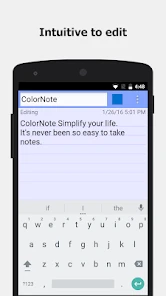
First off, downloading and setting up ColorNote Notepad Notes is a breeze. You can find it on both Android and iOS platforms, and trust me, it won’t gobble up your storage. Once installed, the user interface immediately feels intuitive. There’s something about its simplicity that makes you want to dive right in and start jotting down your thoughts.
Features That Stand Out
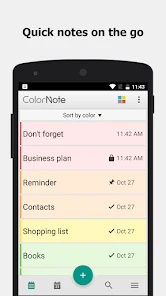
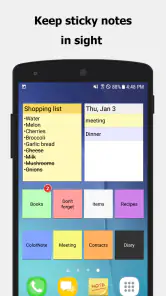
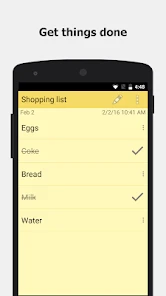
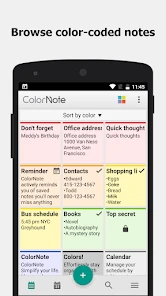
One of the coolest features is the color-coded notes system. It’s like having a rainbow at your fingertips, letting you categorize and prioritize your notes by color. This visual cue helps you differentiate between, say, work tasks and personal reminders at a glance. Plus, the app allows you to create checklists, which is a lifesaver for someone like me who tends to forget their grocery list at home.
A useful habit is to give colors a consistent meaning rather than choosing one at random each time: for instance, I might reserve a shade for household errands and another for work follow-ups. That way, color becomes a quick visual filter, not just decoration. I’d also keep a checklist focused on one outing or task. A grocery list that grows into a running diary becomes harder to scan when I’m in a hurry at the shop.
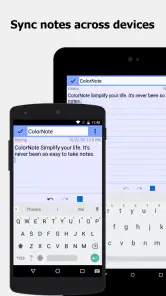
Another handy feature is the ability to set reminders. I mean, who doesn’t need a little nudge now and then? Whether it’s a simple reminder to call your mom or an important meeting alert, ColorNote ensures you’re always on top of your game. And if you’re worried about forgetting your notes, the app’s backup feature syncs your data with your email account, keeping everything safe and sound.
More From Our News Desk

Weather by Xiaomi Review: Clear at a Glance, Less Clear Up Close

X Under Pressure: Can It Recover When Posting Goes Wrong?

Clash of Clans Is Won Between the Battles

Android Auto Makes the Case for Quieter Car Software

MobiOffice: Transforming Mobile Productivity with Seamless Integration

EA SPORTS FC™ Mobile Soccer: Redefining Mobile Sports Gaming
Making the calendar and reminders work together
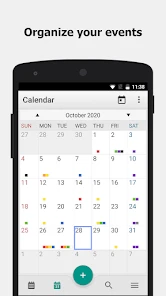
The calendar is useful when a short note needs a place in time rather than just a place in a list. I’d use it for a small personal commitment, a deadline to remember, or a note tied to a particular day, while leaving recurring routines and tightly scheduled work to a dedicated calendar if that is where I already manage my day. This division keeps the notepad from becoming a second, competing calendar.
One practical way to test the reminder workflow is to choose a task you can verify soon, such as taking something along on the next trip out. Add the reminder while the task is fresh, then see whether it reaches you at a useful moment. A reminder only helps if it fits your routine; setting one for every tiny thought can create noise and make the important nudges easier to ignore.
For a shared household list, I would also think through who needs to act on it. ColorNote can make it easy to send a note through email or a messaging app, but sending a copy is not the same as building a jointly managed task board. If several people need to edit one live list and see each other’s changes, a collaboration-first tool may be more convenient. For a quick handoff, though, sharing a concise list is often enough.
Everyday use and trade-offs
Picture a normal weekday: I remember a few groceries while walking out the door, add them to a checklist, then jot down a short task for later and set a reminder so it doesn’t vanish from my mind. This is the kind of low-friction routine where ColorNote makes sense. The best payoff is not a complicated system; it is having small bits of information in one familiar place instead of scattered across scraps of paper and messages to myself.
For backup, I would treat syncing as a useful safeguard, not as a reason to skip checking my setup. Before relying on any notes across devices, I’d make sure the backup option is configured and that I understand which account I’m using. I’d also avoid treating a basic note as the only home for sensitive details or important records. For a critical appointment, keeping a second reminder in the calendar I already check is a sensible backup plan.
That caution matters most when changing phones or accounts. I would check that the notes I care about are backed up before resetting a device, and I would confirm that the account used for syncing is one I can still access. For an app whose appeal is quick, dependable capture, a little care at the point of setup prevents an unpleasant surprise later. I’d also keep a separate copy of any information that would be costly to lose.
User Experience
Using ColorNote feels like a breeze. The app is light on resources, meaning it won’t slow down your phone. I’ve noticed that even with a ton of notes saved, it runs smoothly without any hiccups. The search function is another gem, allowing you to find any note in a snap by typing in a keyword.
Search is most helpful when note titles and wording are specific enough to recognize later. Instead of saving several notes called “List,” I’d use labels such as “Weekend groceries” or “Trip packing.” It is a small habit, but it reduces the time spent opening notes to work out which one contains the detail I need. Color and clear titles also work well together: one helps with broad grouping, while the other pinpoints an item.
There is a useful trade-off here: ColorNote can stay approachable because it does not ask me to design a complicated filing system before I start writing. But the more notes I accumulate, the more my own naming habits matter. Search can retrieve a phrase I remember, yet it cannot make a vague title meaningful after the fact. I’d use distinctive first words and keep each note focused, especially for temporary lists that I may want to find quickly and discard when finished.
Also, if you’re someone who likes to share notes, ColorNote makes it super easy to send your notes to friends or colleagues. Whether via email or a messaging app, sharing is just a few taps away.
When another kind of app fits better
Compared with a plain text notepad, ColorNote gives me more structure through color, checklists, reminders, and its calendar. Compared with a full document editor, it is less suited to drafting and formatting substantial pieces of writing. And compared with team-oriented task tools, a personal note app is not where I would expect to manage a project with many owners, statuses, and hand-offs. Those are different jobs, so choosing a simpler tool can be a benefit rather than a compromise.
The choice also depends on how you like to think. If you remember information by seeing a compact list and a few visual distinctions, color and checkboxes can make a small collection of notes feel manageable. If you prefer nested folders, linked pages, elaborate formatting, or a carefully structured archive, you may spend more time working around a simple notepad than benefiting from it. I would not judge that as a flaw so much as a sign that the app is aimed at quick, independent notes.
For students, I see a good fit in keeping a short reading list, a packing checklist, or quick reminders about errands between classes. I would not use it as the sole home for extensive course notes that need diagrams, citations, or a clear hierarchy across a term. Likewise, someone working independently may appreciate keeping a few follow-ups handy, while a team with shared ownership and changing deadlines is better served by a proper project tool. The important question is whether your notes are mostly personal prompts or part of a larger workflow.
For a realistic test, I’d use it through one busy day rather than move my whole digital life at once. In the morning, I might write a brief list of items to pick up, add a note about a call to make, and place a reminder for the time I’m likely to act. Later, I can search for the call note instead of scrolling through old messages. At the end of the day, I can check off what is done and remove what no longer matters. That small cycle shows whether the app’s simplicity actually reduces friction for me.
The switching cost is mostly about habits. If you already keep years of notes in another service, moving everything may take more effort than starting fresh with only current lists and active reminders. I’d try ColorNote with a few low-stakes notes first, then decide whether its way of organizing suits me before making it the sole home for anything important. In-app purchases range from $1.99 to $15.99 per item, so I would check the current purchase details if I planned to buy anything; the app itself is free.
That gradual approach also answers the question of whether it can replace a current notes app: I would not assume it should. Keep the old app available while trying a handful of everyday notes, and notice whether you miss features you rely on, such as longer-form editing or shared organization. If the new routine feels quicker and you can retrieve what you save, move only the useful, active material. There is little value in transferring an archive simply to make the new app look complete.
Cost is straightforward at the starting point because the app is free to use, while optional in-app purchases are listed from $1.99 to $15.99 per item. I’d decide whether any paid option matters to my own use before spending, rather than treating an upgrade as a requirement for basic note-taking. For someone who only needs lists, small notes, and reminders, trying the free app first is the sensible way to judge its fit.
Final Thoughts
All in all, ColorNote Notepad Notes is a solid app for anyone looking to organize their life a bit better. It’s user-friendly, packed with useful features, and best of all, it’s free! Whether you’re a student, a professional, or just someone who loves making lists, this app is definitely worth checking out. Give it a try and you might wonder how you ever managed without it!
I’d recommend it most to people who want quick capture and uncomplicated lists, and less to anyone looking for an advanced writing environment or a shared project hub. Try it with a grocery checklist, a couple of color-coded notes, and one reminder; that is enough to see whether its simple style fits your routine. If it does, keep using it. If you find yourself needing deeper organization, richer documents, or more collaborative planning, choose a tool designed around that need instead.
So, if you’re ready to start your journey towards a more organized life, head over to your app store and download ColorNote today. It might just become your new best friend in the digital world!
ColorNote Notepad Notes Frequently Asked Questions
Does ColorNote Notepad Notes include a calendar for organizing plans?
Yes. ColorNote’s store summary highlights a calendar alongside notes, shopping lists, and to-do lists. That makes the app relevant if you want a place for both quick written reminders and basic planning. It is built around practical organization, so you can use it to keep everyday information and plans together rather than relying only on loose notes.
Is ColorNote Notepad Notes available for children and families?
ColorNote is rated for Everyone, so its stated content rating makes it suitable for a broad audience, including families looking for a straightforward productivity app. It focuses on notes, shopping lists, to-do lists, and a calendar rather than entertainment content. As with any app, parents can decide whether its features fit a child’s needs and how the device should be used.
Can I use ColorNote Notepad Notes for shopping lists and everyday tasks?
Yes. ColorNote is designed for quick, practical notes, including shopping lists and to-do lists. You can keep a checklist for errands or jot down information you want to remember, then use color-coding to make different notes easier to spot. Its straightforward notepad approach makes it useful for everyday organization as well as longer notes.
Is ColorNote Notepad Notes free to download, and are there in-app purchases?
ColorNote Notepad Notes is free to download, and its core note-taking features are available without a required subscription. The app also offers optional in-app purchases, priced from $1.99 to $15.99 per item, so check the purchase details shown in your app store before buying anything. You can use it for notes, checklists, and reminders without treating a purchase as a prerequisite.
What features does ColorNote Notepad Notes offer?
ColorNote Notepad Notes is a versatile app that offers a range of features for organizing and managing your notes efficiently. Users can create text notes, checklists, and reminders with ease. The app allows color-coding for different notes, making it easy to distinguish between them. Additionally, ColorNote offers synchronization across devices, ensuring that your notes are always up-to-date and accessible wherever you are.
Pros
- User-friendly interface for quick note-taking
- Syncs across devices for easy access
- Supports reminders for task management
- Offers color code organization
- Lightweight and fast performance
Cons
- Limited text formatting options
- No collaboration features
- Ads in free version can be distracting
- Lacks advanced note structuring
- No handwriting or drawing support
- Category
- Productivity
- Version
- 4.7.6











