CloverVPN - Fast & Unlimited
- 104.00
- 4.8
- Installs
- 1.00M
- Price
- Free

Screenshots
Analysis by Reviewed
I look at a VPN a little differently when a device is shared. It is not just a switch for one person’s browsing: someone else may pick up the phone later, need a familiar connection, or wonder why a site behaves differently. CloverVPN is a free tools app from KANYRIDE, and its appeal is straightforward: it is intended for everyday internet use rather than a complicated networking project. In my view, that makes it worth considering for a household that wants a simple option, provided everyone understands what a VPN can—and cannot—do.
A shared device needs a shared routine
Before installing any VPN on a device used by several people, I would agree on a basic handoff habit: say whether the connection is on, and avoid changing it without telling the next person. That small bit of coordination matters more than it may seem. A family member who opens a banking app or joins a video call may not know why the service responds differently if the previous user changed the connection.
This is particularly useful when a tablet travels between rooms or comes along on errands. One person might use it to read, another to check a personal account, and someone else to look up directions. A quick check before a task—“Am I using the VPN right now?”—can prevent a confusing detour. I would make the check part of the handoff rather than relying on whoever last touched the screen to remember every setting.
How it fits into a shared-device routine
On a shared phone or tablet, the most useful VPN is often the one people can operate without needing the household’s unofficial tech support. CloverVPN’s focus on ordinary browsing gives it a clear role: a family member can use it as a general connection layer when checking messages, reading, or browsing away from home. The practical benefit is less about adding another app to manage and more about making a deliberate connection choice before using the internet.
A realistic example is a tablet that travels between family members. One person may use it to look up a recipe, another to catch up on news while waiting somewhere, and a third to check a personal account. Rather than assuming every network is equally trustworthy, the person holding the device can decide whether to use the VPN for that session. That is a useful habit, but it works best when the household agrees on what the app is for and who is responsible for turning it on or off.
I would not treat a VPN as a complete privacy or safety solution. It does not make every website trustworthy, prevent someone from sharing personal information, or replace account security. It can be one part of a sensible routine, alongside using strong account passwords, keeping apps current, and being cautious about unexpected messages. That distinction matters especially on a shared device, where different people may have different expectations about what “protected” means.
Keep setup simple, but agree on who controls it
Because CloverVPN is aimed at everyday use, I would approach setup with a practical goal: make sure each person who uses the device knows where the app is and how to check whether they intend to use it. A VPN setting can affect more than one person’s browsing when the device is passed around, so it is worth explaining the arrangement instead of quietly changing how the device connects.
You May Like

Clash of Clans Is Won Between the Battles

Android Auto Makes the Case for Quieter Car Software

MobiOffice: Transforming Mobile Productivity with Seamless Integration

EA SPORTS FC™ Mobile Soccer: Redefining Mobile Sports Gaming

How Microsoft OneDrive Became a Mobile Productivity Giant

How Google Translate Breaks Language Barriers Effortlessly
One useful household rule is to avoid changing connection settings mid-task unless there is a reason. If someone is signing in, paying a bill, or using a service that is sensitive to network changes, they may prefer to finish the task before switching modes. If a page or service behaves unexpectedly, the first step should be to check whether the VPN is involved, rather than repeatedly refreshing or entering account details. This is a small troubleshooting habit, but it can prevent confusion and unnecessary sign-in attempts.
It also helps to keep account boundaries clear. A VPN connection is not the same thing as a shared account, and one person’s use of a device should not be assumed to grant another person access to their browsing accounts. If the device is used by several people, separate user profiles or signed-out sessions—where the device supports them—can help keep personal activity distinct. CloverVPN should be thought of as a connection tool, not a way to organize household accounts.
For someone who wants fine-grained control over every network setting, a more advanced VPN may be a better fit. CloverVPN’s everyday positioning is appealing if the priority is straightforward use, but people who need detailed configuration should compare options carefully and confirm that the controls they depend on are available before making it their regular choice.
Choose a sensible boundary for each person
On a shared device, I would avoid treating the VPN as a personal privacy switch that one household member can silently impose on everyone else. It is a connection choice that can affect the next person’s session, so the person using the device should know what is active. If children use the same tablet, an adult can explain the purpose in plain language without suggesting that the app makes every online activity private or safe.
There is also a practical distinction between protecting a connection and protecting an account. If several people sign into the same browser profile, saved sessions and browsing history may remain available regardless of whether a VPN is in use. For sensitive accounts, I would sign out after use or choose a separate device profile if the operating system offers one. That habit addresses a different household risk than the VPN does, and it is easy to overlook because both topics are often described as “privacy.”
Coordinate without turning the VPN into a household chore
The coordination challenge is usually not technical; it is making sure one person’s choice does not surprise the next. If a family member turns on a VPN and hands the device to someone else, that person may encounter a different browsing experience without knowing why. A simple handoff—“the VPN is on” or “I switched it off”—can save time, particularly when the next person is trying to use a service that reacts differently to a changed connection.
I would also avoid treating “always on” as an assumption for a shared device. Whether a VPN should remain active depends on how the household uses that device and whether particular sites or services work as expected. A person reading public information may value the extra network layer; someone troubleshooting a login problem may need to check whether the VPN is contributing to it. The better routine is intentional use, not blindly leaving a setting in place because it was useful once.
Another practical tip is to agree on a basic troubleshooting order: confirm whether CloverVPN is being used, try the task again only if it is safe to do so, and then decide whether the connection should be changed. Avoid entering sensitive details repeatedly while trying random network changes. This keeps the app from becoming the default explanation for every internet problem, while still making it easy to identify when the VPN may be relevant.
For a household that relies on online payments, work logins, or other services that need a stable session, timing matters. I would not switch connection settings while a payment is processing or a form is being submitted. Finish the sensitive task first, then test a connection change with something low-stakes, such as opening a public page. This is not a special CloverVPN feature; it is a useful way to keep any VPN experiment from creating avoidable account trouble.
In the broader VPN category, the usual alternatives range from very simple apps to services built around extensive server choices and technical controls. CloverVPN’s everyday-use focus makes it more suitable for people who want a general-purpose tool than for users who need to fine-tune a connection for work, travel, or a specific network problem. If a household already relies on a VPN with settings everyone understands, switching solely for the sake of trying another app may add more coordination than value.
Age, trust, and realistic expectations
The app is rated for Everyone, which describes its content rating; it should not be mistaken for a guarantee that every online destination is appropriate for every age. A VPN does not filter the internet simply by being installed. For younger users, I would still rely on the device’s own supervision options and clear household rules about browsing, accounts, and sharing personal information.
That is especially important on a device used by adults and children alike. The VPN may affect how the device connects, but it does not create age-specific profiles or substitute for a conversation about online behavior. Adults should also explain that a VPN is not permission to bypass household expectations or access content they would otherwise avoid. Keeping that distinction clear helps prevent misplaced trust in the app’s role.
Trust also means being thoughtful about what any VPN provider can see or handle. I would recommend reading the app’s privacy information and considering whether its approach matches the household’s needs before routing regular browsing through it. That is sensible due diligence for any VPN, not a reason to assume a problem. If a family needs strict, clearly documented privacy controls, it should compare providers on those requirements rather than choosing on ease of use alone.
CloverVPN has an average rating of 4.8 from around 5,200 ratings, with more than 100 written reviews, and it has passed one million installs. Those figures suggest that many people have tried it, but popularity is not a substitute for checking whether its behavior suits a particular shared-device setup. I would use community feedback as one input, especially when looking for recurring reports about connection reliability or compatibility, rather than treating a high average as a guarantee for every phone and network.
When reading user feedback, I would look for comments that describe a similar phone, network, or use case rather than taking a broad claim as proof of how it will work in my home. A report about trouble on one network may not predict behavior elsewhere, while repeated comments about the same sort of interruption can be a useful reason to test cautiously. The most useful first test is a normal, low-risk browsing session on the device that will actually be shared.
Who should choose it—and who should look elsewhere
I can see CloverVPN working well for someone who wants a free, uncomplicated VPN option for routine browsing and does not need to manage a collection of advanced network settings. It may also suit a household that shares a device, has a clear handoff routine, and is comfortable treating the VPN as one modest layer in a wider approach to online safety.
I would look elsewhere if the main requirement is detailed control, specialized business use, or a carefully managed setup for multiple people with different permissions. Those needs call for comparing providers and device-level options directly. I would also skip any VPN if the goal is to guarantee anonymity or make risky online behavior harmless; no single connection app can responsibly promise that outcome.
The app is free, and its current version is 1.2.1. It supports Android 6.0 and later, so compatibility is worth checking on an older device before planning to use it across a household’s phones and tablets. The release date is Aug 8, 2026, so I would not assume that a device running an older operating system is supported simply because it can install other recent apps.
It is also worth deciding what success would look like before making the app part of a household routine. For one person, success may simply mean having a connection option ready for ordinary browsing. For another, it may require consistent behavior across several devices or specific controls for different users. Those are different expectations, and the latter is a reason to compare alternatives rather than assuming a simple app will cover a more involved setup.
My household verdict
For me, CloverVPN makes the most sense as a simple, shared-device tool when people coordinate its use and understand its limits. I like the everyday focus, but I would not confuse ease of use with a full household privacy system. The best result comes from pairing the app with separate accounts where possible, clear handoffs, and sensible browsing habits.
If your household wants a straightforward VPN to consider for ordinary browsing, CloverVPN is a reasonable candidate to try. If you need strict user-by-user controls, detailed technical options, or content supervision, choose a tool designed for those jobs instead. That distinction is the key to deciding whether it belongs on a shared device: useful as a connection choice, not a substitute for household rules or careful judgment.
CloverVPN - Fast & Unlimited Frequently Asked Questions
What is CloverVPN - Fast & Unlimited, and what does it do?
CloverVPN is a virtual private network (VPN) app designed to route your internet traffic through a VPN server. This can help protect traffic on public Wi-Fi and may let you connect through servers in other locations. Its name highlights speed and unlimited use, but actual performance and access to particular websites or services depend on your connection, the available servers, and the app’s current terms.
Is CloverVPN really free and unlimited to use?
The app’s “Fast & Unlimited” name suggests unrestricted use, but it does not by itself confirm that every feature is free or that usage has no conditions. Check the store listing and the app’s in-app pricing, subscription details, and terms before connecting. Look for possible limits, advertisements, paid upgrades, or trial periods, since these can change over time and may vary by platform or region.
Can I use CloverVPN to stream content or access blocked websites?
A VPN may change the apparent location of your connection, but CloverVPN cannot guarantee access to every streaming service, website, or app. Services can restrict VPN connections, and server availability, network speed, and local rules can affect the result. Before downloading for a specific purpose, review the app’s current server options and check whether the service you want to use permits VPN connections.
Does CloverVPN protect my privacy and keep my activity private?
A VPN can encrypt traffic between your device and its VPN server, which is useful on networks you do not control. However, a VPN does not make you completely anonymous or protect you from every threat. Privacy depends on how the provider handles connection data, browsing information, and other personal details. Read CloverVPN’s privacy policy and permissions carefully, and avoid assuming that “VPN” means no data is collected.
Which devices can run CloverVPN, and what should I check before installing it?
CloverVPN availability and compatibility can differ between Android and iOS, as well as by device model, operating-system version, and country. Check the official store page for your device to confirm requirements, the developer’s identity, recent update information, and user reviews. Download from a trusted app store rather than an unfamiliar third-party source, and review permissions and subscription terms before completing setup.
Pros
- Simple interface makes it easy to connect without configuring advanced settings.
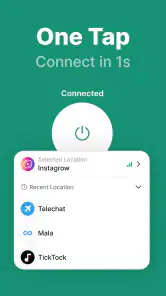
- One-tap connection is convenient for quick sessions on public Wi-Fi.
- Unlimited-use claims may suit users who stream or browse frequently.
- Can help mask your IP address from websites and networks you connect through.
- Useful for accessing the internet with an added layer of connection privacy.
Cons
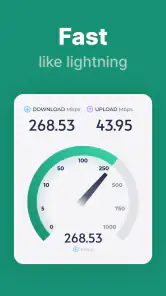
- VPN routing can reduce connection speeds
- especially on distant servers.
- The provider may collect connection or usage data; check its privacy policy.
- A VPN does not guarantee complete anonymity or protect against every online threat.
- Streaming and region-restricted services may block VPN connections.
- Free access or unlimited use may come with ads
- limits
- or paid-plan prompts.

- Category
- Tools
- Version
- 1.2.1











