ClevCalc - Calculator
- 21.11K
- 4.7
- Installs
- 100.00M
- Price
- Free

Screenshots
Analysis by Reviewed
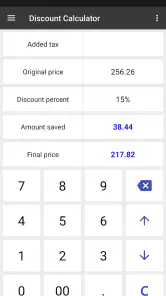
I recommend starting with one small task rather than exploring every tool at once. ClevCalc - Calculator is a free productivity app from Cleveni Inc. that brings everyday arithmetic together with practical conversion and finance tools. Its first useful moment can be as simple as checking a discount while shopping: enter the price and percentage, confirm the result, and get back to your decision without opening a browser or searching for another calculator.
What to expect when you open it
The main appeal is convenience, not a radical change to how a calculator works. You can use it for ordinary sums, then move to a more specific calculation when a situation calls for one. That makes it a sensible choice if your phone’s built-in calculator feels too limited, but it may be more than you need if you only add, subtract, multiply, and divide.
Its reach is reflected in its 4.7 average from around 1.1 million ratings, with over 100 million installs. It is rated for Everyone and is currently at version 2.24.2. Those figures suggest a well-established option, but I would still judge it by whether its extra tools fit your own routine.
For a first-time user, there is no need to configure a complicated workflow before getting value from it. Open the regular calculator, enter a familiar sum, and then try one tool that matches something you already do. That simple path helps answer the practical question: will having these functions together save me time, or will I keep returning to the calculator I already know?
Getting comfortable with the layout
When I first try a utility app, I look for the everyday action before digging into settings. ClevCalc’s straightforward calculator layout gives you a familiar starting point, while its other functions are there for when you need them. The app’s themes offer a small but useful bit of personal choice; I like using a darker appearance at night, though appearance matters less than whether the right calculator is easy to find.
If you are new to it, try a simple calculation first, then explore one extra tool you are likely to use. For example, someone planning a meal with friends can work out a tip or divide a total, while a shopper can check a percentage discount. Starting with a real task makes the variety feel helpful rather than like a menu of features you have to learn.
A useful next step is to notice which tool you reach for twice. If you often compare prices, keep the discount calculator in mind; if you cook, travel, or work with measurements, the converter may be the part that earns a place in your routine. I would not try to memorize every option. The app works best as a set of tools you can dip into when a specific question comes up.
More From Our News Desk

Weather by Xiaomi Review: Clear at a Glance, Less Clear Up Close

X Under Pressure: Can It Recover When Posting Goes Wrong?

Clash of Clans Is Won Between the Battles

Android Auto Makes the Case for Quieter Car Software

MobiOffice: Transforming Mobile Productivity with Seamless Integration

EA SPORTS FC™ Mobile Soccer: Redefining Mobile Sports Gaming
Everyday calculations beyond the keypad
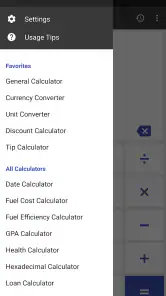
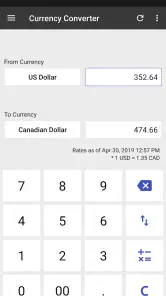
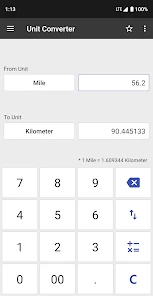
ClevCalc isn't just your average calculator app; it's an all-in-one solution. The app offers a plethora of functions that go beyond basic arithmetic. We're talking about currency conversions, unit conversions, a world clock, a tip calculator, and even a fuel cost calculator—just to name a few. With this app, you won't need to download multiple apps for different calculations, which is a huge plus for those of us who love to keep things simple and organized.
User Interface and Experience
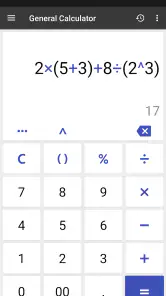
The user interface of ClevCalc is sleek and intuitive. From the moment you open the app, you're greeted with a clean and straightforward layout. There's no clutter, just functional design. The buttons are large enough to prevent any accidental taps, which is a relief for those of us with larger fingers. Plus, the app supports multiple themes, so you can customize it to fit your personal style. I found the dark theme particularly appealing during night-time use.
One practical habit is to treat each tool as a quick check, not as a replacement for careful record-keeping. At a shared dinner, for instance, I would use the tip calculator to estimate the gratuity and the regular calculator to divide the amount, then verify the final split before sending anyone a request. This two-step approach is useful because a correct percentage does not automatically settle how a group wants to share tax, tip, or individual orders.
Conversions also reward a little attention. For a trip, you can check a currency conversion and use a unit conversion for a distance or temperature, but exchange rates can change, so I would confirm an important purchase with a current source before relying on an estimate. Likewise, a converted measurement is only useful when you choose the right units; pause to check the labels rather than rushing through the number entry.
For a first successful real-world test, imagine comparing two household products with different package sizes. Use the unit converter to put the quantities into comparable units, then use the standard calculator to compare the prices. This does not make the buying decision for you, but it can expose when the larger-looking package is not actually the better value. The small trade-off is that you must enter the correct units yourself, so a quick label check matters more than speed.
Advanced Features
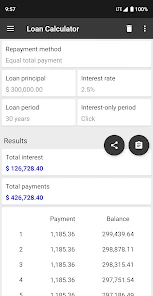
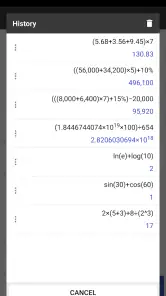
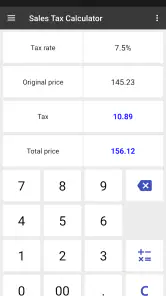
One of the standout features of this app is its ability to handle advanced calculations with ease. For students or professionals who need to solve complex equations, the scientific calculator function is a godsend. It supports logarithms, trigonometric functions, and other advanced mathematical operations. On the more practical side, the app can also calculate discounts, VAT, and loan interest, making it a handy tool for everyday financial tasks.
Those tools are most valuable when they answer a focused question. If I am comparing two sale prices, I can calculate the percentage off each one rather than trusting a large promotional label. For a loan, an interest calculation can help me understand an estimate, but I would not treat a quick result as a complete repayment plan: fees, payment timing, and the lender’s terms can change the real cost.
The scientific functions make the app more useful than a basic phone calculator for homework or a quick check at work. Still, anyone doing high-stakes engineering, accounting, or exam work should use the calculator required by their course or profession and verify important results. A multipurpose phone app is convenient, but it is not a substitute for a validated workflow when precision and auditability matter.
When using a scientific function, I recommend writing down the expression first and checking the order of operations before accepting the displayed answer. It is an easy safeguard when entering a longer expression on a small screen, where a misplaced tap can be harder to spot than on paper. For coursework, use the same notation and checking method your class expects; convenience should not become a reason to skip showing your work.
The finance tools are best treated as quick estimators rather than personal financial advice. A discount or tax calculation is usually a straightforward way to check a purchase, while a loan estimate depends on details beyond a single interest figure. If the result will affect a major commitment, compare it with the lender’s own terms and a more complete planning tool.
Where it fits among alternatives
Compared with the calculator already installed on a phone, ClevCalc’s advantage is having conversions and purpose-built everyday calculators close at hand. Compared with downloading a separate currency app, unit converter, and tip tool, its appeal is keeping those jobs together. The trade-off is that a dedicated specialist may offer a clearer workflow for a single demanding task, while someone who rarely uses anything beyond basic arithmetic may prefer the simpler built-in option.
For a first meaningful routine, I would use it on a grocery or home-improvement trip: calculate a discount, convert a measurement when comparing package sizes, and use the ordinary calculator to check the final total. That is enough to see whether the app saves you time without turning a simple errand into a feature tour. If you travel often, cook from recipes with different units, share expenses, or need scientific functions, the extra breadth is easier to justify.
It is less compelling if you need specialized financial planning, a dedicated scientific calculator with a particular input method, or a tool that documents calculations for professional review. In those cases, a purpose-built app or desktop program is likely a better fit. ClevCalc is strongest as a handy generalist, not as a replacement for every specialist tool.
That distinction also helps decide whether to keep it. If you only need a one-off conversion, a web search or built-in tool may be enough; installing another app is not automatically an improvement. But if you regularly switch between arithmetic, measurement conversions, and practical estimates, having those jobs in one place can reduce interruptions. The advantage is less about doing something impossible elsewhere and more about avoiding repeated app-hopping.
People who are likely to get the most from it include frequent travelers checking everyday conversions, home cooks adapting measurements, shoppers comparing discounts, and anyone who splits shared bills. A student may also appreciate having ordinary and scientific calculations together for quick checks. Someone who needs a formal calculation history, specialized business reporting, or a narrowly tailored professional workflow should choose a dedicated tool instead.
Cost, compatibility, and a sensible next step
The app is free to download, with in-app purchases priced from $2.99 to $24.99 per item. I would begin with the free experience and only consider a purchase if a feature or option you actually use makes the upgrade worthwhile. It supports Android 8.0 and later, which is useful to check before installing on an older device.
It has been available since January 13, 2013, and that long-running presence helps explain why many people recognize it as a general-purpose calculator. Still, longevity is not a reason to buy anything or change your habits. Try the free version against a task you already perform, and let that experience—not the size of its audience—decide whether it belongs on your phone.
Overall, I see ClevCalc as a practical upgrade for people who regularly jump between simple sums, conversions, and everyday financial estimates. Its large audience and strong rating make it an easy app to consider, but the right test is personal: choose one recurring task, try it, and see whether keeping several calculation tools together makes your day simpler.
What to check before relying on a result
A common source of confusion in any all-purpose calculator is assuming that every tool answers the same kind of question. A percentage discount gives you a calculated amount, but a shop’s final price can also depend on how its offer is applied. A currency conversion helps you understand an approximate equivalent, but it should not be mistaken for the exact amount a card provider or exchange service will charge. I use the result as a quick reference, then check the terms that matter to the decision.
For shared expenses, decide the rule before entering numbers. If one person ordered separately or the group wants to split tax differently from the tip, a single total divided evenly may not reflect what everyone agreed to pay. ClevCalc can help with the arithmetic; it cannot decide the fairest arrangement. Clarifying the split first makes the calculation quicker and avoids treating a mathematically correct answer as automatically fair.
Likewise, for fuel-cost planning, make sure the figures you enter reflect the trip and vehicle assumptions you actually want to compare. A calculator can help organize an estimate, but a changed route or driving pattern changes the result. That makes the tool handy for comparing possibilities, not a guarantee of what a journey will cost.
Who should make it their everyday calculator
I would choose it over a basic calculator when I expect to move between several kinds of everyday questions and want a single starting point. The mix is especially useful for errands: work out a percentage, check a quantity, and finish with a sum without searching for separate utilities. Its broad approach is the point, although it does mean that users seeking one highly specialized workflow may find a dedicated alternative more focused.
If your needs are mostly adding a receipt or checking a simple sum, the phone’s built-in calculator is likely enough. If you are studying a subject with a required calculator, use that one for assignments and exams rather than assuming a general-purpose app matches its rules. And if a financial decision needs documented assumptions or a full schedule, use a planning tool that is designed to show those details.
For everyone else, I suggest giving it a low-pressure trial: use it once for a genuine task, check the answer independently, and notice whether the extra tools were easy to reach. If that saves a few steps on the next similar occasion, it has earned its place. If you keep forgetting it exists, there is no need to force a change from a simpler option.
Final Thoughts
In conclusion, ClevCalc - Calculator is more than just a calculator—it's a comprehensive tool designed to meet a wide range of needs. Whether you're a student, a professional, or someone who just wants to keep their finances in check, this app has something for you. It's a reliable, user-friendly, and feature-rich app that deserves a spot on your smartphone.
So, if you're in the market for a new calculator app, give ClevCalc a try. It's available for both Android and iOS, and you might just find it becomes one of your most-used apps.
ClevCalc - Calculator Frequently Asked Questions
What kind of app is ClevCalc - Calculator?
ClevCalc - Calculator is a productivity app that brings several practical calculation tools together. Its store summary highlights a calculator, percentage calculations, and unit and currency conversion. It may be useful if you want more than a basic calculator in one place, whether you are working through everyday sums or converting measurements.
What should I check before downloading ClevCalc - Calculator?
Check that your phone runs Android 8.0 or later, the minimum operating-system requirement for the app. ClevCalc - Calculator is free to download, and optional in-app purchases are available. Its content rating is Everyone, so it is presented for a general audience. These points can help you decide whether it fits your device and how you plan to use it.
Does ClevCalc - Calculator work on older phones?
ClevCalc - Calculator is available for devices running Android 8.0 or later, so it may suit older phones that still meet this requirement. Before downloading, check your device’s operating-system version and make sure you have enough room for another app. It is a productivity tool for everyday calculations, conversions, and other practical tasks.
What features does ClevCalc - Calculator offer?
ClevCalc - Calculator is a versatile tool that offers a wide range of features beyond basic calculations. Users can enjoy unit conversions, currency conversions, percentage calculations, and even health-related calculations like BMI. It also includes a mortgage calculator, making it a comprehensive app suitable for various personal and professional needs.
Is ClevCalc - Calculator free to use?
Yes, ClevCalc - Calculator is free to download and use. However, users should be aware that the app may offer in-app purchases or display ads. These purchases typically provide enhanced features or an ad-free experience, catering to users who prefer an uninterrupted interface. Optional purchases are priced from $2.99 to $24.99 per item.
Pros
- User-friendly interface for easy navigation.
- Supports a wide range of calculations.
- Customizable themes for personalization.
- Fast and accurate results.
- Includes a unit converter feature.
Cons
- Contains ads in the free version.
- Some features require in-app purchases.
- Limited advanced mathematical functions.
- Occasional lag on older devices.
- No graphing capabilities.
- Category
- Productivity
- Version
- 2.24.2